
pengenalan
This manual provides instructions for the assembly, operation, and maintenance of your Ameriwood Home Condor Toolless Double Pedestal Computer Desk. Designed for home office or study environments, this desk offers a functional workspace with integrated storage. Please read these instructions carefully before beginning assembly and retain them for future reference.
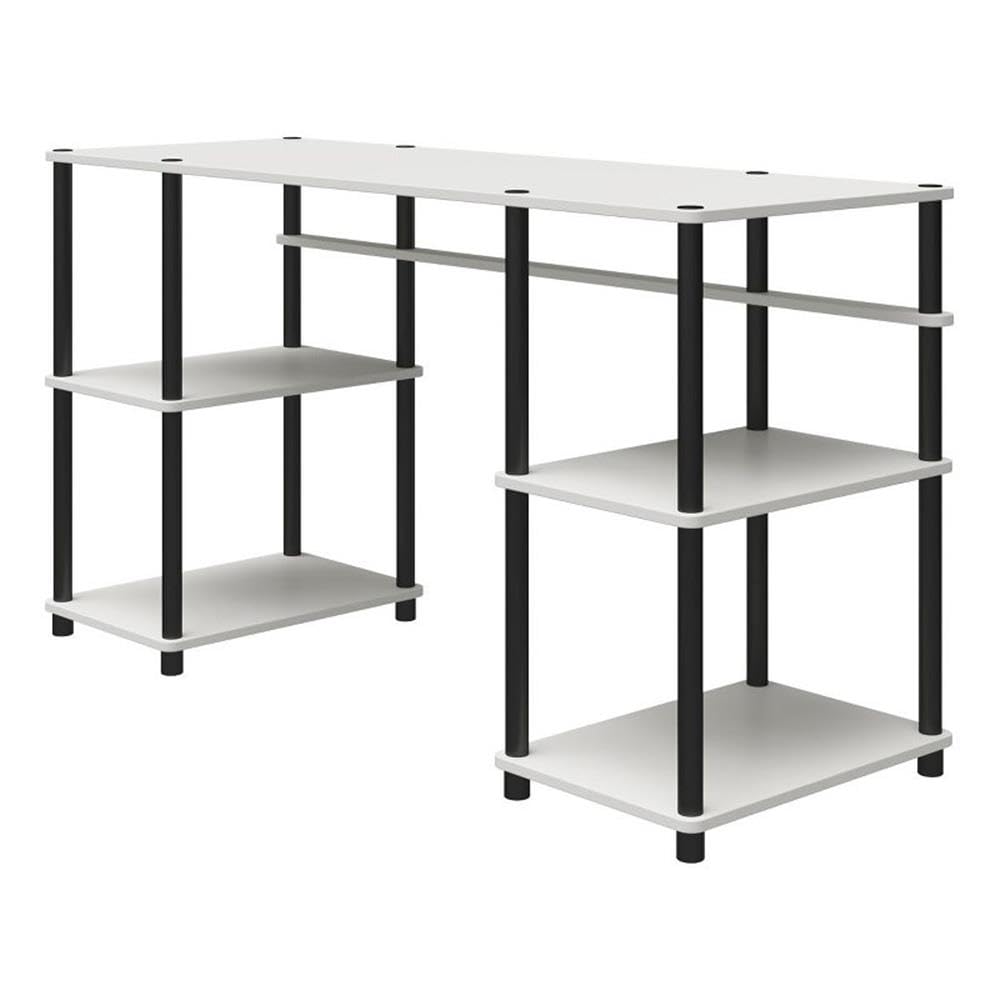
Image: The Ameriwood Home Condor Toolless Double Pedestal Computer Desk, showcasing its design and functionality in a typical home office setup.
Maklumat Keselamatan
- Pastikan semua bahagian diikat dengan selamat sebelum digunakan.
- Do not exceed the maximum weight capacities for the desktop or shelves.
- Jauhkan bahagian kecil dan bahan pembungkusan daripada kanak-kanak.
- Pasang meja pada permukaan yang lembut dan bersih untuk mengelakkan calar.
- Periksa semua sambungan secara berkala untuk memastikan ia kekal ketat.
Persediaan dan Perhimpunan
The Ameriwood Home Condor Desk is designed for toolless assembly, requiring only one person. The assembly process involves screwing the support bars into the shelves and desktop. The product ships in one box and typically involves 4 main assembly steps.

Image: Visual guide indicating an 'Easy' assembly level, 4 steps, 6 boards, 1-year warranty, and cleaning instructions.
Kandungan Pakej
Before starting assembly, verify that all components are present. The package contains 6 main boards and various support bars required for construction.

Image: An illustration of the desk's components in a disassembled state, showing the desktop, shelves, and support bars.
Langkah Perhimpunan
- Buka bungkusan semua komponen dan letakkannya di atas permukaan yang bersih dan lembut.
- Identify the desktop, shelves, and support bars.
- Attach the support bars to the shelves and desktop by screwing them in until secure. No tools are required for this process.
- Ensure all connections are tight and the desk is stable before placing items on it.
Operasi
The Condor Computer Desk provides a spacious surface for your computer, monitors, and other work essentials. The integrated double pedestals offer open shelving for convenient storage of books, files, dan bekalan pejabat.
- Penggunaan Desktop: Utilize the main desktop surface for laptops, monitors, keyboards, and writing tasks.
- Penyimpanan Rak: The four open shelves are suitable for organizing textbooks, binders, printers, or decorative items.

Image: The desk fully assembled and in use, demonstrating its capacity for a laptop, printer, and organized storage on its shelves.
Penyelenggaraan dan Penjagaan
To maintain the appearance and longevity of your Ameriwood Home Condor Desk, follow these simple care instructions:
- Pembersihan: Wipe the desk surfaces with a dry cloth or duster. Avoid using harsh chemicals or abrasive cleaners, which can damage the finish.
- Tumpahan: Lap segera sebarang tumpahan untuk mengelakkan kerosakan lembapan pada kayu yang telah direkayasa.
- Perlindungan: Use coasters under beverages and protective pads under hot items to prevent marks and stains.
Menyelesaikan masalah
If you encounter any issues with your desk, please review the assembly steps to ensure all components are correctly installed and tightened. Common issues and solutions:
- Bergoyang-goyang: Check that all support bars are fully screwed into place and tightened. Ensure the desk is on a level surface.
- Bahagian yang hilang: If any parts are missing upon unboxing, please contact customer support immediately.
Spesifikasi
Detailed specifications for the Ameriwood Home Condor Toolless Double Pedestal Computer Desk:

Image: Technical drawing showing the desk's overall dimensions (55.1"W x 20.1"D x 30.1"H) and weight capacities (Top: 60 lbs, Shelves: 20 lbs each).
| Ciri | Perincian |
|---|---|
| Nombor Model | 8712013COM |
| Jenama | Rumah Ameriwood |
| Dimensi Terpasang (L x D x T) | 55.12" x 20.08" x 30.12" |
| Assembled Unit Weight | 38.28 paun |
| Kapasiti Berat Desktop | 60 paun |
| Kapasiti Berat Rak (setiap satu) | 20 paun |
| Bilangan Rak | 4 |
| Ketebalan Atas Meja | 0.75 Inci |
| bahan | Kayu Kejuruteraan (Atas), Logam (Tapak) |
| warna | putih |
| Perhimpunan Diperlukan | Yes (Toolless) |
Maklumat Waranti
The Ameriwood Home Condor Toolless Double Pedestal Computer Desk is covered by a Waranti Terhad 1 Tahun for manufacturer defects. This warranty covers defects in materials and workmanship under normal use. Please retain your proof of purchase for warranty claims.
Sokongan Pelanggan
For assistance with assembly, missing parts, or warranty claims, please contact Ameriwood Home customer support. Refer to the contact information provided with your purchase or visit the official Ameriwood Home webtapak untuk pilihan sokongan.
Anda juga boleh melawat Kedai Rumah Ameriwood di Amazon untuk maklumat lanjut produk.