
1. Pengenalan
Thank you for choosing the Taipow 6W Touch Table Lamp. l serba boleh iniamp combines ambient lighting with convenient USB charging capabilities, making it an ideal addition to any bedroom, office, or living space. Featuring touch control, adjustable brightness, multiple colors, and a timer function, this lamp is designed for ease of use and eye comfort. Please read this manual thoroughly before operating the device to ensure safe and efficient use.

Figure 1: Taipow Touch Table Lamp in use, charging multiple devices.
2. Maklumat Keselamatan
- Baca semua arahan dengan teliti sebelum digunakan.
- Jangan buka atau ubah suai lamp. Unauthorized modifications may cause damage or injury.
- Simpan lamp jauh daripada air dan persekitaran yang mempunyai kelembapan tinggi.
- Gunakan hanya penyesuai kuasa yang ditentukan.
- Jangan dedahkan lamp kepada cahaya matahari langsung atau suhu yang melampau.
- Cabut plag lamp daripada salur keluar kuasa sebelum dibersihkan atau apabila tidak digunakan untuk tempoh yang lama.
- l iniamp direka untuk kegunaan dalaman sahaja.
3. Kandungan Pakej
Sila semak pakej untuk item berikut:
- Taipow Touch Table Lamp (1 unit)
- Kabel Kuasa (1 unit)
- Manual Pengguna (dokumen ini)
4. Persediaan
Follow these steps to set up your Taipow Touch Table Lamp:
- Bongkar: Keluarkan l dengan berhati-hatiamp dan semua aksesori daripada pembungkusan.
- penempatan: Letakkan lamp di atas permukaan yang stabil dan rata. Lamp features an anti-slip and wear-resistant silicone base for stability.
- Sambungkan Kuasa: Insert the power cable into the AC power input port on the back of the lamp. Plug the other end of the power cable into a standard wall outlet. The lamp requires a continuous power supply to function.
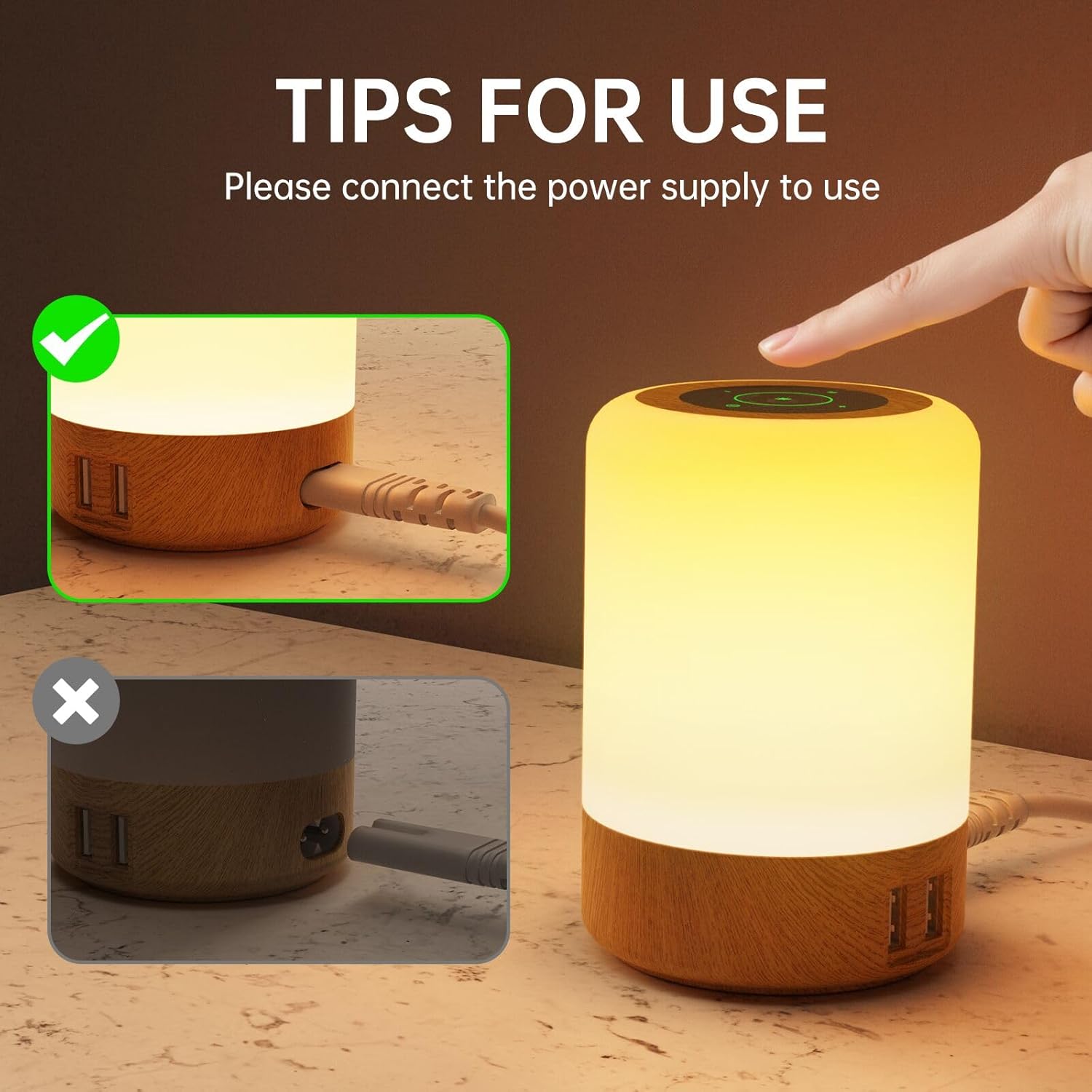
Figure 2: Ensure the lamp disambungkan dengan betul kepada sumber kuasa.

Figure 3: Anti-slip base and lamp dimensi.
Port Pengecasan USB
Lamp is equipped with 4 USB-A charging ports (Max 2.4A per port, 30W total output). These ports can charge your mobile phones, tablets, and other devices whether the lamp dihidupkan atau dimatikan.
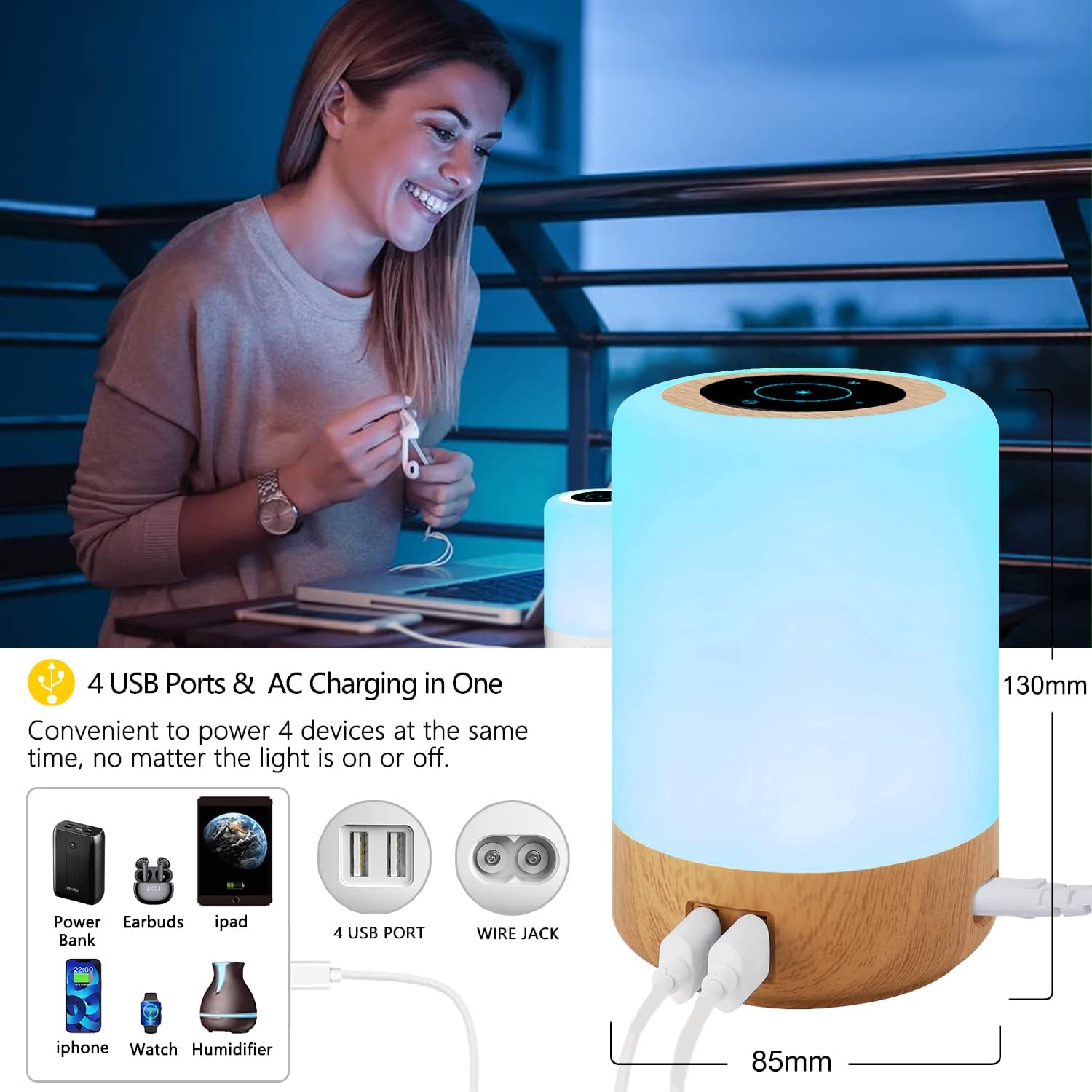
Figure 4: Four USB charging ports for convenient device charging.
5. Arahan Operasi
Sentuh Panel Kawalan
Lamp features a sensitive touch control panel on its top surface for easy operation.
- Hidupkan/Mati Kuasa: Lightly touch the power icon on the top panel to turn the lamp hidup atau mati.
- Laraskan Kecerahan: In warm white mode, long press the '+' or '-' symbols on the touch panel to continuously adjust the brightness (10 levels available).
- Tukar Warna: In RGB mode, short press the '+' or '-' symbols to cycle through the 8 available colors.
- Tukar Mod Pencahayaan: Short press the 'M' (Mode) button to switch between 3 lighting modes: Flashing, Strobe, and Fade.
- Tetapkan Pemasa: Short press the timer icon to set the auto-off timer for 1, 2, 4, or 6 hours. The lamp akan dimatikan secara automatik selepas tempoh yang dipilih.

Figure 5: Adjusting brightness using the touch control.

Figure 6: Exploring the 8 colors and 3 lighting modes.

Figure 7: Auto-off timer function for energy saving and convenience.
6. Penyelenggaraan
- Pembersihan: Sebelum membersihkan, pastikan lamp is unplugged from the power outlet. Use a soft, dry cloth to wipe the surface of the lamp. Jangan gunakan pembersih yang melelas, pelarut atau bahan kimia yang keras, kerana ini boleh merosakkan kemasan.
- Storan: Jika menyimpan lamp Untuk tempoh yang lama, cabut plagnya dan simpan di tempat yang sejuk dan kering, jauh daripada cahaya matahari langsung dan kelembapan.
- Penggantian mentol: Sumber cahaya LED disepadukan dan tidak boleh diganti oleh pengguna.
7. Penyelesaian masalah
| Masalah | Kemungkinan Punca | Penyelesaian |
|---|---|---|
| Lamp tidak menyala. | Not connected to power or power outlet issue. | Pastikan kabel kuasa dipasang dengan selamat pada kedua-dua lamp and a working wall outlet. Test the outlet with another device. |
| Kawalan sentuhan tidak bertindak balas. | Dust or debris on the touch panel; temporary software glitch. | Clean the touch panel with a soft, dry cloth. Unplug the lamp for 30 seconds and then plug it back in to reset. |
| Port USB bukan mengecas peranti. | Device cable issue; device not compatible; lamp tidak berkuasa. | Pastikan lamp is plugged into a power source. Try a different USB cable or device. Check device charging requirements. |
| Cahaya berkelip atau malap. | Bekalan kuasa tidak stabil. | Pastikan lamp is connected to a stable power source. Avoid using with power strips that are overloaded. |
8. Spesifikasi
| Ciri | Perincian |
|---|---|
| Jenama | Taipow |
| Nombor Model | S400 |
| Dimensi (L x W x H) | 9 x 9 x 13 cm (3.54 x 3.54 x 5.12 inci) |
| Berat badan | 310 gram (0.68 lbs) |
| bahan | Wood (base), Acrylonitrile Butadiene Styrene (ABS) (lampnaungan) |
| Jenis Sumber Cahaya | LED |
| Wattage | 6 Watt |
| Input Voltage | AC100-265V 50/60HZ |
| Output USB | 5V/6A (max total), 2.4A (max per port) |
| Bilangan Port USB | 4 |
| Suhu Warna | 3000-3200K (Putih Hangat) |
| Ciri Khas | Color Changing, Dimmable, Memory Function, Timer Function |
| Tukar Gaya | Sentuh |

Figure 8: Detailed electrical specifications.
9. Waranti dan Sokongan
Taipow products are manufactured to high-quality standards. This product comes with a limited warranty against defects in materials and workmanship from the date of purchase. Please retain your proof of purchase for warranty claims.
For technical support, troubleshooting assistance, or warranty inquiries, please contact our customer service team through the retailer's platform or visit the official Taipow brand store online. We are committed to providing excellent customer service and support.
Kedai atas talian: Taipow Official Store