
1. Pengenalan
Thank you for choosing the Langsdom GT4 Dual Driver Earbuds. These wireless earbuds are designed to provide a superior audio experience with dual dynamic drivers, Bluetooth 5.0 connectivity, and convenient touch controls. This manual will guide you through the setup, operation, and maintenance of your new earbuds.
2. Kandungan Pakej
Sila semak pakej untuk item berikut:
- Langsdom GT4 Dual Driver Earbuds (Left and Right)
- Kes Pengecasan
- Kabel Pengecas USB-C
- Soft Ear Caps (S, M, L sizes)
- Manual Pengguna

Image: Contents of the Langsdom GT4 earbud package, including earbuds, charging case, USB-C cable, and various ear tip sizes.
3. Produk Lebihview
The Langsdom GT4 earbuds feature advanced technology for an immersive audio experience.
3.1 Dual Dynamic Drivers
Each earbud is equipped with two 8mm dynamic drivers, providing enhanced bass and clear treble for a rich sound profile.

Image: Diagram illustrating the dual 8mm dynamic drivers within the Langsdom GT4 earbuds, highlighting superior audio sound with AAC and SBC support.
3.2 Bluetooth 5.0 Technology
Utilizing Bluetooth 5.0, the earbuds offer a stable and fast connection, ensuring high-quality audio transmission and compatibility with various devices.
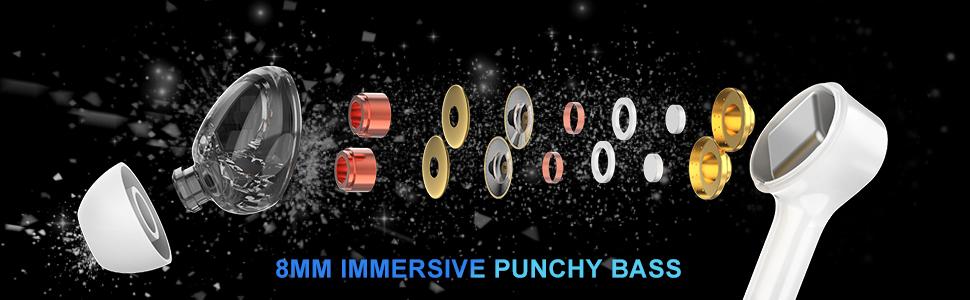
Image: Close-up of the Bluetooth 5.0 chip inside the earbud, emphasizing HD call quality, wide compatibility, and long battery life.
3.3 Hayat Bateri yang Panjang
The earbuds provide up to 5 hours of playtime on a single charge, with the charging case extending total playtime to approximately 30 hours.
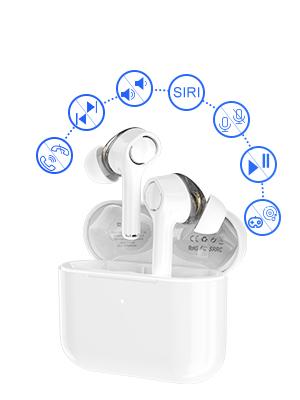
Image: Graphic showing the Langsdom GT4 earbuds and charging case, indicating 1.2 hours charging time, 5 hours play time, and 30 hours total endurance time.
3.4 Reka Bentuk Ergonomik
Designed for comfort and stability, each earbud weighs only 4g and comes with three sizes of silicone ear tips to ensure a secure fit for extended wear.

Image: A person wearing the Langsdom GT4 earbuds, demonstrating their comfortable and secure fit.
4. Arahan Persediaan
4.1 Mengecas Fon telinga dan Sarung
- Letakkan fon telinga ke dalam bekas pengecasan. Pastikan mereka duduk dengan betul.
- Sambungkan kabel pengecas USB-C ke port pengecasan pada kes dan ke sumber kuasa.
- The indicator light on the charging case will show charging status. A full charge takes approximately 1.2 hours for the earbuds and case.
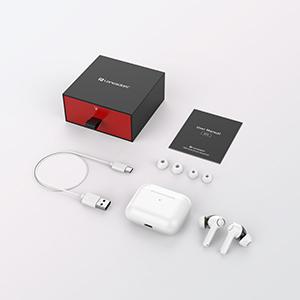
Image: Close-up of the USB-C charging port on the Langsdom GT4 charging case, with a charging cable connected.
4.2 Berpasangan dengan Peranti
- Buka penutup bekas pengecas. Fon telinga akan dihidupkan secara automatik dan memasuki mod berpasangan.
- Pada peranti anda (telefon pintar, tablet, dll.), dayakan Bluetooth.
- Cari untuk "GT4" in the list of available Bluetooth devices and select it to connect.
- Setelah disambungkan, anda akan mendengar nada pengesahan dan fon telinga akan sedia untuk digunakan.
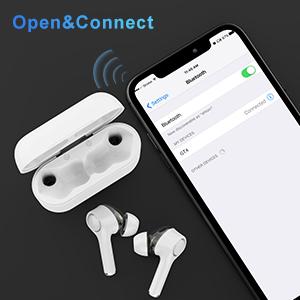
Image: A smartphone screen showing the Bluetooth settings with "GT4" selected for pairing, next to the open charging case with earbuds.
5. Arahan Operasi
5.1 Kawalan Sentuhan
The Langsdom GT4 earbuds feature intuitive touch controls. Gently tap the touch sensitive area on either earbud to perform the following actions:
| Tindakan | Earbud Kiri (L) | Earbud Kanan (R) |
|---|---|---|
| Main/Jeda | 1 Ketik | 1 Ketik |
| Kelantangan Naik | - | 2 Ketik |
| Kelantangan Kurang | 2 Ketik | - |
| Lagu Seterusnya | Tekan lama 3s | - |
| Lagu Sebelumnya | - | Tekan lama 3s |
| Jawab/Tamatkan Panggilan | 1 Ketik | 1 Ketik |
| Tolak Panggilan | 2 Ketik | 2 Ketik |
| Activate Voice Assistant (Siri/Google) | 3 Ketik | 3 Ketik |
| Game Mode / Exit Game Mode | 3 Ketik | - |
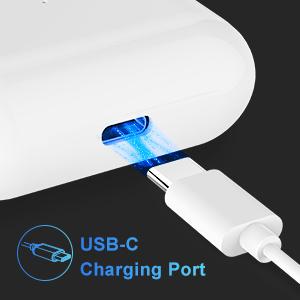
Image: Diagram illustrating the various touch control functions on the Langsdom GT4 earbuds, including play/pause, volume, call management, and voice assistant activation.
5.2 Music and Game Modes
The GT4 earbuds offer a dual-mode function for optimized audio performance based on your activity.
- Mod Muzik: Provides rich stereo bass and clear sound for an immersive listening experience.
- Mod Permainan: Reduces latency for synchronized audio and video, enhancing your gaming experience.
To switch between modes, tap the left earbud 3 times.

Image: Graphic comparing Music Mode (low latency, stereo bass) and Gaming Mode (zero delay, synchronization) for the Langsdom GT4 earbuds.
6. Penyelenggaraan
- Bersihkan fon telinga dan bekas pengecas dengan kerap menggunakan kain lembut dan kering.
- Elakkan mendedahkan fon telinga kepada suhu, kelembapan atau cecair yang melampau.
- Simpan fon telinga dalam bekas pengecasnya apabila tidak digunakan untuk melindunginya dan mengekalkan hayat bateri.
- Do not attempt to disassemble or repair the earbuds yourself. Contact customer support for assistance.
7. Penyelesaian masalah
| Masalah | Penyelesaian |
|---|---|
| Fon telinga tidak berpasangan | Ensure earbuds are charged. Turn off and on Bluetooth on your device. Forget "GT4" from your device's Bluetooth list and re-pair. |
| Hanya satu fon telinga berfungsi | Place both earbuds back in the charging case, close the lid, then open it again. Ensure both earbuds are charged. |
| Kelantangan rendah atau kualiti bunyi yang lemah | Adjust volume on both earbuds and your device. Ensure ear tips are properly sealed in your ear. Clean any debris from the earbud speakers. |
| Fon telinga tidak dicas | Check the charging cable and power source. Ensure earbuds are correctly seated in the charging case. Clean charging contacts on earbuds and case. |
| Connectivity issues (disconnections) | Ensure your device is within the Bluetooth range (33-50 feet). Avoid obstacles between earbuds and device. Try resetting the earbuds (refer to manufacturer's specific reset instructions if available, otherwise re-pair). |
8. Spesifikasi
- model: GT4
- Ketersambungan: Wayarles (Bluetooth 5.0)
- Saiz Pemandu: Dual 8mm Dynamic Drivers per earbud
- Masa main: Sehingga 5 jam (earbud), sehingga 30 jam (dengan sarung pengecasan)
- Masa Pengecasan: Lebih kurang 1.2 jam
- Port Pengecasan: USB-C
- Jenis Kawalan: Kawalan Sentuh
- Berat Earbud: 4 gram (setiap satu)
- Bahan: plastik
- Dimensi: 1.97 x 0.71 x 1.57 inci (Produk)
9. Video Produk Rasmi
Video: Tayangan video produk rasmicasing the Langsdom GT4 Dual Driver Earbuds, demonstrating features like auto-pairing, dual drivers, Bluetooth 5.0, secure fit, and long battery life.
10. Waranti dan Sokongan
Langsdom products come with a standard manufacturer's warranty. For detailed warranty information, product support, or service inquiries, please refer to the warranty card included in your package or visit the official Langsdom webtapak.
Maklumat Hubungan: Please refer to the contact details provided on the product packaging or the official Langsdom webtapak untuk perkhidmatan pelanggan.