
1. Produk Lebihview
This manual provides detailed instructions for the installation, operation, and maintenance of your COMFEE CF-CFW12A 12000 BTU Monosplit Air Conditioner Kit. This system is designed for wall installation and features inverter technology for efficient cooling and heating.
Ciri-ciri utama termasuk:
- Cooling Capacity: 12000 BTU (3.52 kW)
- Heating Capacity: 13000 BTU (3.81 kW)
- Energy Efficiency Class (Cooling): A++
- Energy Efficiency Class (Heating): A+
- Fungsi Penyahlembap Bersepadu
- Night Function for optimized sleep comfort
- Utilizes R-32 Refrigerant
2. Maklumat Keselamatan Penting
Read all safety warnings and instructions carefully before installing or operating this appliance. Failure to follow these instructions may result in electric shock, fire, property damage, or personal injury.
- Pemasangan Profesional Diperlukan: This air conditioning system requires professional installation by a qualified technician. Do not attempt to install the unit yourself.
- Keselamatan Elektrik: Ensure the power supply matches the specifications of the unit. Do not use extension cords or multiple outlet adapters. Always disconnect power before performing any maintenance or cleaning.
- Pengendalian Bahan Penyejuk: This unit contains R-32 refrigerant, which is mildly flammable. Only qualified personnel should handle refrigerant. Do not puncture or burn the refrigerant circuit.
- Kanak-kanak dan Orang Terdedah: Perkakas ini tidak dimaksudkan untuk digunakan oleh orang (termasuk kanak-kanak) yang kurang keupayaan fizikal, deria atau mental, atau kurang pengalaman dan pengetahuan, melainkan mereka telah diberi pengawasan atau arahan mengenai penggunaan perkakas oleh orang yang bertanggungjawab untuk keselamatan mereka.
- Pengudaraan: Ensure proper ventilation around both indoor and outdoor units to prevent overheating and ensure efficient operation.
- Penyelenggaraan: Only perform maintenance tasks described in this manual. For complex repairs, contact a qualified service technician.
3. Kandungan Pakej
Your COMFEE CF-CFW12A air conditioner kit includes the following main components:
- Indoor Unit (CF-CFW12A IU)
- Outdoor Unit (CF-CFW12A OU)
- Alat Kawalan Jauh
- Manual Pengguna (dokumen ini)
- Installation Accessories (e.g., mounting plate, refrigerant lines, electrical cables - specific items may vary by kit)
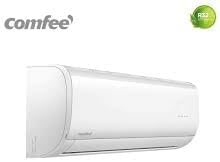
Rajah 3.1: COMFEE CF-CFW12A Indoor Unit. This unit is designed for wall mounting inside the room to be conditioned.

Rajah 3.2: COMFEE CF-CFW12A Outdoor Unit. This unit houses the compressor and condenser, and is installed outside.
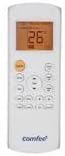
Rajah 3.3: Remote Control for COMFEE Air Conditioner. Used to adjust settings and modes.
4. Pemasangan dan Persediaan
The installation of the COMFEE CF-CFW12A monosplit air conditioner requires specialized knowledge and tools. It must be performed by a certified professional. Attempting self-installation may void your warranty and lead to improper operation or safety hazards.
4.1. Professional Installation Steps (Overview for User Information)
- Pemilihan Tapak: The technician will choose optimal locations for both the indoor and outdoor units, considering factors like airflow, structural support, drainage, and proximity to power.
- Memasang Unit Dalaman: The indoor unit's mounting plate is securely fixed to the wall.
- Memasang Unit Luaran: The outdoor unit is placed on a stable, level surface or mounted on a wall bracket, ensuring adequate clearance for airflow.
- Paip penyejuk: Copper pipes are connected between the indoor and outdoor units to form the refrigerant circuit. This involves flaring, connecting, and vacuuming the lines to remove moisture and air.
- Sambungan Saliran: A drain hose is connected to the indoor unit to remove condensed water, ensuring proper slope for gravity drainage.
- Pendawaian elektrik: Power cables and communication wires are connected between the units and to the main power supply, following local electrical codes.
- Leak Test and Commissioning: After all connections are made, the system is checked for leaks, refrigerant is released into the system, and the unit is tested for proper operation in all modes.
For detailed installation instructions, please refer to the separate installation manual provided to your professional installer.
5. Arahan Operasi
The COMFEE CF-CFW12A air conditioner is operated primarily using the wireless remote control. Ensure batteries are correctly inserted into the remote control.
5.1. Fungsi Alat Kawalan Jauh
Refer to Figure 3.3 for a visual guide to the remote control buttons.
- Butang kuasa: Tekan untuk menghidupkan atau MATI unit.
- Butang MOD: Cycles through operating modes: AUTO, COOL, DRY, FAN, HEAT.
- TEMP ▲ / ▼ Buttons: Melaraskan tetapan suhu yang dikehendaki.
- Butang KIPAS: Selects fan speed: AUTO, LOW, MED, HIGH.
- Butang HAyunan: Controls the vertical louver movement for air direction.
- Butang PEMASA: Sets the ON/OFF timer for automatic operation.
- Butang SLEEP: Activates the Sleep mode, which adjusts temperature gradually for comfort during sleep and saves energy.
- Butang ECO: Activates energy-saving mode (if available).
- Butang TURBO: Mengaktifkan penyejukan atau pemanasan maksimum untuk perubahan suhu yang cepat.
5.2. Operasi Asas
- Hidupkan: Press the POWER button. The unit will start in the last selected mode or AUTO mode.
- Pilih Mod: Press the MODE button repeatedly until your desired mode (COOL, HEAT, DRY, FAN) is displayed.
- Tetapkan Suhu: Use the TEMP ▲ or ▼ buttons to set your preferred temperature.
- Laraskan Kelajuan Kipas: Tekan butang KIPAS untuk memilih kelajuan kipas yang dikehendaki.
- Matikan: Tekan butang POWER sekali lagi.
6. Penyelenggaraan
Regular maintenance ensures optimal performance and extends the lifespan of your air conditioner. Always disconnect power to the unit before performing any maintenance.
6.1. Pembersihan Penapis Udara
Penapis udara hendaklah dibersihkan setiap dua minggu atau lebih kerap bergantung pada penggunaan dan kualiti udara.
- Buka panel hadapan unit dalaman.
- Keluarkan penapis udara.
- Bersihkan penapis menggunakan pembersih vakum atau basuh dengan air suam (di bawah 40°C).
- Allow the filters to dry completely in a shaded area before reinstalling. Do not expose to direct sunlight.
- Pasang semula penapis dan tutup panel hadapan.
6.2. Pembersihan Unit Luar
The outdoor unit should be cleaned periodically to remove dust, leaves, and debris that can accumulate on the coils and fan blades. This should ideally be done by a professional technician.
- Ensure the power supply to the outdoor unit is disconnected.
- Carefully remove any visible debris from the coil fins and fan area.
- Do not bend the coil fins. If they are bent, gently straighten them with a fin comb.
- Elakkan menyembur air terus ke atas komponen elektrik.
6.3. Seasonal Checks
- Before Summer/Winter: Have a professional technician inspect the refrigerant levels, electrical connections, and overall system performance.
- Long Periods of Non-Use: If the unit will not be used for an extended period, operate it in FAN mode for a few hours to dry the internal components and prevent mold growth. Disconnect the power supply.
7. Penyelesaian masalah
Sebelum menghubungi perkhidmatan, semulaview isu biasa berikut dan penyelesaiannya.
| Masalah | Kemungkinan Punca | Penyelesaian |
|---|---|---|
| Unit tidak bermula | Tiada bekalan kuasa Bateri alat kawalan jauh mati Fungsi pemasa diaktifkan | Periksa sambungan kuasa dan pemutus litar Gantikan bateri kawalan jauh Batalkan tetapan pemasa |
| Penyejukan/pemanasan tidak mencukupi | Penapis udara kotor Tingkap/pintu terbuka Tetapan suhu tidak betul Unit luar tersumbat | Penapis udara bersih Tutup tingkap dan pintu Laraskan tetapan suhu Kosongkan halangan di sekitar unit luar |
| Air menitis dari unit dalaman | Drain hose clogged or bent Indoor unit not level | Periksa dan bersihkan hos saliran Ensure indoor unit is level (professional service) |
| Bunyi yang luar biasa | Bunyi operasi biasa (contohnya, aliran bahan pendingin) Bahagian longgar Penghalang kipas | Tiada tindakan diperlukan untuk bunyi biasa Contact professional service for inspection |
| Alat kawalan jauh tidak berfungsi | Bateri mati atau salah dimasukkan Halangan antara alat kawalan jauh dan unit | Replace batteries, ensure correct polarity Remove obstructions, ensure direct line of sight |
Jika masalah berterusan selepas mencuba penyelesaian ini, sila hubungi juruteknik servis bertauliah.
8. Spesifikasi Produk
The following table outlines the technical specifications for the COMFEE CF-CFW12A air conditioner kit.
| Ciri | Spesifikasi |
|---|---|
| Jenama | COMFEE' |
| Nombor Model | CF-CFW12A |
| taip | Mini-split Air Conditioner |
| Jenis Pemasangan | Professional (Wall-mounted) |
| Kapasiti Penyejukan | 12000 BTU (3.52 kW) |
| Kapasiti Pemanasan | 13000 BTU (3.81 kW) |
| Kecekapan Tenaga (Penyejukan) | A++ |
| Kecekapan Tenaga (Pemanasan) | A+ |
| Nisbah Kecekapan Tenaga Bermusim (SEER) | 16 |
| Bahan penyejuk | R-32 |
| Voltage | 230 Volt |
| Ciri Khas | Dehumidifier, Heating and Cooling Function, Inverter Technology |
| warna | putih |
| Berat Barang | 90 kilograms (Total for kit) |
| Jenis Penapis | Penapis standard |
| Tahun Mula | 2020 |
9. Waranti dan Sokongan
9.1. Jaminan Produk
COMFEE products are manufactured to high-quality standards. For specific warranty terms and conditions, including coverage period and what is covered, please refer to the warranty card included with your product or consult your retailer at the time of purchase. Keep your proof of purchase for warranty claims.
9.2. Technical Support and Service
If you encounter any issues that cannot be resolved using the troubleshooting guide, or if you require professional service or spare parts, please contact:
- Your authorized COMFEE retailer.
- An authorized COMFEE service center.
When contacting support, please have your product model number (CF-CFW12A) and serial number ready. This information can typically be found on a label on the indoor or outdoor unit.