
YESKAMO B08B81VCQF
YESKAMO Wireless Security Camera Outdoor User Manual
Model: B08B81VCQF
Your guide to setting up and operating your YESKAMO security camera.
1. Pengenalan
Thank you for choosing the YESKAMO Wireless Security Camera. This manual provides detailed instructions for the installation, operation, and maintenance of your new security camera. Please read this manual thoroughly before use and keep it for future reference.
2. Kandungan Pakej
Sila semak kandungan bungkusan dengan teliti. Jika terdapat barang yang hilang atau rosak, sila hubungi khidmat pelanggan.
- YESKAMO Wireless Security Camera
- Penyesuai Kuasa
- Skru dan Penambat Pemasangan
- Manual Pengguna
3. Produk Lebihview
The YESKAMO Wireless Security Camera is designed for outdoor surveillance, featuring high-resolution video, two-way audio, and advanced motion detection capabilities. It integrates floodlights and a siren for enhanced security.
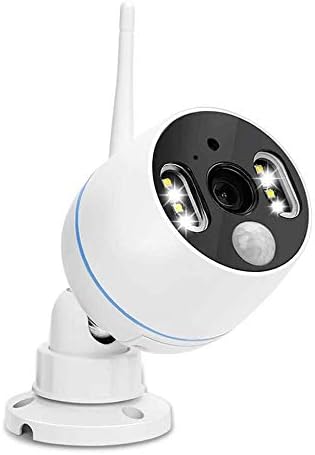
Rajah 3.1: Depan view of the YESKAMO Wireless Security Camera, showing the lens, floodlights, and antenna.

Figure 3.2: Key features of the YESKAMO camera, including floodlight, siren alarm, PIR activation, two-way audio, 1080P resolution, TF card storage, IP66 waterproof rating, A/V recording, and day/night vision.
4. Persediaan
4.1 Pemasangan
Pilih lokasi yang sesuai untuk kamera anda, pastikan ia mempunyai view of the area you wish to monitor and is within Wi-Fi range. The camera is designed for wall mounting.
- Mark the drilling positions on the wall using the camera base as a template.
- Gerudi lubang dan masukkan sauh dinding.
- Secure the camera base to the wall with the provided screws.
- Laraskan sudut kamera mengikut keperluan.

Figure 4.1: Diagram illustrating the 'True Plug & Play' setup, showing the camera auto-pairing with a local monitor and connecting to a home router for remote viewing.
4.2 Pemasangan Apl & Pembuatan Akaun
To access your camera remotely and utilize all its features, you will need to download the official YESKAMO app on your smartphone (Android or iOS).
- Scan the QR code in the quick start guide or search for "YESKAMO" in your app store.
- Pasang apl dan bukanya.
- Follow the on-screen prompts to create a new account or log in if you already have one.
4.3 Berpasangan Peranti
Once the app is installed and you are logged in, follow these steps to pair your camera:
- Hidupkan kamera menggunakan penyesuai kuasa yang disediakan.
- Dalam aplikasi, ketik ikon "Tambah Peranti" atau "+".
- Select your camera model or scan the QR code on the camera itself.
- Follow the app's instructions to connect the camera to your Wi-Fi network. Ensure your Wi-Fi password is correct.
- Once connected, the camera will appear in your device list.
5. Arahan Operasi
5.1 Langsung View
From the app's main screen, tap on your camera to access the live video feed. You can view foo masa nyatatage dari kamera anda bila-bila masa, di mana sahaja.
5.2 Pengesanan Gerakan & Makluman
The camera features advanced PIR motion detection to minimize false alarms. When motion is detected, the camera can trigger floodlights, a siren, and send alerts to your smartphone.

Figure 5.1: Illustration of Smart PIR Motion Detection, which uses dual sensors (heat and motion) to accurately detect humans, animals, and vehicles, significantly reducing false alarms.

Figure 5.2: The camera's proactive deterrence features, including PIR-activated ultra-bright floodlights and a siren alarm, alongside color night vision capabilities displayed on a smartphone.
To configure motion detection settings:
- In the app, go to Camera Settings > Motion Detection.
- Adjust sensitivity levels and define detection zones.
- Enable or disable floodlight and siren activation upon detection.
5.3 Audio Dua Hala
The built-in microphone and speaker allow for two-way communication. You can hear what's happening around the camera and speak through the camera to visitors or intruders.

Figure 5.3: The two-way audio function allows users to hear and speak with individuals in the surveillance area directly through the camera via the mobile application.
To use two-way audio:
- Semasa dalam live view, ketik ikon mikrofon dalam aplikasi.
- Hold the icon to speak, and release to listen.
5.4 Rakaman & Main Semula
The camera supports local storage via a TF card (not included) and cloud storage (subscription may be required). Recordings can be reviewed terus daripada apl.

Figure 5.4: Workflow for local and remote playback with audio, illustrating how PIR activation, siren alarms, and message alerts lead to recorded events that can be reviewed.
To access recordings:
- In the app, navigate to the "Playback" section.
- Select the date and time to view peristiwa yang dirakam.
5.5 Penglihatan Malam
The camera provides clear visibility even in low-light conditions. It features color night vision, allowing for more detailed images at night when sufficient ambient light is available or floodlights are activated.
6. Penyelenggaraan
6.1 Pembersihan
Regularly clean the camera lens and housing to ensure optimal performance. Use a soft, damp kain. Jangan gunakan bahan kimia yang keras atau pembersih yang kasar.
6.2 Kemas Kini Perisian Tegar
Periodically check for firmware updates through the app. Keeping your camera's firmware up-to-date ensures you have the latest features and security enhancements.
7. Penyelesaian masalah
7.1 Kamera Luar Talian
- Periksa sama ada kamera dihidupkan dan penyesuai kuasa disambungkan dengan kukuh.
- Ensure your Wi-Fi router is working correctly and the camera is within Wi-Fi range.
- Restart the camera by unplugging and replugging the power.
- If the issue persists, try re-pairing the camera with the app.
7.2 Kualiti Video yang Buruk
- Bersihkan lensa kamera.
- Ensure a strong Wi-Fi signal. Weak signals can affect streaming quality.
- Semak kelajuan sambungan internet anda.
7.3 Motion Alerts Not Received
- Sahkan bahawa pengesanan gerakan diaktifkan dalam tetapan aplikasi.
- Semak tetapan pemberitahuan telefon anda untuk memastikan aplikasi dibenarkan menghantar pemberitahuan.
- Laraskan sensitiviti pengesanan gerakan.
8. Spesifikasi
| Ciri | Perincian |
|---|---|
| Model | B08B81VCQF |
| Resolusi | 3MP (1080p, 720p supported) |
| Ketersambungan | Wayarles (Wi-Fi) |
| Sumber Kuasa | Battery Powered (or via adapter) |
| Julat Penglihatan Malam | Sehingga 100 Kaki |
| Audio | Audio Dua Hala |
| Pengesanan Pergerakan | PIR Motion Activated |
| Rintangan Cuaca | IP66 |
| Dimensi | 8.15 x 7.09 x 3.62 inci |
| Berat badan | 1.26 paun |
9. Waranti dan Sokongan
YESKAMO products come with a standard manufacturer's warranty. For specific warranty terms and conditions, please refer to the warranty card included with your product or visit the official YESKAMO webtapak.
If you encounter any issues or have questions not covered in this manual, please contact YESKAMO customer support:
- Visit the YESKAMO Store on Amazon: YESKAMO Store
- Rujuk maklumat hubungan yang diberikan dalam pembungkusan produk anda.
Ask a question about this manual
Ask about setup, troubleshooting, compatibility, parts, safety, or missing instructions. Manuals+ will review the question and use this page’s manual context to help answer it.