
1. Pengenalan
This manual provides detailed instructions for the safe and effective operation of your PIXEL G1s RGB Video Light. Please read this manual thoroughly before use and retain it for future reference. The PIXEL G1s is a versatile and portable RGB video light designed for various photography and videography applications, featuring app control, a high-capacity battery, and multiple lighting effects.
2. Kandungan Pakej
Sahkan bahawa semua item yang disenaraikan di bawah disertakan dalam pakej anda. Jika ada barang yang hilang atau rosak, sila hubungi peruncit anda.
- 1 x PIXEL G1s RGB Video Light
- 1 x 1/4” Screw
- 1 x Ball Head Adapter
- 1 x Kabel Pengecas Jenis-C
- 1 x Manual Pengguna

Image: Contents of the PIXEL G1s package.
3. Ciri-ciri Produk
- Convenient APP Control: Adjust hue (0-359°), saturation (0-100%), brightness (0-100%), and color temperature (2500K-8500K) via smartphone.
- Bateri Berkapasiti Tinggi: Built-in 6400mAh battery provides over 210 minutes of runtime at 100% brightness. Full charge in approximately 2.5 hours via USB Type-C.
- Pemasangan Serbaguna: 360° rotating arm with cold shoe allows for flexible positioning on cameras, microphones, or smartphones.
- Precision LCD Display: Intuitive screen provides real-time readings of settings and battery level.
- 10 Scene Effects: Pre-programmed lighting effects for various creative scenarios.
- Pembinaan Tahan Lama: Aluminum alloy body ensures longevity and portability.

Imej: Selesaiview of the PIXEL G1s RGB Video Light.
4. Persediaan
4.1 Pengecasan Awal
Before first use, fully charge the PIXEL G1s using the provided Type-C charging cable. Connect the cable to the USB Type-C port on the device and a compatible USB power source. The LCD display will indicate charging status.

Image: Charging the PIXEL G1s via USB Type-C.
4.2 Attaching the Ball Head Adapter
The included ball head adapter allows for versatile mounting. Screw the 1/4” screw into the bottom of the light, then attach the ball head adapter to the screw. This assembly can then be mounted onto tripods, light stands, or camera hot shoes.

Image: Demonstrating the 360° rotating arm and mounting options.
5. Arahan Operasi
5.1 Hidupkan/Mati Kuasa
To power on the device, slide the power switch located on the side of the unit. To power off, slide the switch back to the OFF position.
5.2 Kawalan dan Paparan
The PIXEL G1s features an intuitive LCD display on the back and control dials/buttons on the side for easy adjustment.

Image: LCD display and control buttons.
5.3 Mod Operasi
The light offers several modes for different lighting needs:
- CCT Mode (Color Temperature): Adjust brightness from 0-100% and color temperature from 2500K (warm) to 8500K (cool).
- Mod RGB: Adjust hue (0-359°), saturation (0-100%), and brightness (0-100%) to achieve any desired color.
- Special Effects Mode: Choose from 10 pre-programmed scene effects like lightning, ambulance, police, fire truck, candle light, and more.

Image: Visual guide for brightness, color temperature, and RGB adjustments.
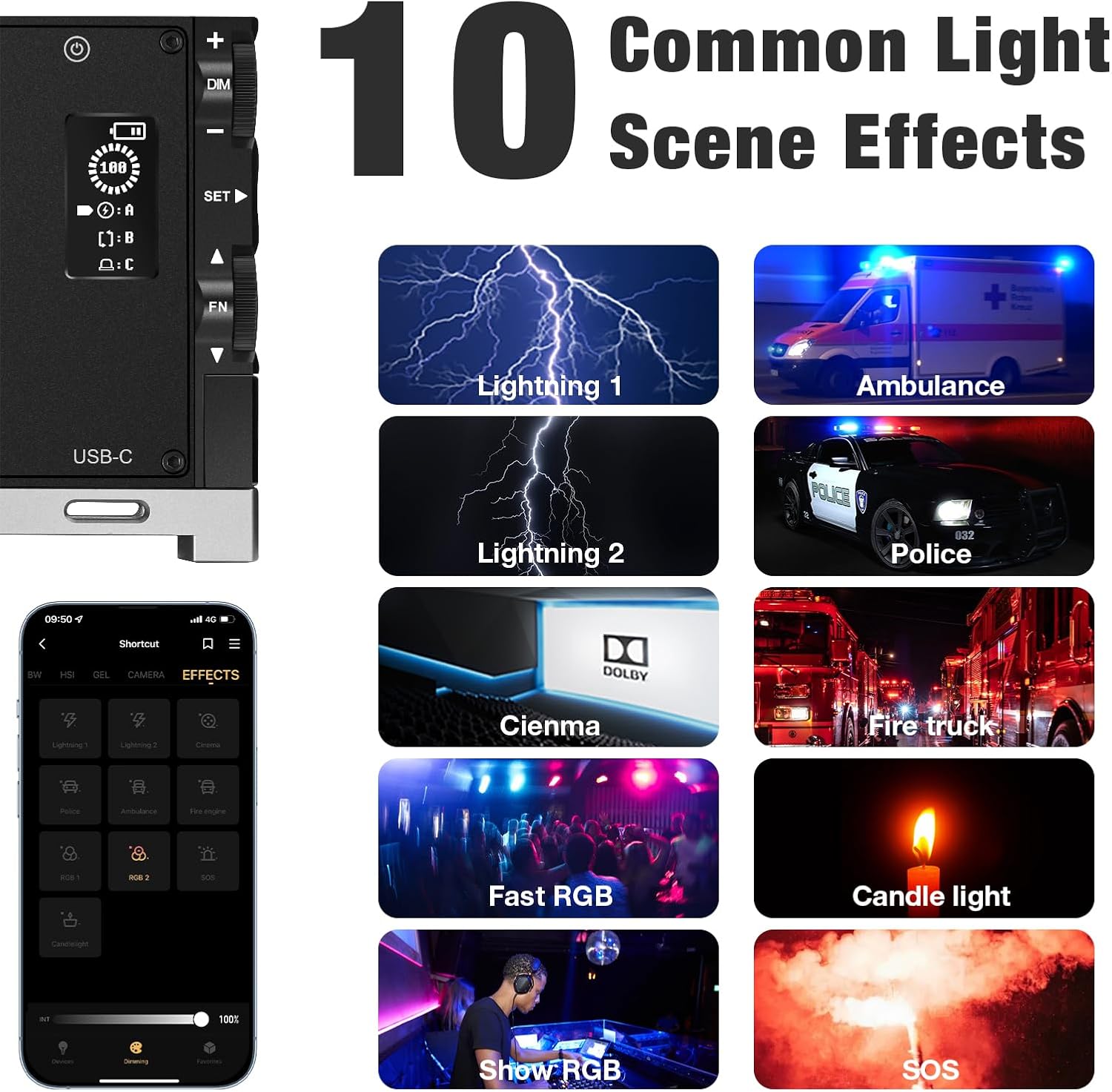
Imej: Cthamples of the 10 common light scene effects.
5.4 Kawalan APP
Download the official PIXEL app to control the G1s light wirelessly via your smartphone. The app provides comprehensive control over all settings and effects, offering enhanced flexibility.

Image: Smartphone app interface for wireless control.
Official Product Video: PIXEL G1s RGB Video Light Overview
Video ini memberikan penerangan ringkasview of the PIXEL G1s RGB Video Light's features and functionality.
6. Mengecas dan Bateri
The PIXEL G1s is equipped with a 6400mAh rechargeable Lithium-Ion battery. A full charge takes approximately 2.5 hours using the provided USB Type-C cable. The battery provides up to 210 minutes of continuous use at 100% brightness. The device includes built-in overheating protection for safe operation.
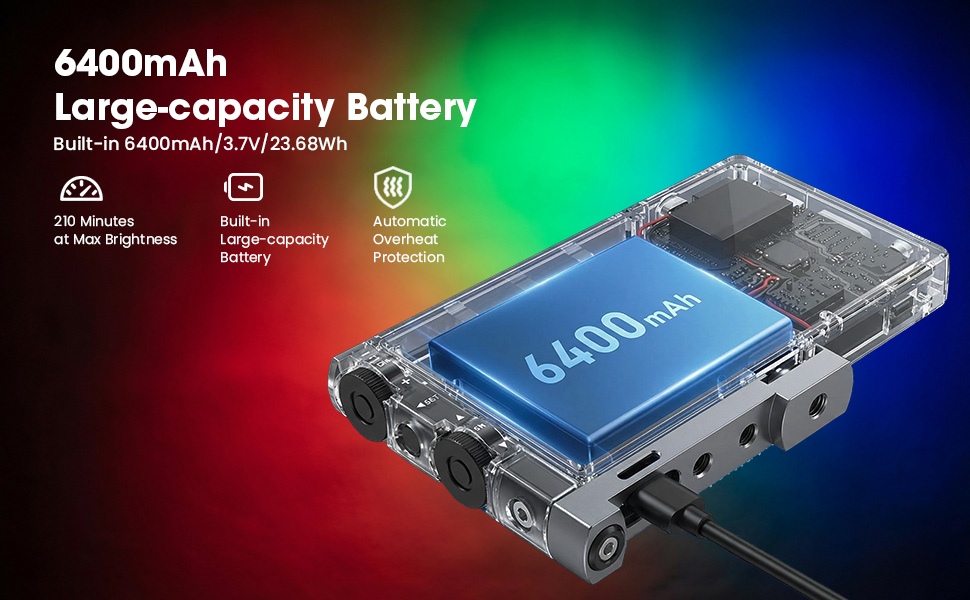
Image: Battery specifications and charging details.
7. Pilihan Pemasangan
The PIXEL G1s is designed for flexible mounting:
- 1/4” Screw Hole: Standard screw hole for attaching to tripods, light stands, or other photography accessories.
- Ball Head Adapter: Use the included ball head adapter for 360° rotation and tilt, allowing precise light positioning.
- Lekapan Kasut Sejuk: The rotating arm features a cold shoe mount for attaching to cameras or other compatible devices.

Image: Different mounting and positioning examples.
8. Penyelenggaraan
- Pastikan peranti kering. Jangan dedahkannya kepada lembapan atau hujan.
- Clean the light panel and body with a soft, dry cloth. Avoid using harsh chemicals or abrasive materials.
- Simpan peranti di tempat yang sejuk dan kering apabila tidak digunakan.
- Elakkan daripada menjatuhkan atau meletakkan peranti kepada kesan yang kuat.
9. Penyelesaian masalah
- Lampu tidak menyala: Ensure the battery is charged. Check the power switch position.
- Isu sambungan aplikasi: Ensure Bluetooth is enabled on your smartphone and the light. Restart both the app and the light.
- Kecerahan/warna yang tidak konsisten: Check the settings on the LCD display or within the app. Ensure the device is not in a low power state.
10. Spesifikasi
| Spesifikasi | Perincian |
|---|---|
| Jenama | PIXEL |
| Nombor Model | G1s |
| Dimensi Produk | 5.1"P x 0.6"L x 2.1"T (5.1 x 0.6 x 2.7 inci) |
| Berat Barang | 1.06 paun |
| Jenis Bateri | 1 bateri Lithium Ion (termasuk) |
| Kapasiti Bateri | 6400mAh |
| Hayat Bateri (100% Kecerahan) | 210 minit |
| Masa Mengecas | lebih kurang 2.5 jam |
| Julat Suhu Warna | 2500K-8500K |
| Teknologi Ketersambungan | USB |
| Antara Muka Perkakasan | USB |
11. Waranti dan Sokongan
For warranty information and customer support, please refer to the official PIXEL webtapak atau hubungi peruncit anda. Simpan resit pembelian anda sebagai bukti pembelian.