
1. Pengenalan
Thank you for choosing the Awei A831BL Bluetooth In-Ear Headset. This manual provides essential information for the safe and efficient use of your device. Please read it carefully before use and retain it for future reference.
The Awei A831BL is a wireless in-ear headset designed for mobile phone use, offering up to 8 hours of continuous talk and music playback. It features pure, high-quality bass sound and is suitable for various activities.
2. Kandungan Pakej
Sila semak pakej untuk item berikut:
- Awei A831BL Bluetooth In-Ear Headset
- Kabel Pengecas USB
- Petua Telinga (pelbagai saiz)
- Manual Pengguna
3. Produk Lebihview
Familiarize yourself with the components of your Awei A831BL headset.
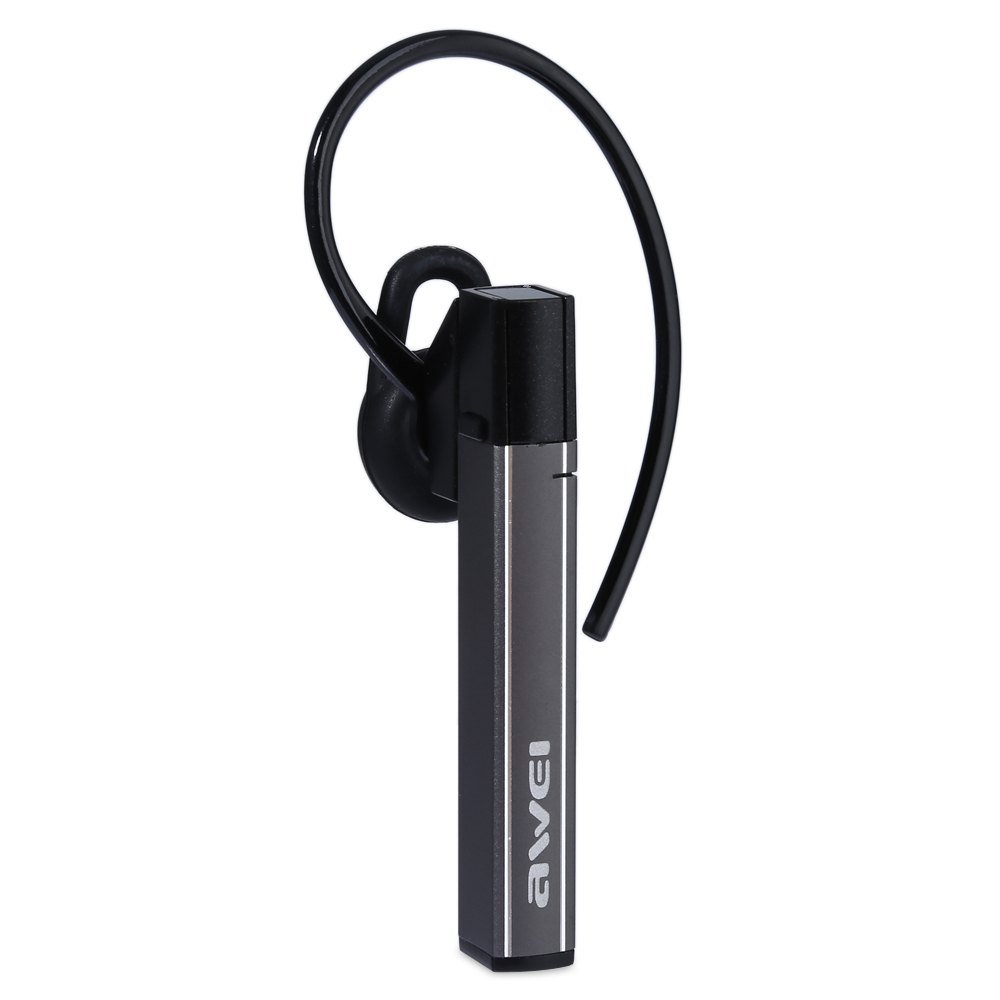
Image: The Awei A831BL Bluetooth In-Ear Headset in grey, showing the earbud design and inline controls.
The headset features an ergonomic in-ear design for comfortable wear, especially during activities. It includes an integrated microphone for hands-free calls and inline controls for managing audio and calls.
4. Persediaan
4.1 Mengecas Alat Dengar
- Sambungkan kabel pengecas USB ke port pengecasan pada alat dengar.
- Sambungkan hujung kabel USB yang satu lagi ke penyesuai kuasa USB (tidak disertakan) atau port USB komputer.
- The indicator light will illuminate (e.g., red) during charging.
- Once fully charged, the indicator light will change (e.g., turn blue or turn off).
A full charge provides up to 8 hours of talk or music playback time.
4.2 Berpasangan Bluetooth
- Ensure the headset is fully charged and turned off.
- Press and hold the Multi-function button (usually the center button on the inline control) for approximately 5-7 seconds until the indicator light flashes red and blue alternately, indicating pairing mode.
- Pada telefon bimbit atau peranti yang didayakan Bluetooth anda, dayakan Bluetooth dan cari peranti yang tersedia.
- Pilih "Awei A831BL" daripada senarai peranti yang ditemui.
- Jika diminta kata laluan, masukkan "0000" (empat sifar).
- Once successfully paired, the indicator light will flash blue slowly, and you may hear a confirmation tone.
Fon kepala akan cuba menyambung semula secara automatik ke peranti terakhir yang dipasangkan apabila dihidupkan.
5. Arahan Operasi
5.1 Hidupkan/Mati Kuasa
- Hidupkan kuasa: Press and hold the Multi-function button for about 3 seconds until the blue indicator light flashes.
- Matikan: Press and hold the Multi-function button for about 3-4 seconds until the red indicator light flashes briefly and then turns off.
5.2 Main balik Muzik
- Main/Jeda: Tekan butang Pelbagai fungsi sekali.
- Kelantangan: Tekan butang '+'.
- Perlahankan suara: Tekan butang '-'.
- Lagu Seterusnya: Tekan dan tahan butang '+'.
- Trek Sebelumnya: Tekan dan tahan butang '-'.
5.3 Pengurusan Panggilan
- Jawab Panggilan: Press the Multi-function button once when a call comes in.
- Tamatkan Panggilan: Tekan butang Berbilang fungsi sekali semasa panggilan.
- Tolak Panggilan: Press and hold the Multi-function button for about 2 seconds when a call comes in.
- Dail Semula Nombor Terakhir: Tekan dua kali butang Berbilang fungsi.
The integrated microphone allows for clear hands-free communication.
6. Penyelenggaraan
- Bersihkan set kepala dengan kerap menggunakan kain lembut dan kering.
- Avoid exposing the headset to extreme temperatures, humidity, or corrosive substances.
- Do not attempt to disassemble or modify the headset, as this will void the warranty and may cause damage.
- Simpan set kepala di tempat yang sejuk dan kering apabila tidak digunakan.
7. Penyelesaian masalah
| Masalah | Penyelesaian |
|---|---|
| Alat dengar tidak dihidupkan. | Pastikan alat dengar dicas sepenuhnya. Sambungkannya ke sumber kuasa dan cuba lagi. |
| Tidak boleh berpasangan dengan peranti. | Ensure the headset is in pairing mode (flashing red and blue). Turn off and on your device's Bluetooth. Move closer to the device. Clear previous Bluetooth connections on your device. |
| Tiada bunyi atau kelantangan rendah. | Check the volume levels on both the headset and your connected device. Ensure the headset is properly connected. |
| Kualiti panggilan yang lemah. | Ensure the microphone is not obstructed. Move to an area with less interference. Check your phone's signal strength. |
8. Spesifikasi
| Ciri | Perincian |
|---|---|
| Jenama | Awei |
| Nombor Model | A831BL |
| warna | Kelabu |
| Teknologi Ketersambungan | Wayarles (Bluetooth) |
| Jenis Alat dengar | Dalam Telinga |
| Mikrofon | ya |
| Pembatalan Bunyi | Tidak |
| Hayat Bateri | Up to 8 hours (talk/music) |
| Ciri Bunyi | Pure, high-quality bass sound |
| bahan | plastik |
| Peranti Serasi | Telefon Bimbit |
9. Waranti dan Sokongan
Awei products are designed and manufactured to the highest quality standards. For warranty information and customer support, please refer to the warranty card included in your package or contact your local retailer. Keep your purchase receipt as proof of purchase.
For further assistance, please visit the official Awei webtapak atau hubungi bahagian perkhidmatan pelanggan mereka.