
1. Pengenalan
Thank you for choosing the Philips Shaver S3134/51. This electric rotary shaver is designed for both wet and dry use, offering a comfortable and efficient shaving experience. Please read this user manual carefully before using the appliance and save it for future reference. This manual provides essential information on safe operation, setup, usage, maintenance, and troubleshooting.
2. Maklumat Keselamatan Penting
To ensure safe operation and prevent injury, always follow these basic safety precautions:
- Unplug before use: This appliance is designed for cordless operation only. Always disconnect the shaver from the power outlet before use.
- Jangan gunakan perkakas jika ia rosak.
- Keep the charging adapter dry. Do not immerse it in water or use it in wet conditions.
- Perkakas ini boleh digunakan oleh kanak-kanak berumur 8 tahun ke atas dan orang yang kurang keupayaan fizikal, deria atau mental atau kurang pengalaman dan pengetahuan jika mereka telah diberi penyeliaan atau arahan mengenai penggunaan perkakas dengan cara yang selamat dan memahami bahaya yang terlibat .
- Kanak-kanak tidak boleh bermain dengan perkakas. Pembersihan dan penyelenggaraan pengguna tidak boleh dibuat oleh kanak-kanak tanpa pengawasan.
- Only use the original Philips charger provided with the appliance.
- Jangan buka perkakas untuk menggantikan bateri yang boleh dicas semula.
3. Kandungan Pakej
The Philips Shaver S3134/51 package typically includes:
- Philips Shaver S3134/51
- Penyesuai Pengecasan
- Topi Pelindung
- Berus Pembersih
- Manual Pengguna
4. Bermula (Persediaan)
4.1 Mengecas Pencukur
Before first use, or when the battery indicator shows low charge, fully charge your shaver. A full charge provides up to 60 minutes of cordless shaving time.
- Pastikan pencukur dimatikan.
- Insert the small plug of the charging adapter into the shaver's charging socket.
- Pasangkan penyesuai ke soket dinding.
- The battery indicator light will illuminate to show charging status. When fully charged, the light may turn solid or switch off, depending on the model.
- Pengecasan penuh biasanya mengambil masa lebih kurang 1 jam.
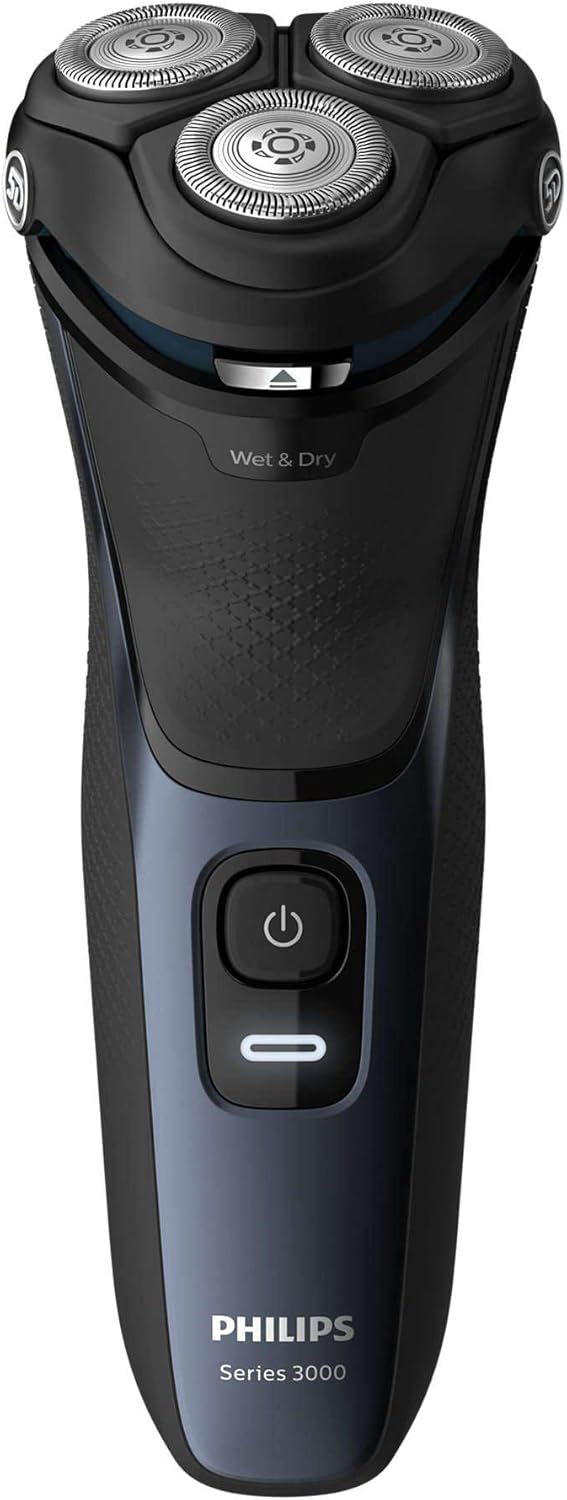
Rajah 1: Depan view of the Philips Shaver S3134/51, showing the power button and 'Wet & Dry' indicator.
5. Mengendalikan Pencukur
5.1 Menghidupkan/Mematikan
- Untuk menghidupkan pencukur, tekan butang kuasa sekali.
- Untuk mematikan pencukur, tekan butang kuasa sekali lagi.
5.2 Bercukur Basah
For a refreshing and comfortable shave, you can use the shaver with foam or gel.
- Wet your face and apply shaving foam or gel.
- Hidupkan pencukur.
- Move the shaver in slow, circular motions over your skin.
- Rinse the shaving heads under running water during and after shaving to prevent clogging.
5.3 Pencukuran Kering
Untuk pencukuran yang cepat dan mudah, gunakan pencukur pada kulit kering.
- Pastikan kulit anda bersih dan kering.
- Hidupkan pencukur.
- Move the shaver in slow, circular motions over your skin.
5.4 Menggunakan Pemangkas Pop-Up
Perapi pop timbul bersepadu sesuai untuk mengekalkan misai dan jambang anda.
- Ensure the shaver is turned on.
- Luncurkan butang pelepas pemangkas ke atas untuk mengaktifkan pemangkas.
- Hold the trimmer perpendicular to your skin and move it gently to trim desired areas.
- Apabila selesai, tolak perapi ke bawah sehingga ia berbunyi pada tempatnya.

Rajah 2: Sisi view of the Philips Shaver S3134/51 with the precision pop-up trimmer extended.
6. Pembersihan dan Penyelenggaraan
Pembersihan tetap memastikan prestasi optimum dan memanjangkan jangka hayat pencukur anda.
6.1 Pembersihan Harian
- After each use, turn off the shaver and unplug it from the charger.
- Open the shaving unit by pressing the release button (if applicable) or gently pulling the shaving head assembly upwards.
- Bilas unit pencukur dengan teliti di bawah air suam yang mengalir.
- Goncangkan air berlebihan dan biarkan unit pencukur terbuka sehingga kering di udara.
- Tutup unit pencukur.
6.2 Pembersihan Mendalam (Mingguan/Bulanan)
Untuk pembersihan yang lebih teliti:
- Lakukan langkah pembersihan harian.
- Tanggalkan kepala pencukur dari unit pencukur.
- Clean the individual cutters and guards with the provided cleaning brush. Do not clean more than one cutter and guard at a time, as they are matching sets.
- Rinse all parts under warm running water.
- Benarkan semua bahagian kering sepenuhnya sebelum dipasang semula.
6.3 Menggantikan Kepala Pencukur
For optimal shaving performance, it is recommended to replace the shaving heads every two years. Replacement heads can be purchased from authorized Philips retailers or the Philips website. Refer to your shaver's packaging or the Philips website for the correct replacement head type for model S3134/51.
7. Penyelesaian masalah
| Masalah | Kemungkinan Punca | Penyelesaian |
|---|---|---|
| Pencukur tidak dihidupkan. | Bateri kosong. | Cas pencukur selama sekurang-kurangnya 1 jam. |
| Pencukur tidak dicas. | Adapter not properly connected or faulty. | Ensure the adapter is securely plugged into both the shaver and the wall outlet. Try a different outlet. If the issue persists, contact Philips support. |
| Prestasi pencukuran yang lemah. | Kepala pencukur kotor atau usang. | Bersihkan kepala pencukur dengan teliti. Jika prestasi tidak bertambah baik, pertimbangkan untuk menggantikan kepala pencukur. |
| Kerengsaan kulit selepas bercukur. | Teknik pencukuran yang salah atau kulit sensitif. | Ensure you are using gentle, circular motions. Try wet shaving with foam or gel. Allow your skin to adapt to the new shaver. |
If you encounter problems not listed here, or if the suggested solutions do not resolve the issue, please contact Philips Customer Support.
8. Spesifikasi
- Nombor Model: S3134/51
- Jenama: PHILIPS
- Sumber Kuasa: Dikuasakan Bateri (Litium-ion Boleh Dicas Semula)
- Hayat Bateri: Mencukur tanpa wayar sehingga 60 minit
- Masa Pengecasan: Approximately 1 hour for a full charge
- Sistem Pencukur: Rotary, 5D Pivot & Flex Heads
- Bahan Bilah: Keluli Tahan Karat
- penggunaan: Basah & Kering
- Komponen yang Disertakan: Shaver, Charger
- Dimensi (L x W x H): 2.79 x 24.64 x 16.51 cm
- Berat: 281 Gram
- warna: Biru Ribut
9. Waranti dan Sokongan
This Philips appliance comes with a standard manufacturer's warranty. Please refer to the warranty card included in your package or visit the official Philips webtapak untuk terma dan syarat waranti terperinci khusus untuk wilayah anda.
For product support, frequently asked questions, or to register your product, please visit the Philips support website or contact your local Philips customer service center. Contact information can typically be found on the Philips webtapak atau dalam dokumentasi yang disediakan bersama produk anda.
Sokongan dalam talian: www.philips.com/support