
1. Pengenalan
Thank you for choosing the Eurolite FD-32+1 DMX Dimmer Panel. This manual provides essential information for the safe and efficient operation of your device. Please read these instructions carefully before initial use and keep them for future reference. This device is designed for professional stage and show applications, offering precise DMX control over lighting fixtures.
2. Arahan Keselamatan
Sentiasa patuhi langkah berjaga-jaga keselamatan berikut untuk mengelakkan kejutan elektrik, kebakaran atau kerosakan pada peranti.
- Keselamatan Elektrik: Ensure the power supply matches the device's requirements (9V - 12V / 300 mA DC). Disconnect power before cleaning or servicing.
- Persekitaran: Do not expose the device to rain, moisture, or extreme temperatures. Operate in a dry, well-ventilated area.
- Pengendalian: Avoid strong impacts or dropping the device. Do not open the housing or attempt repairs yourself; refer servicing to qualified personnel.
- Pengudaraan: Ensure proper airflow around the unit to prevent overheating. Do not block ventilation openings.
3. Produk Lebihview
The Eurolite FD-32+1 DMX Dimmer Panel is a compact DMX controller designed for precise control of lighting effects. It features multiple faders for individual channel control and a master fader for overall intensity adjustment.
3.1 Kawalan Panel Hadapan
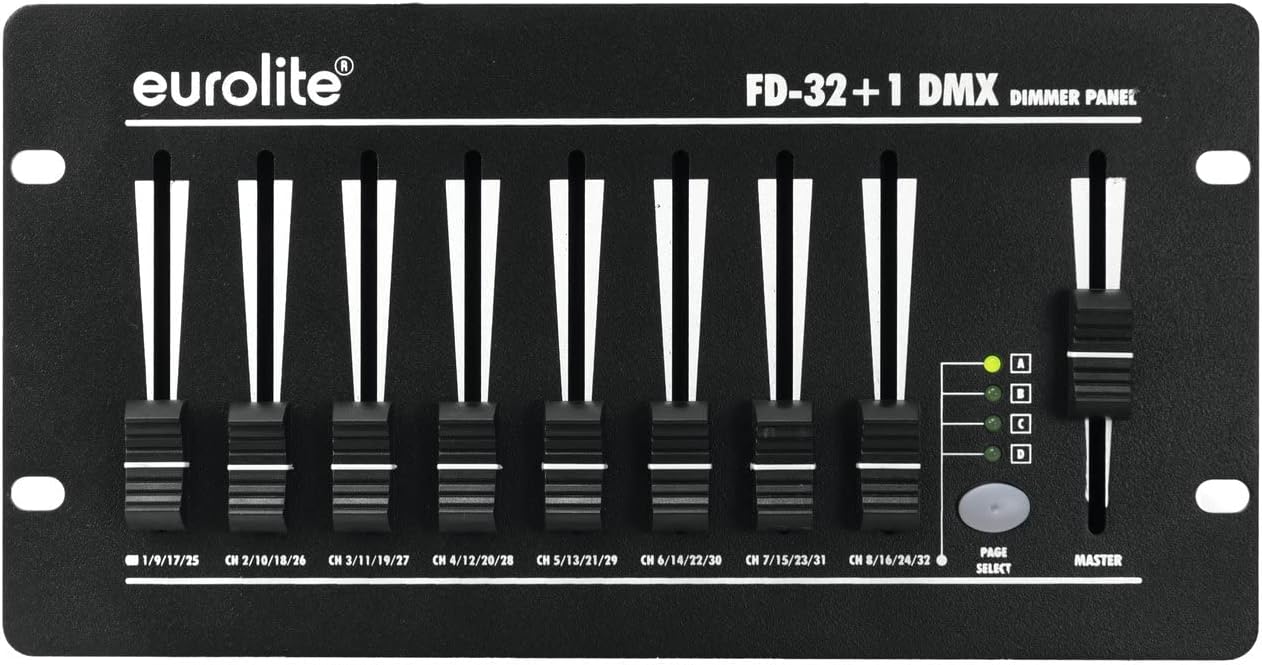
Imej 1: Depan view of the Eurolite FD-32+1 DMX Dimmer Panel. This image displays the eight individual channel faders, the master fader on the right, and the 'PAGE SELECT' button with its corresponding indicator LEDs (A, B, C, D).
Panel hadapan termasuk:
- Channel Faders (1-8): Control the intensity of individual DMX channels. Each fader is labeled with its corresponding channel range (e.g., CH 1/9/17/25).
- Master Fader: Controls the overall output intensity of all active channels.
- PAGE SELECT Button: Cycles through four pages (A, B, C, D) to access a total of 32 DMX channels (8 channels x 4 pages).
- Page Indicator LEDs (A, B, C, D): Indicate the currently selected page.
3.2 Sambungan Panel Belakang

Imej 2: belakang view of the Eurolite FD-32+1 DMX Dimmer Panel. This image shows the power input (DC INPUT), DMX OUT connector, and the main power switch.
The rear panel provides the necessary connections:
- DC INPUT (9V - 12V / 300 mA DC): Power input connector for the external power adapter.
- DMX KELUAR: 3-pin XLR connector for sending DMX signals to compatible lighting fixtures.
- Suis kuasa: Main power ON/OFF switch for the unit.
4. Persediaan
Follow these steps to set up your DMX Dimmer Panel:
- Membongkar: Carefully remove the device from its packaging. Inspect for any signs of damage during transit.
- penempatan: Place the dimmer panel on a stable, flat surface, such as a table (Bordsmontering). Ensure adequate ventilation around the unit.
- Sambungan Kuasa: Sambungkan penyesuai kuasa yang disediakan kepada INPUT DC on the rear panel. Plug the adapter into a suitable power outlet.
- Sambungan DMX: Connect a 3-pin DMX cable from the DMX KELUAR connector on the dimmer panel to the DMX IN of your first DMX-compatible lighting fixture. Daisy-chain additional fixtures as required.
- Hidupkan kuasa: Balikkan KUASA switch on the rear panel to the 'ON' position. The unit should power up.
5. Arahan Operasi
This section details how to operate your Eurolite FD-32+1 DMX Dimmer Panel.
5.1 Operasi Asas
- Hidupkan kuasa: Ensure the unit is powered on using the switch on the rear panel.
- Pilih Halaman: Tekan ke PILIHAN HALAMAN button to cycle through pages A, B, C, and D. The corresponding LED will illuminate to indicate the active page. Each page controls a different set of 8 DMX channels. For example:
- Page A: Channels 1-8
- Page B: Channels 9-16
- Page C: Channels 17-24
- Page D: Channels 25-32
- Adjust Channel Intensity: Move the individual channel faders (1-8) up or down to control the intensity of the assigned DMX channels on the selected page. Moving a fader up increases intensity, while moving it down decreases intensity.
- Adjust Master Intensity: Gunakan MASTER fader to control the overall output intensity of all active channels on the currently selected page. This acts as a global dimmer for the page.
5.2 Pengalamatan DMX
The FD-32+1 sends DMX signals starting from channel 1. Ensure your DMX lighting fixtures are addressed correctly to respond to the channels controlled by the dimmer panel. For example, if a fixture is set to DMX address 1, it will respond to fader 1 on Page A. If a fixture is set to DMX address 9, it will respond to fader 1 on Page B.
6. Penyelenggaraan
Regular maintenance ensures the longevity and optimal performance of your device.
- Pembersihan: Gunakan kain lembut dan kering untuk membersihkan bahagian luar unit. Jangan gunakan pembersih cecair atau pelarut.
- Penggantian fius: If the unit does not power on, check the fuse located near the power input on the rear panel. Replace it with a fuse of the exact same type and rating. Refer to the specifications for fuse details.
- Storan: When not in use for extended periods, store the device in a dry, dust-free environment, preferably in its original packaging.
7. Penyelesaian masalah
Jika anda menghadapi masalah, rujuk panduan penyelesaian masalah berikut:
| Masalah | Kemungkinan Punca | Penyelesaian |
|---|---|---|
| Unit tidak dihidupkan. | No power from outlet; faulty power adapter; blown fuse. | Check power outlet; test power adapter; replace fuse (see Maintenance). |
| No DMX output to fixtures. | Incorrect DMX cable connection; fixture DMX address mismatch; faulty DMX cable. | Ensure DMX cable is securely connected; verify fixture DMX addresses; try a different DMX cable. |
| Individual channels not responding. | Incorrect page selected; fixture DMX address mismatch. | Press PAGE SELECT to ensure the correct page is active; verify fixture DMX addresses correspond to the active page's channels. |
8. Spesifikasi
- Jenama: Eurolite
- model: 70063830 (FD-32+1 DMX Dimmer Panel)
- Jenis Pemasangan: Pemasangan meja
- Berat Barang: 1250 Gram
- Input Kuasa: 9V - 12V DC, 300 mA
- Saluran DMX: 32 (8 faders x 4 pages)
- Output DMX: XLR 3-pin
9. Waranti dan Sokongan
For warranty information and technical support, please refer to the documentation provided with your purchase or contact your authorized Eurolite dealer. Keep your proof of purchase for any warranty claims.