
1. Pengenalan
The Yamaha P515 is a flagship digital piano in the P-series, designed to offer advanced sound quality, features, and a realistic playing experience. Its portable and slim design makes it suitable for both home use and performances outside the home. This manual provides essential information for setting up, operating, and maintaining your P515 digital piano.
Ciri-ciri Utama:
- Premium Piano Samples: Features Yamaha CFX and Bösendorfer Imperial grand piano samples for rich, authentic sound.
- Realistic Keyboard Action: Natural Wood X (NWX) keyboard with synthetic ebony and ivory keytops, providing the feel and response of a grand piano.
- Pemodelan Resonans Maya (VRM): Delivers vivid and varied expression by simulating the complex sympathetic resonances of an acoustic grand piano.
- Sistem Pembesar Suara Bersepadu: Built-in speakers for clear sound reproduction in various settings.
- Smart Pianist App Compatibility: Connects with the Smart Pianist app for iOS devices, offering enhanced control and learning features.
- Ketersambungan: Includes USB, Aux In/Out, and MIDI ports for versatile integration with other devices.
2. Apa yang ada di dalam Kotak
Upon unpacking your Yamaha P515, ensure all the following items are present:
- Yamaha P515 Digital Piano Unit
- Sustain Pedal (FC4A type)
- Rehat Muzik
- Power Supply (AC Adaptor)
- Manual Pengguna (dokumen ini)
3. Persediaan
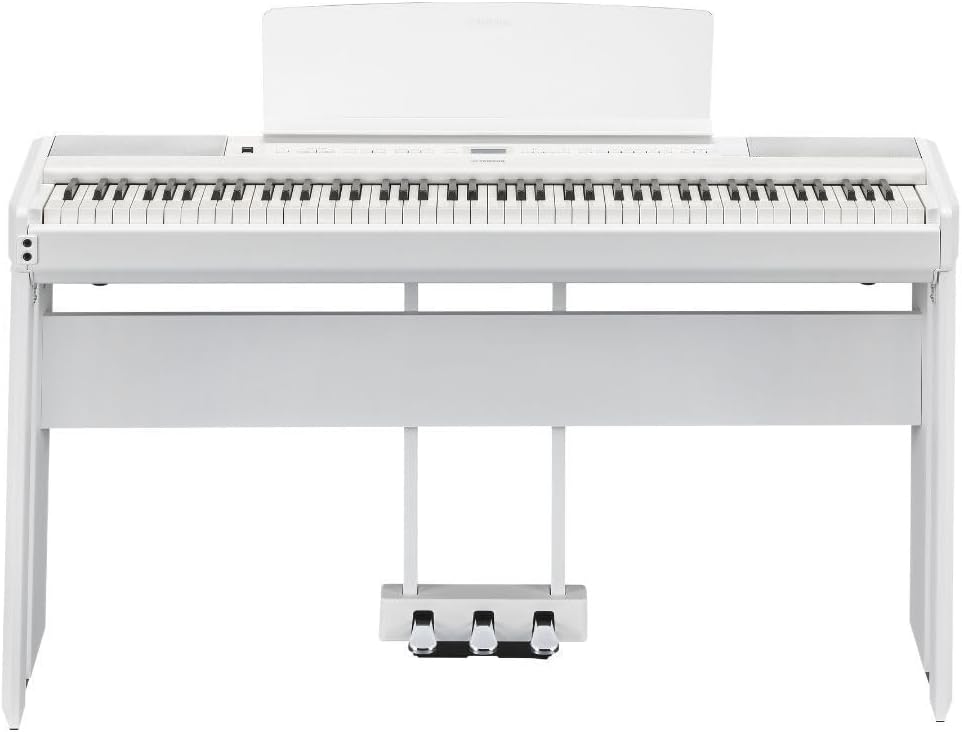
The Yamaha P515 is designed for flexible setup. It can be used as a portable unit or integrated with optional accessories like a furniture stand (L515) and a triple-pedal unit (LP1) for a more traditional piano experience. The main keyboard unit, stand, and pedal unit are typically packaged separately.
Langkah Perhimpunan:
- Buka Pembungkusan Komponen: Keluarkan semua komponen dari bungkusannya dengan berhati-hati.
- Assemble Stand (Optional): If using the optional L515 furniture stand, follow its specific assembly instructions. Ensure it is stable and securely fastened.
- Attach Pedal Unit (Optional): If using the optional LP1 triple-pedal unit, connect it to the stand and the piano unit as per its instructions. The included FC4A sustain pedal can be used directly with the piano if a triple-pedal unit is not desired.
- Place Piano Unit: Carefully place the P515 digital piano onto the assembled stand or a suitable, stable surface.
- Sambungkan Kuasa: Connect the supplied AC adaptor to the DC IN jack on the rear panel of the piano, then plug it into a power outlet.
- Sambungkan Pedal: If using the FC4A sustain pedal, plug it into the SUSTAIN jack on the rear panel. If using the LP1 triple-pedal unit, connect its cable to the PEDAL UNIT jack.
- Lampirkan Rehat Muzik: Insert the music rest into the slots on the top panel of the piano. This piece is removable if not desired.

4. Arahan Operasi
This section details the basic operation of your Yamaha P515 digital piano.
4.1 Hidupkan/Mati Kuasa dan Kelantangan
- Butang Kuasa: Located on the left side of the control panel. Press to turn the instrument on or off.
- Jumlah Induk: Use the slider next to the power button to adjust the overall volume of the piano.
4.2 Pemilihan Bunyi
The P515 offers a wide range of instrument voices. Use the dedicated buttons on the control panel to select different categories:
- PIANO: Selects various acoustic piano sounds, including Yamaha CFX Grand and Bösendorfer Imperial.
- E.PIANO: Accesses electric piano voices.
- ORGAN: Provides different organ sounds.
- CLV/VIB: Offers clavichord and vibraphone sounds.
- STRING: Selects various string instrument sounds.
- LAIN-LAIN: Accesses a broader range of voices, including guitars, bass, and more. Use the navigation buttons (up/down/left/right) and the LCD screen to browse and select specific sounds within this category.
4.3 Advanced Sound Features
- DUAL/SPLIT: Allows layering two voices (Dual) or splitting the keyboard into two different voices (Split).
- SOUND BOOST/EQ: Enhances the sound with a boost function or adjusts the equalizer settings.
- REVERB: Adds reverberation effects to the sound, simulating different acoustic environments.
- KUNCI PANEL: Locks the control panel to prevent accidental changes during performance.
4.4 Rakaman dan Main semula
- REKAM: Initiates recording of your performance.
- MAIN/JEDA: Plays back recorded performances or pauses playback.
- DEMO/SONG: Plays demonstration songs or allows selection from pre-loaded songs.
4.5 Alatan Latihan
- METROME: Activates a metronome to help with timing.
- RITMA: Provides various rhythm patterns for accompaniment.
- MASA: Adjusts the tempo of the metronome or rhythm.
4.6 Connectivity and Smart Pianist App
- USB KE HOS: Connects the piano to a computer for MIDI data transfer.
- USB KE PERANTI: Allows connection of a USB flash drive for data storage.
- Bluetooth: Enables wireless connection to smart devices for audio streaming or app control.
- Smart Pianist App: Download the Smart Pianist app for iOS devices to access advanced controls, voice selection, settings adjustments, and chord chart analysis for songs in your music library.


5. Penyelenggaraan
Proper maintenance ensures the longevity and optimal performance of your Yamaha P515 digital piano.
- Pembersihan: Use a soft, dry cloth to wipe the surface of the instrument. For stubborn dirt, slightly dampen the cloth with water and a mild detergent, then wipe dry immediately. Avoid abrasive cleaners, solvents, or chemical wipes, as these can damage the finish.
- Pembersihan Kunci: Gently wipe the keys with a soft, slightly damp kain. Jangan gunakan kelembapan berlebihan.
- Storan: Store the piano in a stable environment, away from direct sunlight, extreme temperatures, and high humidity. Avoid placing heavy objects on the keyboard.
- Pengangkutan: When moving the piano, ensure it is properly secured to prevent damage. If transporting over long distances, use appropriate protective casing.
6. Penyelesaian masalah
If you encounter issues with your Yamaha P515, refer to the following common troubleshooting tips:
- Tiada Bunyi:
- Periksa sama ada kuasa dihidupkan dan kelantangan dinaikkan.
- Ensure headphones are not plugged in, or if they are, check their volume.
- Verify that external speakers or amplification systems are correctly connected and powered.
- Kunci Tidak Menjawab:
- Mulakan semula instrumen.
- Check if the Panel Lock function is active.
- Auto Matikan: The P515 features an auto power-off function to save energy. If the instrument is not operated for a certain period (default is 30 minutes), it will automatically turn off. This setting can be adjusted or disabled via the Function menu.
- Isu Kesambungan Bluetooth:
- Ensure Bluetooth is enabled on both the piano and your smart device.
- Check that the devices are within range.
- Try restarting both the piano and the smart device.
For more detailed troubleshooting or issues not covered here, please consult the full owner's manual or contact Yamaha customer support.
7. Spesifikasi
| Ciri | Spesifikasi |
|---|---|
| Jenama | Yamaha |
| Nama Model | P515WH |
| Bilangan Kunci | 88 |
| Jenis Kekunci | Natural Wood X (NWX) with synthetic ebony and ivory keytops |
| Polifoni (Maks.) | 256 |
| Bunyi Piano | Yamaha CFX, Bösendorfer Imperial |
| Dimensi (L x W x H) | 52.6 x 14.8 x 5.7 inci (1336 x 376 x 145 mm) |
| Berat Barang | 50 paun (22.0 kg) |
| Ketersambungan | USB (to Host, to Device), Aux In (3.5mm Jack), Aux Out (L/L+R, R), MIDI In/Out, Headphones (3.5mm Jack), Pedal Unit |
| Sumber Kuasa | AC Adaptor (included) |
| Perisian yang Disokong | Smart Pianist app for iOS devices |

8. Video Produk Rasmi
Explore the features and capabilities of the Yamaha P515 Digital Piano through these official product videos.
9. Waranti dan Sokongan
For warranty information, product registration, and customer support, please refer to the documentation included with your product or visit the official Yamaha website. Yamaha provides comprehensive support for its products, including FAQs, service centers, and contact information.