
pengenalan
Thank you for choosing the Awei B923BL Wireless Magnetic Sports Bluetooth Earphones. This manual provides essential information for setting up, operating, maintaining, and troubleshooting your new earphones. Please read it carefully before use to ensure optimal performance and longevity of your device.
Kandungan Pakej
Sila semak pakej untuk item berikut:
- Awei B923BL Wireless Magnetic Sports Bluetooth Earphones
- Kabel Pengecas USB
- Pelbagai Saiz Petua Telinga
- Manual Pengguna
Produk Selesaiview
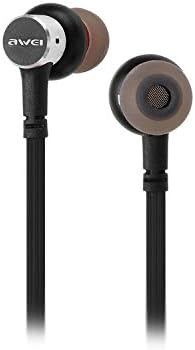
The Awei B923BL earphones are designed for active lifestyles, featuring a wireless Bluetooth connection and a magnetic design for convenient storage around your neck when not in use. They include an integrated microphone for hands-free calling.

Persediaan
1. Mengecas Fon Telinga
Before first use, fully charge your earphones. Connect the provided USB charging cable to the charging port on the earphones and the other end to a USB power source (e.g., computer USB port, wall adapter). The indicator light will show charging status and turn off or change color when fully charged.
2. Berpasangan Bluetooth
- Pastikan fon telinga dimatikan.
- Press and hold the multi-function button (usually the power button) until the indicator light flashes red and blue alternately, indicating pairing mode.
- On your mobile phone or Bluetooth-enabled device, go to the Bluetooth settings and enable Bluetooth.
- Cari untuk available devices. You should see "Awei B923BL" or a similar name in the list.
- Select "Awei B923BL" to connect. Once connected, the indicator light will usually flash blue slowly or turn off, and you may hear a confirmation tone.
- Jika digesa untuk kata laluan, masukkan "0000".
Once paired, the earphones will automatically connect to the last paired device when turned on, if the device's Bluetooth is active and within range.
Arahan Operasi
Hidupkan/Mati Kuasa
- Hidupkan kuasa: Press and hold the multi-function button for approximately 3 seconds until the blue indicator light flashes.
- Matikan: Press and hold the multi-function button for approximately 5 seconds until the red indicator light flashes and then turns off.
Main balik Muzik
- Main/Jeda: Tekan butang pelbagai fungsi sekali.
- Lagu Seterusnya: Tekan dan tahan butang Kelantangan +.
- Trek Sebelumnya: Tekan dan tahan butang Kelantangan -.
Pengurusan Panggilan
- Jawab/Tamatkan Panggilan: Tekan butang pelbagai fungsi sekali.
- Tolak Panggilan: Tekan dan tahan butang berbilang fungsi selama lebih kurang 2 saat.
- Dail Semula Nombor Terakhir: Tekan dua kali butang berbilang fungsi.
Kawalan Kelantangan
- Tingkatkan Kelantangan: Tekan butang Volume +.
- Kurangkan Kelantangan: Tekan butang Kelantangan -.
Penyelenggaraan
- Clean the earphones regularly with a soft, dry cloth. Do not use harsh chemicals or abrasive materials.
- Tanggalkan hujung telinga dan bersihkannya dengan sabun lembut dan air jika perlu, pastikan ia kering sepenuhnya sebelum dipasang semula.
- Simpan fon telinga di tempat yang sejuk dan kering jauh dari cahaya matahari langsung dan suhu yang melampau.
- Avoid exposing the earphones to water or excessive moisture.
- Do not attempt to disassemble or modify the earphones, as this will void the warranty.
Menyelesaikan masalah
- Fon telinga tidak dihidupkan: Pastikan fon telinga dicas sepenuhnya.
- Tidak boleh berpasangan dengan peranti:
- Make sure the earphones are in pairing mode (flashing red and blue).
- Pastikan Bluetooth didayakan pada peranti anda.
- Gerakkan fon telinga lebih dekat dengan peranti anda.
- Try restarting both the earphones and your device.
- Kosongkan sambungan Bluetooth sebelumnya pada peranti anda jika anda mempunyai terlalu banyak.
- Tiada bunyi atau kelantangan rendah:
- Periksa tahap kelantangan pada kedua-dua fon telinga dan peranti anda yang disambungkan.
- Pastikan fon telinga disambungkan dengan betul ke peranti anda.
- Cuba mainkan sumber audio yang berbeza.
- Isu kualiti panggilan:
- Pastikan mikrofon tidak terhalang.
- Beralih ke kawasan yang kurang gangguan.
Spesifikasi
| Ciri | Perincian |
|---|---|
| Nama Jenama | Awei |
| Nombor Model | B923BL |
| warna | Hitam |
| Faktor Bentuk Fon Kepala | Di Telinga |
| Teknologi Ketersambungan | Tanpa wayar |
| Teknologi Komunikasi Tanpa Wayar | Tanpa wayar |
| Penerangan Julat Umur | Dewasa |
| bahan | Getah |
| Peranti Serasi | Telefon Bimbit |
| Ciri Kabel | Tanpa Kabel |
| Kaedah Kawalan | Sentuh |
| Bilangan Item | 1 |
| Pengeluar | Awei |
| Ciri Khas | Microphone Included (Note: This model does not feature active noise cancellation as per product description.) |
Waranti dan Sokongan
Maklumat Waranti
This product comes with a 1-year manufacturer's warranty from the date of purchase. For warranty claims or service, please contact the manufacturer or their authorized service agent. For further details, you may also contact the retailer where the product was purchased.
Sokongan Pelanggan
If you encounter any issues not covered in this manual or require further assistance, please refer to the contact information provided with your product packaging or visit the official Awei webtapak untuk sumber sokongan.