
1. Pengenalan
This manual provides detailed instructions for the proper use and maintenance of your Easyfone Prime-A1 Unlocked Flip Cell Phone. Please read this manual thoroughly before using your device to ensure optimal performance and longevity.
2. Kandungan Pakej
Upon opening your Easyfone Prime-A1 package, please verify that all the following items are included:
- Easyfone Prime-A1 Cell Phone
- Charging Set (Adapter and Cable)
- Bateri
- Manual Pengguna (dokumen ini)
- SpeedTalk SIM CARD (may be included depending on package)

Image: The Easyfone Prime-A1 product box, detailing the model, item number, FCC ID, and package contents. It also lists radio equipment type, frequency bands, manufacturer, and address.
3. Produk Lebihview
The Easyfone Prime-A1 is a classic bar-type flip cell phone designed for ease of use, featuring large buttons, a backlit keypad, and clear sound. It focuses on essential communication functions like calling and texting, without internet access or a camera for simplicity.
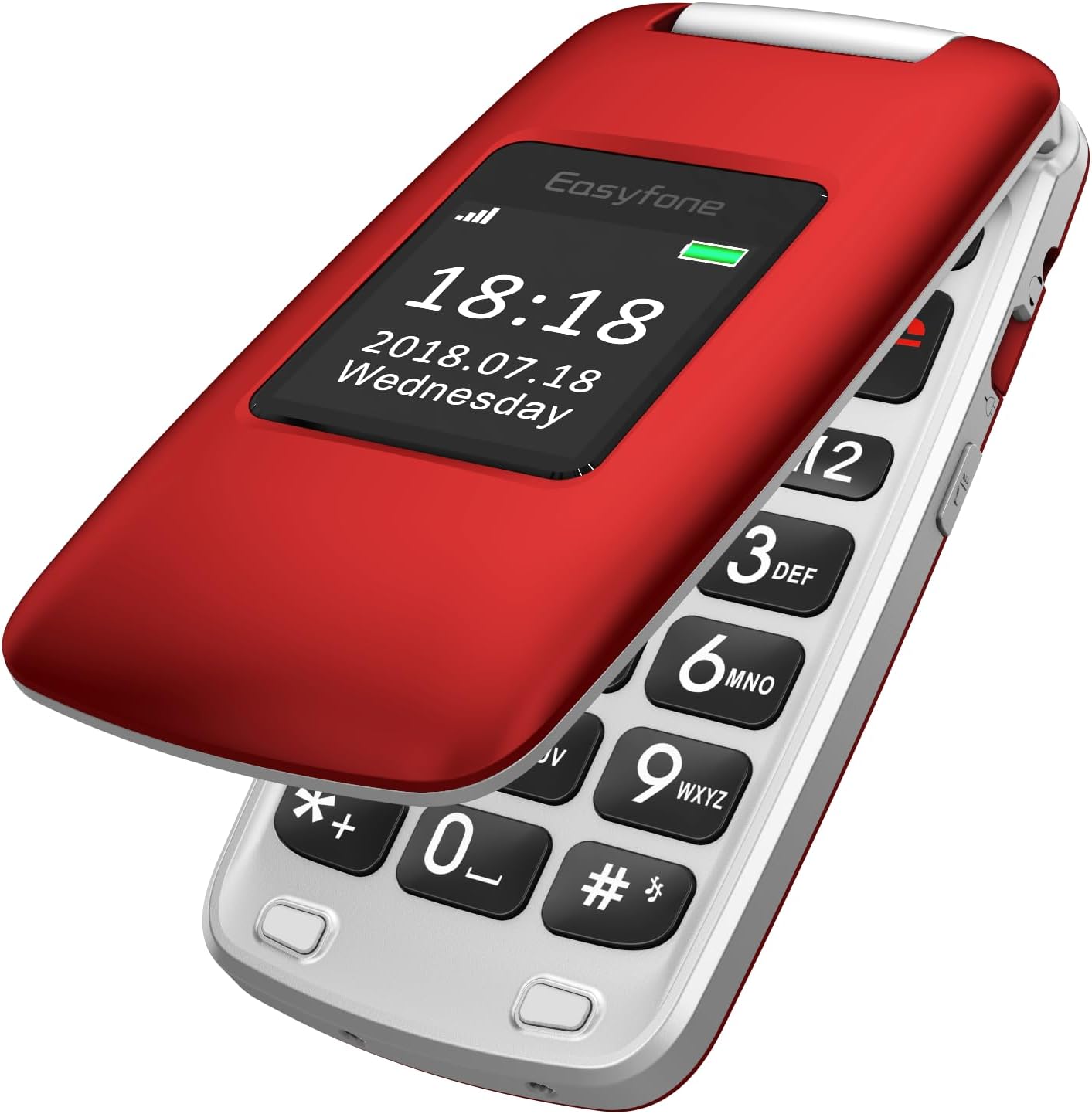
Image: The Easyfone Prime-A1 flip phone in its closed position, showcasing the external display with the current time and date. The phone is red with a silver hinge.

Image: The Easyfone Prime-A1 flip phone in its open position, revealing the large, easy-to-read keypad and the internal screen. The phone is red and silver.
4. Persediaan
4.1. Inserting SIM Card and Memory Card
- Carefully open the back cover of the phone.
- Jika bateri dipasang, keluarkannya.
- Locate the SIM card slot(s). The phone supports standard SIM cards.
- Slide the metal cover of the SIM slot to the left to unlock it, then lift it.
- Insert your SIM card with the gold contacts facing down, ensuring it is correctly oriented according to the diagram on the phone.
- Close the metal cover and slide it to the right to lock it into place.
- If using a memory card (MicroSD), locate the memory card slot and insert the card with the gold contacts facing down until it clicks into place.
Note: A video titled "How to insert the SIM card and Memory card? See Video!!!" is available online. However, as per our guidelines, only videos created by the seller are embedded in this manual. This particular video is user-generated content and therefore not included here. Please refer to the written instructions above.
4.2. Pemasangan dan Pengecasan Bateri
- After inserting the SIM/memory card, place the battery into the battery compartment, aligning the gold contacts on the battery with the contacts in the phone.
- Replace the back cover, pressing firmly until it snaps securely into place.
- To charge the phone, connect the charging cable to the phone's charging port or place the phone in the provided charging dock. Connect the other end of the cable to the power adapter and plug it into a wall outlet.
- The battery indicator on the screen will show charging status. Allow the phone to charge completely before first use.

Image: The Easyfone Prime-A1 flip phone resting in its dedicated charging dock, indicating it is ready for charging or currently charging. The phone is red.
4.3. Menghidupkan/Mematikan
- Untuk Menghidupkan: Press and hold the red 'End Call' button (usually marked with a power icon) until the screen lights up and the Easyfone logo appears.
- Untuk Mematikan: Press and hold the red 'End Call' button until a power-off confirmation appears on the screen. Select 'Power Off' to shut down the device.
5. Operasi Asas
5.1. Membuat Panggilan
- Buka telefon lipat.
- Enter the phone number using the keypad. The large, backlit buttons ensure easy dialing.
- Press the green 'Call' button to initiate the call.
- To end the call, press the red 'End Call' button.
5.2. Menerima Panggilan
- When an incoming call is received, the phone will ring and display the caller's information.
- Press the green 'Call' button to answer the call.
- To reject the call, press the red 'End Call' button.
5.3. Sending and Receiving Text Messages
- Navigate to the 'Messages' menu from the main screen.
- Select 'Write Message' to compose a new text.
- Enter the recipient's number and your message using the keypad.
- Pilih 'Hantar' untuk menghantar mesej.
- Received messages will appear in your 'Inbox'.
5.4. Dail Cepat
The Easyfone Prime-A1 features eight dedicated speed dial buttons (number keys 2-9) and two M1/M2 buttons for quick access to important contacts.
- Setting Speed Dial: Go to 'Settings' > 'Speed Dial' and assign contact numbers to the desired keys (M1, M2, 2-9).
- Menggunakan Dail Pantas: On the main screen, press and hold the assigned speed dial key (M1, M2, or 2-9) to automatically dial the stored contact.
5.5. Fungsi SOS
The SOS button is a critical safety feature. When activated, it will automatically dial pre-set emergency contacts and send an emergency message.
- Setting SOS Contacts: Navigate to 'SOS Settings' in the menu. Add up to five emergency contact numbers.
- Mengaktifkan SOS: In an emergency, press and hold the dedicated SOS button on the back of the phone for a few seconds. The phone will then sequentially call the emergency contacts until one answers, and send a pre-set emergency text message to all contacts.
6. Ciri dan Fungsi
The Easyfone Prime-A1 includes several useful features:
- Radio FM: Listen to your favorite radio stations. Access via the 'Multimedia' or 'Tools' menu.
- Jam loceng: Set multiple alarms with customizable tones.
- Pemain Audio: Mainkan audio files disimpan pada kad memori anda.
- Nota: Create and save simple text notes.
- Kalkulator: Melakukan pengiraan aritmetik asas.
- Kalendar: View dates and add reminders.
- Bluetooth: Connect to compatible Bluetooth devices like headsets for hands-free communication. Activate and manage Bluetooth from the 'Settings' menu.
- Lampu suluh: A built-in flashlight for convenience. Usually activated by a dedicated side button or through the 'Tools' menu.
- HAC Compatible: Hearing Aid Compatible for users with hearing aids.
- Paparan luaran: Shows time, date, and caller ID without opening the phone.
- Bicu Audio 3.5 mm: Untuk menyambungkan fon kepala berwayar.
7. Penyelenggaraan
7.1. Penjagaan Bateri
- Elakkan daripada mendedahkan bateri kepada suhu yang melampau.
- Jangan tebuk, buka atau litar pintas bateri.
- Use only the original Easyfone charger and battery.
- If the phone will not be used for an extended period, charge the battery to about 50% and store it in a cool, dry place.
7.2. Pembersihan
- Gunakan kain lembut dan kering untuk membersihkan bahagian luar telefon.
- Elakkan menggunakan pembersih cecair atau aerosol, kerana ia boleh merosakkan peranti.
7.3. Penyimpanan
- Store the phone in a cool, dry environment, away from direct sunlight and excessive moisture.
- Keep the phone out of reach of children and pets.
8. Penyelesaian masalah
If you encounter issues with your Easyfone Prime-A1, refer to the following common problems and solutions:
- Telefon tidak boleh dihidupkan: Pastikan bateri dipasang dengan betul dan dicas sepenuhnya. Cuba cas telefon selama sekurang-kurangnya 30 minit sebelum cuba menghidupkannya semula.
- Tidak boleh membuat atau menerima panggilan: Check if the SIM card is properly inserted and activated. Verify that you have network signal. Ensure the phone is not in airplane mode (if applicable).
- Kualiti panggilan yang lemah: Move to an area with better network coverage. Ensure the speaker and microphone are not obstructed.
- Bateri cepat habis: Reduce screen brightness. Close unused applications. If the issue persists, the battery may need replacement.
- Telefon tidak bertindak balas: Remove the battery, wait a few seconds, and then reinsert it and power on the phone. This performs a soft reset.
- Isu Keserasian: Please note that this phone is Tidak serasi with AT&T, Cricket, or with CDMA Networks like Verizon, Sprint, and Boost Mobile. It is unlocked for use with T-Mobile, MetroPCS, SpeedTalk, and Tello Mobile.
9. Spesifikasi
| Ciri | Spesifikasi |
|---|---|
| Nama Model | Prime-A1 |
| Sistem Operasi | Sistem Operasi Nukleus |
| Saiz Skrin | 2.4 Inci |
| Kapasiti Bateri | 1050 Miliamp Jam (Ion Litium) |
| Saiz Terpasang Memori RAM | 64 MB |
| Kapasiti Penyimpanan Memori | 1 GB (expandable via MicroSD, not included) |
| Dimensi Produk | 3.94 x 1.97 x 0.79 inci |
| Berat Barang | 3.32 auns (94 Gram) |
| Teknologi Ketersambungan | Bluetooth |
| Teknologi Selular | 4G (MVNO compatible) |
| Bicu Audio | 3.5 mm |
| Ciri Khas | HAC Compatible, External Display, Charging Dock, FM Radio, Flashlight, SOS Feature, Speed Dial |
| Input Antara Muka Manusia | Butang |
| warna | merah |
10. Waranti dan Sokongan
Your Easyfone Prime-A1 is covered by a manufacturer's warranty. Please refer to the warranty card included in your package for specific terms and conditions. For further assistance, technical support, or to explore other Easyfone products, please visit the official Easyfone store.
Official Easyfone Store: Easyfone Store on Amazon