
1. Pengenalan
This manual provides detailed instructions for the setup, operation, and maintenance of your Optoma UHD50 4K UHD Home Theater Projector. Designed to transform your living room into a high-quality home cinema, the Optoma UHD50 delivers stunning detail, clarity, and vibrant colors with its 4K UHD resolution and 2,400 lumens of brightness. Please read this manual thoroughly before using your projector to ensure optimal performance and longevity.
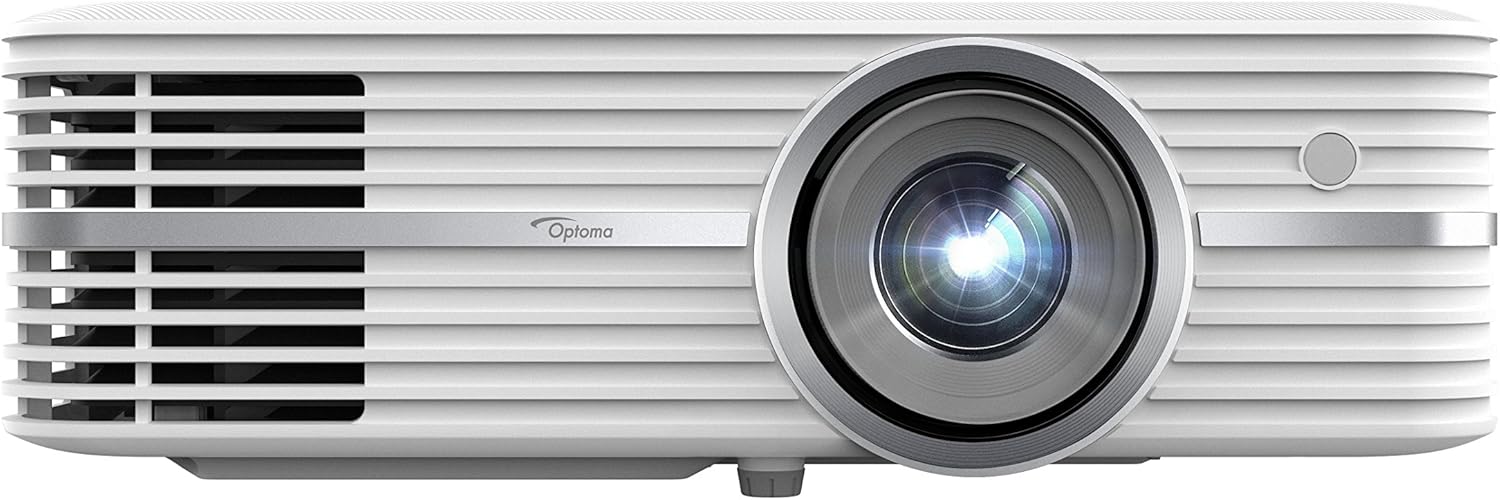
Figure 1: Optoma UHD50 4K UHD Home Theater Projector, front view.
2. Persediaan
2.1 Membongkar dan Meletakkan
Carefully remove all components from the packaging. Ensure all items listed in the "What's in the Box" section are present. Place the projector on a stable, flat surface or mount it securely to the ceiling. The Optoma UHD50 offers flexible installation options, including a 1.3x optical zoom and 15% vertical lens shift, allowing for precise image alignment whether placed on a table or ceiling-mounted.

Figure 2: Flexible installation of the Optoma UHD50, demonstrating zoom and vertical lens shift capabilities.
2.2 Sambungan
Connect your media players, gaming consoles, PCs, Macs, and mobile devices using the available input options. The Optoma UHD50 features HDMI 2.0 inputs with HDCP 2.2 support, HDMI 4K, USB, VGA, and more. Ensure all cables are securely connected to their respective ports.
3. Operasi
3.1 Menghidupkan/Mematikan
To power on the projector, press the power button on the unit or the remote control. The indicator light will change to blue. To power off, press the power button again. The projector will go through a cool-down cycle before completely shutting down.
3.2 Image Quality and Features
The Optoma UHD50 delivers a true 4K Ultra HD experience with 8.3 million addressable pixels, ensuring a razor-sharp picture. It is HDR10 compatible, supporting DCI-P3 wide color gamut for richer, more vivid colors, brighter whites, and deeper blacks. Dynamic Black technology further enhances image depth with a 500,000:1 contrast ratio. Ultra detail technology ensures enhanced image sharpness with a higher frame rate.

Figure 3: The Optoma UHD50 delivers stunning 4K UHD detail and color.

Figure 4: HDR10 compatibility provides enhanced contrast and color depth.

Figure 5: Enjoy a rich, vivid image with advanced color technology and 2,400 lumens of brightness.
4. Penyelenggaraan
4.1 Lamp kehidupan
The Optoma UHD50 features an extra-long lamp life of up to 15,000 hours, which translates to an average of two 2-hour movies every day for over 10 years. This significantly reduces the need for frequent lamp pengganti.

Figure 6: The Optoma UHD50 offers an extended lamp life for prolonged enjoyment.
4.2 Pembersihan
To maintain optimal performance, regularly clean the projector's lens with a soft, lint-free cloth designed for optical surfaces. Ensure the air vents are clear of dust and debris to prevent overheating. Do not use abrasive cleaners or solvents.
5. Penyelesaian masalah
If you encounter any issues with your Optoma UHD50 projector, please refer to the official Panduan Penyelesaian Masalah (PDF) for detailed solutions. Common issues may include:
- Tiada Imej/Isyarat: Verify all cable connections (HDMI, VGA) and ensure the correct input source is selected on the projector.
- Isu Kualiti Imej: Adjust focus and keystone correction. Ensure the projection surface is flat and clean.
- Bunyi Luar Biasa: Check for obstructions around the fan vents. Ensure the projector is placed on a stable surface.
- Imej Berkelip: This may indicate a signal issue or require a firmware update. Consult the troubleshooting guide for specific steps.
- Terlalu panas: Pastikan pengudaraan yang mencukupi di sekitar projektor.
For further assistance, please contact Optoma customer support.
6. Spesifikasi
| Ciri | Perincian |
|---|---|
| Dimensi Produk | 11.1 x 15.4 x 4.6 inci |
| Berat Barang | 11.75 paun |
| Nombor Model | UHD50 |
| Resolusi Paparan | 3840 x 2160 (4K UHD) |
| Kecerahan | 2400 Lumen |
| Nisbah Kontras | Up to 500,000:1 (Dynamic Black) |
| Lamp kehidupan | Sehingga 15,000 jam |
| Teknologi Ketersambungan | VGA, USB, RS232C, Ethernet, HDMI (HDMI 2.0 with HDCP 2.2 support) |
| Anjakan Kanta Menegak | 15% offset (with tolerance +/- 5%) |
| Jarak Unjuran | 2.9' – 34.89' |
7. Apa yang ada di dalam Kotak
- Optoma Home Theater Projectors Model UHD50
- Kord Kuasa
- Alat Kawalan Jauh
- User Manual (on CD or printed quick start guide)
- Kad Waranti
Nota: Kandungan tertentu mungkin sedikit berbeza mengikut kawasan atau bungkusan.
8. Waranti dan Sokongan
Your Optoma UHD50 projector is covered by a limited warranty. Please refer to the warranty card included in your product packaging for specific terms and conditions. For technical support, product registration, or service inquiries, visit the official Optoma webtapak atau hubungi bahagian perkhidmatan pelanggan mereka.
Sumber tambahan:
- Manual Pengguna Rasmi (PDF): Muat Turun Di Sini
- Panduan Penyelesaian Masalah (PDF): Muat Turun Di Sini