
TOOLCRAFT TC4636
TOOLCRAFT TC4636 10-inch Miter Saw User Manual
Model: TC4636
1. Pengenalan
This manual provides essential information for the safe and effective operation, maintenance, and troubleshooting of your TOOLCRAFT TC4636 10-inch Miter Saw. Please read this manual thoroughly before operating the tool to ensure proper use and to prevent injury or damage.
2. Arahan Keselamatan Am
Sentiasa ikuti langkah berjaga-jaga keselamatan asas untuk mengurangkan risiko kebakaran, kejutan elektrik dan kecederaan diri. Simpan manual ini untuk rujukan masa hadapan.
- Pakai peralatan pelindung diri (PPE) yang sesuai, termasuk cermin mata keselamatan, perlindungan pendengaran dan topeng habuk.
- Pastikan kawasan kerja bersih, terang dan bebas daripada halangan.
- Jauhkan kanak-kanak dan orang ramai dari kawasan operasi.
- Jangan kendalikan alatan kuasa dalam atmosfera yang mudah meletup, seperti di hadapan cecair mudah terbakar, gas atau habuk.
- Sentiasa cabut palam kuasa daripada sumber kuasa sebelum membuat sebarang pelarasan, menukar aksesori atau menyimpan alat.
- Gunakan bilah yang betul untuk bahan yang dipotong. Pastikan bilah tajam dan bebas daripada kerosakan.
- Secure the workpiece firmly before cutting. Never hold the workpiece by hand.
- Avoid awkward body positions. Maintain proper footing and balance at all times.
- Do not force the tool. Allow the saw to reach full speed before beginning a cut.
- Periksa kord kuasa secara berkala untuk kerosakan. Jika rosak, dapatkan pembaikan oleh juruteknik yang berkelayakan.
3. Komponen Produk
Familiarize yourself with the main parts of your miter saw.
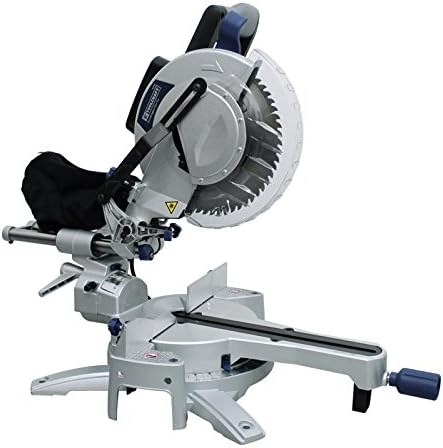
Rajah 1: Berakhirview of the TOOLCRAFT TC4636 10-inch Miter Saw. This image displays the complete miter saw unit, including the motor housing, blade guard, cutting table, fence, and base. The dust collection bag is visible at the rear of the motor housing.
- Perumahan Motor: Contains the motor and drive mechanism.
- Pengawal Bilah: Retracts during cutting to expose the blade and covers it when not in use.
- Cutting Table/Base: Provides a stable surface for the workpiece.
- pagar: Supports the workpiece against the blade.
- Miter Angle Adjustment: Mechanism for setting the horizontal cutting angle.
- Pelarasan Sudut Serong: Mechanism for setting the vertical cutting angle.
- Beg Pengumpulan Habuk: Attaches to the dust port to collect sawdust.
- Bar Sambungan: Provide additional support for longer workpieces.
- Bahan kerja Clamp (Tekan): Secures the workpiece during cutting.
- Blade Wrench (Key): Used for changing the saw blade.
4. Spesifikasi Teknikal
| Ciri | Spesifikasi |
|---|---|
| Model | TC4636 |
| Diameter Cakera | 10 inci (254 mm) |
| kuasa | 2000 W |
| Voltage | 127 V AC - 60 Hz |
| semasa | 16.6 A |
| Kelajuan Motor | 4500 RPM |
| Cutting Capacity (0°/0°) | 340 x 104 mm |
| Cutting Capacity (45°/0°) | 240 x 104 mm |
| Cutting Capacity (0°/45°) | 340 x 55 mm |
| Cutting Capacity (45°/45°) | 240 x 55 mm |
| Sudut Serong | 45 ° Kanan |
| Termasuk Aksesori | 60-tooth disc, dust collection bag, 2 extension bars, workpiece clamp, blade wrench |
| Berat Barang | 26 Kilogram |
| Dimensi Produk | 91 x 58 x 53 cm |
5. Persediaan dan Pemasangan
Sebelum mengendalikan gergaji mitra, pastikan ia dipasang dan diikat dengan betul.
- Membongkar: Keluarkan semua komponen daripada pembungkusan dengan berhati-hati. Sahkan bahawa semua aksesori yang disenaraikan ada.
- Pemasangan: Secure the miter saw to a stable workbench using bolts through the mounting holes in the base. This prevents movement during operation.
- Installing Extension Bars: Insert the two extension bars into their designated slots on the saw base. Tighten the locking knobs to secure them. These provide additional support for longer workpieces.
- Attaching Dust Collection Bag: Connect the dust collection bag to the dust port located at the rear of the blade housing. Ensure it is securely fastened to minimize dust dispersion.
- Pemasangan Bilah (jika belum dipasang terlebih dahulu):
- Tanggalkan gergaji dari sumber kuasa.
- Angkat pelindung bilah bawah.
- Use the provided blade wrench to loosen the arbor nut while holding the arbor lock button.
- Place the 60-tooth disc onto the arbor, ensuring the teeth are pointing downwards towards the front of the saw.
- Re-tighten the arbor nut securely.
- Bahan kerja Clamp (Press) Installation: Pasangkan bahan kerja clamp to the saw table. It can be adjusted to hold various workpiece sizes.
6. Arahan Operasi
Ikuti langkah-langkah ini untuk operasi gergaji mitra anda yang selamat dan berkesan.
- Sambungan Kuasa: Connect the saw to a 127V AC, 60Hz power outlet. Ensure the circuit can handle the 16.6A current draw.
- Melaraskan Sudut Miter:
- Longgarkan pemegang kunci miter.
- Rotate the turntable to the desired angle (e.g., 0°, 45°). The scale indicates the angle.
- Tighten the miter lock handle to secure the angle.
- Melaraskan Sudut Serong:
- Longgarkan tombol kunci serong.
- Tilt the saw head to the desired bevel angle (up to 45° right).
- Ketatkan tombol kunci serong.
- Positioning Workpiece:
- Place the workpiece firmly against the fence and the saw table.
- Use the extension bars for support if the workpiece is long.
- Secure the workpiece with the workpiece clamp to prevent movement during the cut.
- Membuat Potongan:
- Ensure the blade is clear of the workpiece before starting the motor.
- Press the power switch to start the saw. Allow the blade to reach full speed (4500 RPM).
- Slowly and steadily lower the saw head through the workpiece. Do not force the cut.
- Setelah pemotongan selesai, lepaskan suis kuasa dan biarkan bilah berhenti sepenuhnya sebelum menaikkan kepala gergaji.
- Wait for the blade to stop before removing the workpiece or clearing sawdust.
7. Penyelenggaraan
Penyelenggaraan tetap memastikan jangka hayat dan operasi yang selamat bagi gergaji miter anda.
- Pembersihan: After each use, disconnect the power and clean the saw. Remove sawdust and debris from the motor vents, blade guard, and table using a brush or compressed air.
- Pemeriksaan Bilah: Periksa mata gergaji secara kerap untuk ketajaman, retak atau gigi yang hilang. Gantikan bilah yang kusam atau rosak dengan segera.
- Pelinciran: Sapukan lapisan ringan minyak mesin pada bahagian bergerak dan titik pangsi mengikut keperluan untuk memastikan operasi lancar.
- Berus Karbon: Check carbon brushes periodically. If worn down, replace them with genuine TOOLCRAFT replacement parts. Refer to a qualified service technician if unsure.
- Kord Kuasa: Inspect the power cord for any cuts, abrasions, or damage. Do not use the saw if the cord is damaged.
- Storan: Store the miter saw in a clean, dry, and secure location, out of reach of children.
8. Penyelesaian masalah
Bahagian ini menangani isu biasa yang mungkin anda hadapi.
| Masalah | Kemungkinan Punca | Penyelesaian |
|---|---|---|
| Saw tidak bermula | No power supply; faulty switch; worn carbon brushes | Check power connection and circuit breaker; test switch; replace carbon brushes |
| Bilah mengikat dalam bahan kerja | Dull blade; improper workpiece support; forcing the cut | Replace blade; ensure workpiece is securely clamped; reduce feed rate |
| Getaran yang berlebihan | Loose blade; damaged blade; saw not securely mounted | Tighten blade arbor nut; replace damaged blade; secure saw to workbench |
| Poor cut quality (rough cuts, splintering) | Dull blade; incorrect blade type for material; too fast feed rate | Replace or sharpen blade; use appropriate blade; slow down cutting speed |
9. Waranti dan Sokongan
For warranty information, technical support, or to order replacement parts, please contact TOOLCRAFT customer service. Keep your purchase receipt as proof of purchase.
Pengeluar: KERAF ALAT
Please refer to the official TOOLCRAFT website or your point of purchase for the most current contact information and warranty details.