
Nova TKW-13
NOVA Medical Products Heavy Duty Knee Scooter (Model TKW-13) Instruction Manual
Your guide to safe and effective use of your NOVA Knee Scooter.
pengenalan
The NOVA Medical Products Heavy Duty Knee Scooter, Model TKW-13, is designed to provide non-weight bearing mobility for individuals recovering from foot, ankle, or Achilles injuries. This knee scooter offers a stable and comfortable alternative to crutches, supporting users up to 400 lbs. This manual provides essential information for the proper setup, operation, maintenance, and care of your knee scooter.
Ciri-ciri Utama
- Heavy Duty Design: Supports up to 400 lbs, suitable for users between 4'11" and 6'2".
- Kebolehgerakan yang Dipertingkatkan: Equipped with NOVA's patented locking hand brakes and 8" rugged all-terrain wheels for a smooth and stable ride.
- Keselesaan boleh laras: Features an easily adjustable, padded, and contoured knee platform, along with adjustable handles for personalized fit. The knee platform can be offset for left or right leg use.
- mudah alih: Steering column folds down for convenient transport and storage in a car trunk.
- Aksesori Pilihan: Compatible with a basket, fleece knee pad cover, and cup holder (sold separately).
Arahan Persediaan
Follow these steps to assemble and prepare your NOVA Knee Scooter for use:
- Bongkar: Keluarkan semua komponen dari pembungkusan dengan berhati-hati.
- Berhimpun: Follow the specific assembly instructions provided with your product. Ensure all parts are securely fastened.
- Laraskan Ketinggian Pemegang: Adjust the handle height to a comfortable position, ensuring your arms are slightly bent when holding the grips.
- Adjust Knee Platform: Adjust the knee platform height to fit your leg, allowing your uninjured foot to rest flat on the floor.
- Orient Knee Platform: The knee platform can be rotated 180 degrees to accommodate either an injured left or right leg. To adjust, remove the height adjustment knob, turn the platform, and re-insert the knob securely.
- Periksa Brek: Ensure the hand brakes are functioning correctly and can be locked for parking.

Image: Key dimensions and adjustable components of the TKW-13 Knee Scooter.
Arahan Operasi
Using your NOVA Knee Scooter effectively and safely:
- Pemasangan: With the brakes locked, place the knee of your injured leg onto the padded platform.
- Dorongan: Use your uninjured leg to push off the ground, propelling the scooter forward.
- Pemandu: Use the handlebars to steer the scooter in your desired direction.
- Brek: Squeeze the hand brake levers to slow down or stop. To engage the parking brake, push down on the small lever on the brake handle until it locks. To release, pull up on the small lever.
- Manuver: The unique frame and steering design allow for smooth turns. Be mindful of your surroundings and avoid sudden movements.

Image: Close-up of the patented locking hand brakes for speed control and parking.
Pelarasan
The NOVA Knee Scooter is designed for easy adjustments to ensure optimal comfort and stability:
- Knee Platform Height: To adjust the height of the knee platform, locate the height adjustment knob beneath the platform. Unscrew and remove the knob, then slide the platform post up or down to your desired height. Re-insert and tighten the knob securely.
- Knee Platform Orientation: If your injured leg is the left leg, you may want to rotate the knee platform 180 degrees for better clearance for your scooting leg. Follow the same steps as adjusting the height: remove the knob, rotate the platform, and re-secure the knob.
- Ketinggian Hendal: The handlebar height can be adjusted by loosening the quick-release lever on the steering column, raising or lowering the handlebars to a comfortable position, and then securely tightening the lever.
Video: This official NOVA video demonstrates the features, adjustments, and folding of the NOVA Knee Scooters, including the TKW-13 model.
Folding for Transport and Storage
The NOVA Knee Scooter is designed to fold for easy transport and compact storage:
- Lower Handlebars: Adjust the handlebars to their lowest position.
- Release Steering Column: Locate the quick-release lever on the steering column. Pull up on the lever and slide the pin out of the bracket.
- Fold Down: Gently fold the steering column downwards until it rests compactly against the main frame.
- selamat: Ensure all folding mechanisms are securely latched to prevent accidental unfolding during transport.
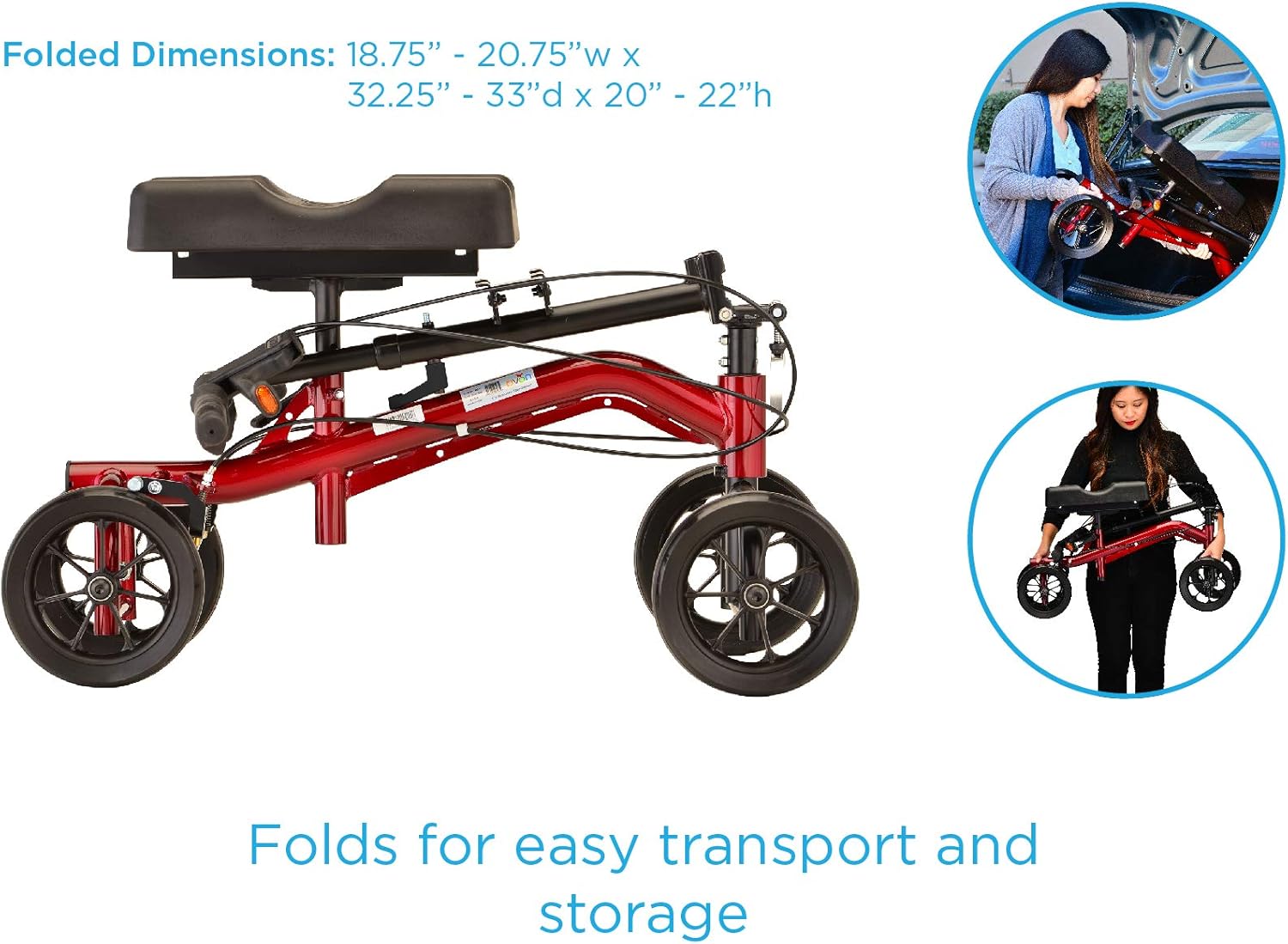
Image: The knee scooter folds for easy transport and storage, fitting into a car trunk.
Aksesori Pilihan
Enhance your knee scooter experience with these optional accessories (sold separately):
- bakul: A convenient front-mounted basket for carrying personal items. Easily attaches and detaches.
- Fleece Knee Pad Cover: Provides additional comfort and warmth for your injured leg. It is removable and washable.
- Pemegang cawan: Attaches to the handlebar for easy access to beverages. Adjustable to hold various drink sizes.

Image: The NOVA Knee Scooter shown with optional accessories: basket, fleece cover, and cup holder.
Specifications (Model TKW-13)
| Ciri | Perincian |
|---|---|
| Nombor Model | TKW-13 |
| Approximate User Height | 4’11” - 6’2” |
| Kapasiti Berat | 400 lb |
| Berat Produk | 29 lb |
| Knee Pad Height Adjustment | 17” - 22” |
| Knee Pad Dimensions | 7.5"W x 15”D x 2.75"H |
| Tangani Penyesuaian Ketinggian | 31.5" - 37.75" |
| Dimensi Keseluruhan (Tidak Dilipat) | 19"L x 32.25"D |
| Dimensi Dilipat | 18.75” – 20.75”W x 32.25” – 33”D x 20” – 22”H |
| warna | merah |
Penyelenggaraan
Regular maintenance ensures the longevity and safe operation of your knee scooter:
- Pembersihan: Wipe down the frame and knee pad with a damp cloth and mild soap as needed. Avoid abrasive cleaners.
- Pemeriksaan Roda: Periodically check the wheels for wear and tear. Ensure they roll smoothly and are free of debris.
- Pemeriksaan Brek: Regularly test the hand brakes to ensure they engage properly and provide adequate stopping power. Adjust if necessary (refer to assembly instructions for brake adjustment).
- Ketegangan Pengikat: Periodically check all bolts, screws, and quick-release levers to ensure they are securely tightened.
- Storan: Store the knee scooter in a dry, clean place when not in use. If storing for an extended period, consider folding it for compact storage.
Menyelesaikan masalah
If you encounter any issues with your NOVA Knee Scooter, refer to these common solutions:
- Kesukaran Memandu: Check if the steering column is properly aligned and secured. Ensure wheels are free of obstructions.
- Brek Tidak Terpakai: Inspect the brake cables for damage or looseness. Adjust the brake tension as per the assembly instructions. If issues persist, contact customer support.
- Perjalanan Tidak Stabil: Verify that all quick-release levers and fasteners are securely tightened. Ensure the knee platform is correctly installed and adjusted to your height.
- Berdecit/Bunyi bising: Lubricate moving parts with a silicone-based lubricant. Check for loose components.
For persistent problems or issues not covered here, please contact NOVA Medical Products customer support.
Waranti dan Sokongan
NOVA Medical Products stands by the quality and integrity of its products. Your knee scooter comes with a manufacturer's warranty. Please refer to the warranty information included with your product packaging for specific terms and conditions. For any questions, support, or warranty claims, please contact NOVA Medical Products directly. Contact information is typically found in the product packaging or on the official NOVA Medical Products webtapak.
Penafian Undang-undang
Kenyataan mengenai suplemen makanan belum dinilai oleh FDA dan tidak bertujuan untuk mendiagnosis, merawat, menyembuhkan atau mencegah sebarang penyakit atau keadaan kesihatan.
Ask a question about this manual
Ask about setup, troubleshooting, compatibility, parts, safety, or missing instructions. Manuals+ will review the question and use this page’s manual context to help answer it.