
LG AKB74115501
LG AKB74115501 Remote Controller Assembly
Manual Arahan Rasmi
pengenalan
This manual provides essential information for the proper setup, operation, and maintenance of your LG AKB74115501 Remote Controller Assembly. This genuine LG replacement part is designed to function seamlessly with compatible LG televisions, ensuring a reliable and intuitive user experience. Please read this manual thoroughly before use.
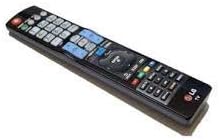
An image of the LG AKB74115501 Remote Controller Assembly, a black rectangular remote with numerous buttons, including a numeric keypad, navigation controls, and dedicated function buttons.
Persediaan
The LG AKB74115501 Remote Controller Assembly is designed for straightforward setup. No complex programming is typically required for compatible LG televisions.
Pemasangan Bateri
- Cari petak bateri di belakang alat kawalan jauh.
- Luncurkan penutup petak bateri ke bawah atau mengikut arah yang ditunjukkan oleh anak panah untuk membukanya.
- Masukkan dua (2) bateri AAA, pastikan terminal positif (+) dan negatif (-) sejajar dengan tanda di dalam petak.
- Tutup penutup petak bateri dengan menggelongsorkannya semula ke tempatnya sehingga ia berbunyi dengan selamat.
Once batteries are installed, the remote should be ready for immediate use with your compatible LG television.
Arahan Operasi
This remote control provides full functionality for your LG television. Familiarize yourself with the key buttons and their functions:
- Butang kuasa (●): Menghidupkan atau mematikan televisyen.
- Pad Nombor (0-9): Memasukkan nombor saluran atau input berangka lain secara langsung.
- Saluran Atas/Bawah (CH▲/CH▼): Changes television channels sequentially.
- Kelantangan Naik/Turun (VOL▲/VOL▼): Adjusts the television's audio volume.
- Bisu (🔇): Menukar fungsi bisu audio.
- Input/Sumber: Selects different input sources (e.g., HDMI 1, AV, Component).
- Menu/Tetapan: Accesses the television's main menu or settings.
- Navigation Buttons (Up, Down, Left, Right, OK/Enter): Digunakan untuk menavigasi menu dan mengesahkan pilihan.
- Belakang/Keluar: Kembali ke skrin sebelumnya atau keluar dari menu semasa.
- 3D Option: Activates or deactivates 3D mode on compatible LG 3D televisions.
- Butang Warna (Merah, Hijau, Kuning, Biru): Used for specific functions within certain applications or menus, as indicated on screen.
Point the remote control directly at the television's remote sensor for optimal performance.
Penyelenggaraan
Proper care will extend the life and functionality of your remote control.
Pembersihan
- Lap alat kawalan jauh dengan kain lembut dan kering.
- Untuk kotoran degil, sedikit dampen kain dengan air atau pembersih yang lembut dan tidak melelas. Jangan sembur pembersih terus ke alat kawalan jauh.
- Avoid using harsh chemicals, solvents, or abrasive cleaning materials, as these can damage the remote's surface or internal components.
Penggantian Bateri
Replace batteries when the remote's response becomes sluggish or it stops functioning. Always replace both batteries at the same time with new AAA batteries. Do not mix old and new batteries, or different types of batteries.
Penyimpanan
Store the remote control in a cool, dry place away from direct sunlight, extreme temperatures, and high humidity. If storing for an extended period, remove the batteries to prevent leakage.
Menyelesaikan masalah
Jika anda mengalami masalah dengan alat kawalan jauh anda, cuba penyelesaian berikut:
- Jauh tidak bertindak balas:
- Pastikan bateri dimasukkan dengan betul dengan polariti yang betul (+/-).
- Gantikan bateri lama dengan yang baru.
- Check for any obstructions between the remote and the television's sensor.
- Ensure you are within the effective operating range and pointing the remote directly at the TV.
- Butang khusus tidak berfungsi:
- Clean the remote's surface, especially around the unresponsive buttons, to remove any dirt or debris that might be preventing proper contact.
- If only certain buttons fail, it might indicate internal damage. Consider contacting LG support.
- Operasi sekejap:
- Ini selalunya menunjukkan kuasa bateri rendah. Gantikan bateri.
- Ensure no strong light sources (like direct sunlight or bright fluorescent lights) are interfering with the remote's infrared signal.
If problems persist after trying these steps, please refer to the Warranty and Support section.
Spesifikasi
| Ciri | Perincian |
|---|---|
| Nombor Model | AKB74115501 |
| Pengeluar | LG |
| Peranti Serasi | Televisyen |
| Bilangan Maks Peranti yang Disokong | 1 |
| warna | Hitam |
| Ciri Khas | Ergonomik |
| Berat Barang | 4.5 auns |
| Dimensi Pakej | 9.76 x 2.52 x 1.02 inci |
| Tarikh Mula-mula Tersedia | 15 Julai 2015 |
Waranti dan Sokongan
For specific warranty details regarding your LG AKB74115501 Remote Controller Assembly, please refer to the documentation included with your purchase or visit the official LG webtapak. Syarat jaminan mungkin berbeza mengikut wilayah dan peruncit.
Sokongan Pelanggan
If you require further assistance, technical support, or have questions not covered in this manual, please contact LG customer service or visit their official support page:
- LG Official Webtapak: www.lg.com
- LG Support Page: Cari untuk "LG Support" on their website for contact numbers and online resources specific to your region.
When contacting support, please have your product model number (AKB74115501) and purchase information readily available.
Ask a question about this manual
Ask about setup, troubleshooting, compatibility, parts, safety, or missing instructions. Manuals+ will review the question and use this page’s manual context to help answer it.