
1. Pengenalan
This manual provides essential information for the safe and efficient operation of your Sharp KC-A50EU-W Air Purifier. This device is designed to improve indoor air quality by filtering dust, pollen, mold spores, and odors, while also offering humidification using Plasmacluster ion technology. Please read these instructions thoroughly before use and retain them for future reference.
Maklumat Keselamatan Penting
- Sentiasa pastikan unit diletakkan di atas permukaan yang stabil dan rata.
- Jangan sekat udara masuk atau lubang ekzos.
- Jauhkan unit daripada air dan kelembapan.
- Cabut plag unit sebelum membersihkan atau melakukan sebarang penyelenggaraan.
- Jangan cuba membaiki unit ini sendiri. Hubungi kakitangan servis yang berkelayakan.
2. Produk Lebihview
The Sharp KC-A50EU-W is an advanced air purifier and humidifier designed for rooms up to 38 m². It features Plasmacluster ion technology to neutralize airborne pollutants and a multi-stage sistem penapisan.

Rajah 2.1: Depan view of the Sharp KC-A50EU-W Air Purifier, showing the main body and air outlet.
Ciri-ciri Utama:
- Plasmacluster Ion Technology: Releases positive and negative ions to clean the air.
- Humidification Function: Adds moisture to the air for improved comfort.
- High Air Circulation: Efficiently processes air in rooms up to 38 m².
- Berbilang-stage Penapisan: Includes a HEPA filter for fine particles and an odor filter.
- Operasi senyap: Designed for minimal noise output.
3. Persediaan
3.1 Membongkar
- Keluarkan penulen udara dengan berhati-hati daripada pembungkusnya.
- Tanggalkan semua bahan pelindung dan beg plastik.
- Check for any damage during transit. If damaged, do not operate and contact your retailer.
3.2 Penempatan
For optimal performance, place the air purifier in a location where air can circulate freely. Avoid placing it directly against walls or furniture. Ensure it is on a flat, stable surface. The unit is suitable for floor areas up to 24 square meters (as per specifications, though product description states 38m², use the more conservative spec for placement advice).

Rajah 3.1: sebelah view of the air purifier, showing the air intake grille. Ensure this area is unobstructed.
3.3 Pemasangan Penapis
Before first use, ensure all filters are correctly installed and any protective plastic packaging has been removed from them. Refer to the maintenance section for detailed filter handling.
4. Arahan Operasi
The control panel allows you to manage the various functions of your air purifier.

Rajah 4.1: Close-up of the control panel, showing buttons for power, fan speed, Plasmacluster, and humidification.
4.1 Hidupkan/Mati Kuasa
- Pasangkan kord kuasa ke soket elektrik yang sesuai (220V).
- Tekan ke HIDUP/MATI button to turn the unit on. The unit will start in a default mode.
- Tekan ke HIDUP/MATI butang sekali lagi untuk mematikan unit.
4.2 Pelarasan Kelajuan Kipas
Gunakan KELAJUAN KIPAS button to cycle through different fan settings (e.g., Low, Medium, High, Auto). The current setting will be indicated on the display or by indicator lights.
4.3 Plasmacluster Ion Operation
Tekan ke CLEAN ION SHOWER ON button to activate the Plasmacluster ion generator. This function helps to remove airborne viruses, bacteria, and odors. An indicator light will confirm activation.
4.4 Humidification Function
- Pastikan tangki air diisi dengan air bersih.
- Tekan ke CLEAN AIR & HUMIDIFY ON button to activate the humidification function.
- The unit will automatically maintain a comfortable humidity level.
- The humidity level may be displayed on the control panel.
4.5 Kunci Kanak-kanak
To prevent accidental operation, press and hold the KUNCI KANAK-KANAK button for 3 seconds to activate or deactivate the child lock function.
5. Penyelenggaraan
Regular maintenance ensures optimal performance and extends the life of your air purifier. Always unplug the unit before cleaning or performing maintenance.
5.1 Pembersihan dan Penggantian Penapis
The Sharp KC-A50EU-W uses multiple filters that require periodic cleaning or replacement.
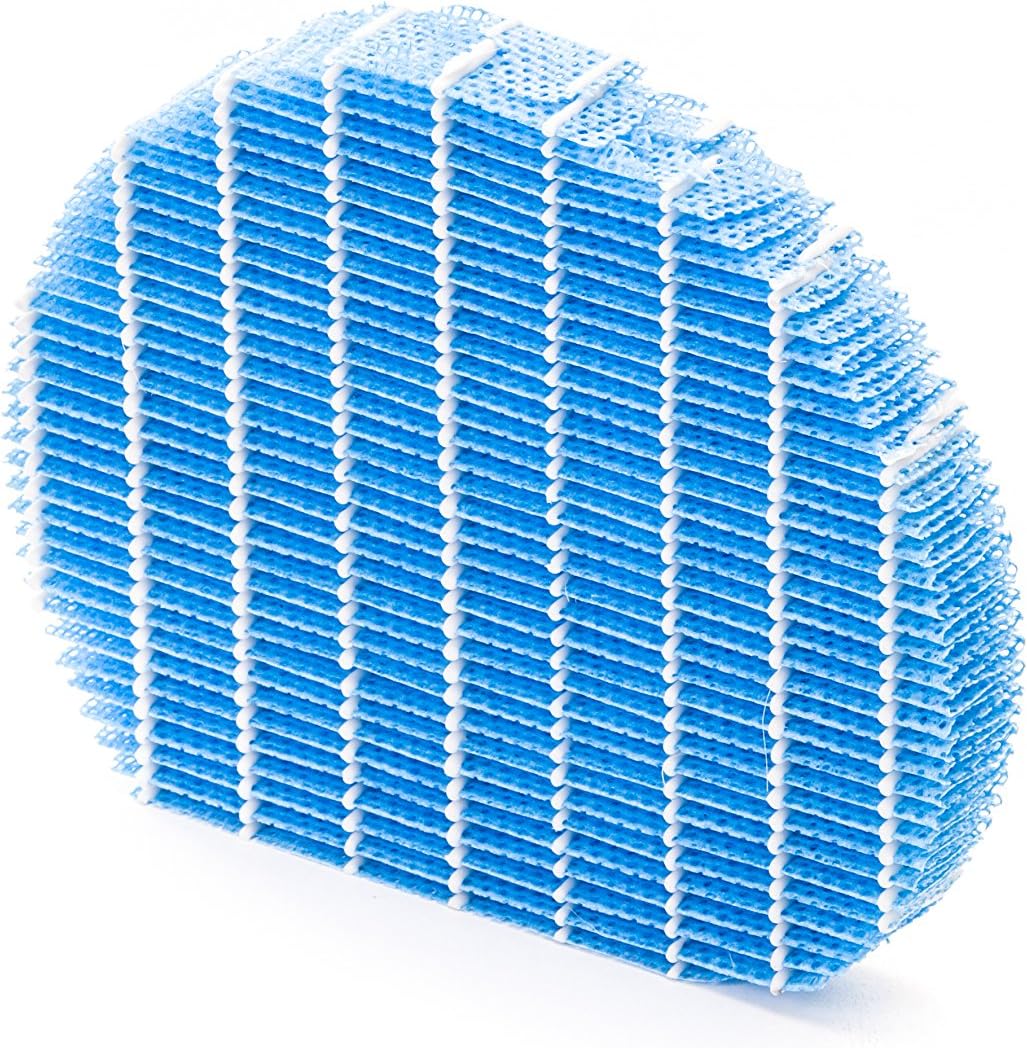
Rajah 5.1: Example of a humidifying filter component, which requires regular cleaning.
- Pra-penapis: Clean regularly (e.g., monthly) by vacuuming or washing with water. Allow to dry completely before reinstallation.
- Penapis HEPA: This filter captures fine dust and allergens. It cannot be washed and must be replaced. The replacement interval can vary, but typically ranges from 2 to 5 years depending on usage and air quality. Monitor the filter's condition; if it appears significantly discolored (e.g., black instead of white), replace it immediately.
- Deodorizing Filter (Activated Carbon): This filter removes odors. It can often be washed periodically (e.g., every few months) to refresh its effectiveness. Allow to dry completely. Replace when odors persist after cleaning.
- Humidifying Filter: If using the humidification function, clean the humidifying filter and its tray at least every 4 weeks to prevent mold and bacteria growth. Use a mild detergent and rinse thoroughly.
5.2 Pembersihan Tangki Air
For units with humidification, clean the water tank regularly (e.g., weekly) to prevent mineral buildup and bacterial growth. Use a soft brush and mild detergent, then rinse thoroughly with clean water.
5.3 Pembersihan Luaran
Lap bahagian luar unit dengan lembut, damp kain. Jangan gunakan pembersih atau pelarut yang melelas.
6. Penyelesaian masalah
If you encounter issues with your Sharp KC-A50EU-W, refer to the following common problems and solutions.
| Masalah | Kemungkinan Punca | Penyelesaian |
|---|---|---|
| Unit tidak dihidupkan. | Power cord not properly connected; no power at outlet. | Pastikan kord kuasa dipasang dengan kukuh. Periksa soket kuasa dengan peranti lain. |
| Prestasi pembersihan udara yang lemah. | Filters are dirty or clogged; filters incorrectly installed. | Clean or replace filters as per maintenance instructions. Ensure filters are installed correctly. |
| Humidification not working or low output. | Water tank is empty; humidifying filter is dirty or clogged. | Refill the water tank. Clean the humidifying filter and tray. |
| Bunyi luar biasa dari unit. | Obstruction in fan; unit not on a level surface. | Check for any foreign objects near the fan. Place the unit on a stable, level surface. |
| Bau yang berterusan. | Deodorizing filter is saturated or needs cleaning/replacement. | Clean or replace the deodorizing filter. |
Jika masalah berterusan selepas mencuba penyelesaian ini, sila hubungi sokongan pelanggan.
7. Spesifikasi
- Nombor Model: KC-A50EU-W
- Pengeluar: tajam
- warna: putih
- Dimensi Produk (L x W x H): 24 x 69 x 2.5 cm
- Berat Barang: 9.2 kg (9200 Gram)
- Sumber Kuasa: 220V
- Jenis Penapis: HEPA
- Kawasan Lantai yang Disyorkan: 24 meter persegi
- Tahap Bunyi: 49 Desibel
- Bahan: plastik
- Negara Asal: Jepun
8. Waranti dan Sokongan
Untuk maklumat jaminan dan sokongan pelanggan, sila rujuk kad jaminan yang disertakan dengan produk anda atau lawati cawangan rasmi Sharp. webtapak untuk wilayah anda. Simpan resit pembelian anda sebagai bukti pembelian.