
1. Pengenalan
Thank you for choosing the Nortek Soundream 2.1 Attive Minispeaker system. This manual provides essential information for the proper setup, operation, and maintenance of your new audio system. Please read this manual thoroughly before using the product to ensure optimal performance and safety.
2. Maklumat Keselamatan
Untuk mengelakkan kebakaran, kejutan elektrik atau kerosakan produk, sila patuhi langkah berjaga-jaga keselamatan berikut:
- Jangan dedahkan perkakas ini kepada hujan atau lembapan.
- Jangan letakkan objek yang diisi dengan cecair, seperti pasu, pada perkakas.
- Pastikan pengudaraan yang betul. Jangan sekat sebarang bukaan pengudaraan.
- Jangan pasang berhampiran mana-mana sumber haba seperti radiator, daftar haba, dapur, atau radas lain (termasuk amppenghidup) yang menghasilkan haba.
- Lindungi kabel kuasa dari berjalan atau dicubit, terutama pada palam, wadah kemudahan, dan titik di mana mereka keluar dari perkakas.
- Hanya gunakan lampiran/aksesori yang ditentukan oleh pengilang.
- Cabut plag perkakas ini semasa ribut petir atau apabila tidak digunakan untuk tempoh yang lama.
3. Kandungan Pakej
Sila pastikan semua item ada dalam pakej:
- 1 x Nortek Soundream 2.1 Subwoofer
- 2 x Pembesar Suara Satelit
- 1 x Power Cable (Corded Electric)
- 1 x Audio Input Cable (e.g., 3.5mm stereo jack)
- 1 x Manual Pengguna (dokumen ini)
4. Produk Lebihview
The Nortek Soundream 2.1 system consists of a subwoofer and two satellite speakers designed to deliver enhanced audio for various devices.
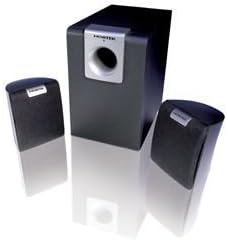
Image: The Nortek Soundream 2.1 Attive Minispeaker system, featuring a central subwoofer unit and two compact satellite speakers.
Komponen:
- subwufer: The main unit containing the amplifier, bass driver, and primary controls.
- Pembesar Suara Satelit: Two compact speakers for mid-range and high-frequency audio.
- Kawalan: Typically located on the subwoofer, these include power on/off, master volume, and potentially bass level adjustment.
5. Persediaan
Follow these steps to set up your Nortek Soundream 2.1 system:
- penempatan:
- Place the subwoofer on the floor, preferably near a wall or in a corner for optimal bass response.
- Position the two satellite speakers on either side of your listening area, facing towards you. Ensure they are equidistant from your listening position for balanced stereo sound.
- Sambungkan Pembesar Suara Satelit:
- Connect the cables from the satellite speakers to the corresponding output jacks on the back of the subwoofer. Ensure correct polarity if applicable (e.g., red to red, black to black).
- Sambungkan Sumber Audio:
- Connect one end of the audio input cable (e.g., 3.5mm stereo jack) to the 'Audio In' port on the subwoofer.
- Connect the other end of the audio input cable to the audio output jack of your device (e.g., computer, smartphone, MP3 player, TV).
- Sambungkan Kuasa:
- Plug the power cable into the power input on the subwoofer.
- Palamkan hujung kabel kuasa yang lain ke salur keluar dinding elektrik standard.
6. Arahan Operasi
Once the system is set up, follow these steps to operate your speakers:
- Hidupkan kuasa: Locate the power button or switch on the subwoofer and turn it to the 'ON' position. An indicator light may illuminate.
- Kawalan Kelantangan: Turn the master volume knob on the subwoofer to a low setting before playing audio. Gradually increase the volume to your desired listening level.
- Bass Adjustment (if available): If your subwoofer has a separate bass control knob, adjust it to achieve your preferred bass level.
- Mainkan Audio: Start playing audio from your connected device.
- Matikan: When finished, turn the power switch on the subwoofer to the 'OFF' position. For extended periods of non-use, it is recommended to unplug the system from the power outlet.
7. Penyelenggaraan
Proper maintenance ensures the longevity and performance of your speaker system:
- Pembersihan: Disconnect the power before cleaning. Use a soft, dry cloth to wipe the surfaces of the speakers and subwoofer. Do not use liquid cleaners or abrasive materials.
- Pengudaraan: Ensure that the ventilation openings on the subwoofer are not blocked by dust or other objects.
- Storan: If storing the system for an extended period, unplug it and store it in a cool, dry place away from direct sunlight and extreme temperatures.
- Penjagaan Kabel: Avoid bending or crimping the audio and power cables excessively.
8. Penyelesaian masalah
If you encounter issues with your Nortek Soundream 2.1 system, refer to the following common problems and solutions:
- Tiada Bunyi:
- Ensure the power cable is securely plugged into both the subwoofer and the wall outlet.
- Verify the power switch on the subwoofer is in the 'ON' position.
- Check that the audio input cable is securely connected to both the subwoofer and your audio source.
- Increase the master volume on the subwoofer and the volume on your audio source device.
- Test with a different audio source or cable to rule out a faulty source or cable.
- Bunyi Herot:
- Reduce the volume on both the subwoofer and your audio source.
- Ensure the audio input cable is fully inserted and not damaged.
- Semak sebarang gangguan daripada peranti elektronik lain.
- Only One Satellite Speaker Working:
- Periksa sambungan pembesar suara satelit yang tidak berfungsi ke subwoofer.
- Ensure the audio source is outputting stereo sound.
9. Spesifikasi
- model: Nortek Soundream 2.1
- Konfigurasi: 2.1 Channel (Subwoofer + 2 Satellite Speakers)
- Power Output (Wattage): 2 Watt
- Sumber Kuasa: Elektrik Bertali
- Berat Barang: Kira-kira 1.5 kg (3.31 paun)
- ASIN: B000CFYA2C
- Pengeluar: Nortek
10. Waranti dan Sokongan
For warranty information and technical support, please refer to the warranty card included with your product or visit the official Nortek webtapak. Simpan resit pembelian anda sebagai bukti pembelian untuk sebarang tuntutan waranti.