
परिचय
This manual provides detailed instructions for the installation, operation, and maintenance of your VECHTEL 8 CORE 6G+128G Android 15 Car Radio. Please read this manual thoroughly before installation and use to ensure proper function and to prevent damage. Keep this manual for future reference.
वाहन सुसंगतता
This car radio is designed for specific vehicle models. It is compatible with:
- FIAT 500L दरम्यान उत्पादित मॉडेल्स 2013 आणि 2019.
The system features a plug-and-play wiring harness, eliminating the need for power cable modifications in compatible vehicles.

Image: Visual guide for checking dashboard compatibility. Shows examples of dashboards where the unit can and cannot be installed. If unsure, consult the seller with a photo of your car's central console.

Image: Comparison of a Fiat 500L dashboard before and after the VECHTEL car radio installation, demonstrating seamless integration.
बॉक्समध्ये काय आहे
उत्पादन पॅकेजमध्ये खालील घटक समाविष्ट आहेत:
- VECHTEL Android Car Radio Unit
- जीपीएस अँटेना
- बाह्य मायक्रोफोन
- मागील कॅमेरा
- कॅनबस डिकोडर
- पॉवर केबल
- आरसीए केबल
- यूएसबी केबल
- मागील कॅमेरा इनपुट केबल
- Adapter Antenna
- वापरकर्ता मॅन्युअल (हा दस्तऐवज)

प्रतिमा: एक षटकview of all included accessories and cables, such as the GPS antenna, external microphone, rear camera, Canbus, and various wiring harnesses.
सेटअप आणि स्थापना
व्यावसायिक स्थापनेची शिफारस केली जाते. स्थापनेला सुरुवात करण्यापूर्वी वाहनाची वीज खंडित झाली आहे याची खात्री करा.
वायरिंग कनेक्शन
Refer to the wiring diagram for correct connections. The system uses a plug-and-play design for the main power harness.
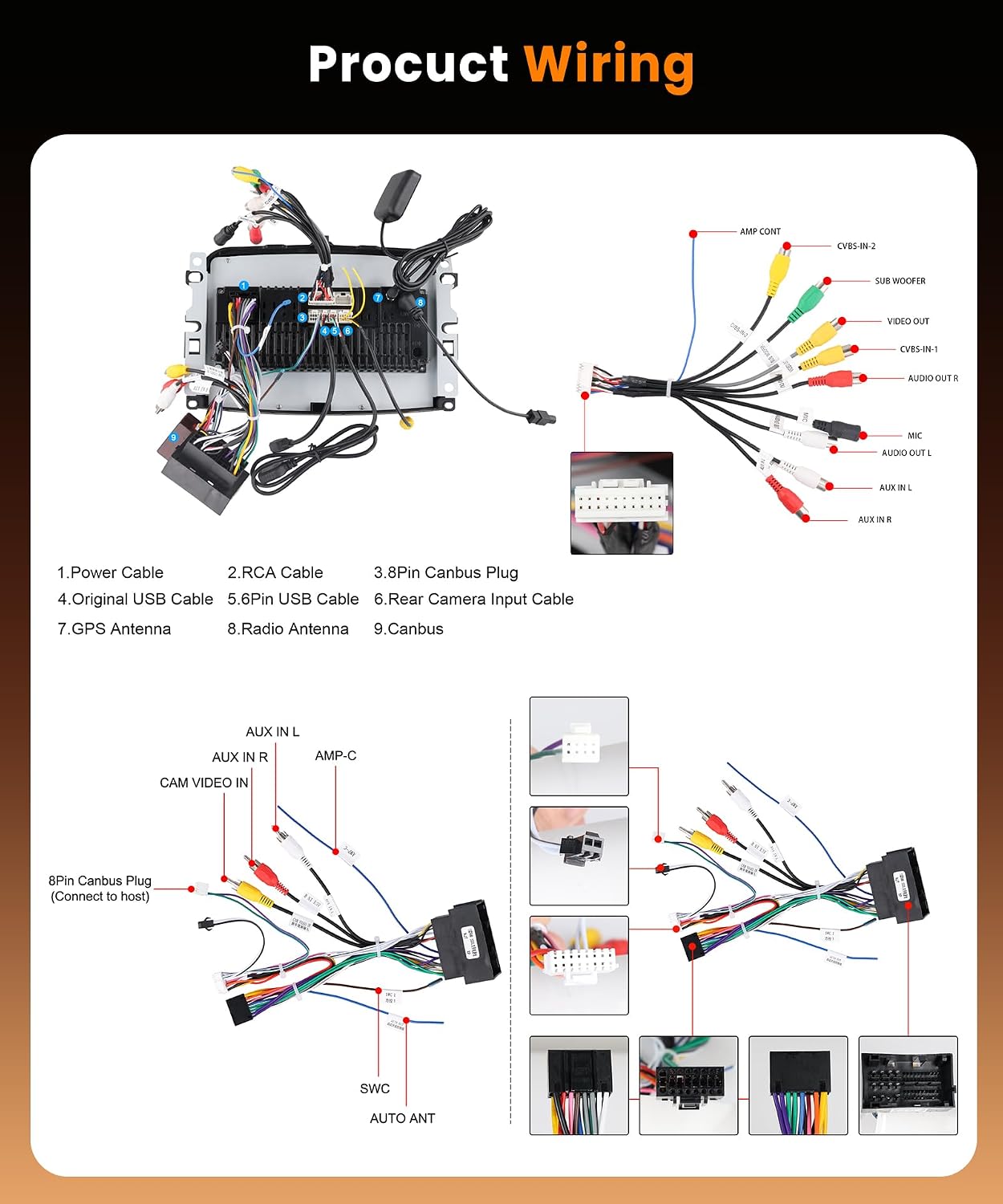
Image: Comprehensive wiring diagram illustrating connections for power, RCA, Canbus, USB, GPS antenna, radio antenna, and rear camera input. Each cable is numbered for easy identification.
- उर्जा केबल: Connect to the vehicle's main power harness.
- आरसीए केबल: ऑडिओ/व्हिडिओ इनपुट/आउटपुट कनेक्शनसाठी (उदा., बाह्य amplifier, subwoofer, video output).
- ३.८ पिन कॅनबस प्लग: Connects to the vehicle's Canbus system for steering wheel controls and other vehicle data.
- मूळ यूएसबी केबल: Connects to the vehicle's existing USB port if applicable.
- ४ पिन यूएसबी केबल: Additional USB input for media or device charging.
- मागील कॅमेरा इनपुट केबल: Connects the rear camera to the unit.
- जीपीएस अँटेना: स्पष्ट असलेल्या ठिकाणी माउंट करा view इष्टतम सिग्नल रिसेप्शनसाठी आकाशाचे निरीक्षण.
- रेडिओ अँटेना: वाहनाचा रेडिओ अँटेना जोडा.
- कॅनबस: Ensure the Canbus decoder is correctly connected to the main harness.
Rear Camera Wiring
Follow these steps for connecting the rear camera:

Image: Detailed diagram illustrating the connection points for the rear camera, including power, ground, and trigger wire connections to the car's reverse light circuit and the head unit.
- Red Cable (1 & 3): Connect to the positive (+) power supply of the car's reverse light.
- काळी केबल (२): Connect to the negative (-) ground of the car's reverse light power supply.
- काळी केबल (२): Connect this reverse trigger wire to the corresponding input on the car radio's power harness. This signals the unit to switch to the camera view जेव्हा रिव्हर्स गियर गुंतलेले असते.
ऑपरेटिंग सूचना
बेसिक ऑपरेशन
The unit features a 7-inch HD IPS touchscreen with an Android 15 operating system, an 8-core CPU, 6GB RAM, and 128GB ROM for smooth performance and app installation.

Image: Illustrates the high-speed operation capabilities of the unit, highlighting the Android 15 OS, 8-core processor, and memory specifications, alongside GPS and Wi-Fi functionalities.
वायरलेस कारप्ले आणि अँड्रॉइड ऑटो
Connect your smartphone wirelessly to access navigation, music, calls, and more directly on the car radio screen. Supports advanced voice control via Siri or Google Assistant.

Image: Shows the CarPlay and Android Auto interfaces, demonstrating wireless and wired connection options, and voice command features like "Hey Siri, open the map" or "OK, open music."
GPS Navigation and Wi-Fi
The unit includes a GPS module for both offline and online navigation. Connect to Wi-Fi or a mobile hotspot to download apps from the Play Store, stream videos, and use online navigation services.

Image: Depicts the GPS function showing a car navigating a city map and the Wi-Fi function displaying various app icons available for download and use.
ब्लूटूथ 5.0
Utilize Bluetooth 5.0 for hands-free calling and wireless music streaming. Pair your device through the Bluetooth settings menu.

Image: Shows the Bluetooth interface with a call screen and music playback, indicating Bluetooth 5.0 connectivity for high-speed data transfer and stable connections.
एफएम/आरडीएस रेडिओ
Tune into your favorite FM radio stations. The RDS (Radio Data System) feature displays station information, song titles, and other data where available.

Image: Displays the FM/RDS radio interface with frequency tuning and preset options, alongside the Equalizer (EQ) function for audio customization.
स्टीयरिंग व्हील नियंत्रण
The unit supports original steering wheel controls, allowing you to manage audio, calls, and other functions without taking your hands off the wheel. Configuration may be required in the settings menu.

Image: Shows the steering wheel control learning interface, allowing users to map vehicle steering wheel buttons to radio functions, next to a backup camera view.
मागील कॅमेरा सपोर्ट
The system is compatible with the included Full HD rear camera, providing a clear view of the area behind your vehicle when reversing. The display automatically switches to the camera feed when reverse gear is engaged.
मिरर लिंक
Mirror Link functionality allows you to display your smartphone's screen (Android or iOS) directly onto the car radio's display.

Image: Illustrates the Mirror Link feature, showing a smartphone screen mirrored onto the car radio display, compatible with both Android and iOS devices.
स्प्लिट स्क्रीन कार्यक्षमता
The 7-inch HD IPS touchscreen supports split-screen mode, allowing you to run two applications simultaneously, such as navigation and music playback.
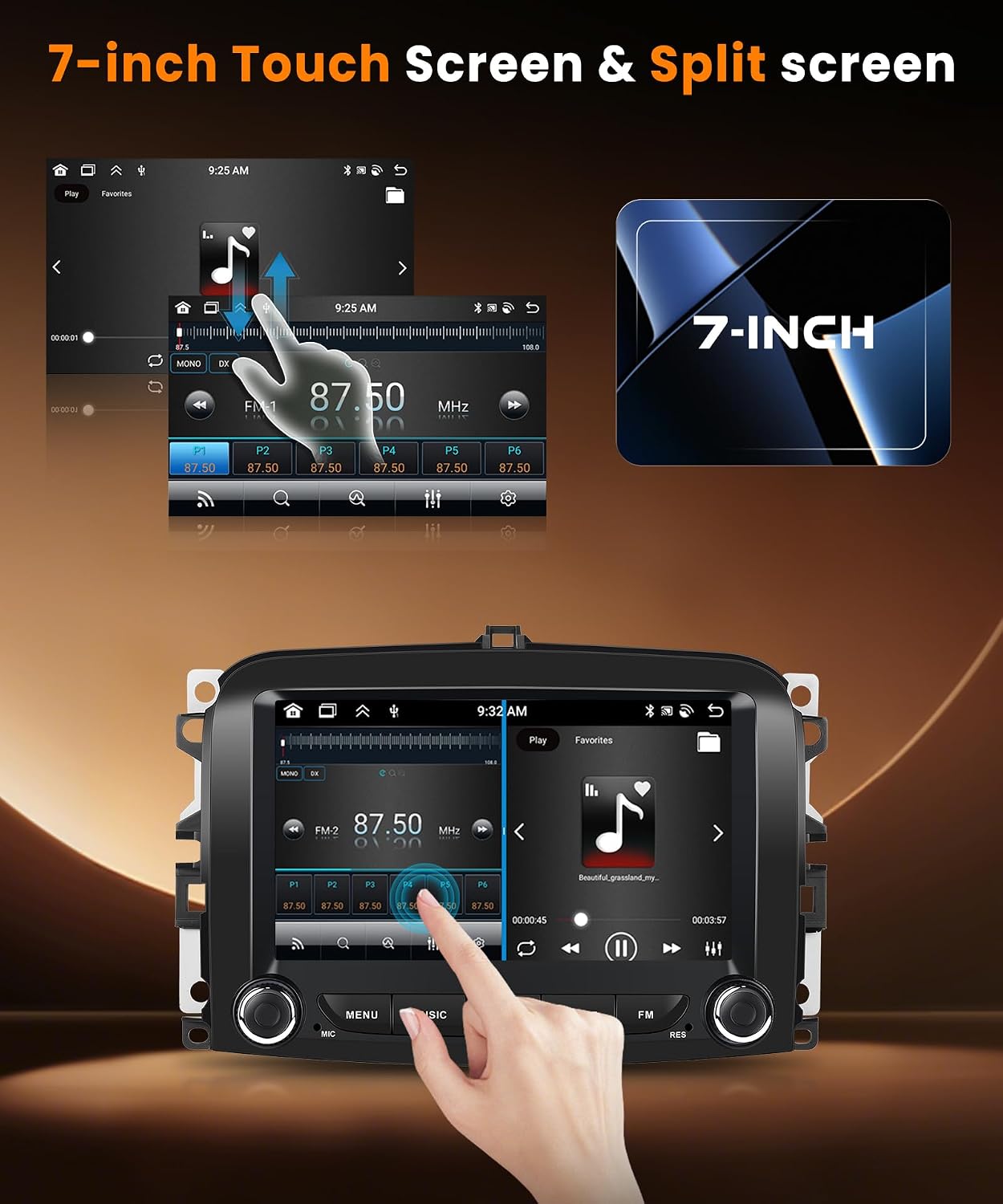
Image: Demonstrates the 7-inch HD IPS touchscreen with split-screen functionality, showing two applications running side-by-side, such as a music player and a web ब्राउझर
EQ सेटिंग्ज
Customize your audio experience with the built-in Equalizer (EQ) settings. Adjust various frequency bands to match your preferences.
एकाधिक UI थीम्स
Personalize your car radio's interface by choosing from multiple available UI themes.

Image: Shows a collage of different user interface themes available for the car radio, allowing for personalization of the display's appearance.
देखभाल
- स्क्रीन साफ करणे: टचस्क्रीन स्वच्छ करण्यासाठी मऊ, लिंट-फ्री कापड वापरा. अपघर्षक क्लीनर किंवा सॉल्व्हेंट्स वापरू नका.
- सॉफ्टवेअर अपडेट्स: इष्टतम कामगिरी आणि नवीन वैशिष्ट्यांमध्ये प्रवेश सुनिश्चित करण्यासाठी वेळोवेळी सॉफ्टवेअर अपडेट्स तपासा. अपडेट्स सामान्यतः सिस्टम सेटिंग्जमध्ये किंवा उत्पादकांच्या वर आढळू शकतात. webसाइट
- सामान्य काळजी: युनिटला अति तापमान, दीर्घकाळ थेट सूर्यप्रकाश किंवा जास्त आर्द्रतेच्या संपर्कात आणणे टाळा.
समस्यानिवारण
| समस्या | संभाव्य कारण | उपाय |
|---|---|---|
| युनिट चालू होत नाही. | वीज कनेक्शन तुटले आहे, फ्यूज फुटला आहे, वाहनाच्या बॅटरीची समस्या आहे. | सर्व पॉवर केबल कनेक्शन तपासा. वाहनाचे फ्यूज तपासा. वाहनाची बॅटरी चार्ज झाली आहे याची खात्री करा. |
| आवाज नाही. | Volume too low, mute activated, incorrect audio output settings, speaker wiring issue. | Increase volume. Check if mute is active. Verify audio output settings. Inspect speaker wiring. |
| GPS सिग्नल कमकुवत किंवा चुकीचा आहे. | GPS अँटेना चुकीच्या पद्धतीने बसवलेला किंवा अडथळा आणलेला. | Ensure GPS antenna is mounted in a clear, unobstructed location (e.g., dashboard, under windshield). |
| कारप्ले/अँड्रॉइड ऑटो कनेक्ट होत नाहीये. | Bluetooth/Wi-Fi off on phone, incorrect pairing, phone software issue. | Ensure Bluetooth and Wi-Fi are enabled on your phone. Re-pair the device. Restart both phone and car radio. |
| मागचा कॅमेरा दिसत नाहीये. | Incorrect wiring, camera malfunction, reverse trigger not detected. | Check camera power and video input connections. Verify the reverse trigger wire is correctly connected to the reverse light. |
| Radio and music play simultaneously (as per review). | Software glitch, incorrect audio routing. | Restart the unit. Check audio settings for simultaneous playback options. If issue persists, contact customer support. |
| Wi-Fi turns off by itself (as per review). | Software issue, power management setting. | Check Wi-Fi settings for any automatic shutdown options. Perform a factory reset if necessary. Contact customer support. |
तपशील
| वैशिष्ट्य | तपशील |
|---|---|
| ब्रँड | VECHTEL |
| ऑपरेटिंग सिस्टम | Android 15 |
| CPU | 8 कोर |
| रॅम | 6GB |
| रॉम (अंतर्गत स्टोरेज) | 128GB |
| स्क्रीन आकार | 7 इंच |
| डिस्प्ले प्रकार | HD IPS Touchscreen (1024*600 resolution) |
| कनेक्टिव्हिटी | ब्लूटूथ ४.२, यूएसबी, वाय-फाय |
| विशेष वैशिष्ट्ये | Wireless CarPlay, Wireless Android Auto, GPS Navigation, Touchscreen, Built-in Bluetooth, Built-in Wi-Fi, Steering Wheel Control, Mirror Link, FM/RDS Radio, EQ Settings, Full HD Rear Camera Support, Split Screen, Multiple UI Themes |
| सुसंगत साधने | स्मार्टफोन्स |
| ऑडिओ आउटपुट मोड | स्टिरिओ |
| सराउंड साउंड चॅनल कॉन्फिगरेशन | 5.1 |
| व्हिडिओ एन्कोडिंग | एच.२६४, एच.२६५/एचईव्हीसी, एमपीईजी-४ |
| उत्पादनाचे परिमाण (DxWxH) | 5.2P x 22.7L x 14.9H cm (2.05D x 8.94W x 5.87H inches) |
| आउटपुट पॉवर (RMS) | 45 वॅट्स |
| कमाल आउटपुट पॉवर | 180 Watts (4 channels) |
| समर्थित ऑडिओ स्वरूप | AVI, WAV, WMA |
हमी माहिती
हे उत्पादन ए सह येते तीन वर्षांची वॉरंटी from the date of purchase. The warranty covers manufacturing defects and malfunctions under normal use. Please retain your proof of purchase for warranty claims. The warranty does not cover damage caused by improper installation, misuse, accidents, or unauthorized modifications.
ग्राहक समर्थन
If you encounter any issues or have questions regarding your VECHTEL car radio, please contact our customer support team. You can reach us via the Amazon messaging system. When contacting support, please provide your order number and a detailed description of the issue.
For compatibility inquiries before purchase, please send us your car's model year and a photo of your central console via Amazon.