
MiLESEEY NV20
MILESEEY NV20 नाईट व्हिजन मोनोक्युलर वापरकर्ता मॅन्युअल
Model: NV20 | Brand: MiLESEEY
1. परिचय
Thank you for choosing the MILESEEY NV20 Night Vision Monocular. This device is designed to provide clear observation in low-light and complete darkness conditions, making it ideal for various outdoor activities such as hunting, wildlife observation, camping, and security monitoring. Equipped with advanced infrared technology and a high-resolution sensor, the NV20 allows for both photo and video recording, capturing your experiences with exceptional clarity.
Please read this manual thoroughly before using the device to ensure proper operation and to maximize its performance and lifespan.
२. बॉक्समध्ये काय आहे?

आकृती 2.1: पॅकेज सामग्री
The image displays all items included in the MILESEEY NV20 Night Vision Monocular package: the monocular device, a black carrying case, a black wrist strap, a USB-C charging cable, an 8GB SD card, and the user manual.
- MILESEEY NV20 Night Vision Monocular
- 8GB SD कार्ड
- USB-C चार्जिंग केबल
- Grippy Strap
- Lens Cloth Cleaner
- वापरकर्ता मॅन्युअल
- कॅरींग केस
3. उत्पादन संपलेview

Figure 3.1: MILESEEY NV20 Front View
This image shows the main body of the MILESEEY NV20 Night Vision Monocular, highlighting the objective lens at the front, the infrared illuminator below it, and the control buttons on the top surface.
3.1 प्रमुख घटक
- वस्तुनिष्ठ भिंग: 35mm lens for light gathering.
- इन्फ्रारेड (IR) इल्युमिनेटर: Provides invisible light for night vision.
- आयपीस: 52mm for comfortable viewing
- Focusing Handwheel: स्पष्ट प्रतिमांसाठी फोकस समायोजित करते.
- नियंत्रण बटणे: Power, IR level adjustment, Zoom, Record/Capture.
- TFT Color LCD Screen: 1.54-inch display for viewing आणि प्लेबॅक.
- यूएसबी-सी पोर्ट: चार्जिंग आणि डेटा ट्रान्सफरसाठी.
- मायक्रो एसडी कार्ड स्लॉट: फोटो आणि व्हिडिओ साठवण्यासाठी.
- ट्रायपॉड माउंट: Standard 1/4-inch thread for tripod attachment.
4. सेटअप
4.1 बॅटरी चार्ज करणे
The NV20 is equipped with a built-in 3000mAh rechargeable battery. Before first use, fully charge the device.
- Locate the USB-C port on the side of the monocular, usually protected by a rubber flap.
- दिलेली USB-C चार्जिंग केबल पोर्टशी जोडा.
- Connect the other end of the cable to a compatible USB power adapter (e.g., 5V/1A).
- The charging indicator on the device will show charging status. A full charge typically takes about 4 hours.
महत्त्वाचे: Please DO NOT use an adapter above 5.5V to charge the device to prevent damage.
4.2 मायक्रो SD कार्ड घालणे
The device supports Micro SD cards for storing photos and videos. An 8GB SD card is included.
- Open the rubber flap covering the USB-C port and SD card slot.
- Insert the Micro SD card into the designated slot with the gold contacts facing down, until it clicks into place.
- To remove the card, gently push it in until it clicks again, and it will spring out.
5. ऑपरेटिंग सूचना
5.1 पॉवर चालू/बंद
- पॉवर चालू: Press and hold the Power button (usually the central button on top) for approximately 3-5 seconds until the screen illuminates and the MILESEEY logo appears.
- वीज बंद: Press and hold the Power button again for 3-5 seconds until the screen turns off.
३.२.२.२ लक्ष केंद्रित करणे

Figure 5.1: Adjusting Focus
The image illustrates the focusing handwheel on the monocular, with an arrow indicating rotation to adjust the focus from a blurry to a clear image. Insets show blurry and clear exampलेस
- Eyepiece Focus: Rotate the eyepiece ring to adjust the diopter for your individual vision, ensuring the on-screen display is sharp.
- Objective Focus: Rotate the focusing handwheel near the objective lens to bring distant objects into sharp focus. Adjust until the image on the screen is clear.
5.3 Night Vision Modes and IR Levels
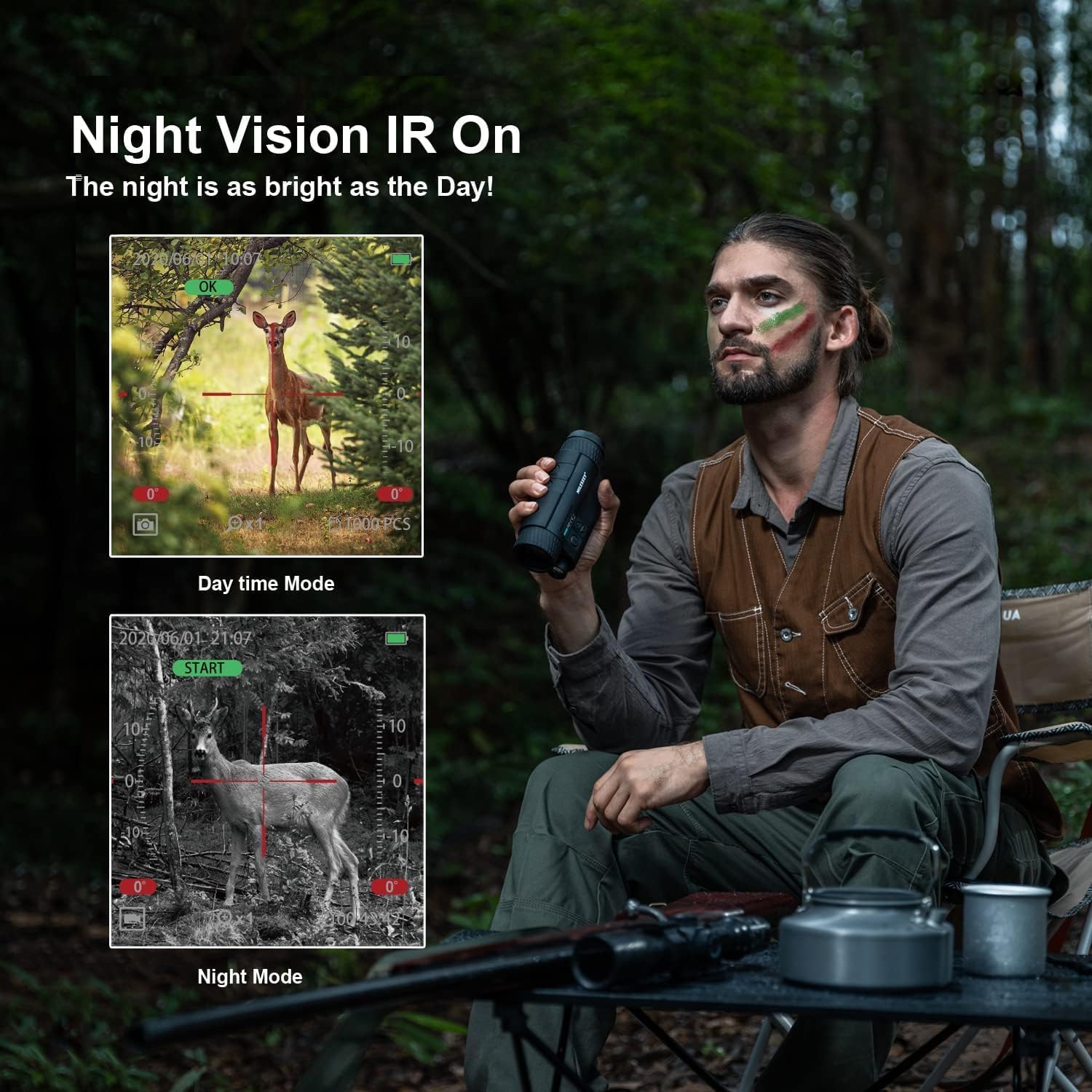
Figure 5.2: Day Mode vs. Night Vision IR On
This image demonstrates the difference between Day Time Mode (color) and Night Mode (black and white with IR activated) when observing a deer, showcasing the monocular's capability to provide clear vision in darkness.
The NV20 operates in both day and night modes. In night mode, the infrared illuminator can be activated and adjusted.
- दिवस मोड: The device displays images in full color. IR is off.
- नाईट मोड: The device displays images in black and white. The IR illuminator can be activated.
- Adjusting IR: Press the IR button (often labeled with a light bulb or sun icon) to cycle through 5 levels of infrared brightness. Higher levels provide more illumination in complete darkness but consume more battery.
5.4 झूम फंक्शन
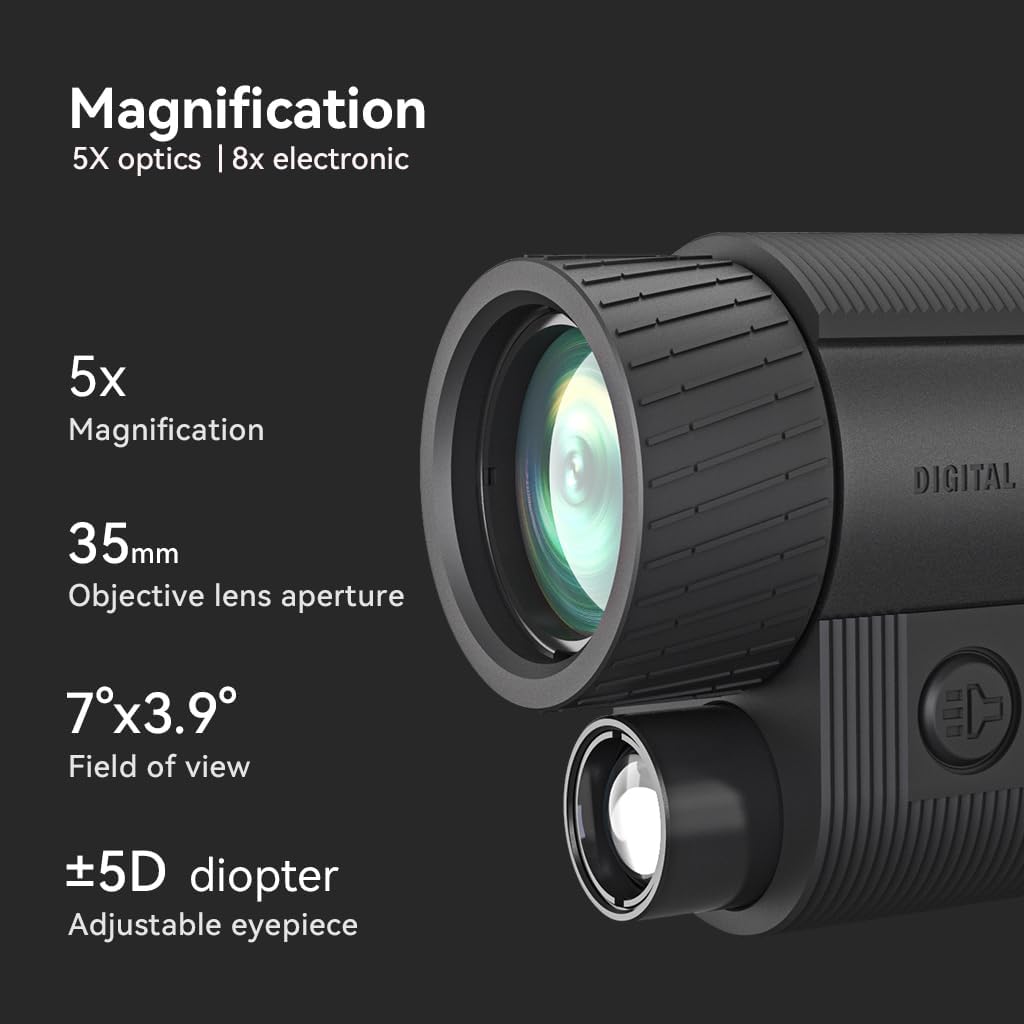
Figure 5.3: Magnification Details
This image highlights the optical and electronic magnification features of the monocular, showing 5x optical magnification and 8x electronic magnification, along with the 35mm objective lens aperture, 7°x3.9° field of view, and ±5D diopter adjustable eyepiece.
The NV20 offers both optical and digital zoom capabilities.
- ऑप्टिकल झूम: The device has a fixed 6X optical magnification.
- डिजिटल झूम: Use the Up/Down arrow buttons to digitally zoom in or out, up to 8X.
३.३ फोटो आणि व्हिडिओ रेकॉर्डिंग

Figure 5.4: Recording Photos and Videos
This image shows a user holding the monocular, with insets displaying the device's screen interface for capturing photos and recording videos, indicating the ability to record and play back moments.
- फोटो काढ: While in observation mode, press the Record/Capture button (often marked with a camera icon) once to take a still photo.
- व्हिडिओ रेकॉर्ड करा: Press and hold the Record/Capture button for a few seconds to start video recording. Press again to stop recording.
४.४ प्लेबॅक आणि File हस्तांतरण
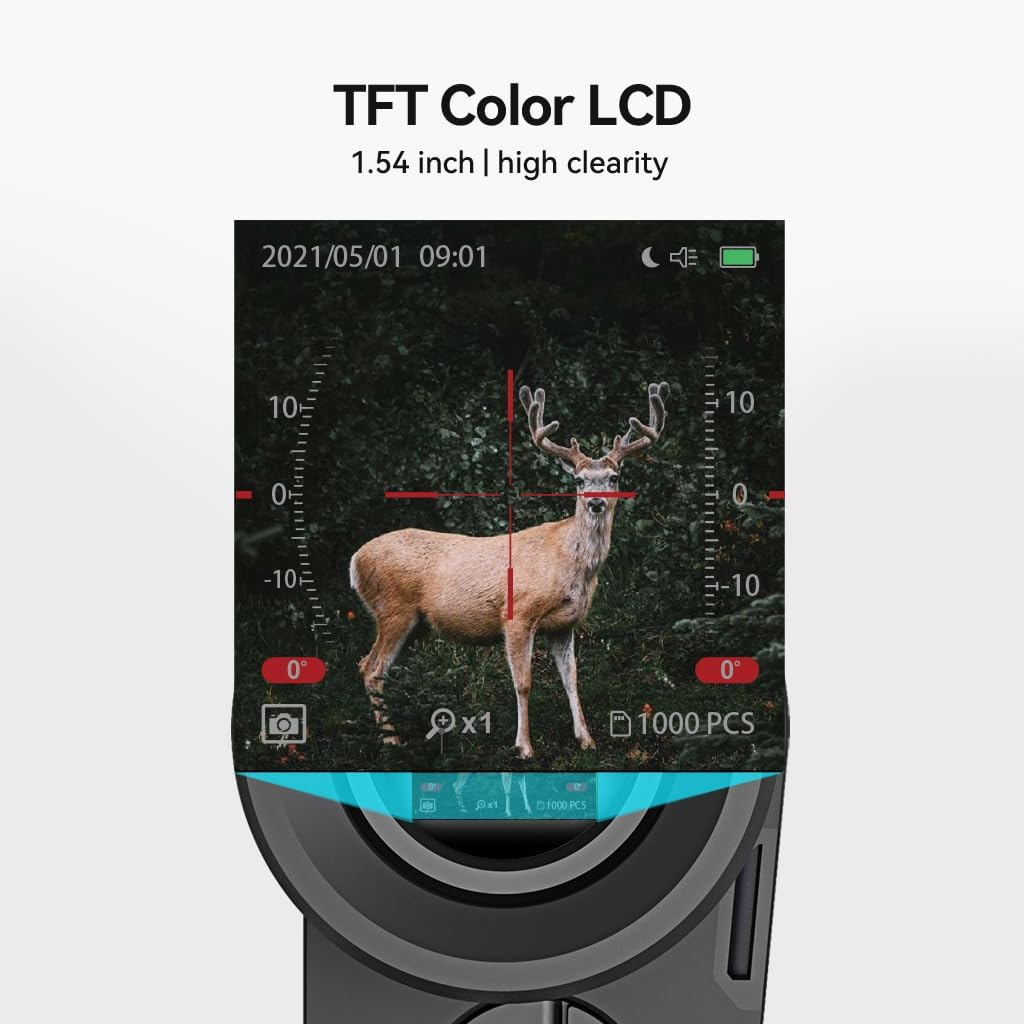
Figure 5.5: TFT Color LCD Display
ही प्रतिमा जवळून पाहते view of the 1.54-inch TFT Color LCD screen of the monocular, showing a clear, detailed image of a deer, demonstrating the high clarity of the display.
- Playback on Device: Enter playback mode via the menu. Use the arrow buttons to navigate through your recorded photos and videos.
- File हस्तांतरण: Connect the monocular to a computer using the USB-C cable. The device will appear as a removable disk, allowing you to copy files थेट.
5.7 मेनू नेव्हिगेशन
Access the device settings and options through the menu. The menu allows adjustment of brightness, contrast, date/time, resolution, and other parameters.
- Press the Menu button (often marked with 'M' or a gear icon) to enter the menu.
- Use the Up/Down arrow buttons to navigate through menu options.
- Press the Record/Capture button to select an option or confirm a setting.
- मेनूमधून बाहेर पडण्यासाठी पुन्हा मेनू बटण दाबा.
३.३ अधिकृत उत्पादन व्हिडिओ
Video 5.1: NV20 Night Vision Introduction
This video provides an official introduction to the MILESEEY NV20 Night Vision Monocular, demonstrating its key features and capabilities in various scenarios. It highlights the device's performance in both day and night conditions, showcasing its optical and digital zoom, and the clarity of its display.
6. देखभाल
- स्वच्छता: Use the provided lens cloth cleaner to gently wipe the lenses. For the body, use a soft, dry cloth. Avoid abrasive materials or harsh chemicals.
- स्टोरेज: Store the monocular in its carrying case in a cool, dry place when not in use. Avoid extreme temperatures and high humidity.
- बॅटरी काळजी: To prolong battery life, avoid fully discharging the battery frequently. If storing for extended periods, charge the battery to about 50% every few months.
- पाणी प्रतिकार: The device is designed for outdoor use but is not fully waterproof. Avoid submerging it in water or exposing it to heavy rain.
7. समस्या निवारण
| समस्या | संभाव्य कारण | उपाय |
|---|---|---|
| डिव्हाइस चालू होत नाही. | बॅटरी कमी आहे; पॉवर बटण जास्त वेळ धरले नाही. | Charge the battery fully; Press and hold the Power button for 3-5 seconds. |
| प्रतिमा अस्पष्ट आहे. | Improper focus; Dirty lens. | Adjust both eyepiece and objective focus; Clean the lenses with the provided cloth. |
| रात्रीच्या दृष्टीची खराब कामगिरी. | IR illuminator off or too low; Insufficient ambient light. | Increase IR level; Ensure there is some ambient light for optimal performance (if not in complete darkness). |
| फोटो/व्हिडिओ रेकॉर्ड करू शकत नाही. | SD card full or not inserted correctly; Device in wrong mode. | Check/reinsert SD card, delete old files; Ensure device is in photo/video mode. |
| लहान बॅटरी आयुष्य. | High IR level usage; Frequent recording; Old battery. | Reduce IR level if possible; Limit continuous recording; Consider battery replacement if very old. |
8. तपशील
| वैशिष्ट्य | तपशील |
|---|---|
| मॉडेलचे नाव | NV20 |
| वस्तुनिष्ठ लेन्स व्यास | 35 मिमी |
| ऑप्टिकल मॅग्निफिकेशन | 6X |
| डिजिटल झूम | 8X पर्यंत |
| इन्फ्रारेड पातळी | 5 स्तर |
| Viewing Range (Complete Dark) | 380 यार्ड पर्यंत |
| Viewing Range (Moonlight) | 550 यार्ड पर्यंत |
| सेन्सर | Dedicated Sony IMX Sensor |
| डिस्प्ले स्क्रीन | 1.54-इंच TFT रंग LCD |
| बॅटरी क्षमता | ३००० एमएएच (अंगभूत) |
| चार्जिंग पोर्ट | यूएसबी-सी |
| स्टोरेज | मायक्रो एसडी कार्ड (१६ जीबी समाविष्ट) |
| साहित्य | नायलॉन |
| रंग | काळा |
| आयटम वजन | ०.१७ किलोग्रॅम (पॅकेज वजन) |
9. हमी आणि समर्थन
MILESEEY provides excellent after-sales service for the NV20 Night Vision Monocular. For specific warranty details, including coverage period and terms, please refer to the warranty card included with your product or visit the official MiLESEEY webसाइट
If you encounter any issues or have questions regarding the operation, maintenance, or troubleshooting of your device, please contact MILESEEY customer support through the contact information provided in your product packaging or on their official website. Please have your product model and purchase information ready when contacting support.
ऑनलाइन संसाधने:
- Visit the MiLESEEY Store on Amazon: MiLESEEY Amazon Store
Ask a question about this manual
Ask about setup, troubleshooting, compatibility, parts, safety, or missing instructions. Manuals+ will review the question and use this page’s manual context to help answer it.