
1. परिचय
This manual provides essential information for the safe and effective use of your Panasonic HC-X2000 UHD 4K Pro Camcorder. Please read this manual thoroughly before using the product and retain it for future reference. Understanding the features and operations will ensure optimal performance and longevity of your camcorder.
2. उत्पादन संपलेview
2.1 प्रमुख वैशिष्ट्ये
- UHD 4K Video Recording: Captures high-resolution 4K video at broadcast-compatible frame rates.
- 24x ऑप्टिकल झूम लेन्स: Features a 25mm wide-angle to 600mm telephoto range.
- 5-Axis Hybrid Image Stabilization: Combines optical and electronic stabilization for smooth footage.
- एकात्मिक वाय-फाय: Enables wireless control from a tablet or smartphone via the HC ROP app.
- Professional Audio Inputs: Supports 24-bit PCM audio recording with XLR inputs.
- 3G-SDI and HDMI Outputs: Provides versatile connectivity for professional workflows.
- कॉम्पॅक्ट आणि लाइटवेट डिझाइन: Engineered for mobility and ease of use in various shooting environments.
२.२ समाविष्ट घटक
The following items are typically included with your Panasonic HC-X2000 Camcorder:
- Panasonic HC-X2000 UHD 4K 3G-SDI/HDMI Pro Camcorder
- Detachable Handle Unit
- लिथियम-आयन बॅटरी
- AC अडॅप्टर/चार्जर
- आयकअप
- लेन्स हुड
- मायक्रोफोन धारक

Figure 2.2.1: The Panasonic HC-X2000 Camcorder shown with its detachable handle unit, battery, and other accessories.
3. सेटअप
3.1 Charging and Installing the Battery
- Connect the AC adapter to the battery charger and a power outlet.
- Insert the battery into the charger. The charging indicator will illuminate.
- चार्जिंग पूर्ण झाल्यावर, बॅटरी चार्जरमधून काढा.
- Align the charged battery with the battery slot on the rear of the camcorder and slide it in until it clicks securely into place.
१.३ SD कार्ड घालणे
- Open the SD card slot cover on the side of the camcorder.
- Insert the SD card (UHS-I compatible recommended for 4K recording) into the slot with the label facing the correct direction until it clicks.
- SD कार्ड स्लॉट कव्हर बंद करा.
3.3 Attaching the Handle Unit
- Align the handle unit with the accessory shoe on top of the camcorder.
- Slide the handle unit forward until it locks into position.
- Secure the handle unit using the locking screw.

Figure 3.3.1: The Panasonic HC-X2000 Camcorder with the detachable handle unit and an external light attached.
4. ऑपरेटिंग सूचना
4.1 पॉवरिंग चालू/बंद
- पॉवर चालू करण्यासाठी, पॉवर स्विच चालू स्थितीत स्लाइड करा.
- पॉवर बंद करण्यासाठी, पॉवर स्विच बंद स्थितीत स्लाइड करा.
४.१ मूलभूत रेकॉर्डिंग
- Open the LCD monitor or extend the viewशोधक.
- Press the REC START/STOP button to begin recording. The REC indicator will illuminate.
- Press the REC START/STOP button again to stop recording.
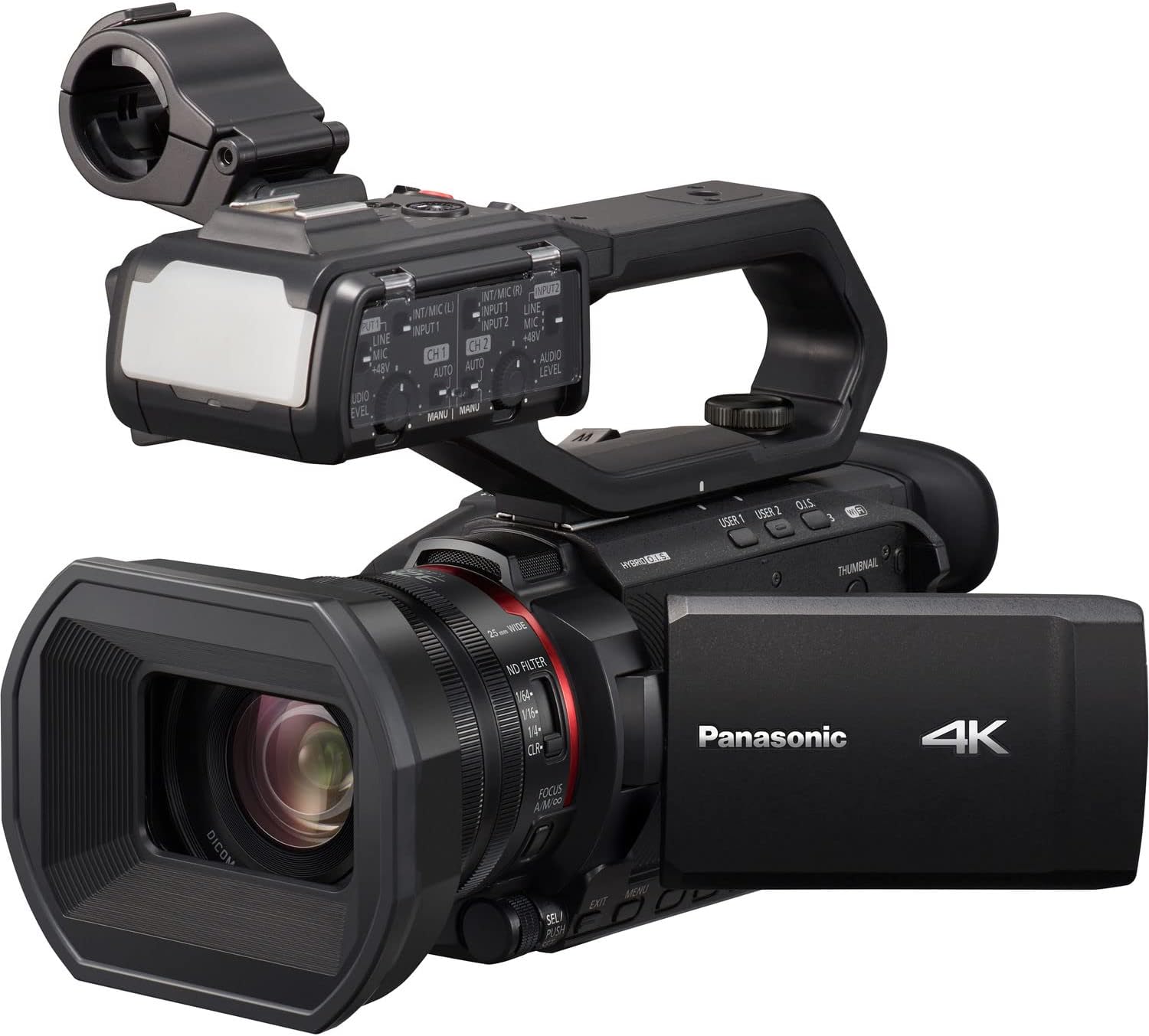
Figure 4.2.1: The Panasonic HC-X2000 Camcorder with its LCD monitor open, displaying the recording interface.
३.३ झूम ऑपरेशन
Use the zoom lever located on the handle or the lens barrel to adjust the zoom. Push the lever towards 'T' for telephoto (zoom in) and 'W' for wide-angle (zoom out).
4.4 फोकस समायोजन
The camcorder supports both auto-focus (AF) and manual focus (MF). Switch between modes using the AF/MF switch on the lens barrel. In MF mode, rotate the focus ring to adjust focus manually.
५.५ प्रतिमा स्थिरीकरण
The 5-Axis Hybrid O.I.S. (Optical Image Stabilizer) is typically active by default. Ensure it is enabled in the menu settings for stable handheld footage.
4.6 Wi-Fi Control
To use Wi-Fi control, enable Wi-Fi in the camcorder's menu and connect your smartphone or tablet to the camcorder's Wi-Fi network. Use the Panasonic HC ROP app for remote camera settings and lens control.
5. देखभाल
४.१ कॅमकॉर्डर साफ करणे
- लेन्स: Use a soft, lint-free cloth specifically designed for optical lenses. For stubborn smudges, use a lens cleaning solution sparingly.
- शरीर: Wipe the camcorder body with a soft, dry cloth. Avoid using strong detergents or solvents.
- एलसीडी मॉनिटर: मऊ, कोरड्या कापडाने हळूवारपणे पुसून टाका.
5.2 बॅटरी काळजी
- प्रथम वापर करण्यापूर्वी बॅटरी पूर्णपणे चार्ज करा.
- वापरात नसताना बॅटरी थंड, कोरड्या जागी साठवा.
- बॅटरीचे आयुष्य वाढवण्यासाठी ती वारंवार पूर्णपणे डिस्चार्ज करणे टाळा.
५.८.१ स्टोरेज
When storing the camcorder for extended periods, remove the battery and store the unit in a dry, dust-free environment, preferably in a protective case.
6. समस्या निवारण
| समस्या | संभाव्य कारण | उपाय |
|---|---|---|
| कॅमकॉर्डर चालू होत नाही. | बॅटरी चार्ज झालेली नाही किंवा योग्यरित्या घातली नाही. | Charge the battery and ensure it is securely inserted. |
| व्हिडिओ रेकॉर्ड करू शकत नाही. | No SD card, SD card full, or write-protected. | Insert an SD card, delete unnecessary files, or unlock the write-protection switch on the card. |
| प्रतिमा अस्पष्ट आहे. | Incorrect focus, dirty lens, or image stabilization off. | Adjust focus, clean the lens, or enable image stabilization. |
| कोणताही ऑडिओ रेकॉर्ड केलेला नाही. | Microphone not connected, audio levels too low, or input settings incorrect. | Check microphone connection, adjust audio input levels, and verify audio settings in the menu. |
7. तपशील
| वैशिष्ट्य | तपशील |
|---|---|
| मॉडेल क्रमांक | एचसी-एक्स१००० |
| सेन्सर | 1/2.5" 8.29M MOS Sensor |
| व्हिडिओ रिझोल्यूशन | UHD 4K (3840 x 2160), Full HD (1920 x 1080) |
| ऑप्टिकल झूम | 24x |
| फोकल लांबी | 25mm - 600mm (35mm equivalent) |
| प्रतिमा स्थिरीकरण | 5-Axis Hybrid O.I.S. |
| कनेक्टिव्हिटी | 3G-SDI, HDMI, USB, Wi-Fi |
| ऑडिओ स्वरूप | 24-बिट पीसीएम |
| स्टोरेज मीडिया | SD/SDHC/SDXC Card |
| परिमाण (W x H x D) | ४.९६ x ४.४९ x ११.१ इंच (अंदाजे) |
| वजन | 16.88 पौंड (अंदाजे) |
8. हमी आणि समर्थन
वॉरंटी माहिती आणि तांत्रिक समर्थनासाठी, कृपया अधिकृत पॅनासोनिक पहा. website or contact your authorized Panasonic dealer. Keep your proof of purchase for warranty claims.
ऑनलाइन संसाधने: For the latest drivers, firmware updates, and detailed FAQs, visit the official Panasonic support page for the HC-X2000 model.