
1. परिचय
This manual provides essential information for the safe and efficient operation of your Polaroid P4 Music Player. Please read it thoroughly before using the device and retain it for future reference.
The Polaroid P4 is a powerful wireless Bluetooth speaker designed to deliver high-quality audio. It features Bluetooth 5.1 connectivity, dual stereo pairing capability, and integration with the Polaroid Music App for an enhanced listening experience.

प्रतिमा: समोर view of the Polaroid P4 Music Player in yellow and white, showcasing its main speaker grilles and display.
२. बॉक्समध्ये काय आहे?
सर्व वस्तू पॅकेजिंगमध्ये आहेत याची खात्री करा:
- Polaroid P4 संगीत प्लेअर
- USB-C चार्जिंग केबल (1m)
- द्रुत प्रारंभ मार्गदर्शक
- Safety & Compliance Leaflet
3. उत्पादन संपलेview
Familiarize yourself with the components and controls of your Polaroid P4 Music Player.
3.1 फ्रंट पॅनेल

प्रतिमा: समोर view of the Polaroid P4 Music Player, highlighting the speaker grilles and the circular display.
- स्पीकर ग्रिल्स: ऑडिओ आउटपुट.
- डिस्प्ले: Shows volume level, battery status, and other indicators.
४.४ टॉप पॅनल नियंत्रणे
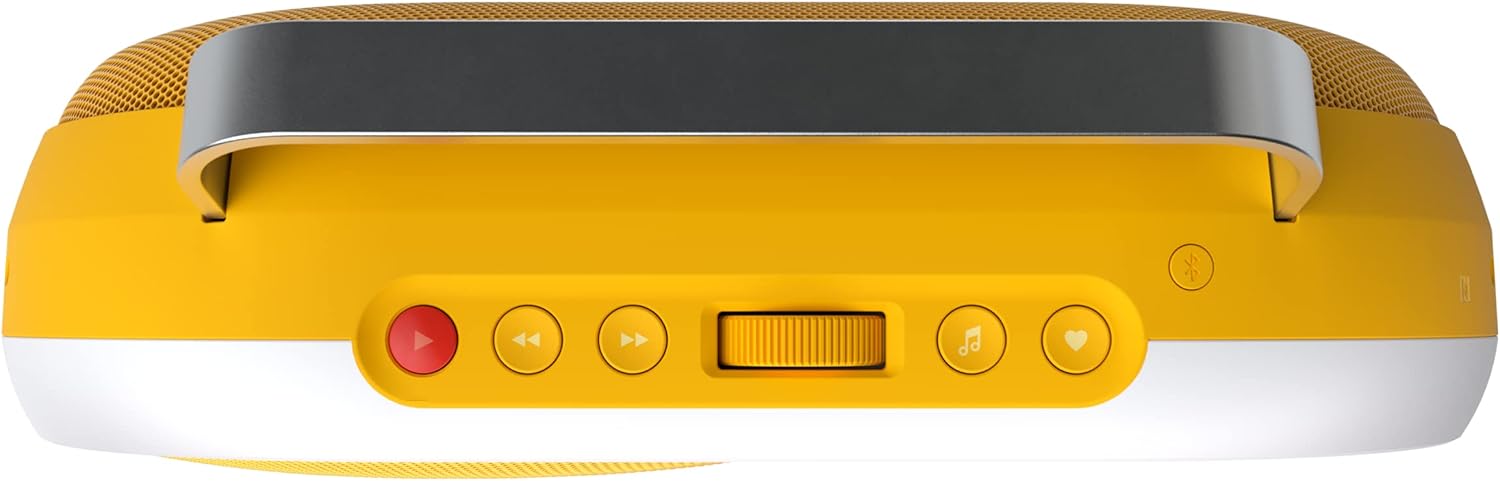
प्रतिमा: वर view of the Polaroid P4 Music Player, detailing the control buttons and the central volume dial.
- पॉवर बटण: चालू/बंद करण्यासाठी दाबा आणि धरून ठेवा.
- प्ले/पॉज बटण: ऑडिओ प्लेबॅक नियंत्रित करते.
- पुढे/मागे बटणे वगळा: ट्रॅक नेव्हिगेट करा.
- व्हॉल्यूम डायल: व्हॉल्यूम समायोजित करण्यासाठी फिरवा.
- ब्लूटूथ पेअरिंग बटण: ब्लूटूथ पेअरिंग मोड सुरू करते.
- हार्ट बटण: Used with the Polaroid Music App to save favorite songs.
3.3 मागील पॅनेल

प्रतिमा: मागचा भाग view of the Polaroid P4 Music Player, showing the USB-C charging port and AUX input.
- USB-C चार्जिंग पोर्ट: चार्जिंग केबल जोडण्यासाठी.
- पोर्टमध्ये ऑक्स: वायर्ड ऑडिओ कनेक्शनसाठी.
4. सेटअप
4.1 डिव्हाइस चार्ज करणे
- Connect the provided USB-C charging cable to the USB-C port on the rear of the P4 Music Player.
- Connect the other end of the USB-C cable to a compatible USB power adapter (not included). A Power Delivery (PD) charger is recommended for optimal charging.
- डिस्प्ले चार्जिंगची स्थिती दर्शवेल. पूर्ण चार्ज होण्यासाठी अंदाजे ३ तास लागतात.
टीप: The P4 Music Player has a built-in Lithium Ion battery. Ensure the device is fully charged before first use for optimal battery life.
4.2 पॉवरिंग चालू/बंद
- To power on, press and hold the Power button on the top panel until the display illuminates.
- To power off, press and hold the Power button again until the display turns off.
4.3 ब्लूटूथ पेअरिंग
- Ensure the P4 Music Player is powered on.
- Press the Bluetooth pairing button on the top panel. The display will show a pairing indicator.
- On your mobile device (smartphone, tablet), navigate to the Bluetooth settings.
- Select "Polaroid P4" from the list of available devices.
- Once connected, the P4 will confirm the successful pairing. The Bluetooth connection range is up to 30 feet.
4.4 Polaroid Music App
The Polaroid Music App enhances your experience with features like Polaroid Radio and music channel management.

Image: The Polaroid P4 Music Player shown alongside a smartphone running the Polaroid Music App, illustrating app integration.
- Download the "Polaroid Music" app from the App Store (iOS) or Google Play Store (Android).
- Open the app and follow the on-screen instructions to connect to your P4 Music Player.
- Use the app to access Polaroid Radio, a curated internet radio service, and manage your music channels.
5. ऑपरेटिंग सूचना
९.०२ ऑडिओ प्लेबॅक
- ब्लूटूथ: Once paired, play audio from your connected device. Use the Play/Pause and Skip buttons on the P4 or your device to control playback.
- औक्स इन: Connect an audio source directly to the AUX IN port using a 3.5mm audio cable (not included). The P4 will automatically switch to AUX input.
5.2 आवाज नियंत्रण
Rotate the Volume Dial on the top panel clockwise to increase volume and counter-clockwise to decrease it. The current volume level will be shown on the display.
5.3 Stereo Pairing (Two P4 Speakers)
The Polaroid P4 supports stereo pairing, allowing two P4 speakers to function as a left and right channel for an immersive stereo sound experience.
- Ensure both P4 speakers are powered on and not connected to any Bluetooth device.
- On one speaker (this will be the primary speaker), press and hold the Bluetooth pairing button until it enters pairing mode.
- On the second speaker, quickly press the Bluetooth pairing button.
- The speakers will attempt to connect to each other. Once successfully paired, they will indicate stereo mode.
- Connect your mobile device to the primary P4 speaker via Bluetooth. Audio will now play in stereo across both units.
5.4 Using the Heart Button
When listening to Polaroid Radio via the Polaroid Music App, press the Heart button on the P4 to save the currently playing song to your favorites list within the app. This feature utilizes Shazam music recognition technology.
6. देखभाल
6.1 स्वच्छता
- Wipe the exterior of the speaker with a soft, dry, lint-free cloth.
- अपघर्षक क्लीनर, सॉल्व्हेंट्स किंवा रासायनिक फवारण्या वापरू नका.
- कोणत्याही छिद्रांमध्ये ओलावा जाण्यापासून टाळा.
५.८.१ स्टोरेज
Store the P4 Music Player in a cool, dry place away from direct sunlight and extreme temperatures. If storing for an extended period, charge the battery to approximately 50% every few months to maintain battery health.
6.3 बॅटरी काळजी
- The P4 contains a non-replaceable internal battery. Do not attempt to open the device.
- बॅटरी वारंवार पूर्णपणे डिस्चार्ज करणे टाळा.
- उपकरणाला जास्त उष्णता किंवा थंडी देऊ नका.
7. समस्या निवारण
If you encounter issues with your Polaroid P4 Music Player, refer to the following common solutions:
| समस्या | संभाव्य कारण | उपाय |
|---|---|---|
| डिव्हाइस चालू होत नाही. | कमी किंवा संपलेली बॅटरी. | दिलेल्या USB-C केबल आणि सुसंगत पॉवर अॅडॉप्टरचा वापर करून डिव्हाइस चार्ज करा. |
| आवाज नाही. | Volume too low; incorrect input source; device not paired. | Increase volume. Ensure correct input (Bluetooth/AUX). Re-pair Bluetooth device. |
| ब्लूटूथ जोड्या अयशस्वी. | Device too far; pairing mode not active; interference. | Ensure P4 is in pairing mode and within 30 feet. Turn off other Bluetooth devices. Try pairing again. |
| स्टीरिओ पेअरिंग अयशस्वी. | Speakers already connected to other devices; incorrect pairing sequence. | Ensure both P4 speakers are disconnected from other devices. Follow stereo pairing instructions carefully. |
| खराब ऑडिओ गुणवत्ता. | Weak Bluetooth signal; audio source quality. | Move device closer to P4. Ensure audio source is high quality. |
If the problem persists, please contact Polaroid customer support.
8. तपशील
Detailed technical specifications for the Polaroid P4 Music Player.
| मॉडेलचे नाव | Polaroid Music Player |
| मॉडेल क्रमांक | 9094 |
| परिमाण (D x W x H) | १६"उ x २६"प x ४७"उ |
| आयटम वजन | ५.१६ पौंड (८२.५६ औंस) |
| साहित्य | प्लास्टिक |
| कनेक्टिव्हिटी तंत्रज्ञान | Bluetooth 5.1, Auxiliary (3.5mm), USB-C (charging) |
| वायरलेस श्रेणी | १६४ फूट (५० मीटर) पर्यंत |
| स्पीकरचा प्रकार | समाक्षीय |
| ऑडिओ आउटपुट मोड | स्टिरिओ |
| स्पीकर कमाल आउटपुट पॉवर | 60 वॅट्स |
| उर्जा स्त्रोत | बॅटरीवर चालणारी (१ लिथियम आयन बॅटरी, समाविष्ट) |
| बॅटरी प्लेबॅक वेळ | 15 तासांपर्यंत |
| चार्जिंग वेळ | अंदाजे 7 तास |
| पाणी प्रतिकार पातळी | पाणी प्रतिरोधक नाही |
| नियंत्रण पद्धत | On-device controls, Polaroid Music App |
| विशेष वैशिष्ट्ये | Stereo pairing, Polaroid Radio, Shazam music recognition |

Image: A comparison table detailing specifications for Polaroid Music Player models P1, P2, P3, and P4, including dimensions, weight, and app/stereo pairing support.
9. हमी आणि समर्थन
9.1 हमी माहिती
The Polaroid P4 Music Player comes with a १ वर्षाची मर्यादित वॉरंटी खरेदीच्या तारखेपासून. ही वॉरंटी सामान्य वापरात उत्पादन दोष आणि कारागिरी कव्हर करते. गैरवापर, अपघात, अनधिकृत बदल किंवा सामान्य झीज यामुळे होणारे नुकसान यात समाविष्ट नाही.
कृपया वॉरंटी दाव्यांसाठी तुमचा खरेदीचा पुरावा ठेवा.
9.2 ग्राहक समर्थन
For technical assistance, warranty claims, or further information, please visit the official Polaroid support webसाइट किंवा त्यांच्या ग्राहक सेवा विभागाशी संपर्क साधा.
Webसाइट: www.polaroid.com/pages/support