
1. परिचय
खरेदी केल्याबद्दल धन्यवाद.asing the Blaupunkt PB10DB Bluetooth Karaoke Speaker. This manual provides essential information for the safe and efficient operation of your device. Please read it thoroughly before use and keep it for future reference. The PB10DB is a portable party speaker designed for high-quality audio playback and karaoke, featuring Bluetooth connectivity, USB, and AUX inputs.
2. सुरक्षितता माहिती
सुरक्षित ऑपरेशन सुनिश्चित करण्यासाठी आणि नुकसान टाळण्यासाठी, कृपया खालील खबरदारी पाळा:
- उपकरणाला अति तापमान, थेट सूर्यप्रकाश किंवा उच्च आर्द्रतेच्या संपर्कात आणू नका.
- Keep the speaker away from water and other liquids. The product is indicated as waterproof, but avoid submerging it.
- Do not attempt to disassemble or modify the speaker. Repairs should only be performed by qualified personnel.
- फक्त निर्दिष्ट चार्जिंग अॅक्सेसरीज वापरा.
- वापरादरम्यान स्पीकरभोवती योग्य वायुवीजन सुनिश्चित करा.
- श्रवणशक्तीचे नुकसान टाळण्यासाठी जास्त काळ जास्त आवाजात ऐकणे टाळा.
3. पॅकेज सामग्री
कृपया पॅकेजमध्ये सर्व वस्तू आहेत का ते तपासा:
- Blaupunkt PB10DB Bluetooth Karaoke Speaker
- पॉवर अॅडॉप्टर/चार्जिंग केबल
- वापरकर्ता मॅन्युअल (हा दस्तऐवज)
- Microphone (if included in your specific package)
4. उत्पादन संपलेview
Familiarize yourself with the various parts of your Blaupunkt PB10DB speaker.
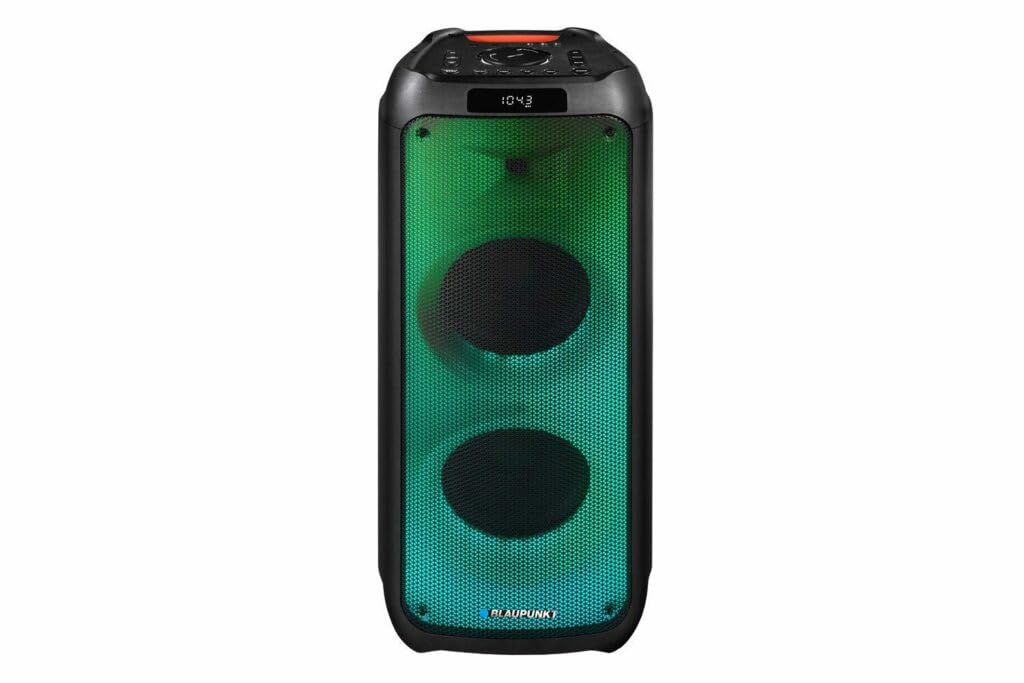
आकृती 1: समोर view of the Blaupunkt PB10DB speaker, showcasing the dual speaker grilles and dynamic LED lighting. The top panel features a display and control buttons.

आकृती 2: टोकदार view of the Blaupunkt PB10DB speaker, highlighting its portable design and the side profile.
Controls and Ports (Typical Layout)
- पॉवर बटण: स्पीकर चालू/बंद करते.
- मोड बटण: Switches between Bluetooth, USB, AUX, and FM radio modes.
- आवाज नियंत्रण: मास्टर व्हॉल्यूम समायोजित करते.
- प्ले/पॉज बटण: मीडिया प्लेबॅक नियंत्रित करते.
- मागील/पुढील ट्रॅक बटणे: ट्रॅकमधून नेव्हिगेट करते.
- मायक्रोफोन इनपुट (MIC IN): For connecting a wired microphone for karaoke.
- यूएसबी पोर्ट: For playing music from a USB drive or charging external devices.
- AUX इनपुट (३.५ मिमी): For connecting external audio devices via an audio cable.
- चार्जिंग पोर्ट: For connecting the power adapter to charge the speaker.
5. सेटअप
३.१ स्पीकर चार्ज करणे
- Connect the provided power adapter to the charging port on the speaker.
- अडॅप्टरला योग्य पॉवर आउटलेटमध्ये प्लग करा.
- स्पीकर चार्ज होत आहे हे दाखवण्यासाठी चार्जिंग इंडिकेटर लाइट प्रकाशित होईल (रंग बदलू शकतो).
- एकदा पूर्णपणे चार्ज झाल्यावर, इंडिकेटर लाईटचा रंग बदलू शकतो किंवा तो बंद होऊ शकतो. चार्जर डिस्कनेक्ट करा.
A full charge typically takes several hours and provides approximately 8 hours of playback time.
5.2 पॉवरिंग चालू/बंद
- चालू करण्यासाठी: Press and hold the Power button for a few seconds until the display lights up and you hear an audible prompt.
- पॉवर ऑफ करण्यासाठी: Press and hold the Power button again for a few seconds until the display turns off and you hear an audible prompt.
6. ऑपरेटिंग सूचना
6.1 ब्लूटूथ पेअरिंग
- Ensure the speaker is powered on and in Bluetooth mode. If not, press the Mode button until "Bluetooth" or a similar indicator appears on the display. The speaker will enter pairing mode, indicated by a flashing Bluetooth icon or LED.
- तुमच्या मोबाईल डिव्हाइसवर (स्मार्टफोन, टॅबलेट इ.), ब्लूटूथ सक्षम करा आणि उपलब्ध डिव्हाइस शोधा.
- Select "Blaupunkt PB10DB" from the list of found devices.
- Once paired, the speaker will emit an audible confirmation, and the Bluetooth indicator will stop flashing.
- तुम्ही आता तुमच्या डिव्हाइसवरून स्पीकरद्वारे ऑडिओ प्ले करू शकता.
चालू केल्यावर स्पीकर शेवटच्या जोडलेल्या डिव्हाइसशी स्वयंचलितपणे पुन्हा कनेक्ट करण्याचा प्रयत्न करेल.
५.४ कराओके फंक्शन
- Connect a wired microphone (not always included) to the MIC IN port on the speaker.
- Ensure the microphone is switched on (if it has a power switch).
- Play your desired karaoke track via Bluetooth, USB, or AUX.
- Adjust the microphone volume and echo effects (if available on the speaker) using the dedicated controls.
६.३ यूएसबी प्लेबॅक
- MP3 ऑडिओ असलेला USB फ्लॅश ड्राइव्ह घाला. fileयूएसबी पोर्टमध्ये एस.
- Press the Mode button to switch to USB mode. The speaker will automatically begin playing music from the USB drive.
- प्लेबॅक नियंत्रित करण्यासाठी प्ले/पॉज आणि मागील/पुढील ट्रॅक बटणे वापरा.
6.4 AUX इनपुट
- ३.५ मिमी ऑडिओ केबलचे एक टोक (समाविष्ट नाही) स्पीकरवरील AUX IN पोर्टशी जोडा.
- Connect the other end of the cable to the headphone jack or audio output of your external audio device.
- AUX मोडवर स्विच करण्यासाठी मोड बटण दाबा.
- Control playback and volume from your external audio device.
7. देखभाल
7.1 स्वच्छता
- Always power off the speaker and disconnect it from the power source before cleaning.
- स्पीकरचा बाहेरील भाग पुसण्यासाठी मऊ, कोरडे कापड वापरा.
- अपघर्षक क्लीनर, मेण किंवा सॉल्व्हेंट्स वापरू नका, कारण ते फिनिशला नुकसान पोहोचवू शकतात.
५.८.१ स्टोरेज
- स्पीकर थेट सूर्यप्रकाश आणि अति तापमानापासून दूर थंड, कोरड्या जागी ठेवा.
- जर जास्त काळ साठवत असाल तर बॅटरीची कार्यक्षमता राखण्यासाठी वेळोवेळी (उदा. दर ३ महिन्यांनी) बॅटरी चार्ज करा.
8. समस्या निवारण
| समस्या | संभाव्य कारण | उपाय |
|---|---|---|
| स्पीकर चालू होत नाही. | बॅटरी संपली आहे. | Charge the speaker using the provided power adapter. |
| स्पीकरमधून आवाज येत नाही. | आवाज खूप कमी किंवा म्यूट आहे. चुकीचा इनपुट मोड. | Increase volume. Press the Mode button to select the correct input (Bluetooth, USB, AUX). |
| ब्लूटूथ जोड्या अयशस्वी. | स्पीकर पेअरिंग मोडमध्ये नाही. डिव्हाइस खूप दूर आहे. हस्तक्षेप. | Ensure speaker is in Bluetooth pairing mode. Move device closer to speaker. Turn off other Bluetooth devices. |
| मायक्रोफोन काम करत नाहीये. | Microphone not connected properly or switched off. Microphone volume too low. | Check microphone connection. Ensure microphone is powered on. Adjust microphone volume. |
| USB प्लेबॅक काम करत नाही. | USB drive not formatted correctly or unsupported file प्रकार | Ensure USB drive is formatted to FAT32 and contains MP3 files. वेगळा USB ड्राइव्ह वापरून पहा. |
9. तपशील
| मॉडेलचे नाव: | PB10DB |
| ब्रँड: | BLAUPUNKT |
| कनेक्टिव्हिटी तंत्रज्ञान: | सहाय्यक, ब्लूटूथ, यूएसबी |
| जास्तीत जास्त स्पीकर आउटपुट पॉवर: | 1000 वॅट्स |
| ऑडिओ आउटपुट मोड: | स्टिरिओ |
| माउंटिंग प्रकार: | टेबल माउंट |
| साहित्य: | धातू आणि प्लास्टिक |
| स्पीकरचा प्रकार: | ट्वीटर |
| विशेष वैशिष्ट्य: | संगीत |
| शिफारस केलेले उपयोग: | For music player |
| रंग: | निळा |
| जलरोधक: | खरे |
| नियंत्रण पद्धत: | स्पर्श करा |
| Tweeter व्यास: | 4 सेंटीमीटर |
| सरासरी बॅटरी आयुष्य: | 8 तास |
| सुसंगत उपकरणे: | लॅपटॉप, स्मार्टफोन |
| उर्जा स्त्रोत: | बॅटरी पॉवर्ड |
| आयटम वजन: | 105 ग्रॅम |
| उत्पादनाचे परिमाण (L x W x H): | 24 x 69 x 2.5 सेमी |
10. हमी आणि समर्थन
Blaupunkt products are designed and manufactured to the highest quality standards. For detailed warranty information, please refer to the warranty card included with your product or visit the official Blaupunkt webसाइट
For technical support, troubleshooting assistance, or service inquiries, please contact Blaupunkt customer support through their official channels.
- अधिकृत Webसाइट: www.blaupunkt.com
- ग्राहक सेवा: Refer to your regional Blaupunkt webसंपर्क तपशीलांसाठी साइट.