
परिचय
This manual provides essential instructions for the safe and effective use of your Polaroid Now i-Type Instant Film Camera. The Polaroid Now camera offers a modern approach to instant photography, featuring an intuitive design and a unique autofocus dual-lens system. It is compatible with both i-Type and 600-type instant films. Please read this manual thoroughly before operating your camera.
बॉक्समध्ये काय आहे
अनबॉक्सिंग करताना, कृपया खालील सर्व वस्तू असल्याची खात्री करा:
- Polaroid Now Instant Film Camera (Black)
- Polaroid Color Golden Moments Edition Film (Double Pack, 16 photos total)
- यूएसबी चार्जिंग केबल
- मानेचा पट्टा
- TheImagingWorld Microfiber Cleaning Cloth
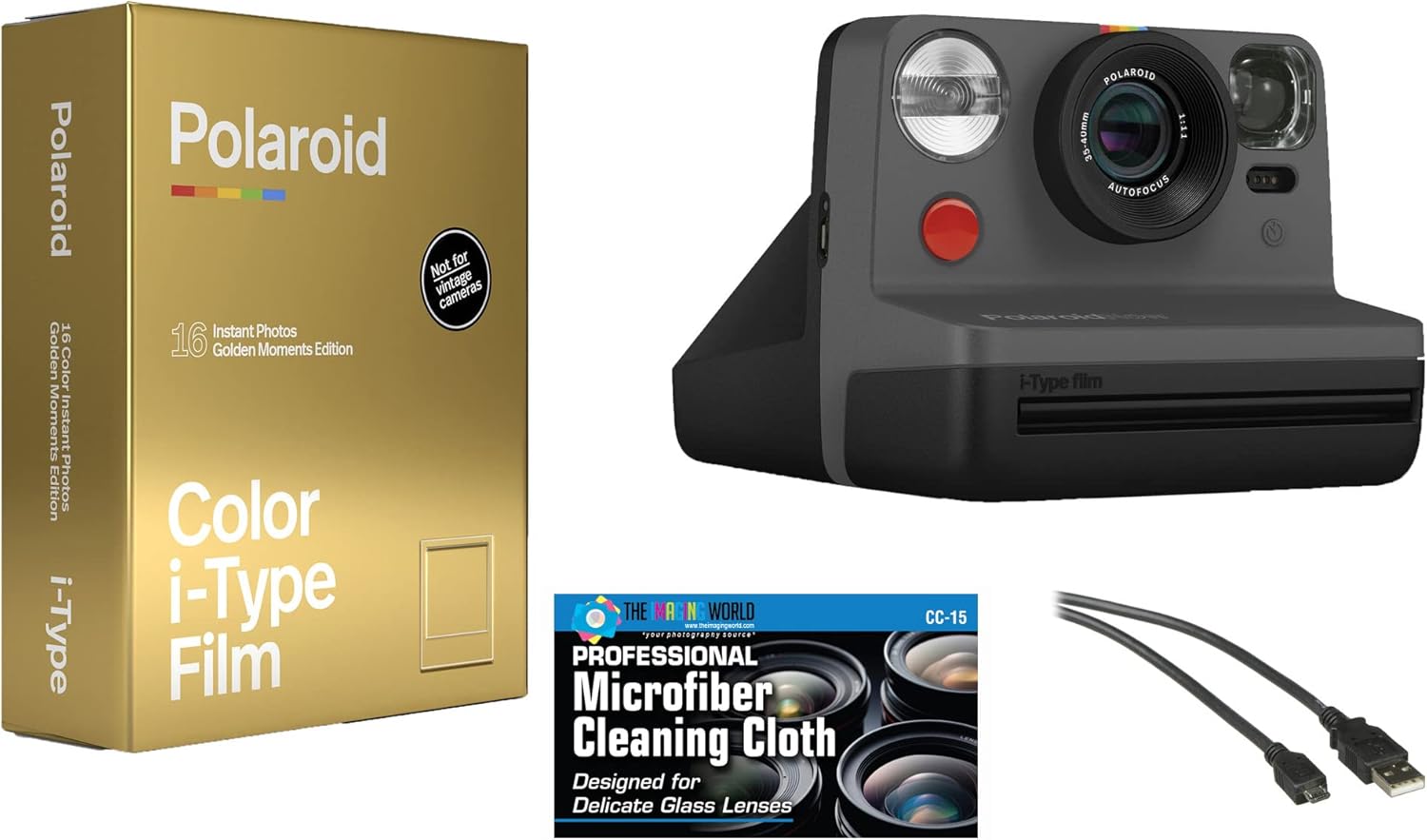
Image: Contents of the Polaroid Now i-Type Instant Film Camera bundle. This includes the black Polaroid Now camera, a box of Polaroid Color i-Type Golden Moments Edition film, a USB charging cable, a neck strap, and a microfiber cleaning cloth.
कॅमेरा संपलाview
Familiarize yourself with the main components of your Polaroid Now camera:
- लेन्स: Features a dual-lens autofocus system (35-40mm) for clear images from 1.8 feet to infinity.
- फ्लॅश: कमी प्रकाशाच्या परिस्थितीसाठी अंगभूत फ्लॅश.
- शटर बटण: Activates the shutter to take a photo.
- Viewशोधक: ऑप्टिकल viewfinder for framing your shots.
- फिल्म इजेक्शन स्लॉट: Where developed photos emerge.
- Film Door Latch: Releases the film door for loading film.
- पॉवर बटण: कॅमेरा चालू/बंद करतो.
- Self-Timer Button: Activates the self-timer function.
- Double Exposure Button: Enables taking two exposures on a single frame.
- बॅटरी इंडिकेटर: सध्याची बॅटरी पातळी दाखवते.
- यूएसबी चार्जिंग पोर्ट: For recharging the internal lithium-ion battery.
सेटअप
1. कॅमेरा चार्ज करणे
The Polaroid Now camera has a built-in rechargeable lithium-ion battery.
- Connect the included USB charging cable to the camera's USB port.
- केबलचे दुसरे टोक USB पॉवर अॅडॉप्टरमध्ये (समाविष्ट नाही) किंवा संगणकाच्या USB पोर्टमध्ये प्लग करा.
- The battery indicator light will show charging status. A full charge typically takes approximately 2 hours and provides enough power for about 15 packs of film.
३. फिल्म लोड करत आहे
The Polaroid Now camera is compatible with Polaroid i-Type and 600-type instant films.
- कॅमेरा बंद असल्याची खात्री करा.
- Press the film door latch to open the film compartment.
- Insert a new pack of Polaroid i-Type or 600 film with the darkslide facing up. Ensure the film pack is fully seated.
- Close the film door firmly. The darkslide will automatically eject. Do not pull the darkslide manually.
- The film counter display will show "8" (for a new pack of 8 photos).
टीप: The included Golden Moments Edition film is i-Type film. i-Type film does not contain a battery, relying on the camera's internal battery. 600-type film packs contain their own battery.
कॅमेरा चालवित आहे
५.२. फोटो काढणे
- पॉवर बटण दाबून कॅमेरा चालू करा.
- च्या माध्यमातून पहा viewतुमचा शॉट तयार करण्यासाठी फाइंडर.
- फोटो काढण्यासाठी शटर बटण पूर्णपणे दाबा.
- The photo will eject from the film slot. Place the photo face down on a flat surface to protect it from light during development. Development time varies by film type and temperature, typically 10-15 minutes.
2. Using the Flash
The flash is enabled by default.
- To disable the flash, press the Flash Button (usually a small lightning bolt icon). The flash indicator will turn off.
- To re-enable, press the Flash Button again.
- It is recommended to use the flash in most indoor situations and for outdoor shots in low light or to fill shadows.
3. Self-Timer Function
The self-timer allows you to be in your own photos.
- Press the Self-Timer Button (often indicated by a clock icon). The LED next to the button will light up.
- Frame your shot and press the Shutter Button.
- You will have approximately 9 seconds before the photo is taken. The LED will blink rapidly during the last few seconds.
4. Double Exposure
Create artistic effects by layering two images onto a single frame.
- Press the Double Exposure Button (often indicated by two overlapping squares). The LED next to the button will light up.
- Take your first photo. The LED will blink, indicating the camera is ready for the second exposure.
- Take your second photo. The combined image will then eject from the camera.
देखभाल
- लेन्स साफ करणे: Use the provided TheImagingWorld Microfiber Cleaning Cloth to gently wipe the lens. Avoid abrasive materials or harsh chemicals.
- रोलर्स साफ करणे: Periodically clean the film rollers to ensure even film development. Refer to the Polaroid webरोलर साफसफाईच्या तपशीलवार सूचनांसाठी साइट.
- स्टोरेज: Store your camera in a cool, dry place away from direct sunlight and extreme temperatures.
- बॅटरी काळजी: दीर्घकाळ साठवणुकीसाठी, बॅटरीची कार्यक्षमता राखण्यासाठी दर काही महिन्यांनी बॅटरी सुमारे ५०% पर्यंत चार्ज करा.
समस्यानिवारण
| इश्यू | संभाव्य कारण / उपाय |
|---|---|
| कॅमेरा चालू होत नाही | Battery may be depleted. Charge the camera using the USB cable. |
| Film not ejecting | Ensure film is loaded correctly. Check if the film pack is empty. Power cycle the camera. |
| फोटो खूप गडद/हलके आहेत. | Adjust lighting conditions. Ensure flash is used appropriately. Avoid shooting directly into bright light sources. |
| Photos have streaks or uneven development | Film rollers may be dirty. Clean the rollers as per maintenance instructions. Ensure film is stored correctly. |
| Camera LEDs blinking erratically | Refer to the official Polaroid support website for specific error codes or try resetting the camera by turning it off and on. |
तपशील
| वैशिष्ट्य | तपशील |
|---|---|
| मॉडेल क्रमांक | 9028 K3 |
| Film Compatibility | Polaroid i-Type and 600-type instant film |
| लेन्स | Autofocus, 35-40mm (dual lens system) |
| फोकसिंग रेंज | 1.8 ft (0.55m) to infinity |
| शटर प्रकार | इलेक्ट्रॉनिक |
| फ्लॅश | अंगभूत फ्लॅश |
| बॅटरी | Built-in 750mAh Lithium-Ion (rated for approx. 15 film packs) |
| विशेष वैशिष्ट्ये | Self-timer, Double Exposure mode, Optical Viewशोधक |
| परिमाण | २.९९ x २.९५ x १.७३ इंच (पॅकेज) |
| वजन | ९.६१ पौंड (वस्तू) |
| उत्पादक | The Imaging World |
हमी आणि समर्थन
For warranty information and customer support, please refer to the documentation provided with your purchase or visit the official website of Polaroid or The Imaging World. Keep your proof of purchase for any warranty claims.
For further assistance, you may contact the manufacturer, The Imaging World, directly.