
YUYTE Cimenn-GZP-124896736
YUYTE Digital Programmable Thermostat User Manual
Model: Cimenn-GZP-124896736
1. परिचय
Thank you for choosing the YUYTE Digital Programmable Thermostat. This manual provides essential information for the safe and efficient operation of your new thermostat. Please read it thoroughly before installation and use, and retain it for future reference.
2. सुरक्षितता माहिती
- Always disconnect power to the heating system before installing or servicing the thermostat.
- स्थापना पात्र इलेक्ट्रिशियन किंवा हीटिंग तंत्रज्ञांनी केली पाहिजे.
- थर्मोस्टॅटला पाणी किंवा जास्त आर्द्रतेच्या संपर्कात आणू नका.
- Keep out of reach of children to prevent misoperation.
- ध्रुवीयतेच्या खुणांनुसार बॅटरी योग्यरित्या घातल्या आहेत याची खात्री करा.
3. पॅकेज सामग्री
पॅकेजमध्ये सर्व वस्तू आहेत का ते तपासा:
- 1 x YUYTE Digital Programmable Thermostat
- १ x वापरकर्ता मॅन्युअल (हे दस्तऐवज)
- Mounting Screws (typically included)

Image: The YUYTE Digital Programmable Thermostat, its user manual, and mounting screws, as typically found in the product package.
4. उत्पादन संपलेview
4.1 वैशिष्ट्ये
- High reliability single-chip performance with strong anti-interference ability.
- अपघाती ऑपरेशन टाळण्यासाठी चाइल्ड लॉक फंक्शन.
- Data memory function retains settings during power failure.
- Holiday mode for comfortable temperatures when returning home.
- Easy operation with intuitive buttons for various working modes.
- Built-in product sensor.
- 0.5°C accuracy.
4.2 घटक

प्रतिमा: समोर view of the thermostat, showing the digital LCD display and the control buttons below it. The display shows room temperature, set temperature, time, and mode indicators.
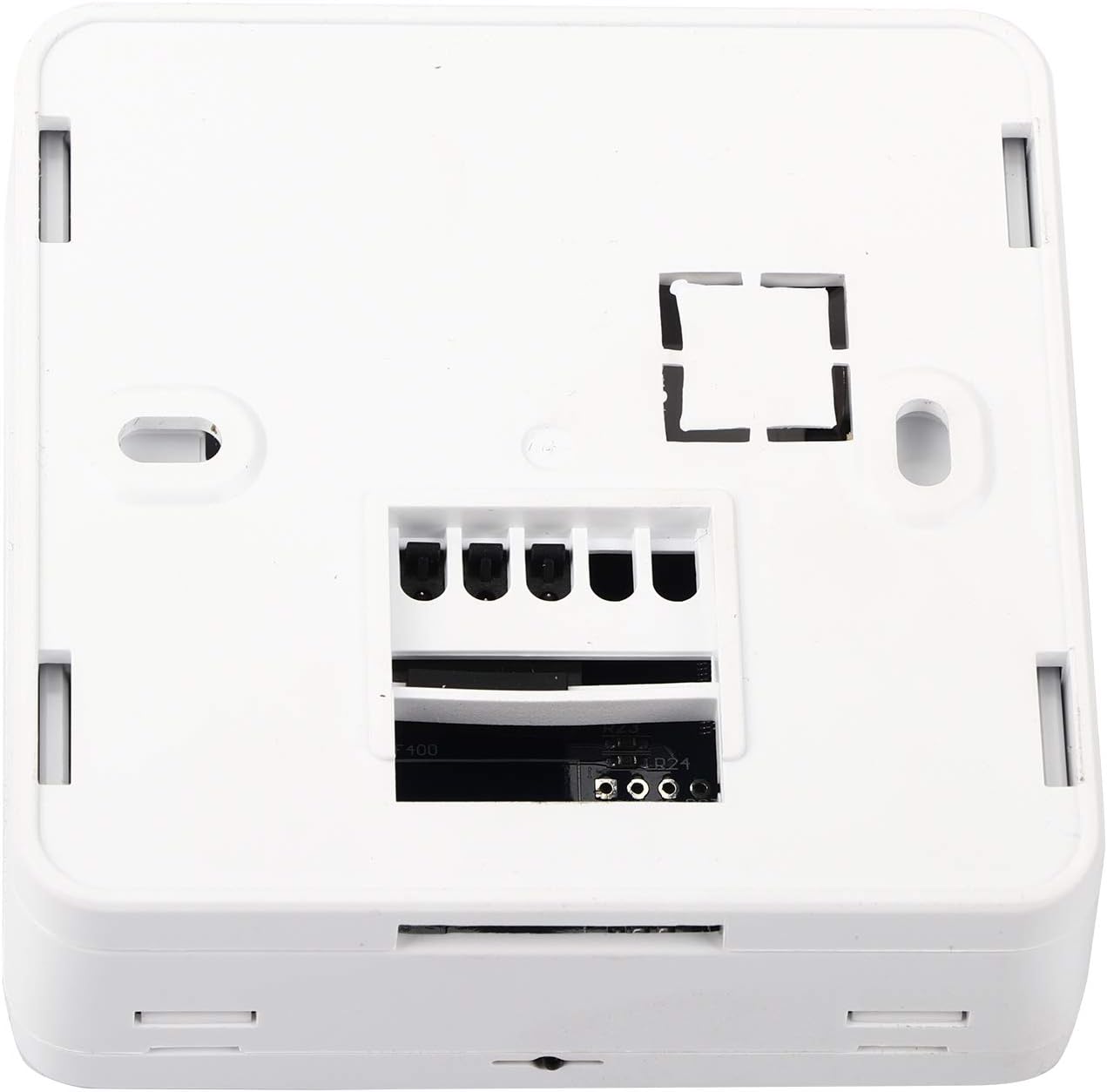
प्रतिमा: मागचा भाग view of the thermostat, revealing the wiring terminals for electrical connection to the heating system.
The thermostat features a clear LCD display for temperature and time, along with intuitive buttons for setting adjustments. The rear panel contains the necessary terminals for connecting to your heating system.
5. सेटअप आणि स्थापना
5.1 माउंटिंग स्थान
Choose a location on an interior wall, approximately 1.5 meters (5 feet) above the floor, away from direct sunlight, drafts, and heat sources (e.g., radiators, televisions). Ensure good air circulation around the thermostat.
5.2 वायरिंग सूचना
- वीज बंद: Before beginning, ensure the main power supply to your heating system is turned off at the circuit breaker.
- जुने थर्मोस्टॅट काढा (लागू असल्यास): Carefully disconnect and label the wires from your existing thermostat.
- माउंटिंग: Secure the thermostat base to the wall using the provided screws. The thermostat is designed for flat mounting and fits standard 86mm hidden boxes or 60mm European boxes.
- वायर कनेक्ट करा: Refer to the wiring diagram provided with your heating system and connect the wires to the appropriate terminals on the YUYTE thermostat. The thermostat is suitable for water heating systems (load current 3A) or boiler heating systems (capacity 5A).
- थर्मोस्टॅट जोडा: Once wiring is complete, carefully attach the front panel of the thermostat to its base.
- पॉवर चालू: Restore power to your heating system at the circuit breaker.

प्रतिमा: साइड प्रोfile of the thermostat, illustrating its compact design and how it sits against the wall after installation.
5.3 बॅटरी इंस्टॉलेशन
The thermostat requires 2 AA batteries (not included) for operation. Open the battery compartment, insert the batteries according to the polarity markings (+/-), and close the compartment. The display will illuminate upon successful battery installation.
6. ऑपरेटिंग सूचना
6.1 मूलभूत ऑपरेशन
Upon initial power-up or after battery replacement, the thermostat will display the current room temperature and time. Use the buttons below the display to navigate and adjust settings.

Image: Close-up of the thermostat's front panel, highlighting the digital display and the 'SET', 'OK', 'Up', and 'Down' arrow buttons for user interaction.
6.2 वेळ आणि दिवस सेट करणे
- दाबा सेट वेळ सेटिंग मोड प्रविष्ट करण्यासाठी बटण.
- वापरा Up आणि खाली arrow buttons to adjust the hour. Press OK पुष्टी करण्यासाठी.
- आठवड्याच्या दिवसासाठी आणि मिनिटांसाठी पुनरावृत्ती करा.
- दाबा OK to exit time setting mode.
6.3 तापमान सेट करणे
- सामान्य ऑपरेटिंग मोडमध्ये, वापरा Up आणि खाली arrow buttons to adjust the desired set-point temperature.
- The new setting will be automatically saved after a few seconds.
6.4 Programming Schedule (7-Day Cycle)
The thermostat allows for a programmable schedule, set per 1 week as a cycle. Detailed programming steps are typically found in the full manual, but generally involve:
- दाबा आणि धरून ठेवा सेट प्रोग्रामिंग मोडमध्ये प्रवेश करण्यासाठी बटण.
- वापरा सेट to cycle through different periods (e.g., morning, day, evening, night) for each day of the week.
- वापरा Up आणि खाली arrows to adjust the start time and desired temperature for each period.
- दाबा OK to confirm settings and move to the next period/day.
- दाबून प्रोग्रामिंग मोडमधून बाहेर पडा सेट until the normal display returns.
6.5 हॉलिडे मोड
Activate Holiday Mode to maintain a specific temperature for a set duration, ideal for when you are away. This feature ensures a comfortable temperature upon your return without needing to manually adjust settings daily.
- Press a specific button (refer to the full manual, often a dedicated 'Holiday' button or a combination of 'SET' and an arrow) to enter Holiday Mode settings.
- Set the desired temperature and the number of days for the holiday period.
- Confirm the settings. The thermostat will revert to its programmed schedule after the holiday period ends.
6.6 चाइल्ड लॉक फंक्शन
To prevent accidental changes to settings, the thermostat includes a child lock function. Typically, this is activated by pressing and holding two specific buttons simultaneously for a few seconds (e.g., 'Up' and 'Down' arrows). Repeat the action to unlock.
7. देखभाल
7.1 स्वच्छता
थर्मोस्टॅटचा बाहेरील भाग मऊ, ड ने पुसून टाका.amp कापड. अपघर्षक क्लीनर किंवा सॉल्व्हेंट्स वापरू नका, कारण ते फिनिश किंवा अंतर्गत घटकांना नुकसान करू शकतात.
7.2 बॅटरी बदलणे
When the battery indicator appears on the display, replace the 2 AA batteries promptly. Ensure the power to the heating system is off before opening the battery compartment. Dispose of old batteries responsibly.
8. समस्या निवारण
| समस्या | संभाव्य कारण | उपाय |
|---|---|---|
| प्रदर्शन रिक्त आहे | No power; dead batteries. | Check circuit breaker; replace batteries. |
| हीटिंग सिस्टम प्रतिसाद देत नाही | Incorrect wiring; system power off; thermostat in wrong mode. | Verify wiring connections; check heating system power; ensure thermostat is in heating mode. |
| तापमान वाचन चुकीचे आहे | Thermostat exposed to drafts or heat sources. | Relocate thermostat or shield it from external influences. |
| Settings cannot be changed | चाइल्ड लॉक सक्रिय आहे. | चाइल्ड लॉक निष्क्रिय करा (विभाग ४.५ पहा). |
समस्या कायम राहिल्यास, कृपया ग्राहक समर्थनाशी संपर्क साधा.
9. तपशील
| वैशिष्ट्य | तपशील |
|---|---|
| मॉडेल क्रमांक | Cimenn-GZP-124896736 |
| वीज पुरवठा | 2 x AA बॅटरी (समाविष्ट नाही) |
| Load Current (Water Heating) | 3A |
| Capacity (Boiler Heating) | 5A |
| तापमान प्रदर्शन श्रेणी | ५ - ३५°C |
| कार्यरत तापमान | ५ - ३५°C |
| अचूकता | ±0.5°C |
| Set-point Temperature Range | १५०°C - २१०°C |
| आउटपुट | रिले स्विच करा |
| प्रोब सेन्सर | NTC (10K, 1%) |
| चालू कार्यक्रम | सायकल म्हणून प्रति 1 आठवडा सेट करा |
| परिमाण | अंदाजे ८० x ४३ x ११९ सेमी (३१.५ x १७ x ४६.८ इंच) |
| वजन | अंदाजे 170 ग्रॅम (6 औंस) |
| साहित्य | एबीएस, प्लास्टिक |
| रंग | पांढरा |
| डिस्प्ले प्रकार | डिजिटल, मॅन्युअल |
| बॅकलाइट | होय |
10. हमी आणि समर्थन
10.1 हमी माहिती
YUYTE products are manufactured to high-quality standards. For specific warranty details, please refer to the warranty card included with your purchase or contact YUYTE customer service. Keep your purchase receipt as proof of purchase.
10.2 ग्राहक समर्थन
If you have any questions, require technical assistance, or encounter issues not covered in this manual, please contact YUYTE customer support. Visit the official YUYTE store on Amazon for more information: YUYTE Store.
Ask a question about this manual
Ask about setup, troubleshooting, compatibility, parts, safety, or missing instructions. Manuals+ will review the question and use this page’s manual context to help answer it.