
1. परिचय
खरेदी केल्याबद्दल धन्यवाद.asing the BONSEN S3101 Cross-Cut Paper Shredder. This manual provides important information regarding the safe operation, setup, maintenance, and troubleshooting of your shredder. Please read this manual thoroughly before using the product and retain it for future reference.

Image 1.1: The BONSEN S3101 Cross-Cut Paper Shredder, a compact device designed for home and office document destruction.
2. महत्त्वाच्या सुरक्षितता सूचना
To reduce the risk of injury or damage, please observe the following safety precautions:
- लहान मुले आणि पाळीव प्राणी यांना श्रेडरपासून दूर ठेवा.
- Keep loose clothing, jewelry, hair, and other foreign objects away from the paper entry slot.
- Do not insert fingers or hands into the paper entry slot.
- वापरात नसताना किंवा साफ करण्यापूर्वी श्रेडर अनप्लग करा.
- Do not shred metal objects, adhesive labels, or wet paper.
- Ensure the shredder head is correctly positioned on the wastebasket for operation. The shredder will not operate if not properly assembled.
- जर पॉवर कॉर्ड खराब झाली असेल तर श्रेडर चालवू नका.
- Avoid placing the shredder near heat sources or in humid environments.
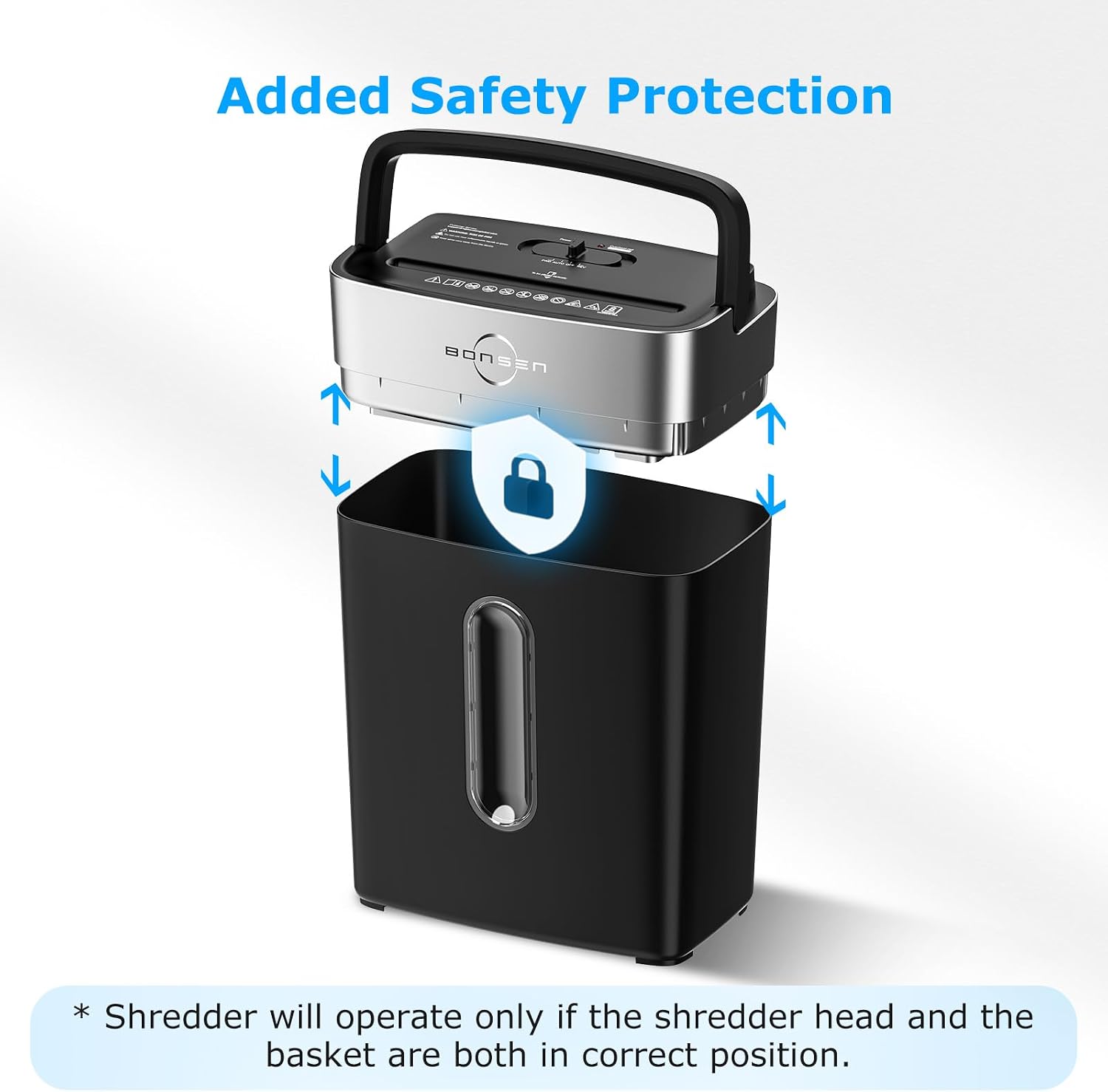
Image 2.1: The shredder features an added safety protection mechanism, ensuring operation only when the shredder head is correctly seated on the wastebasket.
3. उत्पादन घटक
The BONSEN S3101 shredder consists of the following main components:
- Shredder Head (with paper entry slot, control switch, and LED indicators)
- 4-Gallon Wastebasket
- Lift-Off Handle (integrated into the shredder head)
- पॉवर कॉर्ड

Image 3.1: The BONSEN S3101 shredder with its dimensions: 12.09 inches (L) x 7.44 inches (W) x 15.40 inches (H), illustrating its compact design suitable for home or small office use.
4. सेटअप
- Unpack the shredder and all components from the packaging.
- Place the shredder head securely onto the 4-gallon wastebasket. Ensure it is properly aligned and seated to activate the safety interlock.
- Position the shredder on a flat, stable surface.
- पॉवर कॉर्डला मानक इलेक्ट्रिकल आउटलेटमध्ये प्लग करा.
5. ऑपरेशन
5.1 Control Switch Functions
The shredder features a 4-mode control switch located on the top of the shredder head:
- एफडब्ल्यूडी (फॉरवर्ड): Manually feeds paper forward. Useful for clearing minor jams.
- ऑटो (स्वयंचलित): The shredder will automatically start when paper is detected in the entry slot and stop when shredding is complete. This is the recommended setting for normal operation.
- बंद: श्रेडर बंद करतो.
- REV (उलट): Manually reverses the shredder blades. Useful for clearing paper jams.
Image 5.1: Close-up of the shredder's control switch, showing the Forward, Auto, Off, and Reverse settings, along with Power On (green) and Overheat (red) LED indicators.
5.2 Shredding Documents
- Ensure the shredder is plugged in and the control switch is set to ऑटो. The green Power LED should be illuminated.
- Insert up to 8 sheets of 20 lb. bond paper into the paper entry slot. The shredder will automatically begin shredding.
- For credit cards, insert one card at a time into the designated slot.
- The shredder can also handle small paper clips and staples.
- The shredder has a continuous run time of up to 5 minutes. After this period, a 30-minute cool-down period is required to prevent overheating.

Image 5.2: The shredder's capability to shred up to 8 sheets of paper, junk mail, credit cards, staples, and small paper clips.

Image 5.3: An illustration indicating the shredder's 5-minute continuous run time before requiring a cool-down period.
6. देखभाल
6.1 Emptying the Wastebasket
When the wastebasket is full, the shredder will stop operating. To empty it:
- Ensure the shredder is turned बंद आणि अनप्लग केले.
- Use the lift-off handle to carefully remove the shredder head from the wastebasket.
- Empty the shredded contents from the 4-gallon wastebasket.
- Replace the shredder head securely onto the wastebasket.

Image 6.1: The shredder head being lifted off the 4-gallon wastebasket, demonstrating the easy emptying process.
५.२ स्वच्छता आणि स्नेहन
- Clean the exterior of the shredder with a soft, dry cloth. Do not use abrasive cleaners or solvents.
- Regularly lubricate the shredder blades with shredder oil sheets or liquid shredder oil (sold separately) to maintain optimal performance and extend the life of the shredder. Follow the instructions provided with the lubricant.
7. समस्या निवारण
| समस्या | संभाव्य कारण | उपाय |
|---|---|---|
| श्रेडर सुरू होत नाही. |
|
|
| पेपर जाम. |
|
|
| ऑपरेशन दरम्यान श्रेडर थांबतो. |
|
|

Image 7.1: The LED indicators for Power (green) and Overheat (red). A red light indicates the shredder needs to cool down for 30 minutes.

Image 7.2: Visual guide for clearing a paper jam using the reverse function and reducing the paper load.
8. तपशील
- मॉडेल: S3101
- श्रेडर प्रकार: क्रॉस-कट
- सुरक्षा स्तरः पी-4
- श्रेडिंग क्षमता: 8 sheets (20 lb. bond paper), 1 credit card
- सतत धावण्याची वेळ: 5 मिनिटे
- थंड होण्याची वेळ: 30 मिनिटे
- कचरापेटी क्षमता: 4 Gallons (approximately 210 shredded sheets)
- Acceptable Materials: Paper, credit cards, staples, small paper clips
- उत्पादनाचे परिमाण (L x W x H): 12.09 x 7.44 x 15.40 इंच
- आयटम वजन: 7.9 पाउंड
- प्रमाणपत्रे: ETL

Image 8.1: The shredder's P-4 security level, indicating a high level of document security with cross-cut shred size of 13/64" x 45/64" (5 x 18 mm).
9. हमी आणि समर्थन
BONSEN provides professional customer service for the S3101 paper shredder. For any questions, concerns, or support needs, please refer to the contact information provided with your product or visit the official BONSEN webसाइट
कोणत्याही वॉरंटी दाव्यांसाठी खरेदीचा पुरावा म्हणून कृपया तुमची खरेदी पावती जपून ठेवा.