
परिचय
This manual provides essential information for the DIYthinker Sunshine Sun Hand Painting Orange Keycap. This PBT keycap is designed to enhance the aesthetic and tactile experience of your mechanical keyboard. It features an OEM profile and is made from durable, oil-resistant PBT material, ensuring a long-lasting and vibrant addition to your setup.
उत्पादन संपलेview
The DIYthinker Sunshine Sun Keycap is a single, high-quality PBT keycap designed for mechanical keyboards. It features a unique hand-painted orange sun design, adding a personalized touch to your gaming or work setup.
प्रमुख वैशिष्ट्ये:
- OEM प्रोfile: Designed to fit standard mechanical keyboards with an OEM profile.
- टिकाऊ पीबीटी साहित्य: Made from textured, high-grade PBT for enhanced durability and resistance to shine buildup over time.
- अद्वितीय डिझाइन: Features a hand-painted orange sun motif for aesthetic customization.
- बहुमुखी वापर: Suitable for gaming, decoration, or general keyboard enhancement.
पॅकेज सामग्री:
- 1 x DIYthinker Sunshine Sun Hand Painting Orange Keycap
Note: Keyboard and keycap puller tool are not included.
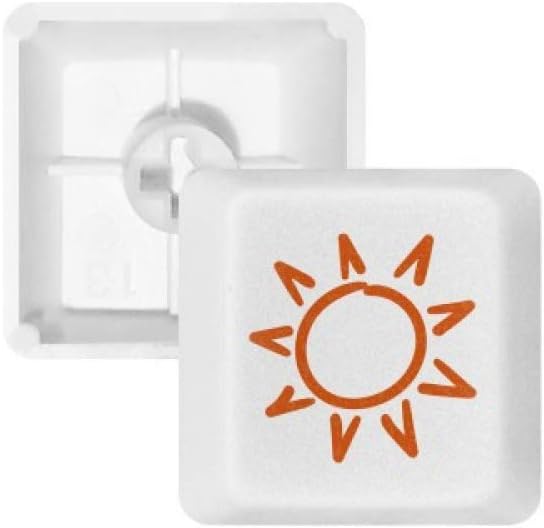
Figure 1: The DIYthinker Sunshine Sun Hand Painting Orange Keycap, showcasing its unique design and PBT material.
सेटअप आणि स्थापना
Installing the DIYthinker keycap is a straightforward process. Ensure your keyboard is powered off before beginning installation.
स्थापनेसाठी पायऱ्या:
- Identify Keycap Size: The keycap is available in R1, R2, R3, and R4 profiles. Refer to the "Size Option" and "OEM Size" diagrams to determine the correct row for your specific keycap. The current product is R4.
- Remove Existing Keycap (if applicable): Gently pull the existing keycap straight up using a keycap puller tool (not included) or by hand. Avoid wiggling excessively to prevent damage to the switch stem.
- Align New Keycap: Align the stem of the DIYthinker keycap with the cross-shaped stem on your mechanical keyboard switch.
- खाली दाबा: Apply gentle, even pressure until the keycap is fully seated on the switch. You should feel a slight click or resistance as it locks into place.

Figure 2: Diagram illustrating the different keycap profiles (R1, R2, R3, R4) and their typical placement on a standard mechanical keyboard layout. This helps in selecting the correct keycap for a specific row.

Figure 3: Diagram showing the OEM dimensions for R1, R2, R3, and R4 keycaps, including height and width measurements (e.g., 12mm height, 18mm width for R4). This provides precise size information for compatibility.
ऑपरेटिंग सूचना
Once installed, the DIYthinker keycap functions identically to any other keycap on your mechanical keyboard. It provides a durable and aesthetically pleasing surface for typing and gaming.
- Press the keycap to actuate the underlying mechanical switch.
- The PBT material offers a textured feel and resistance to wear.
देखभाल
Proper care will ensure the longevity and appearance of your DIYthinker keycap.
- स्वच्छता: मऊ वापरा, डीamp cloth to wipe the keycap. For deeper cleaning, remove the keycap and wash it gently with mild soap and water. Ensure it is completely dry before re-installing.
- कठोर रसायने टाळा: Do not use abrasive cleaners or solvents, as these can damage the PBT material or the painted design.
- Oil-Resistant: The PBT material is inherently oil-resistant, reducing the likelihood of shiny spots from finger oils over time.
समस्यानिवारण
Most issues with a single keycap are related to installation or compatibility.
| समस्या | संभाव्य कारण | उपाय |
|---|---|---|
| Keycap does not fit or is loose. | Incorrect keycap profile (R1, R2, R3, R4) for the intended row, or switch stem damage. | Verify the keycap's R-profile matches the keyboard row. Ensure the switch stem is not bent or damaged. Gently press down firmly to seat the keycap. |
| Keycap feels wobbly. | Not fully seated on the switch stem. | Remove and re-install the keycap, ensuring it is pressed down firmly and evenly until it clicks into place. |
| Design appears faded or damaged. | Exposure to harsh chemicals or excessive abrasion. | Avoid using abrasive cleaners. The design is hand-painted and durable under normal use. |
तपशील
| विशेषता | तपशील |
|---|---|
| ब्रँड | DIYthinker |
| मॉडेल क्रमांक | y01166501b1027531f47444-R4 |
| ASIN | B08DFSY7KN |
| साहित्य | पॉलीब्युटीलीन टेरेफ्थालेट (PBT) |
| कीकॅप प्रोfile | OEM (R4 for this specific model) |
| रंग | MultiColor (Orange sun design on white keycap) |
| सुसंगत साधने | यांत्रिक कीबोर्ड |
| वर्गीकरण | Keycap, Gaming, Decoration |
| पॅकेजचे प्रमाण | 1 x Keycap |
| प्रथम उपलब्ध तारीख | ५ जुलै २०२४ |
हमी आणि समर्थन
Specific warranty information for this product is not provided in the available data. For any product-related inquiries, support, or warranty claims, please contact the manufacturer, DIYlab, or the retailer from whom the product was purchased.
तुम्ही येथे देखील भेट देऊ शकता DIYthinker Store on Amazon अधिक माहितीसाठी.