
1. परिचय
This manual provides comprehensive instructions for the setup, operation, and maintenance of your XPPen AC41 Drawing Tablet Stand. Please read this manual thoroughly before using the product to ensure proper functionality and longevity.

Image 1: XPPen AC41 Drawing Tablet Stand (folded)
2. उत्पादनाची वैशिष्ट्ये
- Constructed from durable ABS and glass fiber for a lightweight and portable design.
- Measures 330.15mm x 223.17mm, compatible with XPPen Artist 15.6 Pro, Artist 15.6 Pro V2, Artist Pro 14/16 Gen2 Drawing Tablets, and other tablets 15.6 inches or smaller.
- Features non-slip pads on both the surface and bottom to prevent movement and enhance stability during use.
- Designed to provide an optimal viewing and drawing angle, reducing neck and shoulder strain.
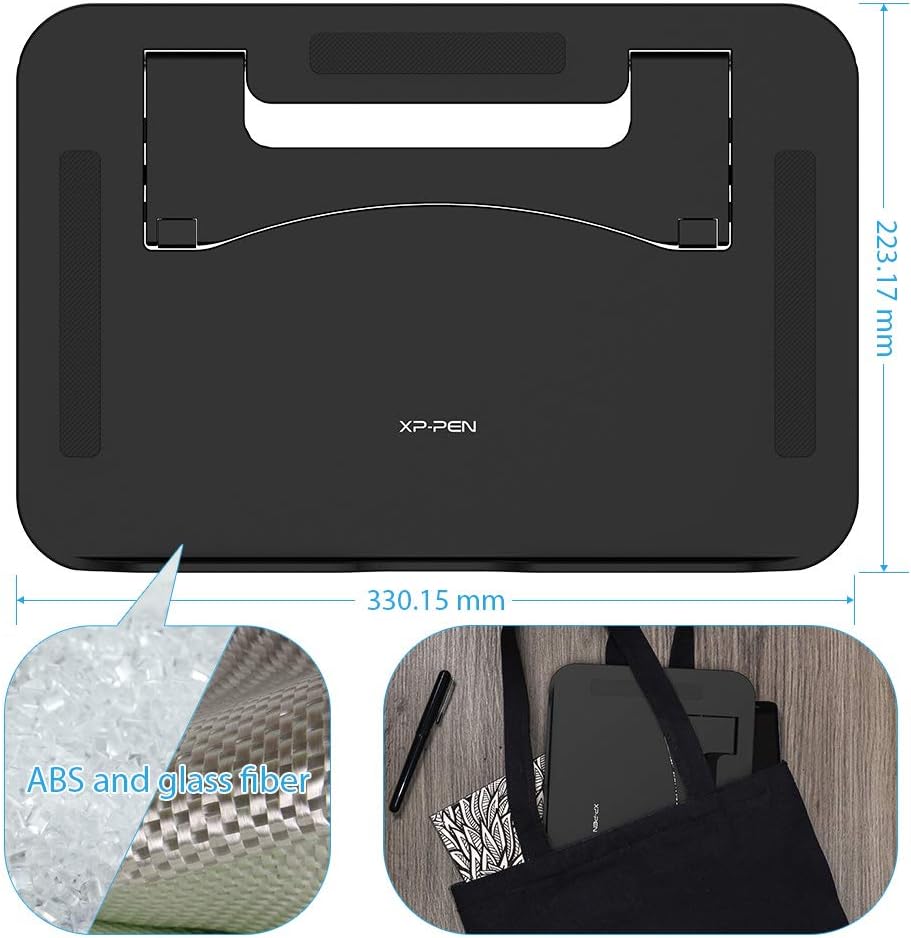
Image 2: Dimensions and Material Composition
४. सेटअप सूचना
Follow these steps to set up your XPPen AC41 Drawing Tablet Stand:
- स्टँड एका सपाट, स्थिर पृष्ठभागावर ठेवा.
- Locate the support plate on the underside of the stand.
- Press down on the designated areas (marked 'PUSH' if visible) and pull the support plate back until it locks into a 90-degree position, providing stable support.
- Ensure the support plate is fully extended and securely locked.
- Carefully place your compatible drawing tablet onto the stand. The non-slip pads will help secure the tablet.
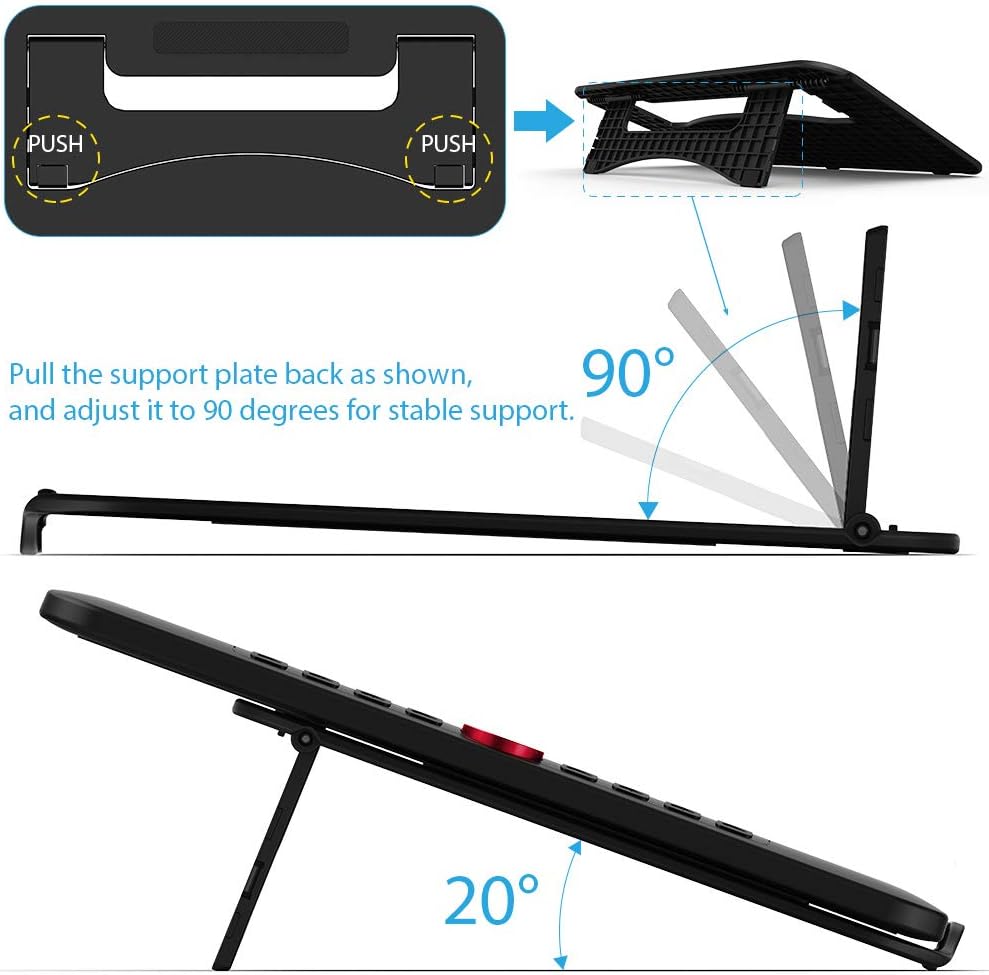
Image 3: Stand Unfolding and Angle

Image 4: Non-Slip Pad Details
4. ऑपरेशन
Once the stand is set up and your tablet is placed on it, you can begin your creative work. The stand provides a fixed, ergonomic angle designed for comfortable drawing and viewing
- Ensure your tablet is centered on the stand for optimal balance.
- The non-slip surface will help keep your tablet in place during use.
- The fixed angle is engineered to reduce physical discomfort during extended use.

Image 5: Placing Tablet on Stand

Image 6: Tablet in Use on Stand
5. काळजी आणि देखभाल
To maintain the condition and functionality of your AC41 stand:
- स्वच्छता: Wipe the stand with a soft, slightly damp cloth. Avoid using harsh chemicals, abrasive cleaners, or solvents, as these can damage the material.
- वाळवणे: Ensure the stand is completely dry before placing any electronic devices on it.
- स्टोरेज: When not in use, fold the stand flat for compact storage. Store in a cool, dry place away from direct sunlight.
6. समस्या निवारण
If you encounter any issues with your AC41 stand, refer to the following common solutions:
- Stand not stable:
Ensure the support plate is fully extended and securely locked into the 90-degree position. Verify that the tablet is placed centrally on the stand and is within the recommended size and weight limits. - Tablet sliding on the stand:
Check that the non-slip pads on both the stand's surface and bottom are clean and free from dust or debris. Clean them gently with a damp cloth if necessary. Ensure your tablet's surface that contacts the stand is also clean. - घडी घालण्यात/उघडण्यात अडचण:
Apply gentle, even pressure when pressing the release mechanism and pulling the support plate. Do not force the mechanism. If resistance persists, check for any obstructions.
7. तांत्रिक तपशील
| वैशिष्ट्य | तपशील |
|---|---|
| मॉडेल क्रमांक | AC41 |
| उत्पादन परिमाणे | 12.99 x 8.78 x 0.39 inches (330.15mm x 223.17mm) |
| आयटम वजन | 10.6 औंस |
| साहित्य | ABS and Glass Fiber |
| रंग | काळा |
| सुसंगत साधने | XPPen Artist 12, Artist 12 Pro, Artist 13.3 Pro, Artist 15.6 Pro, Artist 13.3 Pro V2, Artist 15.6 Pro V2, Artist Pro 14/16 Gen2 Drawing Tablets, and other tablets 15.6 inches or less. |
8. हमी आणि समर्थन
For detailed warranty information, technical assistance, or customer support regarding your XPPen AC41 Drawing Tablet Stand, please visit the official XP-Pen webसाइटवर जा किंवा त्यांच्या ग्राहक सेवा विभागाशी थेट संपर्क साधा.
तुम्हाला अधिक माहिती आणि संपर्क तपशील येथे मिळू शकतात XP-Pen Official Store.