
SONDPEX RUSXi167
SDX Audio Bluetooth Car Stereo Receiver User Manual
Model: RUSXi167
Brand: SONDPEX
परिचय
This manual provides comprehensive instructions for the installation, operation, and maintenance of your SDX Audio Bluetooth Car Stereo Receiver. Please read this manual thoroughly before using the product to ensure proper function and to prevent damage. Keep this manual for future reference.
सुरक्षितता माहिती
सुरक्षित ऑपरेशन सुनिश्चित करण्यासाठी आणि नुकसान टाळण्यासाठी, खालील खबरदारी पाळा:
- गाडी चालवण्यापासून तुमचे लक्ष विचलित होईल अशा पद्धतीने युनिट चालवू नका. रस्ता सुरक्षेला नेहमीच प्राधान्य द्या.
- Ensure proper wiring and connections to avoid short circuits or electrical hazards. Consult a professional if unsure about installation.
- Do not expose the unit to extreme temperatures, direct sunlight, or excessive moisture.
- Avoid disassembling or modifying the unit. This may void the warranty and pose safety risks.
- Keep the volume at a level that allows you to hear external sounds, such as emergency vehicles.
पॅकेज सामग्री
पॅकेजमध्ये सर्व वस्तू आहेत का ते तपासा:
- SDX Audio Bluetooth Car Stereo Receiver Unit
- वायरिंग हार्नेस
- Mounting Hardware (Screws, Brackets)
- रिमोट कंट्रोल
- वापरकर्ता मॅन्युअल (हा दस्तऐवज)
उत्पादन संपलेview
Familiarize yourself with the main components and controls of your car stereo receiver.

आकृती 1: Front panel of the SDX Audio Bluetooth Car Stereo Receiver. This image displays the main unit with its digital LCD display, two rotary knobs on either side, and various control buttons below the display. A USB port is visible on the left, and an AUX-in port on the right. The model number RUSXi167 is printed on the right side of the display.
फ्रंट पॅनल नियंत्रणे:
- पॉवर/व्हॉल्यूम नॉब: Turn to adjust volume, press to power on/off.
- मोड बटण: Cycles through available audio sources (FM, Bluetooth, USB, AUX).
- Band/APS Button: In FM mode, selects radio band (FM1, FM2, FM3) or performs automatic preset scanning.
- Play/Pause/Preset Buttons (1-6): Controls playback for USB/Bluetooth, or selects preset radio stations.
- पुढे/मागे बटणे: Skips tracks or tunes radio frequencies.
- DIS/Clock Button: Displays clock or other information.
- USB Port (Charging): Dedicated USB port for charging mobile devices (5V/1.5A output).
- USB Port (MP3 Playback): Dedicated USB port for MP3 music playback from a USB drive.
- AUX-In Jack: बाह्य ऑडिओ उपकरणांसाठी ३.५ मिमी इनपुट.
- अंगभूत मायक्रोफोन: हँड्स-फ्री कॉलिंगसाठी.
सेटअप आणि स्थापना
Proper installation is crucial for optimal performance. If you are not familiar with car audio wiring, it is recommended to seek professional assistance.
वायरिंग आकृती:
Refer to the provided wiring harness for connections. Common connections include:
- पिवळा वायर: स्थिर १२ व्ही (बॅटरी)
- लाल वायर: Switched 12V (Ignition/ACC)
- काळी वायर: ग्राउंड
- निळा वायर: पॉवर अँटेना/Amplifier Remote Turn-on
- स्पीकर वायर: Typically color-coded (e.g., White/White-Black for Front Left, Gray/Gray-Black for Front Right, Green/Green-Black for Rear Left, Purple/Purple-Black for Rear Right).
स्थापना चरण:
- इलेक्ट्रिक शॉर्ट्स टाळण्यासाठी वाहनाचे निगेटिव्ह बॅटरी टर्मिनल डिस्कनेक्ट करा.
- Remove the existing car stereo unit from the dashboard.
- Connect the SDX Audio receiver's wiring harness to your vehicle's wiring harness, matching colors and functions. Use crimp connectors or solder for secure connections.
- ऍन्टीना केबलला रिसीव्हरशी जोडा.
- Slide the receiver into the dashboard opening and secure it using the provided mounting hardware.
- वाहनाचे निगेटिव्ह बॅटरी टर्मिनल पुन्हा कनेक्ट करा.
- Test the unit's functions (power, radio, USB, Bluetooth, AUX, speaker output).

आकृती 2: The SDX Audio receiver seamlessly integrated into a classic car dashboard, demonstrating its compact and retro-compatible design. The unit's display shows "104.1" indicating FM radio mode.

आकृती 3: The SDX Audio receiver installed in a modern vehicle's dashboard, demonstrating its versatile fit across different car interiors. The display shows "104.1" indicating FM radio mode.
ऑपरेटिंग सूचना
मूलभूत ऑपरेशन:
- पॉवर चालू/बंद: युनिट चालू किंवा बंद करण्यासाठी व्हॉल्यूम नॉब दाबा.
- आवाज नियंत्रण: आवाजाची पातळी समायोजित करण्यासाठी व्हॉल्यूम नॉब फिरवा.
- मोड निवड: दाबा मोड button to cycle through available sources: FM Radio, Bluetooth Audio, USB Playback, AUX Input.
- घड्याळ प्रदर्शन: दाबा DIS button to display the current time.
एफएम रेडिओ ऑपरेशन:
- दाबा मोड until "FM" is displayed.
- दाबा BAND/APS to select FM1, FM2, or FM3 band.
- दाबा पुढे/मागे फ्रिक्वेन्सी मॅन्युअली ट्यून करण्यासाठी बटणे.
- दाबा आणि धरून ठेवा पुढे/मागे buttons for automatic seek tuning.
- स्टेशन साठवण्यासाठी: इच्छित स्टेशनवर ट्यून करा, नंतर प्रीसेट बटणांपैकी एक (१-६) दाबा आणि धरून ठेवा जोपर्यंत तुम्हाला बीप ऐकू येत नाही.
- To recall a preset station: Briefly press the corresponding preset button (1-6).

आकृती 4: The receiver's digital LCD display showing "87.5", indicating it is in FM Radio Mode and tuned to 87.5 MHz.
ब्लूटूथ ऑपरेशन:
- दाबा मोड until "BT" or "Bluetooth" is displayed. The unit will enter pairing mode.
- तुमच्या मोबाइल डिव्हाइसवर, ब्लूटूथ सक्षम करा आणि उपलब्ध डिव्हाइस शोधा.
- Select "SDX Audio" (or similar name) from the list. If prompted for a password, enter "0000".
- Once paired, you can stream audio from your device to the receiver.
- हँड्सफ्री कॉलिंग: When a call comes in, the unit will display "CALL". Press the उत्तर द्या button (green phone icon) to answer, or the कॉल समाप्त करा button (red phone icon) to reject/end.
यूएसबी प्लेबॅक:
- MP3 ऑडिओ असलेला USB फ्लॅश ड्राइव्ह घाला. files into the dedicated USB playback port.
- The unit will automatically switch to USB mode and begin playing the first compatible track.
- वापरा पुढे/मागे ट्रॅक वगळण्यासाठी बटणे.
- वापरा खेळा/विराम द्या प्लेबॅक थांबवण्यासाठी किंवा पुन्हा सुरू करण्यासाठी बटण.
- The unit supports Repeat, Random, and Intro playback modes (refer to specific button functions on the unit).

आकृती 5: एक क्लोज-अप view of the SDX Audio receiver's front panel, clearly labeling the "USB charging port" on the left and the "Music playback port" on the right. A smartphone is shown connected to the charging port, and a USB flash drive is inserted into the music playback port.
AUX इनपुट:
- Connect an external audio device (e.g., MP3 player, smartphone) to the 3.5mm AUX-In jack on the front panel using an audio cable.
- दाबा मोड until "AUX" is displayed.
- Audio from the connected device will now play through the car speakers. Control playback from the external device.
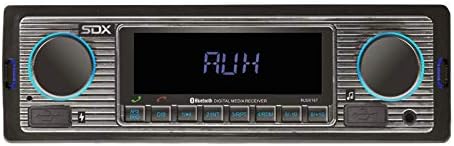
आकृती 6: The receiver's digital LCD display showing "AUX", indicating it is in Auxiliary Input Mode, ready to receive audio from an external device.
ध्वनी सेटिंग्ज:
- The unit features electronic control for Volume, Bass, Treble, Balance, and Fade.
- Preset EQ modes (FLAT, CLASSIC, ROCK, POP) are available for quick sound adjustments.
- Refer to the remote control or specific button combinations on the unit for accessing these settings.
देखभाल
To ensure the longevity and optimal performance of your SDX Audio receiver, follow these maintenance guidelines:
- स्वच्छता: समोरील पॅनल पुसण्यासाठी मऊ, कोरडे कापड वापरा. हट्टी घाणीसाठी, dampen the cloth slightly with water. Avoid using harsh chemicals, abrasive cleaners, or solvents.
- कनेक्शन: सर्व वायरिंग कनेक्शन सुरक्षित आणि गंजमुक्त आहेत याची खात्री करण्यासाठी वेळोवेळी तपासा.
- पर्यावरण: Avoid exposing the unit to extreme temperatures, high humidity, or direct sunlight for prolonged periods.
- यूएसबी पोर्ट: यूएसबी पोर्ट धूळ आणि कचऱ्यापासून मुक्त ठेवा.
समस्यानिवारण
If you encounter issues with your receiver, consult the following table before seeking professional service:
| समस्या | संभाव्य कारण | उपाय |
|---|---|---|
| शक्ती नाही | चुकीचे वायरिंग (पॉवर/ग्राउंड), फ्यूज फुटला, वाहनाच्या बॅटरीची समस्या. | Check all power and ground connections. Inspect the fuse on the unit's wiring harness and replace if necessary. Verify vehicle battery voltage. |
| आवाज नाही | Volume too low, Mute function active, incorrect speaker wiring, incorrect source selected. | Increase volume. Deactivate Mute. Check speaker connections. Ensure correct audio source (FM, BT, USB, AUX) is selected. |
| ब्लूटूथ कनेक्ट होत नाही | Unit not in pairing mode, device not discoverable, interference. | Ensure unit is in Bluetooth mode. Make sure Bluetooth is enabled on your mobile device and it's in pairing mode. Try restarting both devices. Clear previous pairings. |
| USB प्लेबॅक त्रुटी | असमर्थित file format, corrupted USB drive, drive too large. | खात्री करा files are in MP3 format. Try a different USB drive. Format the USB drive to FAT32. |
| खराब रेडिओ रिसेप्शन | अँटेना कनेक्ट केलेला नाही, अँटेना खराब झाला आहे, सिग्नल क्षेत्र कमकुवत आहे. | Check antenna connection. Inspect antenna for damage. Try tuning to stronger stations or move to an area with better signal. |
तपशील
| वैशिष्ट्य | तपशील |
|---|---|
| मॉडेल क्रमांक | RUSXi167 |
| उत्पादन परिमाणे | 8.5 x 6.4 x 3.1 इंच |
| आयटम वजन | 1 पाउंड |
| कनेक्टिव्हिटी तंत्रज्ञान | ब्लूटूथ, यूएसबी, सहाय्यक |
| आउटपुट पॉवर | 100W (25W x 4CH) |
| यूएसबी चार्जिंग आउटपुट | 5V/1.5A |
| एफएम रेडिओ प्रीसेट | 18 स्टेशन |
| डिस्प्ले प्रकार | डिजिटल एलसीडी |
| ईक्यू प्रीसेट्स | FLAT, CLASSIC, ROCK, POP |
| मायक्रोफोन | Built-in for Hands-free Calls |
हमी आणि समर्थन
For warranty information and technical support, please contact SONDPEX customer service. Details regarding warranty coverage and duration are typically provided with your purchase documentation or can be found on the official SONDPEX webसाइट
When contacting support, please have your product model number (RUSXi167) and purchase date available.
पुढील सहाय्यासाठी, भेट द्या SONDPEX Store on Amazon.
Ask a question about this manual
Ask about setup, troubleshooting, compatibility, parts, safety, or missing instructions. Manuals+ will review the question and use this page’s manual context to help answer it.