
Танилцуулга
Welcome to the HP OmniDesk M03 AI Desktop PC. This manual provides essential information for setting up, operating, maintaining, and troubleshooting your new computer. The HP OmniDesk M03 is designed for performance and efficiency, featuring an Intel Core Ultra 7 265 processor with dedicated AI cores, 16GB DDR5 RAM, and a 2TB NVMe SSD, running on Windows 11 Home.
Хайрцагт юу байна
Савлагаанд бүх бүрэлдэхүүн хэсгүүд байгаа эсэхийг шалгана уу:
- HP OmniDesk Desktop PC
- Утасгүй гар
- Хулгана
- Түргэн тохируулах гарын авлага
- Цахилгаан кабель

Image: The HP OmniDesk M03 desktop PC, wireless keyboard, mouse, and power cable, illustrating the contents of the product box.
Тохиргоо
1. Захын төхөөрөмжүүдийг холбох
Before powering on your PC, connect your monitor, keyboard, and mouse.
- Монитор: Connect your monitor to the PC using an HDMI or DisplayPort cable. The ports are located on the rear of the PC.
- Гар ба хулгана: The included keyboard and mouse are wireless. Insert batteries (if not pre-installed) and connect their USB receiver to an available USB port on the PC.
- Эрчим хүч: Connect the power cable to the PC's power input on the rear and then to a wall outlet.
- Сүлжээ (заавал биш): For a wired internet connection, connect an Ethernet cable from your router to the RJ45 port on the rear of the PC.

Image: Rear panel of the HP OmniDesk M03, highlighting the DisplayPort, HDMI, USB, and Ethernet ports for connecting external devices.

Зураг: хажуу тал view of the HP OmniDesk M03 AI Desktop PC, showing its compact tower design.
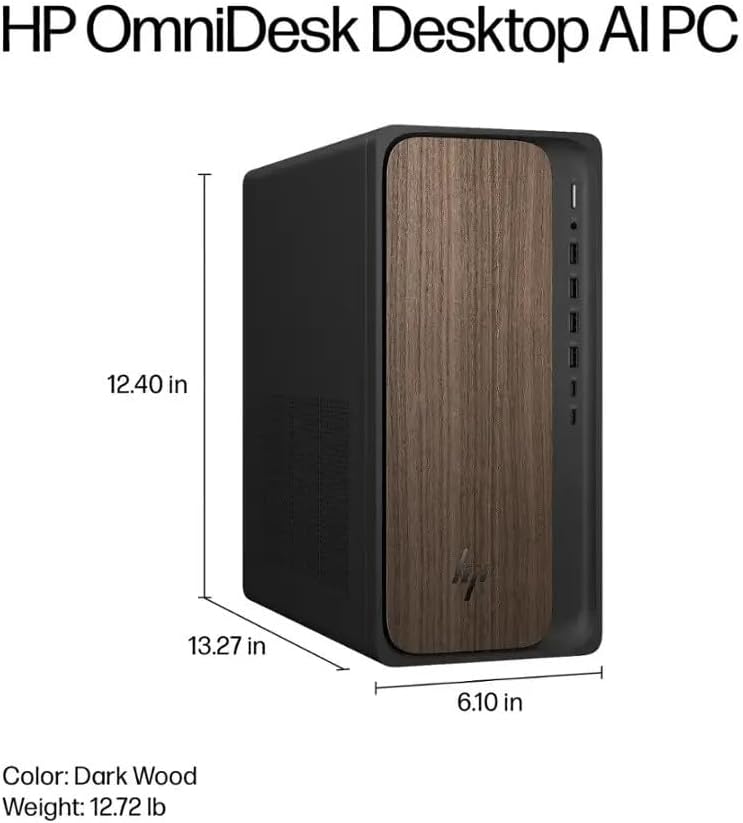
Image: Diagram illustrating the location and type of front and rear ports on the HP OmniDesk M03, including USB-A, USB-C, HDMI, DisplayPort, and audio jacks.
2. Асаалт ба анхны тохиргоо
Once all peripherals are connected:
- Компьютерийн урд талд байрлах асаах товчийг дарна уу.
- Follow the on-screen instructions to complete the Windows 11 Home initial setup, including language selection, network connection (if not wired), account creation, and privacy settings.

Зураг: Урд view of the HP OmniDesk M03, showing the power button at the top right and various USB ports below it.
Компьютерээ ажиллуулж байна
Windows 11 Нүүр хуудас
Your HP OmniDesk M03 comes pre-installed with Windows 11 Home. Familiarize yourself with the operating system's interface, Start menu, and settings. Microsoft provides extensive online resources for Windows 11 usage.
AI онцлог
The Intel Core Ultra 7 265 processor includes dedicated AI cores and Intel AI Boost, enhancing performance for AI-driven applications and features within Windows 11, such as AI Copilot. These features can assist with tasks, content creation, and system optimization.
Холболт
- Wi-Fi 6 (802.11ax): Connect to wireless networks for internet access. Manage Wi-Fi settings through the Windows 11 network settings.
- Bluetooth 5.4: Pair wireless devices such as headphones, speakers, or additional input devices. Access Bluetooth settings via the Windows 11 settings menu.
- Ethernet: For a stable, high-speed wired connection, ensure an Ethernet cable is connected to the RJ45 port.
Засвар үйлчилгээ
Cleaning Your PC
- Гадна: Зөөлөн, хөвөнгүй даавууг бага зэрэг хэрэглээрэй dampened with water or a mild cleaning solution to wipe down the exterior. Avoid harsh chemicals.
- Агааржуулалт: Агаарын урсгалыг хэвийн болгож, хэт халалтаас урьдчилан сэргийлэхийн тулд агааржуулалтын сараалжнаас тоосыг үе үе шахсан агаараар цэвэрлэж байгаарай.
- Портууд: Портуудыг тоос, хог хаягдалгүй байлга.
Програм хангамжийн шинэчлэлтүүд
Regularly update Windows 11 and device drivers to ensure optimal performance, security, and compatibility. Access Windows Update through the Settings menu.
Өгөгдлийн нөөцлөлт
Өгөгдөл алдагдахаас сэргийлэхийн тулд чухал өгөгдлөө гадаад диск эсвэл үүлэн хадгалалт руу тогтмол нөөцлөхийг зөвлөж байна.
Алдааг олж засварлах
Энэ хэсэгт танд тулгарч болох нийтлэг асуудлуудыг авч үзэх болно.
- Эрчим хүчгүй:
- Цахилгааны кабелийг компьютер болон ханын залгуурт найдвартай холбосон эсэхийг шалгаарай.
- Өөр төхөөрөмжийг залгаж, залгуур ажиллаж байгаа эсэхийг шалгана уу.
- Дэлгэц байхгүй:
- Check that the monitor is powered on and correctly connected to the PC via HDMI or DisplayPort.
- Дэлгэц дээрээ зөв оролтын эх үүсвэр сонгогдсон эсэхийг шалгаарай.
- Интернет холболт байхгүй:
- For Wi-Fi, check if the Wi-Fi adapter is enabled and if you are connected to the correct network with the right password.
- For wired connection, ensure the Ethernet cable is properly connected and your router is working.
- Гар/хулгана хариу өгөхгүй байна:
- Check battery levels for wireless devices.
- Ensure the USB receiver is plugged into a functional USB port.
- Try restarting the PC.
Илүү төвөгтэй асуудлуудын талаар HP дэмжлэгээс лавлана уу webсайт эсвэл харилцагчийн үйлчилгээтэй холбоо барина уу.
Үзүүлэлтүүд
Detailed technical specifications for the HP OmniDesk M03 AI Desktop PC:
| Бүрэлдэхүүн хэсэг | Тодорхойлолт |
| Процессор | Intel Core Ultra 7 265 (20-Core, up to 5.3 GHz, Intel AI Boost) |
| Үйлдлийн систем | Windows 11 Home (64 бит) |
| Санах ой (RAM) | 16GB DDR5 5600 МГц |
| Хадгалах | 2TB PCIe NVMe M.2 SSD |
| График | Нэгдсэн Intel график |
| Видео гаралт | 1x HDMI 2.1, 1x DisplayPort 1.4a |
| USB портууд (урд) | 2x USB-A 5Gbps, 2x USB-A 10Gbps, 1x USB-C 5Gbps, 1x USB-C 10Gbps |
| USB портууд (арын) | 4x USB 2.0 Type-A |
| Аудио портууд | 1x Headphone/Microphone Combo, 1x Line Input, 1x Line Output |
| Сүлжээ | Wi-Fi 6 (802.11ax), Bluetooth 5.4, Gigabit Ethernet (RJ45) |
| Хэмжээ (H x W x D) | 13.3" x 6.1" x 12.4" (33.8 см x 15.5 см x 31.5 см) |
| Жин | 11.77 фунт (5.34 кг) |

Image: Diagram showing the height (13.27 inches), width (6.10 inches), and depth (12.40 inches) of the HP OmniDesk M03 desktop PC.
Баталгаат болон дэмжлэг
Баталгаат хугацааны мэдээлэл
Your HP OmniDesk M03 AI Desktop PC comes with a 90 хоногийн хязгаарлагдмал баталгаат хугацаа. This warranty covers defects in materials and workmanship under normal use. For detailed terms and conditions, please refer to the warranty documentation included with your product or visit the official HP support webсайт.
Хэрэглэгчийн дэмжлэг
For technical assistance, troubleshooting, or warranty claims, please contact HP Customer Support:
- Онлайн дэмжлэг: Албан тушаалтанд зочилно уу HP дэмжлэг Webсайт драйверууд, гарын авлага, алдааг олж засварлах гарын авлагуудад зориулсан.
- Утасны дэмжлэг: Refer to the Quick Setup Guide or HP's webбүс нутгийн холбоо барих утасны сайт.
When contacting support, please have your product model (M03) and serial number ready.