
Motorola Moto g86 5G (XT2527-1)
Motorola Moto g86 5G хэрэглэгчийн гарын авлага
Model: Moto g86 5G (XT2527-1)
1. Танилцуулга
This user manual provides essential information for the safe and efficient operation of your Motorola Moto g86 5G smartphone. Please read this manual thoroughly before using your device to ensure optimal performance and to prevent damage.
The Motorola Moto g86 5G features a 1.5K pOLED display, a 50MP Sony LYTIA camera with OIS and Moto AI, and robust IP68/IP69 and MIL-STD 810H certifications for enhanced durability.
2. Төхөөрөмж дууссанview

Зураг 2.1: Урд ба хойд view of the Motorola Moto g86 5G smartphone, showcasing түүний гоёмсог дизайн, камерын модуль.
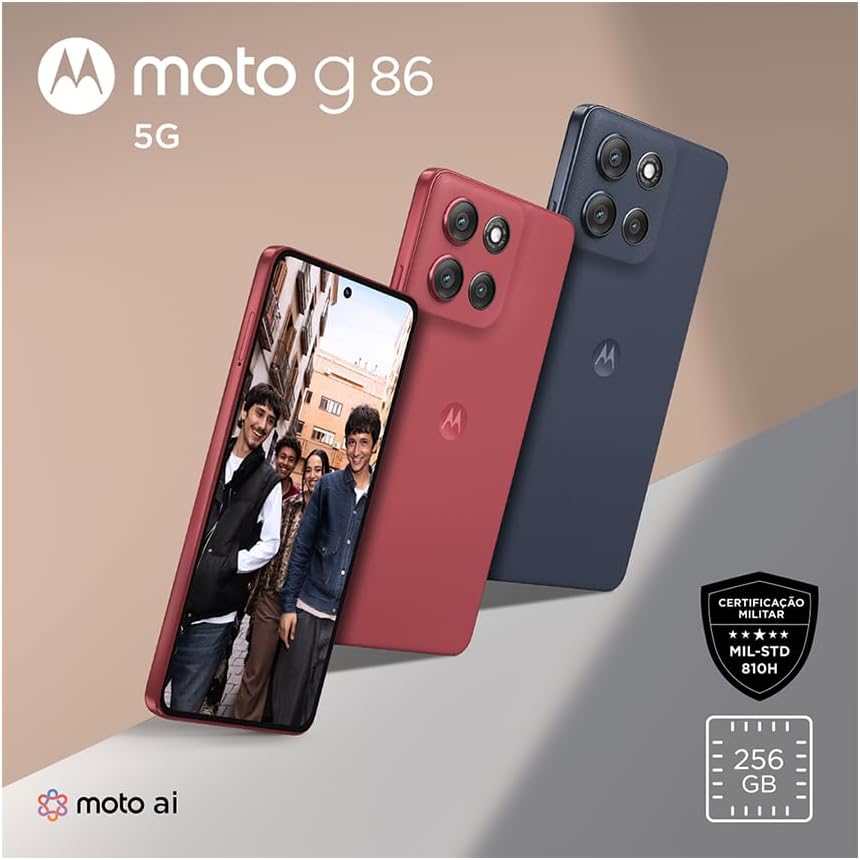
Зураг 2.2: Урд view of the device, highlighting the 1.5K pOLED display and punch-hole camera.

Зураг 2.3: Арын view of the Motorola Moto g86 5G, showing the camera array and Motorola logo.

Зураг 2.4: Доод талд view of the device, illustrating the USB-C charging port and speaker grille.
3. Тохиргоо
3.1. Хайрцагнаас задлах, анхны үзлэг
Upon receiving your Motorola Moto g86 5G, carefully open the packaging and verify that all components are present:
- Motorola Moto g86 5G Smartphone
- TURBOPOWER™ 33W Charger
- USB-A-аас USB-C кабель
- Хурдан эхлүүлэх гарын авлага (энэ гарын авлага)

Зураг 3.1: The Motorola Moto g86 5G smartphone alongside its 33W TURBOPOWER charger and USB-A to USB-C cable.
3.2. Inserting SIM Card and microSD Card (if applicable)
Locate the SIM tray on the side of your device. Use the SIM ejector tool (not explicitly listed as included, but standard) to open the tray. Insert your Nano-SIM card(s) and/or a microSD card into the designated slots. Ensure the tray is fully reinserted to maintain the device's IP68/IP69 water and dust resistance.
3.3. Анх цэнэглэх ба асаах
Before first use, it is recommended to fully charge your device. Connect the USB-C cable to the phone and the TURBOPOWER™ 33W charger to a power outlet. The device supports fast charging. Once charged, press and hold the power button on the side of the phone until the Motorola logo appears to power it on.
4. Төхөөрөмжөө ажиллуулах
4.1. Үндсэн навигаци
The Moto g86 5G runs on Android 15. Navigate the interface using gestures: swipe up for the app drawer, swipe down for notifications and quick settings, and use the navigation bar or gestures for home, back, and recent apps.
4.2. Камерын онцлог
The device features a 50MP Sony LYTIA camera with Optical Image Stabilization (OIS) and Moto AI enhancements. To access the camera, tap the camera icon on your home screen or lock screen. Explore various modes such as Photo, Portrait, Night Vision, and Pro mode for advanced settings. The camera supports 4K video recording.
4.3. Холболт
Your Moto g86 5G supports 5G cellular connectivity, Wi-Fi, Bluetooth, and NFC. To manage these connections, go to Тохиргоо > Сүлжээ ба интернет for Wi-Fi and mobile data, and Тохиргоо > Холбогдсон төхөөрөмжүүд for Bluetooth and NFC.
4.4. Дэлгэц ба аудио
The 6.7-inch 1.5K pOLED display offers vibrant colors and deep blacks. Adjust brightness and display settings under Тохиргоо > Дэлгэц. For audio, the device features stereo speakers. Adjust volume using the physical volume buttons on the side or through Тохиргоо > Дуу ба чичиргээ.
5. Засвар үйлчилгээ, арчилгаа
5.1. Төхөөрөмжөө цэвэрлэж байна
Утасныхаа дэлгэц болон их биеийг цэвэрлэхийн тулд хөвөнгүй зөөлөн даавуугаар цэвэрлээрэй. Химийн хатуу бодис, зүлгүүрийн материал ашиглахаас зайлсхий. Зөрүүд толбоны хувьд бага зэрэг dampдаавуугаар усаар. Цэнэглэхийн өмнө бүх портууд хуурай байгаа эсэхийг шалгаарай.
5.2. Water and Dust Resistance (IP68/IP69)
The Moto g86 5G is rated IP68 and IP69 for water and dust resistance, meaning it can withstand immersion in up to 1.5 meters of fresh water for up to 30 minutes, and is protected against high-pressure, high-temperature water jets. While durable, this resistance is not permanent and may decrease over time with normal wear. Do not intentionally submerge the device or expose it to saltwater, chlorinated water, or liquids other than fresh water. Always ensure the SIM tray is properly closed.
5.3. Програм хангамжийн шинэчлэлтүүд
Keep your device's software updated to ensure optimal performance, security, and access to new features. You can check for updates by going to Тохиргоо> Систем> Системийн шинэчлэлтүүд.
6. Алдаа засах
6.1. Нийтлэг асуудал ба шийдэл
- Төхөөрөмж асахгүй байна: Ensure the battery is charged. Connect the charger and wait a few minutes before attempting to power on again. If unresponsive, perform a force restart by holding the power button for 10-15 seconds.
- Батерейны хугацаа муу: Reduce screen brightness, disable unused connectivity features (Wi-Fi, Bluetooth, GPS), close background apps, and check for software updates.
- Сүлжээний холболттой холбоотой асуудлууд: Check if Airplane mode is off. Restart the device. Verify your SIM card is properly inserted. Contact your service provider if issues persist.
- Аппликейшнууд гацах эсвэл хөлдөх: Аппликейшны кэш болон өгөгдлийг цэвэрлэнэ үү Тохиргоо > Програмууд. If the issue continues, uninstall and reinstall the app. Ensure your device software is up to date.
6.2. Үйлдвэрийн тохиргоонд дахин тохируулах
Хэрэв танд байнгын асуудал тулгарвал үйлдвэрийн тохиргоонд дахин тохируулснаар тэдгээрийг шийдэж болно. Анхааруулга: A factory reset will erase all data from your phone. Back up important data before proceeding. To perform a factory reset, go to Тохиргоо > Систем > Дахин тохируулах сонголт > Бүх өгөгдлийг устгах (үйлдвэрийн тохиргоонд дахин оруулах).
7. Техникийн үзүүлэлтүүд
| Онцлог | Тодорхойлолт |
|---|---|
| Загвар | Moto g86 5G (XT2527-1) |
| Үйлдлийн систем | Android 15 |
| Дотоод санах ой | 256 ГБ |
| RAM | 8 GB (expandable with 16GB Ram Boost) |
| Дэлгэц | 6.7-inch 1.5K pOLED (1220x2712 resolution) |
| Арын камер | 50MP Sony LYTIA with OIS, 4K video recording |
| Зайны багтаамж | 5200 мАч |
| Цэнэглэж байна | TURBOPOWER™ 33W fast charging |
| Холболт | 5G, Bluetooth, NFC, Wi-Fi |
| Бат бөх чанар | IP68/IP69 Water and Dust Resistance, MIL-STD 810H |
| Хэмжээ (ойролцоогоор) | 161.21 мм (H) x 74.74 мм (W) x 7.87 мм (D) |
| Жин | Approx. 425 grams (package weight, actual device weight not specified but inferred to be less) |
| Гэрчилгээ | ANATEL: 00489-25-00330 |

Зураг 7.1: Dimensional diagram of the Motorola Moto g86 5G, showing height, width, and thickness measurements.
8. Баталгаат хугацаа ба дэмжлэг
Баталгаат байдлын нарийвчилсан мэдээлэл авахыг хүсвэл бүтээгдэхүүнд дагалдаж буй баталгаат картаас эсвэл Motorola-н албан ёсны дэмжлэгт зочилно уу. webсайт. Баталгаат нэхэмжлэл гаргахын тулд худалдан авалтаа нотлох баримтаа хадгалаарай.
For technical support, software updates, and frequently asked questions, please visit the Motorola support portal or contact their customer service. Contact information can typically be found on the Motorola website or in the device's pre-installed support application.
Онлайн дэмжлэг: www.motorola.com/support
Ask a question about this manual
Ask about setup, troubleshooting, compatibility, parts, safety, or missing instructions. Manuals+ will review the question and use this page’s manual context to help answer it.