
Танилцуулга
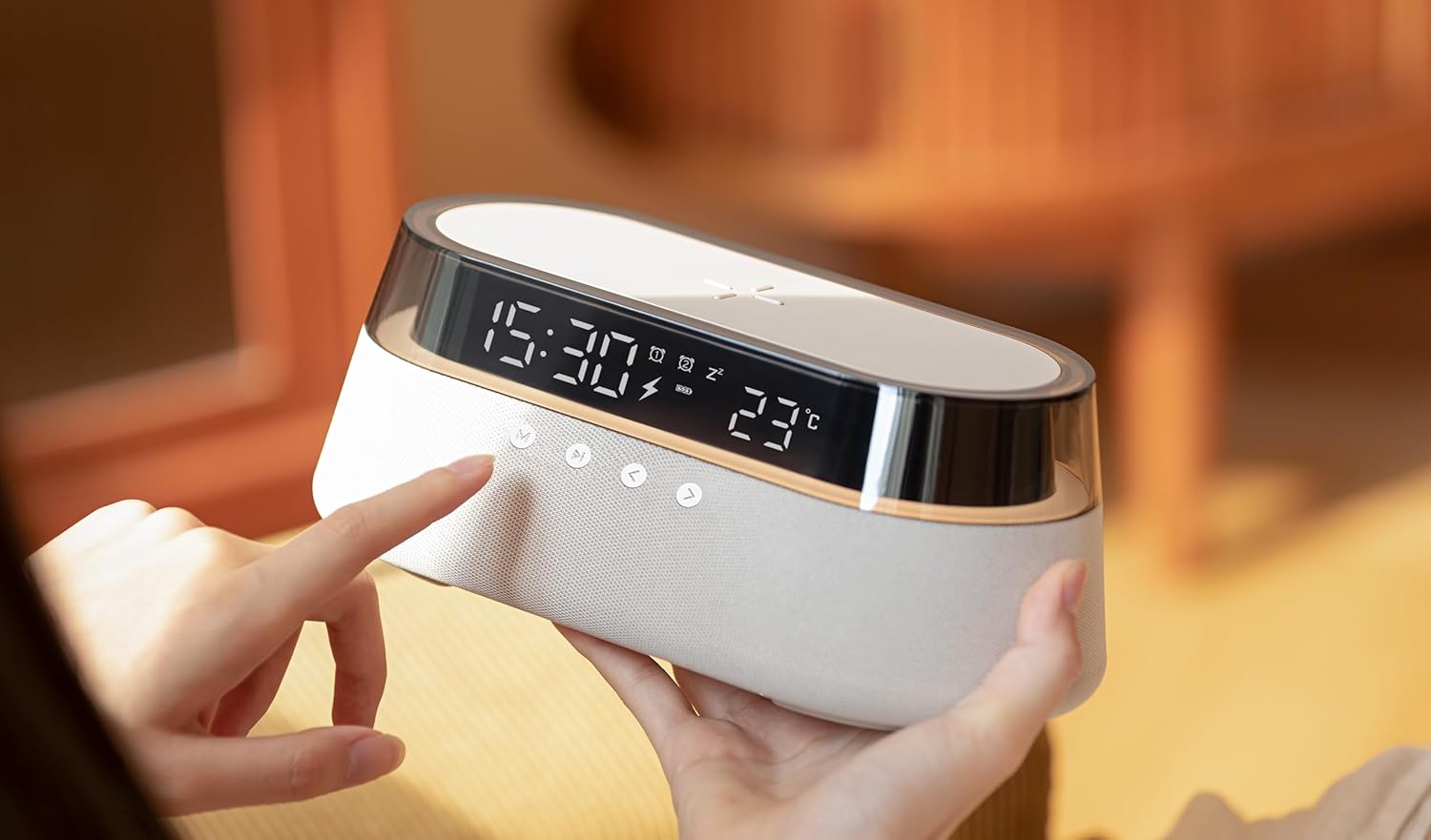
The ActivPro Smart Station is a versatile 6-in-1 device designed to enhance your living space with multiple functionalities. It integrates a 15W fast wireless charging pad, a high-quality Bluetooth speaker, a digital alarm clock with temperature display, and a multi-functional bedside lamp. This manual provides detailed instructions for setting up, operating, and maintaining your Smart Station to ensure optimal performance and longevity.
Хайрцагт юу байна

Upon unboxing your ActivPro Smart Station, please verify that all components are present and in good condition. The package should contain the following items:
- Smart Station Unit
- Цэнэглэх кабель
- Цахилгаан залгуур
- Хэрэглэгчийн гарын авлага (энэ баримт бичиг)
Тохируулах гарын авлага
- Эрчим хүчний холболт: Connect the provided charging cable to the Smart Station's power input port, typically located at the rear. Plug the power plug into a standard wall outlet. The digital display will illuminate upon successful connection.
- Анхны байршил: Place the Smart Station on a stable, flat surface, such as a bedside table or desk. Ensure there is adequate space around the device for optimal wireless charging and sound projection.
- Цаг, огнооны тохиргоо: Refer to the 'Digital Clock & Temperature Display' section for detailed instructions on setting the correct time and date.
Ашиглалтын заавар
1. 15W Fast Wireless Charging

The Smart Station features a 15W fast wireless charging pad on its top surface, compatible with Qi-enabled smartphones and devices. To charge your device, simply place it centrally on the charging pad. A charging indicator icon will appear on the digital display, confirming that charging has commenced. For optimal charging speed, ensure your device is properly aligned and remove any thick cases that may interfere with the connection.
2. Bluetooth чанга яригч

The integrated Bluetooth speaker allows for high-quality audio playback. To connect your device:
- Press the 'M' (Mode) button on the front panel until the Bluetooth icon appears on the display. The speaker will enter pairing mode.
- Ухаалаг утас эсвэл аудио төхөөрөмж дээрээ Bluetooth-г идэвхжүүлж, боломжтой төхөөрөмжүүдийг хайж олоорой.
- Select 'Smart Station' from the list of devices to pair. A confirmation sound will indicate successful pairing.
- Use the volume controls on the Smart Station or your connected device to adjust audio levels. The play/pause and track skip buttons on the Smart Station can also control media playback.
3. Digital Clock & Temperature Display

The Smart Station features a clear digital display showing the current time and ambient temperature. The brightness of the display is adjustable to suit day and night use.
- Цагийг тохируулах: Press and hold the 'M' button to enter time setting mode. Use the '<' and '>' buttons to adjust hours and minutes. Press 'M' again to confirm each setting.
- Сэрүүлгийг тохируулах: Press the alarm icon button (usually depicted as a bell) to enter alarm setting mode. Use '<' and '>' to set the alarm time. Press the alarm button again to confirm.
- Дэлгэцийн тод байдал: Short press the light bulb icon button to cycle through different brightness levels for the display.
4. Bedside Lamp
The Smart Station includes a multi-functional bedside lamp with adjustable brightness and customizable RGB color options. This feature can enhance the ambiance of any room.
- Асаах/унтраах: Short press the light bulb icon button to turn the lamp асаах эсвэл унтраах.
- Гэрэлтүүлгийг тохируулах: Хэзээ лamp is on, press and hold the light bulb icon button to continuously adjust the brightness. Release when the desired brightness is reached.
- Өнгө өөрчлөх: Double-press the light bulb icon button to cycle through different light modes, including warm white and various RGB color options.
Засвар үйлчилгээ
To ensure the longevity and optimal performance of your ActivPro Smart Station, follow these maintenance guidelines:
- Цэвэрлэгээ: Use a soft, dry, lint-free cloth to clean the exterior surfaces of the device. Do not use abrasive cleaners, solvents, or strong chemicals, as these can damage the finish.
- Шингэнээс зайлсхийх: Keep the device away from water and other liquids. In case of accidental spills, immediately disconnect power and allow the device to dry completely before reconnecting.
- Агааржуулалт: Хэт халалтаас урьдчилан сэргийлэхийн тулд агааржуулалтын нүхнүүд (хэрэв байгаа бол) бөглөрөөгүй эсэхийг шалгаарай.
- Хадгалах: Удаан хугацаагаар ашиглаагүй тохиолдолд төхөөрөмжийг нарны шууд тусгал, хэт температураас хол, сэрүүн, хуурай газар хадгална.
Алдааг олж засварлах
If you encounter issues with your Smart Station, please refer to the following common problems and their solutions:
| Асуудал | Боломжит шалтгаан | Шийдэл |
|---|---|---|
| Төхөөрөмж асахгүй байна | Power cable not connected properly; Power outlet issue | Ensure power cable is securely plugged into the device and wall outlet. Test the outlet with another device. |
| Утасгүй цэнэглэгч ажиллахгүй байна | Phone not aligned; Thick phone case; Non-Qi compatible device | Reposition phone centrally on the charging pad. Remove phone case. Ensure your device supports Qi wireless charging. |
| Bluetooth speaker not pairing | Device not in pairing mode; Bluetooth disabled on phone | Ensure Smart Station is in Bluetooth pairing mode (Bluetooth icon flashing). Enable Bluetooth on your phone and search for 'Smart Station'. |
| Сэрүүлэг дуугарахгүй байна | Alarm not set; Volume too low | Verify alarm time is correctly set and activated. Increase the device's volume. |
| Lamp not changing colors/brightness | Буруу товчлуур дарах дараалал | Refer to the 'Bedside Lamp' section for correct button operations (short press, long press, double press). |
If the problem persists after attempting these solutions, please contact ActivPro Global customer support for further assistance.
Үзүүлэлтүүд
| Загварын дугаар | SD332 |
| Бүтээгдэхүүний хэмжээс | 9.25 x 4.53 x 3.62 инч (23.5 x 11.5 x 9.2 см) |
| Зүйлийн жин | 1.52 фунт (689 грамм) |
| Утасгүй цэнэглэх гаралт | 15 Вт хурдан утасгүй цэнэглэх |
| Тоног төхөөрөмжийн интерфейс | Bluetooth |
| Тохиромжтой төхөөрөмжүүд | Cellular Phones (Qi-enabled) |
| Нийт USB портууд | 1 (цахилгаан оролтын хувьд) |
| Оролтын хэмжээtage | 9 вольт (ДС) |
| Үйлдвэрлэгч | ACTIVPRO GLOBAL UK |
| Эхний боломжтой огноо | 16 оны тавдугаар сарын 2025 |
Баталгаат болон дэмжлэг
For warranty information or technical support regarding your ActivPro Smart Station, please contact ActivPro Global customer service. Details for contacting support are typically provided on the product packaging or through the official ActivPro website. Please have your model number (SD332) and purchase information ready when contacting support.
ActivPro Global Customer Service: Please refer to your product packaging or the official ActivPro webхамгийн сүүлийн үеийн холбоо барих мэдээллийг авах сайт.