
TenHutt 20V 6.0Ah Battery and Multi-Functional Charger Kit
TenHutt 20V 6.0Ah Lithium-ion Battery and Multi-Functional Charger Kit for Craftsman V20 Tools Instruction Manual
1. Танилцуулга
This manual provides essential instructions for the safe and efficient operation, maintenance, and troubleshooting of your TenHutt 20V 6.0Ah Lithium-ion Battery and Multi-Functional Charger Kit. Please read this manual thoroughly before using the product to ensure proper handling and to prevent damage or injury.
The kit includes one 20V 6.0Ah Lithium-ion battery and one multi-functional charger designed for compatibility with Craftsman V20 series power tools and original Craftsman V20 batteries and chargers.
2. Аюулгүй ажиллагааны чухал заавар
АНХААРУУЛГА: Аюулгүй байдлын бүх анхааруулга, зааврыг уншина уу. Анхааруулга, зааврыг дагаж мөрдөхгүй байх нь цахилгаан цочрол, гал түймэр болон/эсвэл хүнд гэмтэл учруулж болзошгүй.
- Always use the charger indoors in a dry location.
- d-д батерейг бүү цэнэглэamp эсвэл нойтон орчинд.
- Use only the charger provided with this kit or a compatible Craftsman V20 charger to charge the battery.
- Цэнэглэдэггүй батерейг цэнэглэхийг бүү оролд.
- Keep the battery and charger away from heat sources, direct sunlight, and flammable materials.
- Зайны терминалуудад богино холболт үүсгэж болохгүй.
- Do not disassemble, crush, or incinerate the battery.
- Хэрэв зай нь casing is cracked or damaged, do not use it.
- Орон нутгийн дүрэм журмын дагуу зайгаа хариуцлагатайгаар устгана уу.
- Цэнэглэгчийг ашиглаагүй үед эсвэл цэвэрлэхийн өмнө цахилгааны залгуураас салга.
- Do not allow liquid to enter the charger.
3. Бүтээгдэхүүн дууссанview
The TenHutt 20V 6.0Ah Lithium-ion Battery and Multi-Functional Charger Kit is designed to provide reliable power for your Craftsman V20 tools and convenient charging for various USB-powered devices.
3.1 Иж бүрдэл хэсгүүд
- 1 x TenHutt 20V 6.0Ah Lithium-ion Battery
- 1 x TenHutt Multi-Functional Battery Charger
3.2 Гол онцлогууд
- Өндөр хүчин чадалтай батерей: 6.0Ah (6000mAh) Lithium-ion battery for extended runtime.
- LED батерейны үзүүлэлт: 3 LED lights on the battery to check charge status.
- Multi-Functional Charger: Features a standard battery charging port, a USB-A port, and a Type-C port for charging external devices.
- Өргөн нийцтэй байдал: Designed to be compatible with Craftsman V20 series tools and original Craftsman V20 batteries and chargers.
- Аюулгүй байдлын хамгаалалт: Integrated intelligent chip provides protection against short circuits, overcharging, over-discharging, over-voltage, хэт халалт.
- Удаан эдэлгээтэй барилга: Robust PC+ABS outer shell for impact and wear resistance.

Figure 1: TenHutt 20V 6.0Ah Lithium-ion Battery and Multi-Functional Charger Kit.
4. Техникийн үзүүлэлтүүд
| Бүрэлдэхүүн хэсэг | Тодорхойлолт |
|---|---|
| Зай гаралтын ботьtage | 20 В |
| Зайны төрөл | Лити-ион |
| Зайны багтаамж | 6000mAh (6.0Ah) |
| Зай Wattage | 120Wh |
| Цэнэглэгчийн хувьсах гүйдлийн оролт | 100V-240V / 50-60Hz |
| Цэнэглэгч DC гаралт | 21V Max / 2.5A Max |
| Charger USB-A Output | 5V / 2.4А Макс |
| Charger Type-C Output | 5V / 2.4А Макс |
| Бүтээгдэхүүний хэмжээс | 6.57 x 8.35 x 4.72 инч |
| Зүйлийн жин | 2.88 фунт |

Зураг 2: Илүүview of battery and charger specifications.
5. Тохиргоо ба анхны хэрэглээ
5.1 Батерейг анх цэнэглэх
- Unpack the battery and charger from the packaging.
- Plug the charger into a standard 100-240V AC power outlet. The charger's LED indicator will illuminate to show it is powered.
- Align the battery with the charging port on the charger and slide it in until it clicks securely into place.
- The charger's LED indicator will change to show that charging has begun. Allow the battery to fully charge before first use.
- Once fully charged, the charger's LED indicator will change again (e.g., solid green). Remove the battery by pressing the quick release button and sliding it out.

Figure 3: Charger with USB-A and Type-C ports for versatile charging.
6. Ашиглалтын заавар
6.1 Зайг цэнэглэх
To charge the battery, follow the steps outlined in Section 5.1. The charger is compatible with TenHutt 20V batteries and original Craftsman V20 batteries (e.g., CMCB201, CMCB202, CMCB204, CMCB205, CMCB206, CMCB209).
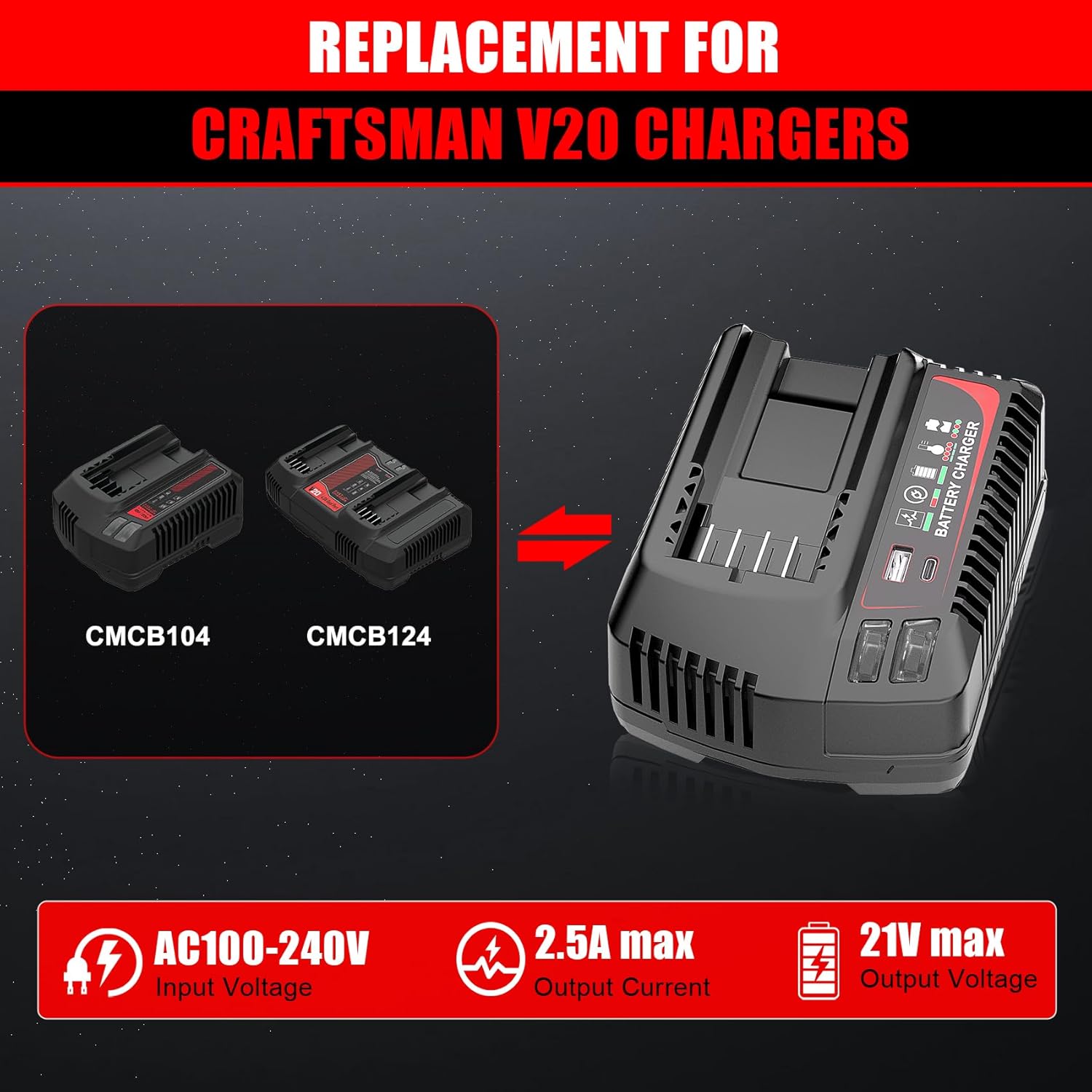
Figure 4: The TenHutt charger is a replacement for Craftsman V20 chargers like CMCB104 and CMCB124.

Figure 5: The TenHutt battery is compatible with various Craftsman V20 battery models.
6.2 Using the Battery with Power Tools
- Батерей бүрэн цэнэглэгдсэн эсэхийг шалгаарай.
- Align the battery with the battery port on your Craftsman V20 power tool.
- Батерейг байранд нь найдвартай товших хүртэл шургуулна.
- To remove the battery, press the quick release button on the battery and slide it out of the tool.

Figure 6: The TenHutt battery and charger are compatible with a wide range of Craftsman V20 tools.
6.3 Using the Charger's USB Ports
The charger features a USB-A port and a Type-C port, allowing you to charge smartphones, tablets, and other USB-powered devices simultaneously while charging a power tool battery or independently.
- Цэнэглэгчийг стандарт 100-240V AC залгуурт залгаарай.
- Connect your USB-powered device to either the USB-A or Type-C port on the charger using an appropriate USB cable.
- The charger will begin providing power to your device.
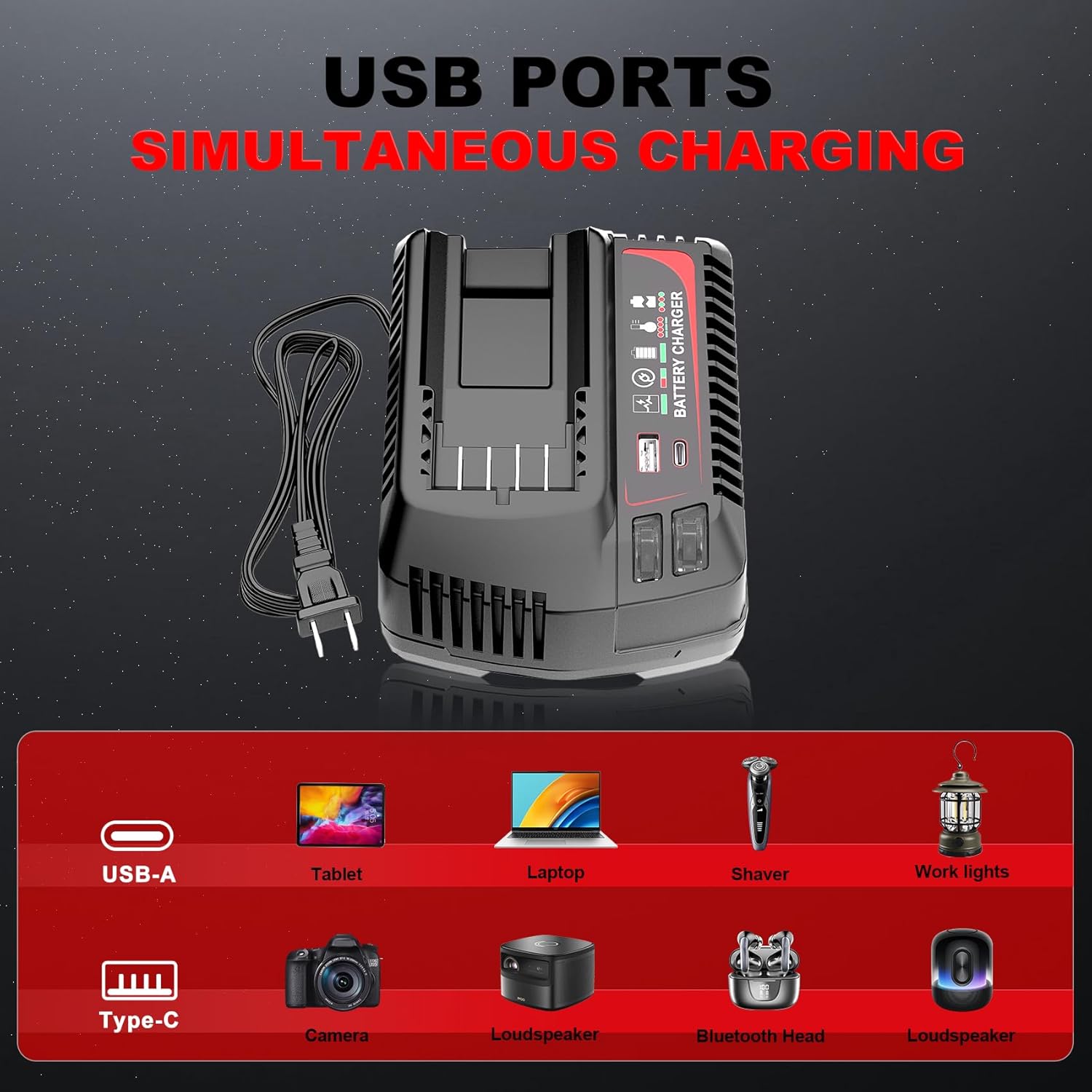
Figure 7: The charger's USB-A and Type-C ports allow for simultaneous charging of various electronic devices.
7. Засвар үйлчилгээ ба хадгалах
7.1 Ерөнхий засвар үйлчилгээ
- Keep the battery and charger clean and free from dust and debris. Use a dry cloth to wipe surfaces.
- Do not use cleaning agents or solvents that could damage plastic parts.
- Regularly inspect the battery and charger for any signs of damage, such as cracks, frayed cables, or loose connections. Do not use damaged components.
7.2 Хадгалалт
- Store the battery and charger in a cool, dry place, away from direct sunlight and extreme temperatures.
- For long-term storage, charge the battery to approximately 50-70% capacity. Avoid storing fully charged or completely discharged batteries for extended periods.
- Хүүхдийн гар хүрэхгүй газар хадгална.
8. Алдаа засах
If you encounter issues with your TenHutt battery or charger, refer to the following common problems and solutions:
| Асуудал | Боломжит шалтгаан | Шийдэл |
|---|---|---|
| Батерейг цэнэглэхгүй байна | Цэнэглэгч залгаагүй; алдаатай гаралт; зайг зөв суулгаагүй; гэмтэлтэй зай/цэнэглэгч. | Ensure charger is securely plugged into a working outlet. Re-seat the battery. Inspect for damage. If damaged, discontinue use. |
| Charger LED not indicating charge status | Battery fully charged; charger malfunction. | Check battery LED indicator. If battery is full, remove it. If not, try another battery or contact support. |
| Батерейг тэжээхгүй байгаа хэрэгсэл | Battery discharged; battery not seated correctly in tool; tool malfunction. | Charge the battery. Ensure battery is fully inserted into the tool. Test with another battery if available. |
| USB портууд нь төхөөрөмжийг цэнэглэдэггүй | Charger not powered; faulty USB cable; device not compatible. | Ensure charger is plugged in. Try a different USB cable. Verify device compatibility with 5V/2.4A output. |
9. Баталгаат хугацаа ба хэрэглэгчийн дэмжлэг
The product comes with a replacement warranty. Please refer to the product packaging or purchase documentation for specific warranty terms and duration. For technical assistance, troubleshooting beyond this manual, or warranty claims, please contact TenHutt customer support through your retailer or the official TenHutt webсайт.
Жич: The product description mentions a "Free Refund for 1.5 YEAR New Replacement". Please verify this information with your purchase documentation.
Ask a question about this manual
Ask about setup, troubleshooting, compatibility, parts, safety, or missing instructions. Manuals+ will review the question and use this page’s manual context to help answer it.