
1. Аюулгүй ажиллагааны чухал заавар
Please read this manual thoroughly before operating the Aokia Cordless Weed Wacker. Failure to follow these instructions may result in injury or damage to the product.
- Always wear appropriate safety gear, including eye protection and sturdy shoes. Be aware of potential flying debris.
- Use the double-switch safety lock function to prevent accidental activation. You need to hold down the lock button before holding down the trigger to start the weed mower.
- Do not operate the tool without proper training and understanding of its functions.
- Use only original batteries and chargers. Charge in a ventilated area away from flammables.
- Clear the work area of any obstacles or debris before operation.
- Нойтон нөхцөлд хэрэглэж болохгүй.
- Power off the tool after use and store it properly in a dry, secure location.
2. Багцын агуулга
Таны багцад бүх зүйл байгаа эсэхийг шалгана уу:
- Aokia Cordless Weed Wacker main unit
- 2.0Ah 12V Rechargeable Battery
- Зай цэнэглэгч
- Metal Blades (recommended for 99% of scenarios)
- Хуванцар ир
- Дугуй хөрөөний ир
- Protective Bar
- Хамгаалалтын бүрээс
- Wheels (for wheeled operation)
- Тохируулах бариул
- Connecting Rods (2 detachable extension poles)
- Хамгаалалтын нүдний шил
- Ажлын бээлий
- Assembly Tools (wrench, screws)
3. Тохиргоо ба угсралт
Follow these steps to assemble your Aokia Cordless Weed Wacker:
- Install the Protective Bar: Attach the protective bar to the main unit as shown. This helps prevent damage to the unit and surrounding objects.
- Дугуйг суурилуулах: Securely attach the wheels to the protective cover using the provided screws and tools. The wheels help disperse the weight and maintain balance during operation.
- Хамгаалалтын тагийг суурилуулах: Align the protective cover with the main unit and secure it with the screws.
- Хутгыг суурилуулах: Carefully attach your desired blade (metal, plastic, or saw blade) to the unit. Ensure it is securely fastened using the provided wrench and screws. Always wear gloves when handling blades.
- Бариулыг суулгах: Attach the adjustable handle to the connecting rod. This handle is ergonomically designed for comfort and control.
- Install the Connecting Rod: Connect the main unit (with blade and wheels) to the handle assembly using the connecting rods. Ensure the connection is firm and secure. The unit can be adjusted to 32, 48, or 65 inches in length.
- Батерейг суулгах: Slide the charged 12V 2.0Ah battery into the designated slot on the handle. Ensure it clicks into place.
Визуал угсралтын гарын авлага
Refer to the following video for a step-by-step visual guide on assembly:
Video: How to install the Cordless Weed Wacker. This video demonstrates the complete assembly process of the Aokia Cordless Weed Wacker, including attaching the protective bar, wheels, cover, blade, handle, and connecting rods.
Video: Weed Wacker Installation steps. This video provides additional visual instructions for installing various components of the weed wacker.
Угсралтын зураг


4. Ашиглалтын заавар
Your Aokia Cordless Weed Wacker is designed for versatile use in various gardening tasks.
Нэгжийг эхлүүлж байна
To start the weed wacker, press and hold the red safety lock button, then press the main trigger. Release the safety lock button while keeping the trigger pressed to maintain continuous operation.
Үйлдлийн горим ба програмууд
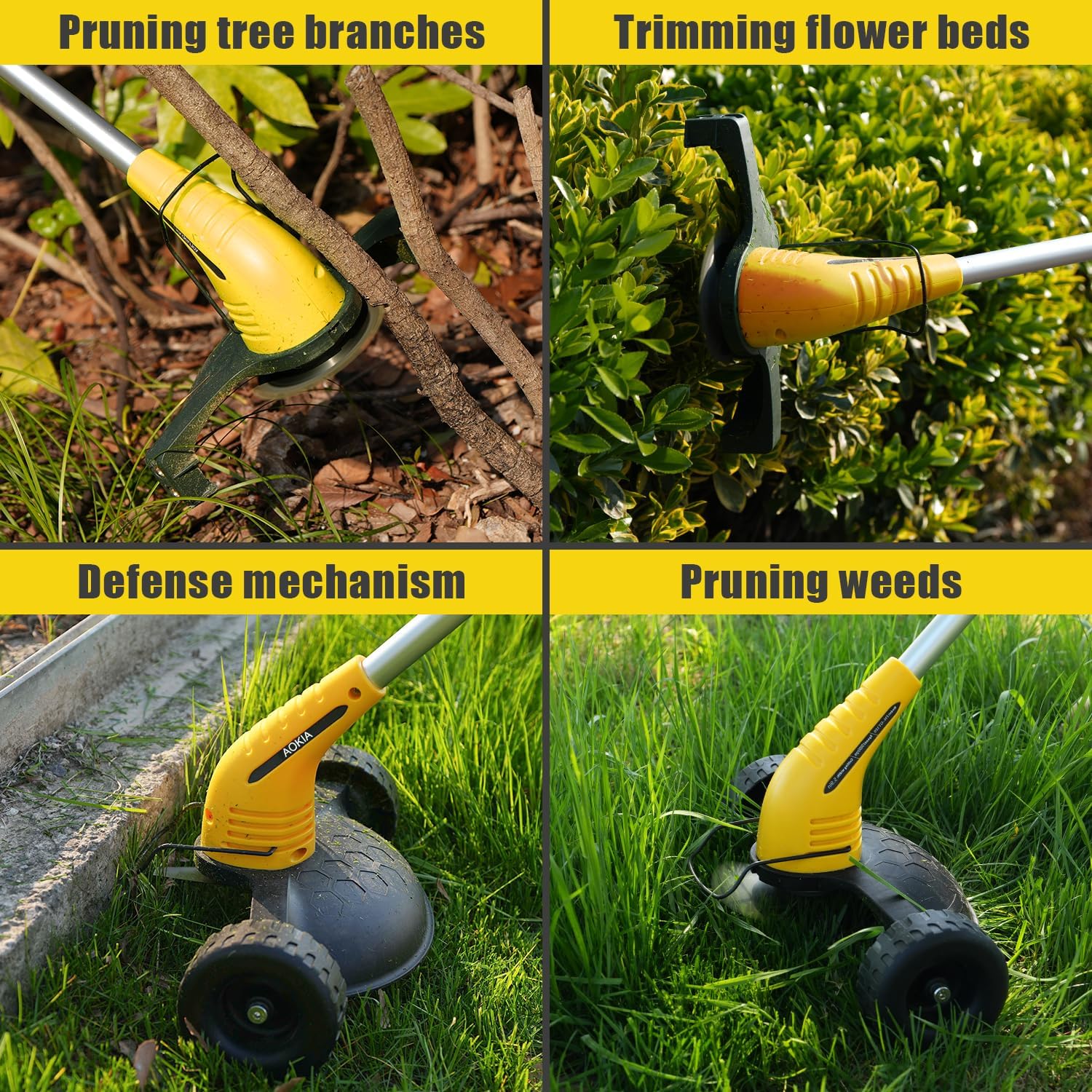
- Wheeled Operation: For general lawn weeding and edging, attach the wheels and use the unit like a small mower. This provides stability and reduces effort.
- Гар ажиллагаа: For trimming bushes, flower beds, or reaching tight spots, detach the wheels for a lightweight, portable experience.
- Хутганы сонголт: Use metal blades for tough grass and weeds, and the circular saw blade for pruning tree branches. Plastic blades are suitable for lighter trimming tasks.
- Тохируулах урт: Adjust the length of the connecting rod (32, 48, or 65 inches) to suit your height and the specific task, reducing back strain.
Usage Videos
Video: Weed Wacker for Lawn String Trimmers for Garden Worker. This video demonstrates the weed wacker in action for general lawn maintenance.
Video: Aokia Weed Wacker Cordless. This video showcases the cordless operation and versatility of the Aokia weed wacker.
Operating Images



5. Засвар үйлчилгээ
Proper maintenance ensures the longevity and optimal performance of your Aokia Cordless Weed Wacker.
- Цэвэрлэгээ: After each use, clean the unit, especially around the blade area, to remove grass clippings and debris.
- Ир солих: Regularly inspect blades for wear and damage. Replace dull or damaged blades promptly to maintain cutting efficiency and safety. Always wear gloves when replacing blades.
- Батерейны арчилгаа: Always use original batteries and chargers. Charge batteries in a well-ventilated area away from flammable materials. Do not store batteries in extremely hot or cold conditions.
- Хадгалах: Store the weed wacker in a dry, secure location, out of reach of children.
6. Алдаа засах
If you encounter issues with your Aokia Cordless Weed Wacker, try the following solutions:
- Төхөөрөмж асахгүй байна: Ensure the battery is fully charged and correctly inserted. Verify that the safety lock button is pressed simultaneously with the trigger.
- Зүсэлтийн гүйцэтгэлийг бууруулсан: Check the blade for dullness or damage and replace if necessary. Ensure the correct blade type is used for the material being cut.
- Батерейг цэнэглэхгүй байна: Ensure the charger is properly connected to both the battery and a working power outlet. Check for any damage to the charger or battery.
- Хэт их чичиргээ: This may indicate a damaged or improperly installed blade. Power off immediately, inspect the blade, and replace or re-install it correctly.
If problems persist, please contact Aokia customer support.
7. Техникийн үзүүлэлтүүд
| Онцлог | Тодорхойлолт |
|---|---|
| Брэнд | Аокиа |
| Эрчим хүчний эх үүсвэр | Battery Powered (12V 2.0Ah) |
| Өнгө | Шар |
| Зүйлийн жин | 4.4 Pounds (approx. 3.72 lbs without battery) |
| Таслах өргөн | 8 инч |
| Бүтээгдэхүүний хэмжээс | 17"L x 4"W (compacted) |
| Тохируулах урт | 32, 48, 65 инч |
| Моторын хурд | 10,000 RPM хүртэл |
| Батерейны ажиллах хугацаа | Up to 30 minutes (per 2.0Ah battery) |
Батерейны мэдээлэл

8. Баталгаат хугацаа ба дэмжлэг
Aokia provides all-round after-sales service for its products. From the moment the products are delivered, a professional after-sales team is always on standby to assist you with any questions or concerns.
For support, please refer to the contact information provided in your product packaging or visit the official Aokia webсайт.