
Nulea KM75
Nulea KM75 Дэвшилтэт Эргономик Утасгүй Гар болон Хулганы Комбо Хэрэглэгчийн Гарын Авлага
Загвар: KM75
Танилцуулга
This manual provides detailed instructions for the setup, operation, and maintenance of your Nulea KM75 Advanced Ergonomic Wireless Keyboard and Mouse Combo. Please read this manual thoroughly before using the product to ensure optimal performance and longevity.
Багцын агуулга
- Nulea KM75 Ergonomic Wireless Keyboard
- Nulea Ergonomic Wireless Mouse
- 2.4G USB Receiver (shared for keyboard and mouse)
- USB-C цэнэглэгч кабель
- Хэрэглэгчийн гарын авлага (энэ баримт бичиг)
Бүтээгдэхүүн дууссанview
Гарны онцлог
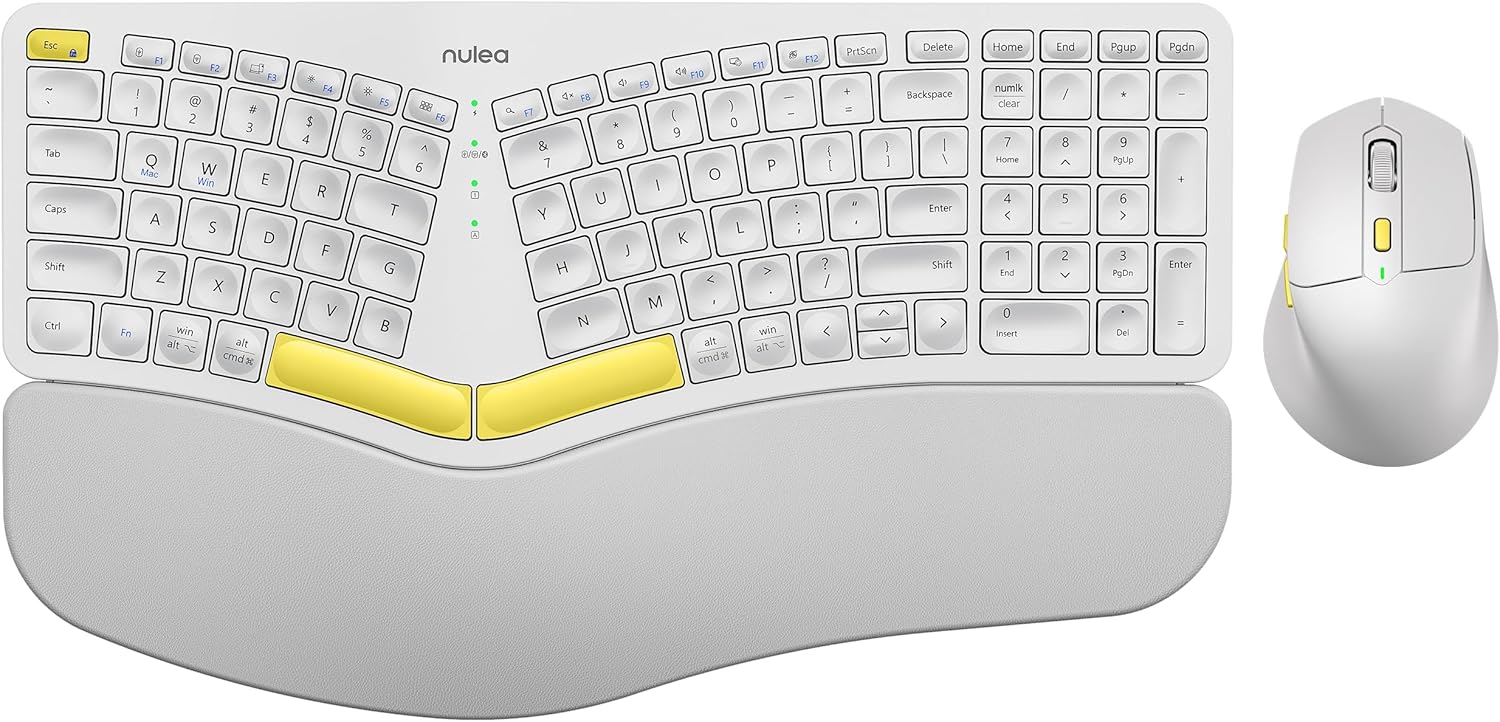
Image: The Nulea KM75 ergonomic keyboard and mouse combo. The keyboard features a curved and split layout with an integrated palm rest, and the mouse is sculpted for comfort. Both are white with yellow accents.
- Ergonomic Curved and Split Key-frame: Designed to position wrists and forearms naturally.
- Нэгдсэн далдуу модны тулгуур: Features a soft memory foam layer for wrist support.
- Adjustable Tilt Design: Allows for optimal keyboard positioning.
- Олон төхөөрөмжийн холболт: Supports USB cable, 2.4G USB receiver, and Bluetooth.
- Цэнэглэдэг батерей: 500mAh capacity with USB-C charging.
- Автомат унтах горим: Conserves power after 30 minutes of inactivity.
Хулганы онцлог шинж чанарууд

Image: A close-up of the Nulea ergonomic mouse, showing its sculpted design for a natural hand posture with integrated palm and thumb rests. The mouse is white with yellow accents.
- Ergonomic Sculpted Design: Integrated palm and thumb rests for natural hand position.
- Тохируулах боломжтой DPI тохиргоо: For precise cursor control.
- Урагшаа/Буцах товчлуурууд: Тохиромжтой хувьд web навигаци.
- Олон төхөөрөмжийн холболт: Supports 2.4G USB receiver and Bluetooth.
- Цэнэглэдэг батерей: 300mAh capacity with USB-C charging.
- Автомат унтах горим: Conserves power after 30 minutes of inactivity.
Тохиргоо
1. Төхөөрөмжүүдийг цэнэглэх
Before initial use, fully charge both the keyboard and mouse using the provided USB-C cable. Connect the USB-C end to the device and the USB-A end to a power source (e.g., computer USB port, USB wall adapter).

Image: Illustration showing the keyboard and mouse connected via USB-C cables for charging. The keyboard has a 500mAh battery and the mouse has a 300mAh battery.
The indicator lights will show charging status and turn off when fully charged. A full charge provides approximately two months of operation.
2. 2.4G USB хүлээн авагчаар холбогдож байна
- Locate the 2.4G USB receiver. It is typically stored in a compartment on the underside of the mouse.
- USB хүлээн авагчийг компьютер дээрх боломжтой USB-A порт руу оруулна уу.
- Гар болон хулганаа холбогдох унтраалга ашиглан асаана уу.
- Гарын товчлуурыг дарна уу Fn + F2 to select 2.4G mode.
- For the mouse, switch the mode selector on the bottom to 2.4G.
- Төхөөрөмжүүд автоматаар холбогдох ёстой.

Image: A close-up of the underside of the mouse, showing the storage compartment for the 2.4G USB receiver.
3. Bluetooth-ээр холбогдож байна
- Гар болон хулганаа асаана уу.
- Гарын товчлуурыг дарна уу Fn + F3 to select Bluetooth mode. The indicator light will blink, indicating pairing mode.
- For the mouse, switch the mode selector on the bottom to Bluetooth. The indicator light will blink.
- Төхөөрөмж дээрээ (компьютер, таблет, ухаалаг утас) Bluetooth-г асаагаад шинэ төхөөрөмжүүдийг хайгаарай.
- Select "Nulea Keyboard" and "Nulea Mouse" from the list of available devices to pair.
- Хослуулах үйл явцыг дуусгахын тулд дэлгэцэн дээрх дурын зааврыг дагана уу.
4. Утастай горимоор холбогдох
- Connect the USB-C charging cable to the keyboard or mouse and the USB-A end to your computer.
- Гарын товчлуурыг дарна уу Fn + F1 to select wired mode.
- For the mouse, switch the mode selector on the bottom to wired mode.
- The devices will function as wired peripherals.

Image: Diagram illustrating the simple connectivity options for the Nulea KM75. Pressing Fn+F1 connects via wired, Fn+F2 via 2.4G, and Fn+F3 via Bluetooth, allowing connection to multiple devices like PCs, laptops, and mobile devices.
5. Төхөөрөмжүүдийн хооронд шилжих
The Nulea KM75 combo supports multi-device connectivity. You can switch between up to three connected devices (one wired, one 2.4G, one Bluetooth) by pressing the corresponding function keys on the keyboard (Fn + F1/F2/F3) and adjusting the mode selector on the mouse.
Ашиглалтын заавар
Гарын хэрэглээ
- Эргономик дизайн: The curved and split key-frame is designed for natural hand and wrist positioning. Allow some time to adapt to this layout for optimal comfort.
- Тохируулах боломжтой хазайлттай хөл: Located on the underside of the keyboard, these legs allow you to adjust the typing angle for personalized comfort.

Image: A user demonstrating the adjustable tilt legs of the Nulea KM75 keyboard, showing how to customize the typing angle for ergonomic comfort.
- Функцийн товчлуурууд (Fn): Many keys have secondary functions accessible by holding down the Fn key and pressing the desired function key (e.g., media controls, volume). Refer to the keycap legends for specific functions.
Хулганы хэрэглээ
- DPI тохируулга: Use the DPI switch button, usually located near the scroll wheel, to cycle through different sensitivity levels (DPI). This allows for precise control or faster cursor movement.

Image: A close-up of the Nulea ergonomic mouse, highlighting the DPI switch key and indicator light for adjusting cursor sensitivity.
- Хажуугийн товчлуурууд: The side buttons (typically on the left for right-handed users) are often pre-programmed for forward and backward navigation in web хөтөч эсвэл file судлаачид.
Засвар үйлчилгээ
- Цэвэрлэгээ: Зөөлөн, хуурай даавуугаар гар болон хулганы гадаргууг цэвэрлэ. Зөрүүд шороонд бага зэрэг damp Зөөлөн савантай даавуу хэрэглэж болно, ингэснээр төхөөрөмжид шингэн орохгүй байх боломжтой. Хүчтэй химийн бодис эсвэл зүлгүүрийн материалаас зайлсхий.
- Батерейны арчилгаа: To prolong battery life, avoid fully discharging the devices frequently. Recharge when the low battery indicator appears. Store in a cool, dry place if not used for extended periods.
- Хадгалах: When not in use, store the USB receiver in its designated compartment on the mouse to prevent loss.
Алдааг олж засварлах
- Төхөөрөмж холбогдоогүй байна:
- Гар болон хулгана хоёулаа асаалттай байгаа эсэхийг шалгаарай.
- Verify the correct connection mode (2.4G, Bluetooth, Wired) is selected on both devices and your computer.
- For 2.4G, ensure the USB receiver is securely plugged into a working USB port.
- For Bluetooth, ensure Bluetooth is enabled on your device and the devices are in pairing mode. Try re-pairing if necessary.
- Ensure the devices are charged.
- Try restarting your computer and the devices.
- Хоцролт эсвэл тасалдалтай холболт:
- Move the devices closer to the USB receiver or your computer to reduce interference.
- Хүлээн авагчийг бусад утасгүй төхөөрөмж эсвэл том металл эд зүйлсийн ойролцоо байрлуулахаас зайлсхий.
- Ensure batteries are sufficiently charged.
- Товчлуурууд хариу өгөхгүй эсвэл хулгана хөдөлгөхгүй байна:
- Зайны түвшинг шалгаж, шаардлагатай бол цэнэглэ.
- Ensure the devices are properly connected (see "Device not connecting" above).
- Clean any debris from around the keys or mouse sensor.
Үзүүлэлтүүд
| Онцлог | Дэлгэрэнгүй |
|---|---|
| Брэнд | Нулеа |
| Загвар | KM75 |
| Холболт | Bluetooth, 2.4G USB, Wired (USB-C) |
| Гарны батерей | 500mAh лити |
| Хулганы батерей | 300mAh лити |
| Тохиромжтой үйлдлийн систем | Windows, Mac OS, Android |
| Онцлог шинж чанарууд | Ergonomic design, Curved/Split key-frame, Integrated palm rest, Adjustable tilt, Adjustable mouse DPI |
| Зүйлийн жин | 4.2 фунт (нийт жин) |
| Багцын хэмжээ | 16.97 x 11.69 x 2.05 инч |
Баталгаат болон дэмжлэг
Nulea products are designed for reliability and performance. For warranty information, technical support, or customer service inquiries, please refer to the contact details provided on the Nulea official website or your purchase documentation. Please retain your proof of purchase for warranty claims.
Ask a question about this manual
Ask about setup, troubleshooting, compatibility, parts, safety, or missing instructions. Manuals+ will review the question and use this page’s manual context to help answer it.