
Aokia B0D54635LP
Aokia Cordless Weed Wacker Instruction Manual
Model: B0D54635LP
Brand: Aokia
1. Танилцуулга
This manual provides essential instructions for the safe and efficient operation, assembly, and maintenance of your Aokia Cordless Weed Wacker. Please read this manual thoroughly before first use and retain it for future reference.
2. Аюулгүй ажиллагааны чухал заавар
Эдгээр аюулгүй байдлын зааврыг дагаж мөрдөхгүй байх нь ноцтой гэмтэл эсвэл эд хөрөнгийн хохирол учруулж болзошгүй.
- Always engage the double-switch safety lock function to prevent accidental activation and ensure safe use.
- Төхөөрөмжийг ажиллуулахаасаа өмнө гарын авлагыг бүхэлд нь уншина уу.
- Use only original Aokia batteries and chargers. Using non-original parts may void your warranty and cause hazards.
- Charge batteries in a well-ventilated area, away from flammable materials.
- Wear appropriate protective gear during operation, including safety glasses, gloves, and sturdy footwear.
- Clear the work area of debris, rocks, and other objects that could be thrown by the cutting blade.
- Do not use the weed wacker in wet conditions or rain.
- Always power off the device and remove the battery before performing any adjustments, cleaning, or maintenance.
- Store the device properly in a dry, secure location, out of reach of children.
- The manufacturer is not liable for damage caused by non-original parts or misuse.
3. Багцын агуулга
Доор жагсаасан бүх зүйлс таны багцад багтсан эсэхийг шалгана уу. Хэрэв ямар нэгэн эд анги дутуу эсвэл гэмтсэн бол хэрэглэгчийн дэмжлэгтэй холбогдоно уу.

Зураг 3.1: Contents of the Aokia Cordless Weed Wacker package. This image displays the main weed wacker unit, various cutting blades (metal and circular saw blade), two wrenches for assembly, safety glasses, a pair of protective gloves, the battery charger, and a 12V lithium-ion battery.
- Aokia Cordless Weed Wacker Main Unit
- 12V 2000mAh лити-ион батерей
- Зай цэнэглэгч
- Metal Blades (multiple, including 5 additional)
- Дугуй хөрөөний ир
- Хамгаалалтын шил
- Хамгаалалтын бээлий
- Assembly Wrenches
- Хэрэглэгчийн гарын авлага (энэ баримт бичиг)
4. Угсрах ба тохируулах
Follow these steps to assemble your Aokia Cordless Weed Wacker.
4.1 Attaching the Protection Cover and Anti-Collision Bar

Зураг 4.1.1: The grass protection cover, designed to prevent clippings from scattering during operation.

Зураг 4.1.2: The anti-collision bar, which protects plants and the weed wacker from damage during use.
Securely attach the grass protection cover and the anti-collision bar to the trimmer head. These components are crucial for user safety and protecting the device and surrounding plants.
4.2 Ир суурилуулах
The Aokia Cordless Weed Wacker supports various blade types for different cutting needs. We strongly recommend using metal blades for most applications due to their durability and effectiveness. Plastic blades are prone to breakage and should be used for very light trimming only.

Зураг 4.2.1: Examples of metal blades (top) and circular saw blades (bottom) for the weed wacker. Metal blades are suitable for general weeding, while circular blades are for tougher branches.
Refer to the following steps for blade installation:

Зураг 4.2.2: Step-by-step visual guide for installing the cutting blade on the weed wacker. It shows removing the metal base, installing the grass protection cover, attaching the anti-collision bar, reinstalling the metal base, placing the blade and iron piece, and finally tightening the nut with the L-type socket wrench.
- Step 1: Remove the Metal Base. Use the provided wrench to remove the nut and blade counter-clockwise.
- Step 2: Install the Grass Protection Cover. Slide the grass protection cover into position.
- Step 3: Install the Anti-Collision Bar. Attach the anti-collision bar to the trimmer head.
- Step 4: Install the Metal Base. Place the metal base back onto the shaft.
- Step 5: Install the Blade and Iron Piece. Position your chosen blade (metal or circular) and the iron piece onto the shaft.
- Step 6: Tighten the Nut. Use the wrench to tighten the nut clockwise until secure. Ensure the blade is firmly attached and does not wobble.
4.3 Adjusting the Length and Handle
The weed wacker features a detachable extension pole, allowing for three different lengths: 32 inches, 48 inches, and 65 inches, to suit various gardening tasks and user heights.

Зураг 4.3.1: Illustration of the weed wacker's adjustable length settings (32", 48", 64") and key features including the safety lock, comfortable handle, grass guard, and anti-collision bar.

Зураг 4.3.2: Close-up of the ergonomically designed adjustable handle, showing its range of motion for maximum comfort and control during operation.
To adjust the length, loosen the locking mechanism on the extension pole, extend or retract to the desired length, and then securely tighten the lock. The auxiliary handle can also be adjusted for optimal comfort and control by loosening its clamp, positioning it, and re-tightening.
5. Батерейг цэнэглэх, суурилуулах
The Aokia Cordless Weed Wacker is powered by a 12V 2000mAh high-capacity rechargeable lithium-ion battery.
5.1 Зайг цэнэглэх
- Цэнэглэгчийг ердийн цахилгаан залгуурт холбоно уу.
- Insert the battery into the charger. Ensure proper alignment.
- The charger's indicator light will show the charging status (refer to charger manual for specific light patterns).
- Батерейг шатамхай материалаас хол, агааржуулалт сайтай газар цэнэглээрэй.
- Батерейг хэт цэнэглэж болохгүй. Бүрэн цэнэглэсний дараа салга.
5.2 Зайг суурилуулах

Зураг 5.2.1: Illustration showing the insertion point for the 12V battery into the weed wacker handle. The upgraded design ensures improved battery-machine contact for maximum performance.
Align the battery with the battery slot at the base of the handle and slide it in until it clicks securely into place. Ensure the battery is fully seated before operation. To remove, press the release button (if present) and slide the battery out.
6. Ашиглалтын заавар
Before operating, ensure you have read and understood all safety instructions and that the device is properly assembled with a fully charged battery.
6.1 Starting and Stopping the Weed Wacker
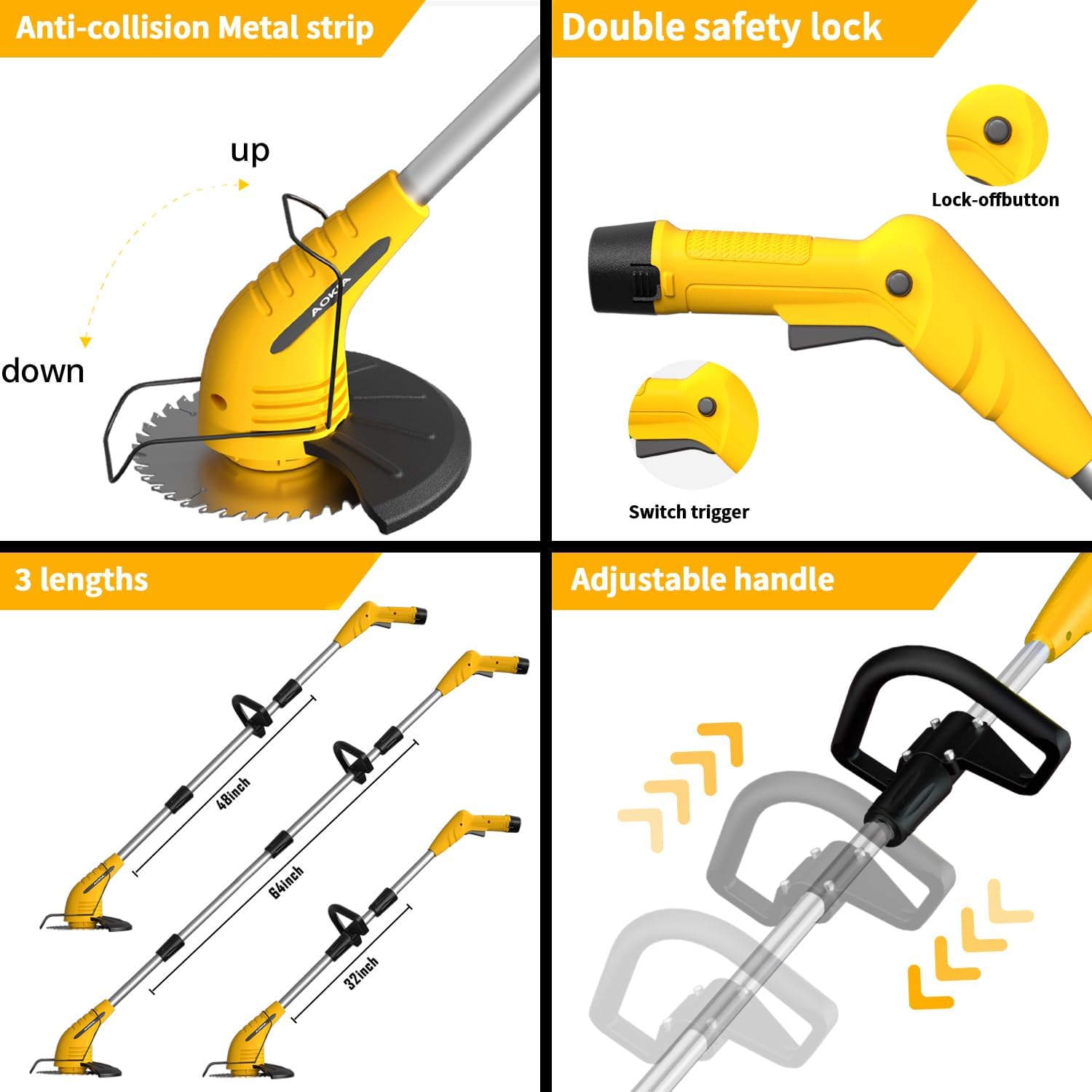
Зураг 6.1.1: Close-up of the weed wacker handle showing the double safety lock button (top) and the switch trigger (bottom). Both must be engaged to start the tool.

Зураг 6.1.2: Demonstrates how the safety lock button must be pressed simultaneously with the trigger to activate the weed wacker, preventing accidental starts.
- To start the weed wacker, first hold down the аюулгүйн түгжээний товчлуур (located on the top of the handle).
- While holding the safety lock button, press the триггер солих. The motor will start, and the blade will begin to rotate.
- To stop the weed wacker, release the switch trigger. The safety lock button will automatically reset.
6.2 Үйлдлийн ерөнхий зөвлөмжүүд
- Ашиглалтын явцад хоёр бариулыг чанга атгах хэрэгтэй.
- Keep the cutting head parallel to the ground for even trimming.
- Move the weed wacker in a sweeping motion, cutting small amounts of material at a time.
- Avoid hitting hard objects like rocks, fences, or concrete, as this can damage the blade and motor.
- Utilize the anti-collision bar to protect delicate plants and avoid contact with hard surfaces.
- For optimal performance, especially with thicker weeds or small branches, use the metal or circular saw blades.
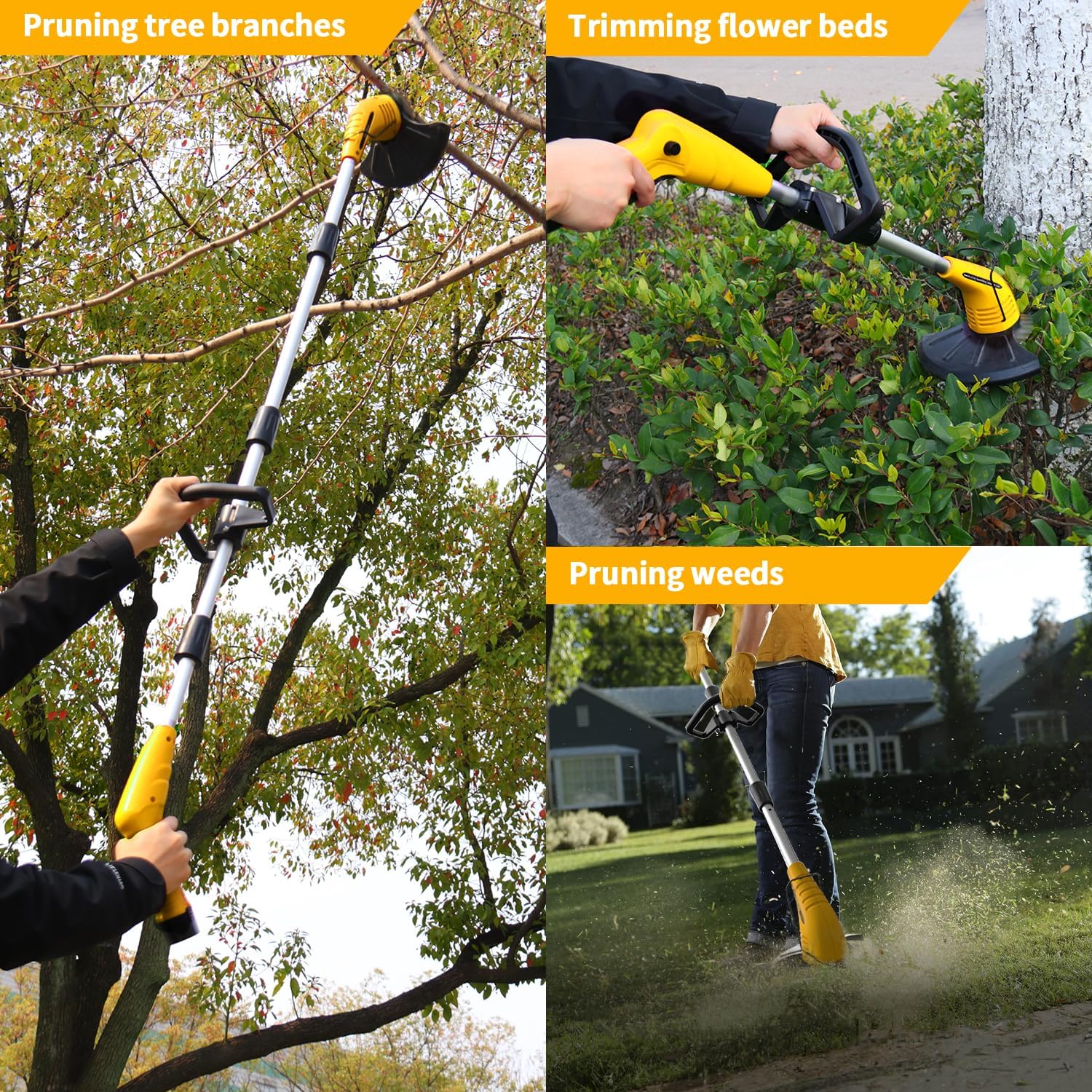
Зураг 6.2.1: Examples of the weed wacker in use: pruning tree branches (top left), trimming flower beds (top right), and pruning weeds (bottom right). This illustrates its versatility for various garden tasks.

Зураг 6.2.2: Highlights the key operational benefits: lightweight design for easy handling, low noise output for quieter operation, and cordless functionality for unrestricted movement.
7. Засвар үйлчилгээ
Regular maintenance ensures the longevity and optimal performance of your Aokia Cordless Weed Wacker.
- Цэвэрлэгээ: After each use, power off the device and remove the battery. Use a dry cloth or soft brush to clean grass clippings and debris from the cutting head, guard, and motor housing. Do not use water or harsh chemicals.
- Хутганы үзлэг: Regularly inspect blades for sharpness, damage, or wear. Replace dull or damaged blades immediately to maintain cutting efficiency and safety. Refer to Section 4.2 for blade installation.
- Батерейны арчилгаа: Store batteries in a cool, dry place. Do not store fully discharged batteries for extended periods. Recharge them periodically if not in use.
- Хадгалах: Store the weed wacker in a dry, secure location, away from direct sunlight, moisture, and extreme temperatures. Ensure it is out of reach of children and pets.
8. Алдаа засах
This section addresses common issues you might encounter with your Aokia Cordless Weed Wacker.
| Асуудал | Боломжит шалтгаан | Шийдэл |
|---|---|---|
| Weed wacker does not start. | Battery not charged or improperly installed. Safety lock not engaged. | Ensure battery is fully charged and correctly inserted. Press the safety lock button before pressing the trigger. |
| Зүсэлтийн гүйцэтгэл муу. | Dull, damaged, or incorrect blade type. Excessive material being cut. | Replace blades if dull or damaged. Ensure you are using the appropriate blade for the task (metal for general, circular for tougher). Cut smaller sections. |
| Батерейны ашиглалтын хугацаа богино. | Battery not fully charged. Old or worn-out battery. Heavy-duty use. | Ашиглахаасаа өмнө батерей бүрэн цэнэглэгдсэн эсэхийг шалгаарай. Худалдан авах талаар бодож үзээрэйasing a spare battery for extended operation. If battery is old, it may need replacement. |
| Black shield/guard loosens during use. | Буруу суурилуулалт эсвэл сул бэхэлгээ. | Power off and remove battery. Re-tighten all fasteners securing the shield/guard. Ensure it is installed according to assembly instructions. |
9. Техникийн үзүүлэлтүүд
| Онцлог | Дэлгэрэнгүй |
|---|---|
| Брэнд | Аокиа |
| Загвар | B0D54635LP |
| Эрчим хүчний эх үүсвэр | Батерейгаар ажилладаг |
| Зайны төрөл | 12V Lithium Ion (2000mAh) |
| Зүйлийн жин | 4.3 фунт (ойролцоогоор 1.95 кг) |
| Таслах өргөн | 5.9 инч (ойролцоогоор 15 см) |
| Бүтээгдэхүүний хэмжээс | 70"L x 5.8"W (adjustable length) |
| Хурд | 10,000 RPM хүртэл |
| Угсрах шаардлагатай | Тиймээ |
10. Баталгаат хугацаа ба хэрэглэгчийн дэмжлэг
Your Aokia Cordless Weed Wacker comes with a нэг жилийн баталгаат хугацаа худалдан авсан өдрөөс.
If you encounter any issues with the battery, machine, blades, or other accessories, please contact Aokia customer support. We are committed to resolving issues promptly and providing free replacements for covered defects.
For support, please refer to the contact information provided with your purchase or visit the official Aokia webсайт.
Ask a question about this manual
Ask about setup, troubleshooting, compatibility, parts, safety, or missing instructions. Manuals+ will review the question and use this page’s manual context to help answer it.