
1. Оршил ба түүнээс дээшview
This manual provides comprehensive instructions for the safe and efficient use of your Hisense 75U7NQ 75-inch Mini-LED ULED Television. Please read this manual thoroughly before operating the TV and retain it for future reference. The Hisense 75U7NQ features advanced display technologies for an immersive viewтуршлага.
Гол онцлогууд:
- Мини-LED технологи: Enhanced backlight control for superior contrast and brightness.
- Квантын цэгийн өнгө: Delivers billions of accurate and vibrant colors.
- 144Hz Game Mode: Ultra-smooth gaming with Variable Refresh Rate (VRR) and Auto Low Latency Mode (ALLM).
- Бүрэн массив орон нутгийн бүдэгрүүлэх: Precise dimming zones for deep blacks and bright highlights.
- Сайн ууView Engine Processor: Optimizes picture quality with real-time analysis and 4K upscaling.
- Dolby Vision IQ ба Dolby Atmos: Enhanced HDR visual experience and immersive surround sound.

Урд view of the Hisense 75U7NQ TV, showcasing түүний нарийхан хүрээ, эрч хүчтэй дэлгэц.
2. Тохиргоо ба суурилуулалт
2.1 Савлах
Carefully remove the TV and all accessories from the packaging. Ensure all components listed in the 'Included Components' section of the specifications are present. Keep packaging materials for future transport or service.
2.2 Тавиур суурилуулах
Хэрэв та зурагтыг хананд суулгаагүй бол тавиурыг дараах байдлаар холбоно уу.
- Дэлгэцийг гэмтээхгүйн тулд ТВ-ээ доош харуулан зөөлөн, цэвэр гадаргуу дээр байрлуул.
- Зурагтын доод хэсэгт байрлах бэхэлгээний нүхнүүдтэй суурийг зэрэгцүүл.
- Secure the stand using the provided screws. Refer to the quick start guide for specific screw types and locations.

Урд view of the Hisense 75U7NQ TV with its central stand attached, ready for placement on a media console.

Ойролцоогоор view of the sleek, black central stand of the Hisense 75U7NQ TV.
2.3 Хананд суурилуулах (заавал биш)
The Hisense 75U7NQ TV is VESA compliant. For wall mounting, use a compatible wall mount kit (sold separately) and follow the instructions provided with the wall mount. Ensure proper ventilation and secure installation.
2.4 Захын төхөөрөмжүүдийг холбох
Connect your external devices to the appropriate ports on the TV. The TV includes HDMI, USB, LAN, and antenna inputs.
- HDMI портууд: For connecting Blu-ray players, game consoles, soundbars, etc. (Supports HDMI 2.1 for 144Hz).
- USB портууд: For connecting USB storage devices for media playback or DVR recording.
- LAN порт: Утастай интернет холболтын хувьд.
- Антен/Кабель оролт: Антен эсвэл кабелийн телевизийн дохиог холбоход зориулагдсан.

Арын view of the Hisense 75U7NQ TV, showing the back panel design and the general layout of the input/output ports.
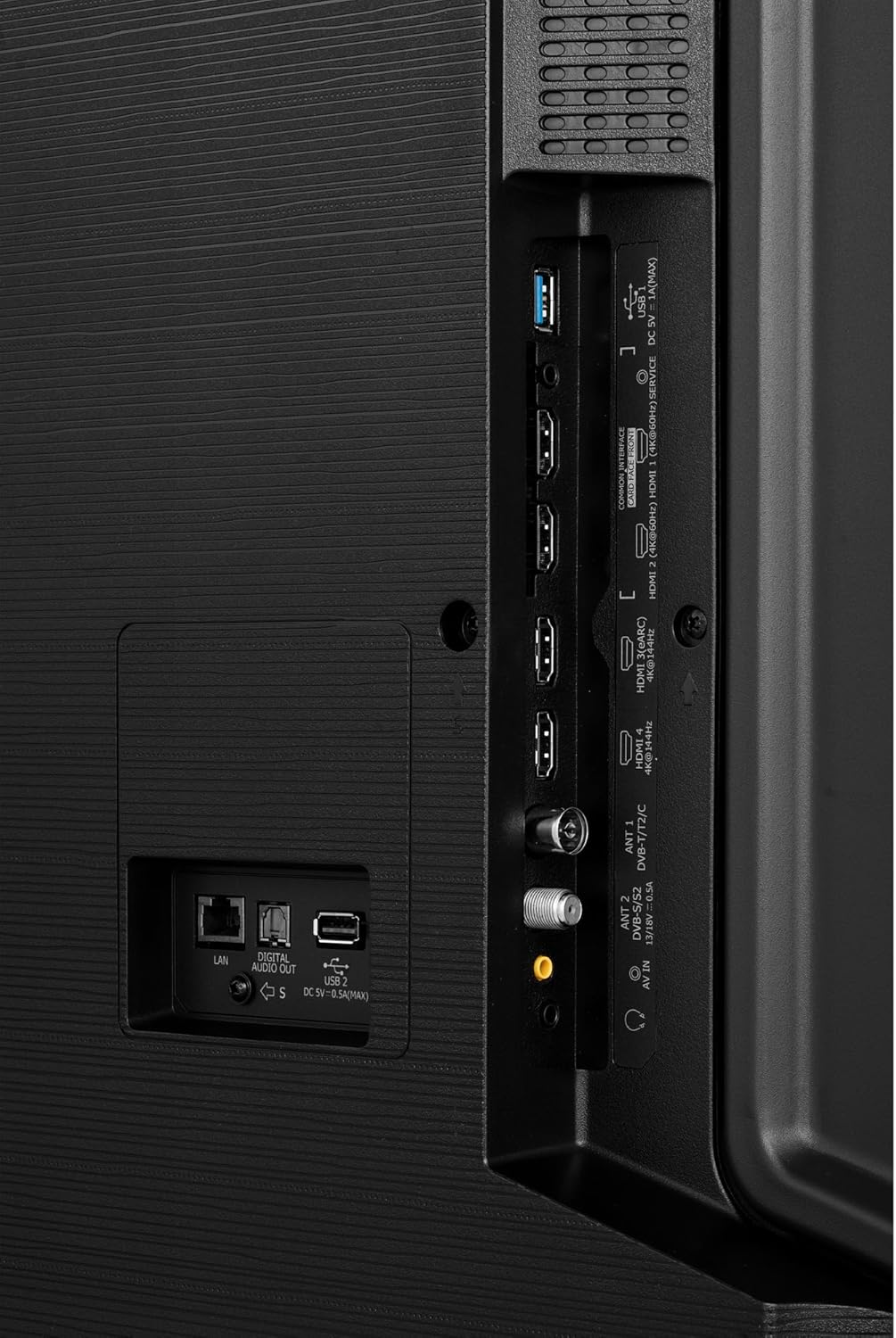
Detailed close-up of the connectivity ports on the back of the Hisense 75U7NQ TV, including HDMI, USB, LAN, and antenna inputs.
2.5 Анхдагч асаалттай
After connecting all necessary cables, plug the power cord into an electrical outlet. Press the power button on the TV or the remote control to turn on the TV. Follow the on-screen instructions for initial setup, including language selection, network connection, and channel scanning.
3. Ашиглалтын заавар
3.1 Алсын удирдлагатайview
The provided remote control allows you to navigate the TV's features and settings. Insert the included batteries into the remote control before use.

Урд view of the Hisense TV remote control, featuring dedicated buttons for streaming services, navigation, and numeric input.
3.2 Basic Navigation (VIDAA U OS)
Your Hisense TV runs on the VIDAA U operating system. Use the directional pad and OK button on the remote to navigate menus and select options. The Home button provides access to smart features, apps, and inputs.
3.3 Зургийн тохиргоо
Access picture settings through the TV's menu to adjust brightness, contrast, color, and sharpness. Select from various picture modes (e.g., Standard, Dynamic, Cinema, Game) to optimize viewing for different content. Dolby Vision IQ automatically adjusts picture settings based on ambient light.
3.4 Дууны тохиргоо
Adjust audio settings such as volume, sound mode (e.g., Standard, Music, Speech), and equalizer settings. Dolby Atmos provides an immersive audio experience with sound moving around you in three-dimensional space.
3.5 Ухаалаг ТВ-ийн онцлогууд
Connect your TV to the internet via Wi-Fi or Ethernet to access a wide range of streaming applications, a web browser, and other smart features available through the VIDAA U platform.
3.6 Тоглоомын онцлогууд
The 75U7NQ is equipped with a 144Hz refresh rate, Variable Refresh Rate (VRR), and Auto Low Latency Mode (ALLM) for an optimized gaming experience. Ensure your game console is connected to an HDMI 2.1 port to utilize these features fully. Activate Game Mode for reduced input lag.
4. Засвар үйлчилгээ
4.1 ТВ цэвэрлэх
- Дэлгэц: Дэлгэцийг зөөлөн, хөвөнгүй даавуугаар зөөлөн арчина. Зөөлөн толботой бол зурагтанд зориулсан тусгайлан бүтээсэн дэлгэц цэвэрлэгч уусмалыг дэлгэцэнд шууд биш, даавуунд түрхэнэ.
- Их бие: Зурагтын хүрээ болон суурийг зөөлөн, хуурай даавуугаар арчина. Зүлгүүрийн цэвэрлэгч эсвэл уусгагч хэрэглэж болохгүй.
Цэвэрлэхийн өмнө ТВ-ээ үргэлж цахилгааны залгуураас салга.
4.2 Програм хангамжийн шинэчлэлтүүд
Your TV may receive software updates to improve performance and add new features. Ensure your TV is connected to the internet. You can usually check for updates manually through the TV's settings menu (System > About TV > Software Update).
4.3 Ерөнхий арчилгаа
- Зурагтыг нарны шууд тусгалд эсвэл дулааны эх үүсвэрийн ойролцоо байрлуулахаас зайлсхий.
- ТВ-ийн эргэн тойронд хангалттай агааржуулалтыг хангах.
- Агааржуулалтын нүхийг хааж болохгүй.
- Цахилгааны утсыг алхах, хавчихаас хамгаална.
5. Алдаа засах
Хэрэв танд ТВ-тэй холбоотой асуудал тулгарвал хэрэглэгчийн дэмжлэгтэй холбогдохын өмнө дараах нийтлэг асуудал, шийдлүүдийг үзнэ үү.
| Асуудал | Боломжит шалтгаан / шийдэл |
|---|---|
| Хүч чадалгүй | Ensure the power cord is securely plugged into the TV and the wall outlet. Check if the outlet is working by plugging in another device. |
| Зураг байхгүй ч дуу чимээ байна | Оролтын эх үүсвэрийг шалгана уу. Холбогдсон төхөөрөмж асаалттай, зөв ажиллаж байгаа эсэхийг шалгаарай. Өөр HDMI кабель ашиглаж үзнэ үү. |
| Дуу байхгүй ч зураг байна | Check the volume level. Ensure Mute is not activated. Check audio output settings on the TV and connected devices. |
| Алсын удирдлага ажиллахгүй байна | Батерейг солих. Алсын удирдлага болон ТВ-ийн IR мэдрэгчийн хооронд ямар ч саад бэрхшээл байхгүй эсэхийг шалгаарай. |
| Сүлжээний холболтын асуудлууд | Check your Wi-Fi password. Restart your router and modem. Try connecting via Ethernet cable if Wi-Fi fails. |
| Picture is Distorted or Unclear | Check antenna connection or cable signal. Adjust picture settings. If using an external device, check its output resolution. |
6. Техникийн үзүүлэлтүүд
Below are the technical specifications for the Hisense 75U7NQ TV.
| Онцлог | Дэлгэрэнгүй |
|---|---|
| Брэнд | Хисенсе |
| Загварын дугаар | 75U7NQ |
| Дэлгэцийн хэмжээ | 75 инч |
| Дэлгэцийн технологи | Мини LED |
| Шийдвэр | 4K |
| Сэргээх хурд | 120Hz (up to 144Hz VRR) |
| Үйлдлийн систем | ВИДАА У |
| Холболт | Wired (Ethernet), Wireless (Wi-Fi), HDMI, USB |
| USB портуудын тоо | 2 |
| Онцлог шинж чанарууд | AMD FreeSync, USB Recording (DVR), Built-in Speaker, Game Mode, Browser |
| Тохиромжтой төхөөрөмжүүд | Laptop, Speaker, Game Console, Tablet, Smartphone |
| Бүтээгдэхүүний хэмжээс (DxWxH) | 33.8 x 167.3 x 103.2 см |
| Оруулсан бүрэлдэхүүн хэсгүүд | Power Cable, Quick Start Guide, User Manual, Batteries, Remote Control |
7. Баталгаат хугацаа ба дэмжлэг
For warranty information, please refer to the warranty card included with your product or contact your retailer. Hisense provides customer support for technical assistance and service inquiries. Please visit the official Hisense website or refer to the contact information provided in your product documentation for support details.
Information regarding the availability of spare parts and guaranteed software updates is not explicitly provided in the product specifications. Please consult Hisense customer service for the most current information.