
1. Танилцуулга
This manual provides comprehensive instructions for the installation, operation, and maintenance of your Hisense AX5125H 5.1.2 Channel Dolby Atmos Soundbar System. Please read this manual thoroughly before using the product to ensure proper and safe operation. Keep this manual for future reference.
The Hisense AX5125H is designed to deliver an immersive audio experience with its 5.1.2 channel configuration, including a wireless subwoofer and true wireless rear speakers. It supports Dolby Atmos and DTS Virtual:X technologies for a dynamic, three-dimensional soundstage.
2. Аюулгүй байдлын чухал мэдээлэл
Гал түймэр, цахилгаанд цохиулах, хүний биед гэмтэл учруулах эрсдлийг бууруулахын тулд энэ бүтээгдэхүүнийг ашиглахдаа аюулгүй байдлын үндсэн арга хэмжээг үргэлж дагаж мөрдөөрэй.
- Энэ төхөөрөмжийг дуслах эсвэл цацаж болохгүй.
- Ваар зэрэг шингэнээр дүүрсэн зүйлийг төхөөрөмж дээр тавьж болохгүй.
- Зөв агааржуулалтыг хангах. Агааржуулалтын нүхийг хааж болохгүй.
- Зөвхөн үйлдвэрлэгчээс заасан хавсралт/дагалдах хэрэгслийг ашиглана уу.
- Аянга шуурганы үед эсвэл удаан хугацаагаар ашиглаагүй үед энэ төхөөрөмжийг цахилгааны залгуураас салга.
- Бүх үйлчилгээг мэргэшсэн үйлчилгээний ажилтнуудад шилжүүлээрэй.
- Батерейг хүүхдээс хол байлга.
3. Багцын агуулга
Багцыг нээхдээ бүх бүрэлдэхүүн хэсгүүд байгаа бөгөөд сайн нөхцөлд байгаа эсэхийг шалгаарай.
- Hisense AX5125H Soundbar
- Утасгүй сабвуфер
- Two (2) True Wireless Rear Speakers
- Алсын удирдлага (2 AAA батерейтай)
- Power Cords (for Soundbar, Subwoofer, and Rear Speakers)
- HDMI кабель
- Оптик кабель
- Wall Mount Brackets and Screws
- Хэрэглэгчийн гарын авлага (энэ баримт бичиг)

Зураг 3.1: Илүүview of the Hisense AX5125H Soundbar system, including the soundbar, wireless subwoofer, and two wireless rear speakers.
4. Тохиргоо ба суурилуулалт
4.1 Байршил
Optimal placement of the soundbar and speakers is crucial for the best audio experience.
- Дууны самбар: Place the soundbar centrally below your television. Ensure no objects obstruct the front or top-firing speakers.
- Утасгүй сабвуфер: Position the subwoofer on the floor, preferably in a corner or near a wall for enhanced bass. Experiment with placement to find the best sound.
- True Wireless Rear Speakers: Place the rear speakers behind your listening position, to the left and right. Ensure they are within range of the soundbar for wireless connection. They can be placed on stands or wall-mounted.
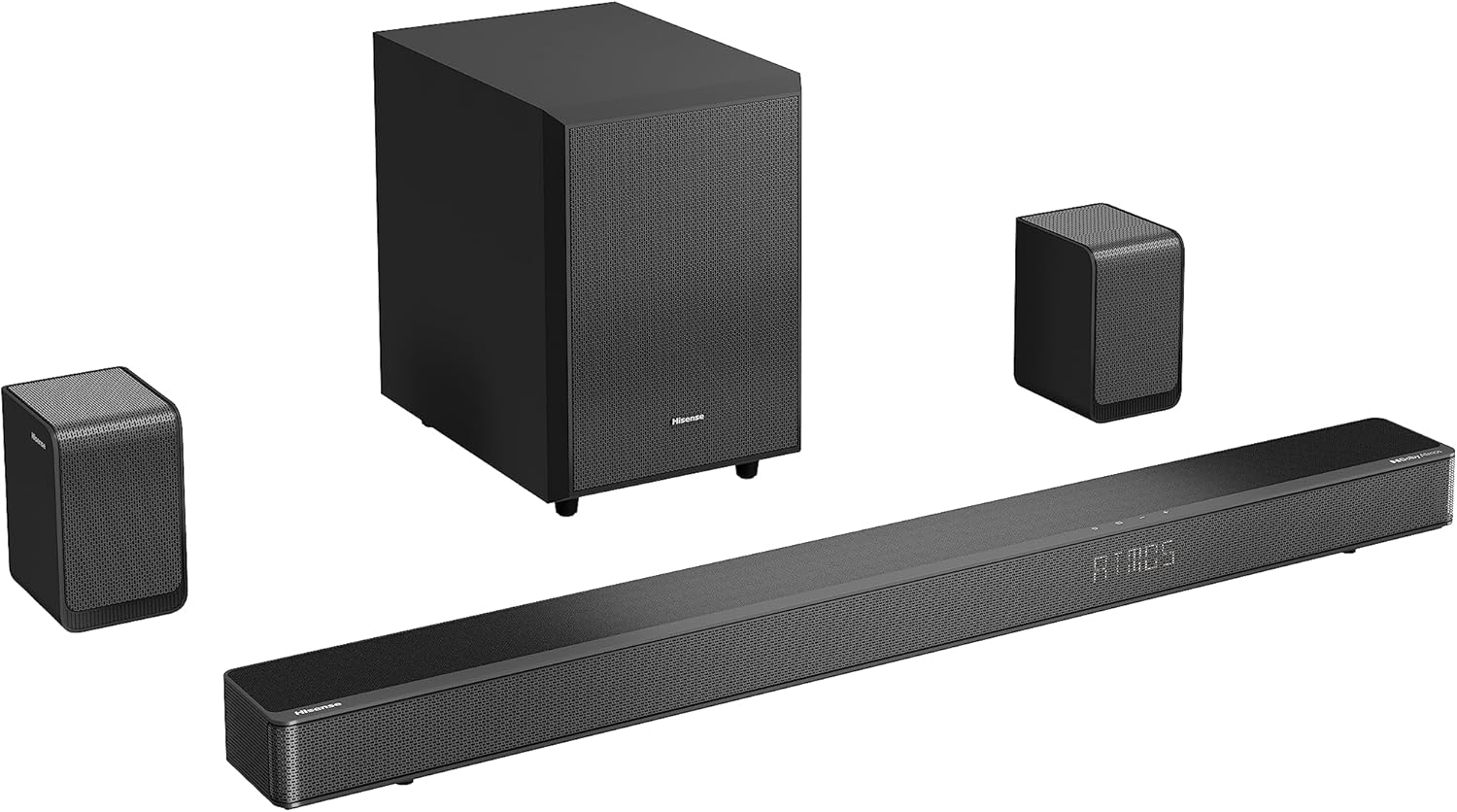
Figure 4.1: The Hisense AX5125H soundbar and its wireless subwoofer, ready for placement.
4.2 холболт
Connect the soundbar to your television or other audio sources.
- Эрчим хүчний холболт: Connect the power cords to the soundbar, subwoofer, and each rear speaker, then plug them into a power outlet. The units will automatically power on or enter standby mode.
- HDMI ARC/eARC (Санал болгож байна):
- Connect one end of the HDMI cable to the HDMI OUT (ARC/eARC) port on the soundbar.
- Connect the other end to the HDMI ARC/eARC port on your television.
- Ensure HDMI ARC/eARC is enabled in your TV's audio settings.
- Оптик холболт:
- Connect one end of the optical cable to the OPTICAL IN port on the soundbar.
- Connect the other end to the optical digital output port on your television or audio source.
- Bluetooth холболт:
- Press the Bluetooth button on the soundbar or remote control to enter pairing mode.
- On your mobile device, search for "Hisense AX5125H" in the Bluetooth settings and connect.

Зураг 4.2: Ар талд view of the Hisense AX5125H soundbar, showing the various input ports for connectivity.
4.3 Wireless Speaker Pairing
The subwoofer and rear speakers should automatically pair with the soundbar upon power-up. If not, follow these steps:
- Бүх төхөөрөмж асаалттай байгаа эсэхийг шалгаарай.
- If pairing fails, press and hold the "Pairing" button on the back of the subwoofer and each rear speaker until the indicator light flashes.
- Then, press and hold the "Pairing" button on the soundbar (refer to the soundbar's specific button location in the quick start guide).
- The indicator lights will turn solid when pairing is successful.
5. Ашиглалтын заавар
5.1 Үндсэн үйлдлүүд
- Асаах/унтраах: дээр дарна уу Хүч алсын удирдлага эсвэл дууны самбар дээрх товчлуур.
- Дууны хяналт: -г ашиглана уу Дууны хэмжээг нэмэгдүүлэх (+) болон Дууг багасгах (-) товчлуурууд.
- Оролтын сонголт: дээр дарна уу Оруулах button to cycle through HDMI, Optical, Bluetooth, and other available inputs.
- Дууг хаах: дээр дарна уу Дууг хаах button to silence the audio. Press again to unmute.

Зураг 5.1: Дээд тал view of the Hisense AX5125H soundbar, showing the integrated control buttons.
5.2 Дууны горим ба тохиргоо
The Hisense AX5125H offers various sound modes and adjustments to optimize your listening experience.
- EQ горимууд: -г ашиглана уу EQ button on the remote to cycle through preset equalization modes (e.g., Movie, Music, News, Sport, Night, AI Surround, Bass Boost).
- Bass/Treble Adjustment: Зориулалтын ашиглах Басс +/- болон Гурван давхарга +/- buttons on the remote to fine-tune audio frequencies.
- Хүрээлэн буй орчны дуу чимээ: The system automatically detects Dolby Atmos or DTS Virtual:X content. Ensure your source material supports these formats for the best immersive experience.
- EzPlay Functionality: For seamless integration with compatible Hisense TVs, EzPlay allows for unified control of the soundbar and TV.
6. Засвар үйлчилгээ, арчилгаа
Proper care ensures the longevity and optimal performance of your soundbar system.
- Цэвэрлэгээ: Use a soft, dry cloth to clean the surfaces of the soundbar, subwoofer, and speakers. Do not use liquid cleaners or aerosols.
- Агааржуулалт: Агааржуулалтын нүхийг бөглөөгүй эсэхийг шалгаарай.
- Хадгалах: Хэрэв төхөөрөмжийг удаан хугацаагаар хадгалах бол цахилгаанаас нь салгаад сэрүүн, хуурай газар хадгална уу.
- Зай солих: Replace remote control batteries (2 AAA) when the remote's range decreases or it stops responding.
7. Алдаа засах
This section addresses common issues you might encounter. If the problem persists, contact Hisense customer support.
| Асуудал | Боломжит шалтгаан | Шийдэл |
|---|---|---|
| Хүч чадалгүй | Цахилгааны утас холбогдоогүй; Цахилгаан залгуур идэвхжээгүй байна. | Ensure power cords are securely connected. Test the outlet with another device. |
| Дуу алга | Incorrect input selected; Volume too low; Mute activated; Cables loose. | Select the correct input source. Increase volume. Deactivate mute. Check all cable connections. |
| Сабвуфер/Арын чанга яригч хослохгүй байна | Out of range; Interference; Pairing failed. | Move units closer. Reduce wireless interference. Re-initiate pairing process as described in Section 4.3. |
| Алсын удирдлага ажиллахгүй байна | Batteries depleted; Obstruction; Incorrect aiming. | Replace batteries. Remove any obstructions between remote and soundbar. Aim remote directly at the soundbar's sensor. |
| Гажуудсан дуу чимээ | Source audio quality; Volume too high; Incorrect EQ settings. | Check source audio. Reduce volume. Adjust EQ settings. |
8. Бүтээгдэхүүний техникийн үзүүлэлтүүд
| Онцлог | Дэлгэрэнгүй |
|---|---|
| Загварын дугаар | AX5125H |
| Сувгууд | 5.1.2 суваг |
| Нийт гаралтын чадал | 500 ватт |
| Аудио технологи | Dolby Atmos, DTS Virtual:X |
| Холболт | HDMI ARC/eARC, Optical, Bluetooth 5.3 |
| Wireless Components | Wireless Subwoofer, True Wireless Rear Speakers |
| Дууны самбарын урт | 92 сантиметр |
| Зүйлийн жин | 12.6 Kilograms (Total system weight) |
| Өнгө | Хар |
| Эрчим хүчний эх үүсвэр | Утастай цахилгаан |
| Батерейнууд багтсан | 2 AAA (for remote) |
9. Баталгаат хугацаа ба дэмжлэг
9.1 Баталгаат хугацааны мэдээлэл
Hisense products are covered by a limited warranty. Please refer to the warranty card included in your package or visit the official Hisense webТанай бүс нутагт хамаарах баталгаат нөхцлийн дэлгэрэнгүй мэдээллийг сайтаас авна уу. Худалдан авалтын баримтаа баталгаат нэхэмжлэлд зориулж худалдан авалтын баталгаа болгон хадгална уу.
9.2 Хэрэглэгчийн дэмжлэг
For technical assistance, troubleshooting, or service inquiries, please contact Hisense customer support. You can find contact information on the official Hisense webсайт эсвэл бүтээгдэхүүний сав баглаа боодол дээр.
Онлайн дэмжлэг: Visit the official Hisense support page for FAQs, software updates, and additional resources.
Утасны дэмжлэг: Refer to your regional Hisense webорон нутгийн холбоо барих утасны сайт.