
1. Бүтээгдэхүүн дууссанview
The UltraPro Outdoor Dusk-to-Dawn Timer (Model 71069) provides automatic control for outdoor lighting, seasonal decorations, and other plug-in devices. Featuring a built-in light sensor, this weather-resistant timer activates connected equipment at dusk and deactivates it at dawn, eliminating the need for manual programming. Its single grounded outlet and durable construction ensure reliable performance in various outdoor conditions.

Image: Two UltraPro Outdoor Dusk-to-Dawn Timers, illustrating the product in a 2-pack configuration.
Гол онцлогууд:
- Үүр бүрхээс хүртэл ажиллагаа: Automatically turns connected devices on at dusk and off at dawn.
- Цаг агаарт тэсвэртэй: Durable housing designed for outdoor use in various weather conditions.
- Single Grounded Outlet: Provides power control for one outdoor device.
- Ergonomic Plug: Designed for easy handling and compatibility with outdoor GFCI outlets.
- LED үзүүлэлт: Illuminates to show when the connected equipment is active.
2. Тохиргоо ба суурилуулалт
Follow these steps to properly set up and install your UltraPro Outdoor Dusk-to-Dawn Timer.
Байршуулахад анхаарах зүйлс:
- Select a location that receives direct sunlight during the day to ensure the light sensor functions correctly.
- Avoid areas that are illuminated by artificial light sources (e.g., porch lights, streetlights) at night, as this may interfere with the dusk-to-dawn functionality.
- Ensure the timer's outlet is positioned downward and at least one foot (30 cm) above the ground to prevent water accumulation and ensure proper drainage.

Image: Diagram showing the dimensions of the UltraPro Outdoor Dusk-to-Dawn Timer: 4.50 inches (114.30mm) in height, 2.50 inches (63.50mm) in width, and 1.25 inches (31.75mm) in depth.
Таймер суурилуулах:
The timer features a mounting loop and keyhole for secure installation.
- Identify a suitable mounting surface near an outdoor GFCI (Ground Fault Circuit Interrupter) outlet.
- Use a screw, nail, or hook to secure the timer through its mounting loop or keyhole.
- Ensure the timer is firmly attached and the outlet faces downwards.

Зураг: Ойролцоогоор view of the UltraPro Outdoor Timer highlighting its mounting keyhole, mounting loop, ergonomic plug, and light sensor. The ergonomic plug is noted to fit most weatherproof covers.
Холбох төхөөрөмжүүд:
- Plug the timer into a grounded outdoor GFCI outlet.
- Plug the device you wish to control (e.g., outdoor lights) into the single grounded outlet on the timer.
- If your device has its own power switch, ensure it is set to the 'ON' position for the timer to control its operation.
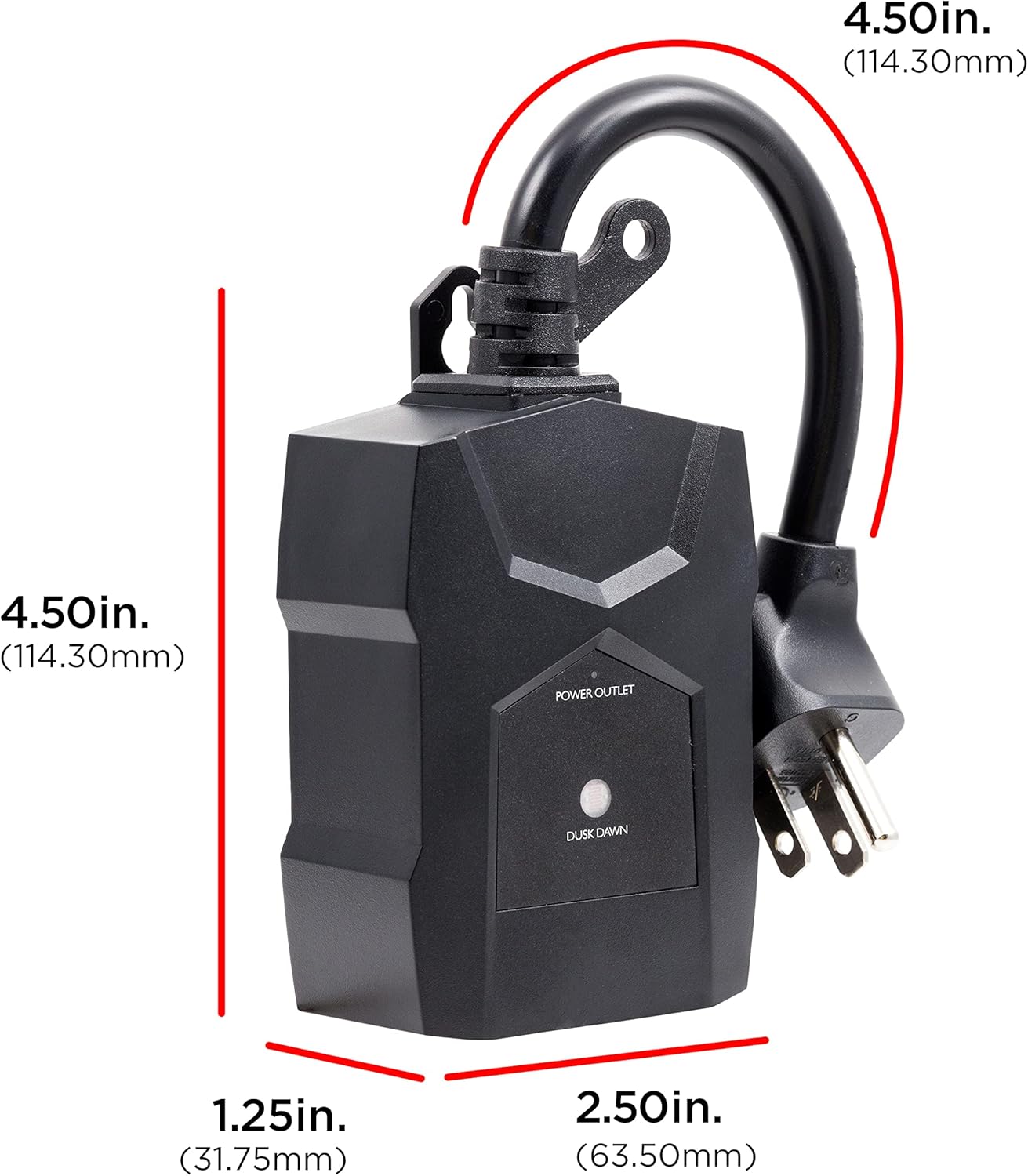
Image: A hand plugging the UltraPro Outdoor Dusk-to-Dawn Timer into an outdoor GFCI outlet, demonstrating proper connection.
Video: An instructional video demonstrating the setup and operation of the UltraPro Outdoor Light-Sensing Dusk-to-Dawn Timer. It shows how to plug the timer into an outdoor GFCI outlet, connect a device, and highlights the automatic dusk-to-dawn functionality and LED indicator.
3. Ашиглалтын заавар
The UltraPro Outdoor Dusk-to-Dawn Timer operates automatically based on ambient light levels.
Автомат ажиллагаа:
- The built-in light sensor detects when natural light levels decrease at dusk.
- Upon detecting dusk, the timer will automatically activate the connected device.
- When natural light levels increase at dawn, the timer will automatically deactivate the connected device.
- No manual programming or adjustments are required for this functionality.

Image: Outdoor string lights illuminated at dusk, demonstrating the 'Dusk to Dawn' feature of the UltraPro timer, which automatically turns on connected devices.
LED үзүүлэлт:
A small LED light on the timer indicates its operational status:
- The LED illuminates when the connected device is activated (i.e., when the timer is supplying power).
- The LED will be off when the connected device is deactivated.


Image: Icons illustrating key features: automatic dusk-to-dawn operation, weather-resistant design, and a single grounded outlet.
4. Засвар үйлчилгээ
The UltraPro Outdoor Dusk-to-Dawn Timer is designed for durability and minimal maintenance.
- Periodically inspect the timer and its connections for any signs of wear, damage, or debris.
- Ensure the light sensor remains clear of obstructions (e.g., leaves, dirt) to maintain accurate operation.
- Таймерын гадна талыг зөөлөн, гamp шаардлагатай бол даавуугаар арчина. Хүчтэй химийн бодис эсвэл зүлгүүрийн цэвэрлэгч хэрэглэж болохгүй.
- Ensure the timer is securely mounted and the outlet remains facing downwards to protect against moisture.
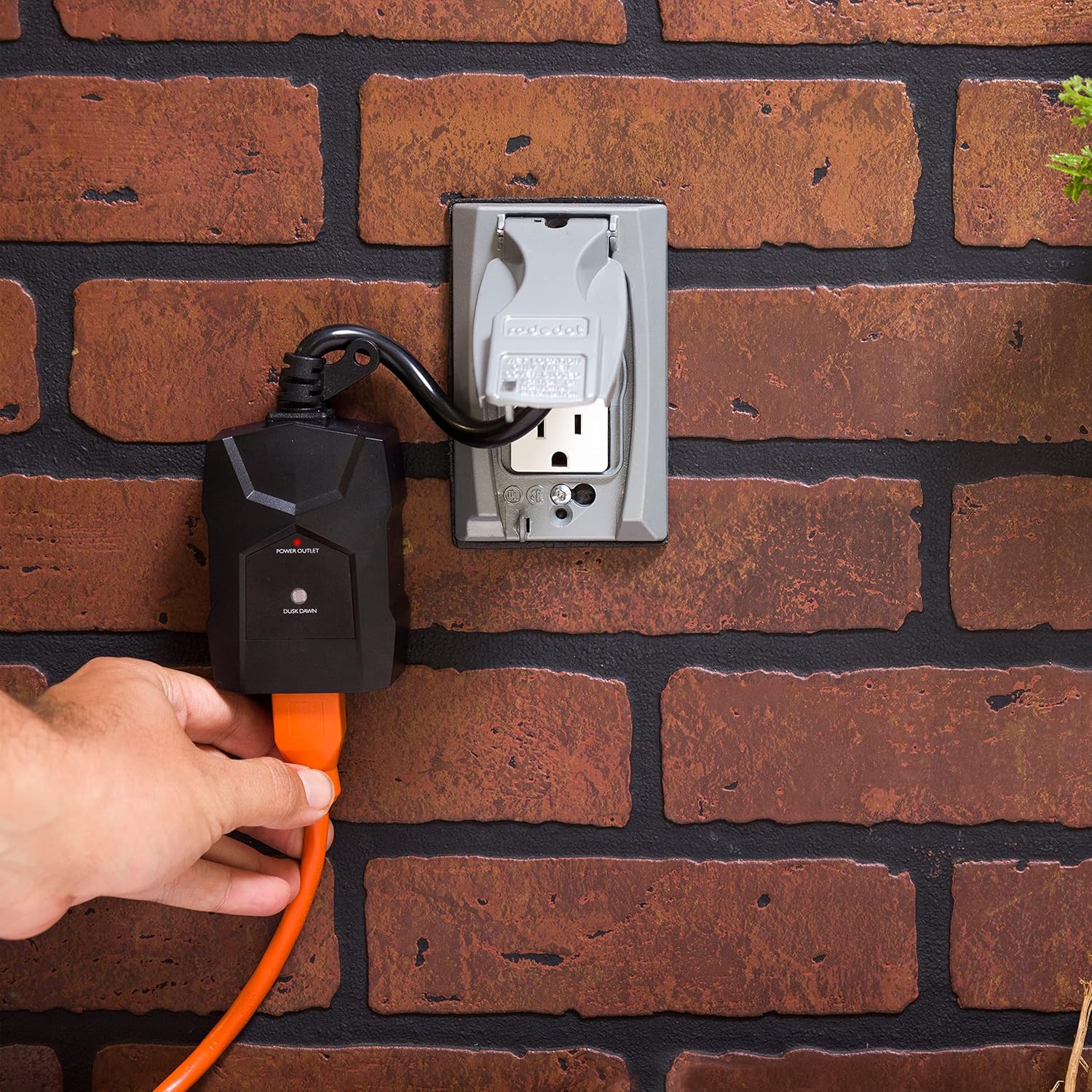
Image: A festive porch decorated with Christmas lights and garland, covered in a light layer of snow, illustrating the timer's weather-resistant capability for seasonal use.
5. Алдаа засах
If you encounter issues with your UltraPro Outdoor Dusk-to-Dawn Timer, refer to the following common problems and solutions:
| Асуудал | Боломжит шалтгаан | Шийдэл |
|---|---|---|
| Device does not turn on at dusk. |
|
|
| Device does not turn off at dawn. |
|
|
| LED indicator is not lit when device is on. |
|
|
6. Техникийн үзүүлэлтүүд
| Атрибут | Дэлгэрэнгүй |
|---|---|
| Брэнд | UltraPro |
| Загварын дугаар | 71069 |
| Өнгө | Хар |
| Материал | Хуванцар |
| Бүтээгдэхүүний хэмжээ (D x W x H) | 1.51" x 2.55" x 11.07" |
| Зүйлийн жин | 13.1 унц |
| Тохиргооны тоо | 5 (referring to internal settings, not user-adjustable) |
| UPC | 030878710695 |
| Үйлдвэрлэгч | Жаско Продактс компани, ХХК |
| Гэрчилгээ | ETL жагсаалтад орсон |
7. Баталгаат хугацаа ба дэмжлэг
Баталгаат мэдээлэл:
This UltraPro Outdoor Dusk-to-Dawn Timer comes with a 1 жилийн хязгаарлагдмал баталгаат хугацаа худалдан авсан өдрөөс. Баталгаат заргад зориулж худалдан авалтаа нотлох баримтаа үлдээнэ үү.
Хэрэглэгчийн дэмжлэг:
For technical assistance, troubleshooting, or warranty inquiries, please refer to the contact information provided in your product packaging or visit the official UltraPro website. Customer care is typically available Monday - Friday, 7:00 AM - 8:00 PM Central Time.