
1. Танилцуулга
This manual provides essential information for the safe and effective operation, maintenance, and troubleshooting of your TOSHIBA Air Purifier Model CAF-Z45US(W). Please read this manual thoroughly before using the appliance and retain it for future reference.

Зураг 1.1: Урд view of the TOSHIBA Air Purifier Model CAF-Z45US(W).
2. Аюулгүй ажиллагааны чухал заавар
Гал түймэр, цахилгаан цочрол, гэмтлийн эрсдэлийг бууруулахын тулд энэ төхөөрөмжийг ажиллуулахдаа үндсэн аюулгүй байдлын урьдчилан сэргийлэх арга хэмжээг үргэлж дагаж мөрдөөрэй.
- Агаар цэвэршүүлэгчийг ашиглахаасаа өмнө бүх зааврыг уншина уу.
- Эрчим хүчний хангамжийн хэмжээг баталгаажуулна ууtage нь төхөөрөмж дээрх үнэлгээний шошготой таарч байна.
- Гэмтсэн утас, залгууртай агаар цэвэршүүлэгчийг ажиллуулж болохгүй.
- Төхөөрөмжийг дулааны эх үүсвэрийн ойролцоо эсвэл нарны шууд тусгалд бүү байрлуул.
- Төхөөрөмжийг ус болон бусад шингэнээс хол байлга.
- Агаар цэвэршүүлэгчийг цэвэрлэх эсвэл засвар үйлчилгээ хийхээс өмнө залгуураас нь салга.
- Ямар ч нүхэнд объект оруулж болохгүй.
- Энэ хэрэгсэл нь зөвхөн дотор ашиглах зориулалттай.
- Хүүхдийг төхөөрөмжөөр тоглуулахгүйн тулд тэднийг хянаж байгаарай.
3. Бүтээгдэхүүн дууссанview
The TOSHIBA Air Purifier Model CAF-Z45US(W) is designed to improve indoor air quality in spaces up to 215 sq ft. It features advanced filtration and smart sensing technology.
3.1 Гол онцлогууд
- H13 Жинхэнэ HEPA шүүлтүүр: Captures 99.97% of microscopic allergens and certain germs.
- Агаарын чанарын мэдрэгч: Monitors real-time air quality with PureSense Technology.
- 4-Color LED Indicator: Visually displays air quality status (Blue: Good, Green: Moderate, Orange: Unhealthy, Red: Very Unhealthy).
- 360° Tornado Airmax System: Optimized aerodynamic design for efficient air circulation, refreshing air 5 times per hour in rooms up to 215 sq ft (CADR: 155 CFM / 262 m³/h).
- Чимээгүй ажиллагаа: Noise level as low as 22dB in Sleep Mode.
- Үйлдлийн горимууд: Auto Mode, Sleep Mode, and 4-speed fan settings.
- Таймер функц: Ашиглалтын горимыг 2, 4 эсвэл 6 цагийн турш тохируулна уу.
- Digital Display & Touch Control: Easy-to-read display and intuitive touch controls.
- Шүүлтүүрийг солих үзүүлэлт: Alerts when filter maintenance is required.
3.2 Бүрэлдэхүүн хэсэг
Familiarize yourself with the main components of your air purifier:

Зураг 3.1: Дотоод view showing the multi-layer filtration system, including the Pre-filter and H13 True HEPA filter.

Image 3.2: Illustration of the air purification process, showing air being drawn in and purified air being released, effectively cleaning a room up to 215 sq ft.

Image 3.3: Close-up of the top control panel with digital display and touch buttons for various functions.

Image 3.4: Diagram illustrating the internal components of the Tornado Airmax System, including the diffused runner, airflow guide vane, and centrifugal fan, designed for efficient air circulation.
4. Тохиргоо
Follow these steps to set up your air purifier for first-time use:
- Нэгжийг задлах: Агаар цэвэршүүлэгчийг савлагаанаас нь болгоомжтой авч хая.
- Шүүлтүүрийн савлагааг арилгах:
- Press the "PUSH" button on the side of the unit to release the upper component.
- Lift the upper section to access the filter compartment.
- Шүүлтүүрийн сагсыг ав.
- Take out the filter and remove all plastic packaging.
- Reinsert the filter into the filter basket, ensuring it is seated correctly.
- Place the filter basket back into the unit.
- Align the upper component and press down until it clicks into place.
- Агаар цэвэршүүлэгчийг байрлуулах: Place the unit on a firm, level surface. Ensure there is adequate space (at least 6 inches) around all sides for optimal airflow.
- Цахилгаанд холбогдох: Цахилгааны утсыг ердийн цахилгаан залгуурт холбоно уу.

Image 4.1: Illustration of how to press the "PUSH" button and lift the top section to access and remove the filter for unpacking or replacement.
5. Ашиглалтын заавар
5.1 Асаах/унтраах
дээр дарна уу Цахилгаан товч () төхөөрөмжийг асаах, унтраахын тулд хяналтын самбар дээр.
5.2 Сэнсний хурдны тохируулга
дээр дарна уу Сэнсний хурдны товчлуур () to cycle through 4 fan speed settings: Low, Medium, High, and Turbo.
5.3 Авто горим
дээр дарна уу Автомат горим товч () to activate Auto Mode. In this mode, the air purifier's sensor detects the air quality and automatically adjusts the fan speed to optimize purification.

Image 5.1: The air purifier operating in Auto Mode, with the 4-color LED light indicating current air quality.
5.4 Унтах горим
дээр дарна уу Унтах горимын товчлуур () to enter Sleep Mode. In this mode, the fan operates at its lowest speed for ultra-quiet operation, and all indicator lights are dimmed or turned off to ensure a peaceful environment.

Image 5.2: The air purifier operating quietly at 22dB, suitable for a peaceful environment like a bedroom or meditation space.
5.5 Таймер функц
дээр дарна уу Цаг хэмжигч товчлуур () to set the operating time for 2, 4, or 6 hours. The unit will automatically turn off after the selected duration.
5.6 Агаарын чанарын үзүүлэлт
The front LED light changes color to indicate the current air quality:
- Цэнхэр: Агаарын сайн чанар
- Ногоон: Дунд зэргийн агаарын чанар
- Улбар шар: Unhealthy Air Quality
- Улаан: Very Unhealthy Air Quality

Image 5.3: Four air purifiers demonstrating the different LED colors corresponding to air quality levels: Blue (Good), Green (Moderate), Orange (Unhealthy), and Red (Very Unhealthy).
6. Засвар үйлчилгээ
Тогтмол засвар үйлчилгээ нь таны агаар цэвэршүүлэгчийн ашиглалтын хугацааг уртасгаж, оновчтой ажиллагааг хангана.
6.1 Шүүлтүүрийг солих
The filter indicator light on the control panel will illuminate when it's time to replace the filter. Filter lifespan varies based on usage and air quality.
- Агаар цэвэршүүлэгчийг цахилгаан залгуураас салга.
- Press the "PUSH" button and lift the upper component.
- Remove the old filter from the filter basket.
- Хуучин шүүлтүүрийг хариуцлагатайгаар устгана уу.
- Insert a new TOSHIBA CAF-Z45US(W) replacement filter into the filter basket, ensuring proper orientation.
- Place the filter basket back into the unit.
- Align and secure the upper component.
- Агаар цэвэршүүлэгчийг холбоно уу.
- Шүүлтүүрийн үзүүлэлтийг дахин тохируулах: -г удаан дар Шүүлтүүрийг дахин тохируулах товч () for 3 seconds until the indicator light turns off.
Жич: Replacement filters for this specific model (CAF-Z45US(W)) may require direct inquiry with TOSHIBA customer support or authorized retailers, as availability can vary.

Image 6.1: Close-up of the control panel showing the filter reset instruction: "Press 3s, to reset Filter".
6.2 Filter Basket Cleaning
The filter basket is washable for convenience. Periodically clean it to maintain airflow.
- Агаар цэвэршүүлэгчийг салга.
- Remove the filter basket as described in Section 6.1.
- Wash the filter basket with mild soap and water.
- Ensure the filter basket is completely dry before reinserting it into the unit.

Image 6.2: Illustration of the washable filter basket with water splashing, indicating it can be cleaned.
6.3 Гадна цэвэрлэгээ
Агаар цэвэршүүлэгчийн гадна талыг зөөлөн, хуурай даавуугаар арчина. Зүлгүүрийн цэвэрлэгч эсвэл уусгагч хэрэглэж болохгүй.
7. Алдаа засах
Хэрэв та агаар цэвэршүүлэгчтэй холбоотой асуудалтай тулгарвал нийтлэг асуудал, шийдлүүдийг дараах хүснэгтээс харна уу.
| Асуудал | Боломжит шалтгаан | Шийдэл |
|---|---|---|
| Төхөөрөмж асахгүй байна. | Холбогдоогүй; хүчээ өгөөчtagд; шүүлтүүрийг зөв суулгаагүй байна. | Ensure power cord is securely plugged in; check household circuit breaker; verify filter is installed and plastic packaging removed. |
| Агаарын цэвэршилт муу. | Filter is dirty or clogged; unit placed in an obstructed area; room size exceeds capacity. | Replace the filter; ensure proper clearance around the unit; confirm room size is within 215 sq ft. |
| Ер бусын дуу чимээ. | Filter not seated correctly; foreign object inside; unit on an uneven surface. | Check and re-seat the filter; inspect for any obstructions; place the unit on a stable, level surface. |
| Air quality indicator always blue/green. | Sensor may be obstructed or dirty; very clean air. | Gently clean the sensor area (refer to maintenance); if air is genuinely clean, this is normal operation. |
If the problem persists after attempting these solutions, please contact TOSHIBA customer support.
8. Техникийн үзүүлэлтүүд
| Онцлог | Дэлгэрэнгүй |
|---|---|
| Загварын дугаар | CAF-Z45US(W) |
| Брэнд | Тошиба |
| Бүтээгдэхүүний хэмжээс | 9.4"D x 9.4"W x 14.9"H |
| Жин | 7.34 фунт |
| Хамрах хүрээ | 215 квадрат фут хүртэл |
| CADR | 155 CFM / 262 м³/цаг |
| Шүүлтүүрийн төрөл | H13 True HEPA Filter (with Pre-filter) |
| Дуу чимээний түвшин | 22дБ хүртэл бага |
| Таймерын тохиргоо | 2 цаг, 4 цаг, 6 цаг |
| Агаарын чанарын мэдрэгч | Yes (PureSense Technology) |
| Өнгө | Цагаан |
| Үйлдвэрлэгч | Тошиба |
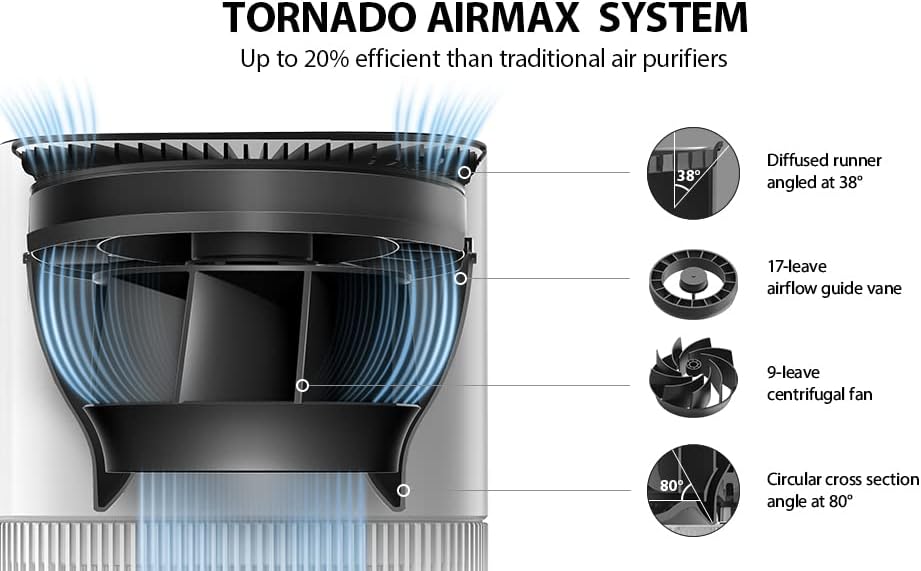
Image 8.1: Diagram showing the dimensions of the TOSHIBA Air Purifier: 9.4 inches (width), 9.4 inches (depth), and 14.9 inches (height).
9. Баталгаат хугацаа ба хэрэглэгчийн дэмжлэг
For warranty information, technical assistance, or to purchase replacement parts and filters, please contact TOSHIBA customer support directly. Refer to the product packaging or the official TOSHIBA webхолбоо барих мэдээллийг авах сайт.
Үйлдвэрлэгч: Тошиба
Загвар: CAF-Z45US(W)