
1. Танилцуулга
This manual provides comprehensive instructions for the safe and efficient installation, operation, and maintenance of the WEST P6100-2110002 Temperature Controller. This device is designed for precise temperature regulation in various industrial and scientific applications, including hatching machines, featuring a two-digital display for process value (PV) and set point (SP), and an integrated alarm function.
2. Аюулгүй байдлын мэдээлэл
- Цахилгааны аюулгүй байдал: Ensure all wiring is performed by qualified personnel in accordance with local and national electrical codes. Disconnect power before installation or maintenance.
- Ботьtage: Цахилгаан хангамжийн хэмжээ байгаа эсэхийг шалгана ууtage matches the controller's requirements (100-240V AC, 50/60Hz).
- Байгаль орчин: Install the controller in an environment free from excessive dust, moisture, corrosive gases, and vibrations.
- Зөв хэрэглээ: Use the controller only for its intended purpose of temperature regulation.
3. Бүтээгдэхүүн дууссанview
The WEST P6100-2110002 is a compact and reliable temperature controller. It features a clear dual-line digital display, intuitive button controls, and robust terminal connections for various inputs and outputs.

Зураг 3.1: Урд view of the WEST P6100-2110002 Temperature Controller, showing the dual digital display for PV and SP, and control buttons.

Зураг 3.2: Хажуу тал view of the controller, displaying the model number P6100 and serial number on a label.
4. Тохиргоо ба суурилуулалт
Careful installation is crucial for the optimal performance and longevity of the temperature controller. Refer to the wiring diagrams and terminal descriptions below.
4.1 Суурилуулалт
The controller is designed for panel mounting. Ensure adequate space for ventilation and access to terminals.
4.2 утас холболт
All electrical connections must be secure and correctly terminated. Refer to the terminal block images for proper wiring.
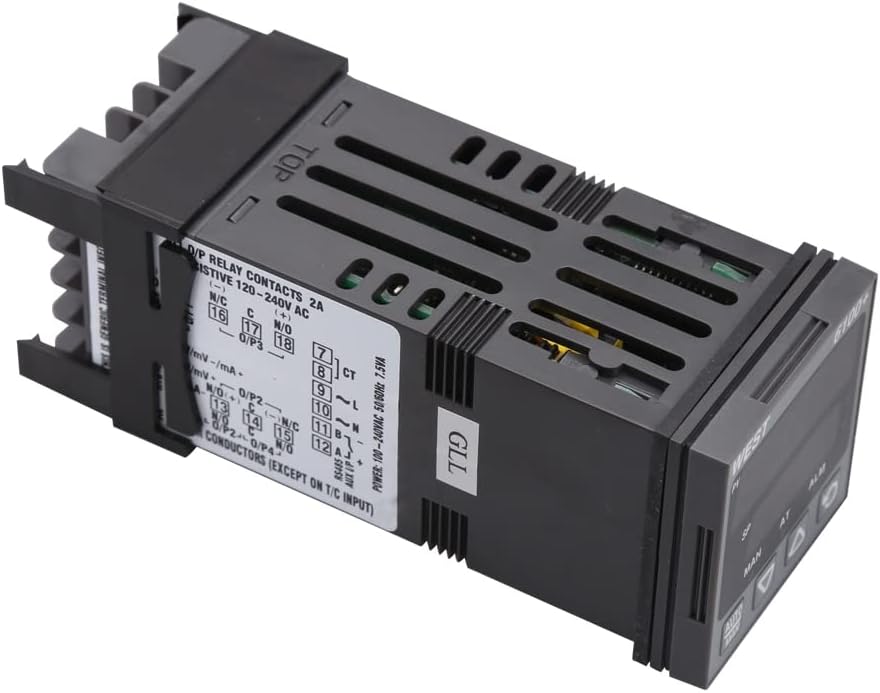
Зураг 4.1: Дээрээс доош view of the controller, illustrating the wiring diagram and terminal assignments for power, inputs, and outputs.

Зураг 4.2: Өнцөгтэй view of the terminal block, showing the screw terminals for electrical connections.

Зураг 4.3: Арын view of the terminal block, providing a clear perspective of the connection points.
Эрчим хүчний хангамж:
- Connect to 100-240V AC, 50/60Hz power source.
- Power Consumption: 7.5VA.
Оруулах:
- The controller supports various input types, including mV, mA, and Thermocouple (T/C) inputs. Refer to the specific terminal markings for correct sensor connection.
Гаралт:
- Relay Contacts: 2A resistive at 120-240V AC. Connect heating or cooling elements to these terminals as required.
Харилцаа холбоо:
- RS485 communication interface is available for integration with other systems.
5. Ашиглалтын заавар
The controller features a user-friendly interface for setting and monitoring temperature.
5.1 Дэлгэцийн үзүүлэлтүүд
- PV (Үйл явцын утга): Displays the current measured temperature.
- SP (Set Point): Displays the desired target temperature.
- ХҮН: Indicates manual control mode.
- Дотор нь: Indicates auto-tuning is active.
- ALM: Indicates an active alarm condition.
5.2 Товчлуурын функцууд
- AUTO/MAN Button: Автомат болон гарын авлагын удирдлагын горимуудын хооронд шилждэг.
- Дээш сум товч (▲): Increases the set point value or navigates menu options.
- Доош сум товч (▼): Decreases the set point value or navigates menu options.
- Cycle/Enter Button (↻): Confirms selections, cycles through display modes, or enters parameter settings.
5.3 Setting the Temperature (Set Point)
- Press the Cycle/Enter button to access the set point adjustment mode. The SP display will flash.
- Use the Up (▲) and Down (▼) arrow buttons to adjust the SP to the desired temperature.
- Press the Cycle/Enter button again to confirm the new set point. The display will stop flashing.
5.4 Сэрүүлгийн функц
The ALM indicator illuminates when an alarm condition is met, as configured in the controller's parameters. Refer to the full product manual for detailed alarm setup and acknowledgment procedures.
6. Засвар үйлчилгээ
Regular maintenance ensures the reliable operation of your WEST P6100-2110002 Temperature Controller.
- Цэвэрлэгээ: Periodically clean the controller's front panel with a soft, dry cloth. Do not use abrasive cleaners or solvents.
- Шалгалт: Утасны холболтын нягтрал болон элэгдэл, зэврэлтийн шинж тэмдэг байгаа эсэхийг тогтмол шалгаж байгаарай.
- Агааржуулалт: Хэт халалтаас урьдчилан сэргийлэхийн тулд агааржуулалтын нүхийг бөглөөгүй эсэхийг шалгаарай.
7. Алдаа засах
If you encounter issues with your temperature controller, refer to the following common problems and solutions:
| Асуудал | Боломжит шалтгаан | Шийдэл |
|---|---|---|
| Хянагч асахгүй байна. | Цахилгаан хангамж байхгүй; буруу утас; гал хамгаалагч шатсан. | Check power connections; verify voltage; inspect internal fuse (if accessible and safe). |
| PV display shows 'HHHH' or 'LLLL'. | Sensor open circuit; sensor short circuit; sensor out of range. | Check sensor wiring; replace faulty sensor; ensure sensor range matches application. |
| Temperature control is unstable. | Incorrect PID parameters; sensor placement issues. | Perform auto-tuning; reposition sensor closer to the controlled area. |
| Alarm (ALM) indicator is on. | Process value exceeded alarm limits. | Check process conditions; verify alarm settings. |
Хэрэв эдгээр шийдлүүдийг туршиж үзсэний дараа асуудал арилахгүй бол техникийн дэмжлэгтэй холбогдоно уу.
8. Техникийн үзүүлэлтүүд
- Загвар: P6100-2110002
- Брэнд: БАРУУН
- Дэлгэцийн төрөл: LCD or LED (Dual Digital Display)
- Эрчим хүчний хангамж: 100-240V хувьсах гүйдэл, 50/60Гц
- Эрчим хүчний хэрэглээ: 7.5ВА
- Гаралт: Relay Contacts, 2A resistive @ 120-240V AC
- Оролтын төрлүүд: mV, mA, Thermocouple (T/C)
- Харилцаа холбоо: RS485
- Барааны жин: 1 грамм (ойролцоогоор 0.035 унц)
- Хэрэглэх тусгай заавар: Халаалтын хяналт
9. Баталгаат хугацаа ба дэмжлэг
For warranty information, technical support, or service inquiries, please refer to the documentation provided at the time of purchase or contact your authorized WEST distributor or reseller. Keep your purchase receipt as proof of purchase.