
Azumi LS5018FP
Azumi Senwa LS5018FP Smartphone User Manual
Your comprehensive guide to the Senwa LS5018FP 4G LTE Smartphone
Танилцуулга
Thank you for choosing the Azumi Senwa LS5018FP 4G LTE Smartphone. This device is designed to provide a reliable and user-friendly mobile experience. This manual will guide you through the setup, operation, and maintenance of your new smartphone, ensuring you get the most out of its features.
The Senwa LS5018FP features a 5-inch HD display, a fingerprint sensor for enhanced security, and runs on Android 11 (Go edition). It is compatible with AT&T and T-Mobile networks, offering broad connectivity options.
Аюулгүй байдлын мэдээлэл
Please read this section carefully before using your device to ensure safe and proper operation.
- Батерейны аюулгүй байдал: Use only manufacturer-approved batteries, chargers, and accessories. Do not disassemble, puncture, or short-circuit the battery. Dispose of batteries properly.
- Жолооны аюулгүй байдал: Always prioritize driving safety. Do not use your phone while driving if it distracts you. Use hands-free accessories when necessary.
- Эмнэлгийн хэрэгсэл: Maintain a safe distance between your phone and medical devices like pacemakers to avoid interference. Consult your physician and medical device manufacturer for specific guidelines.
- Тэсрэх орчин: Шатахуун түгээх станц эсвэл химийн үйлдвэр гэх мэт тэсрэх аюултай орчинтой газарт утсаа унтраагаарай.
- Усны эсэргүүцэл: Энэ төхөөрөмж нь усанд тэсвэртэй биш юм. Шингэн зүйлд өртөхөөс зайлсхий.
- Устгах: Do not dispose of the device in household waste. Follow local regulations for electronic waste disposal.
Багцын агуулга
Таны бүтээгдэхүүний багцад бүх зүйл байгаа эсэхийг шалгаарай:
- Azumi Senwa LS5018FP Smartphone
- Цэнэглэгч
- USB кабель
- 16GB SD карт (урьдчилан суулгасан эсвэл тусад нь дагалдана)
- Хурдан эхлэх гарын авлага (Испани хэл дээр байж магадгүй)

Image: The Azumi Senwa LS5018FP smartphone displayed on its orange retail box, showcasing the device's screen with pre-installed applications and the included accessories.
Бүтээгдэхүүн дууссанview
Familiarize yourself with the physical components of your Senwa LS5018FP smartphone.
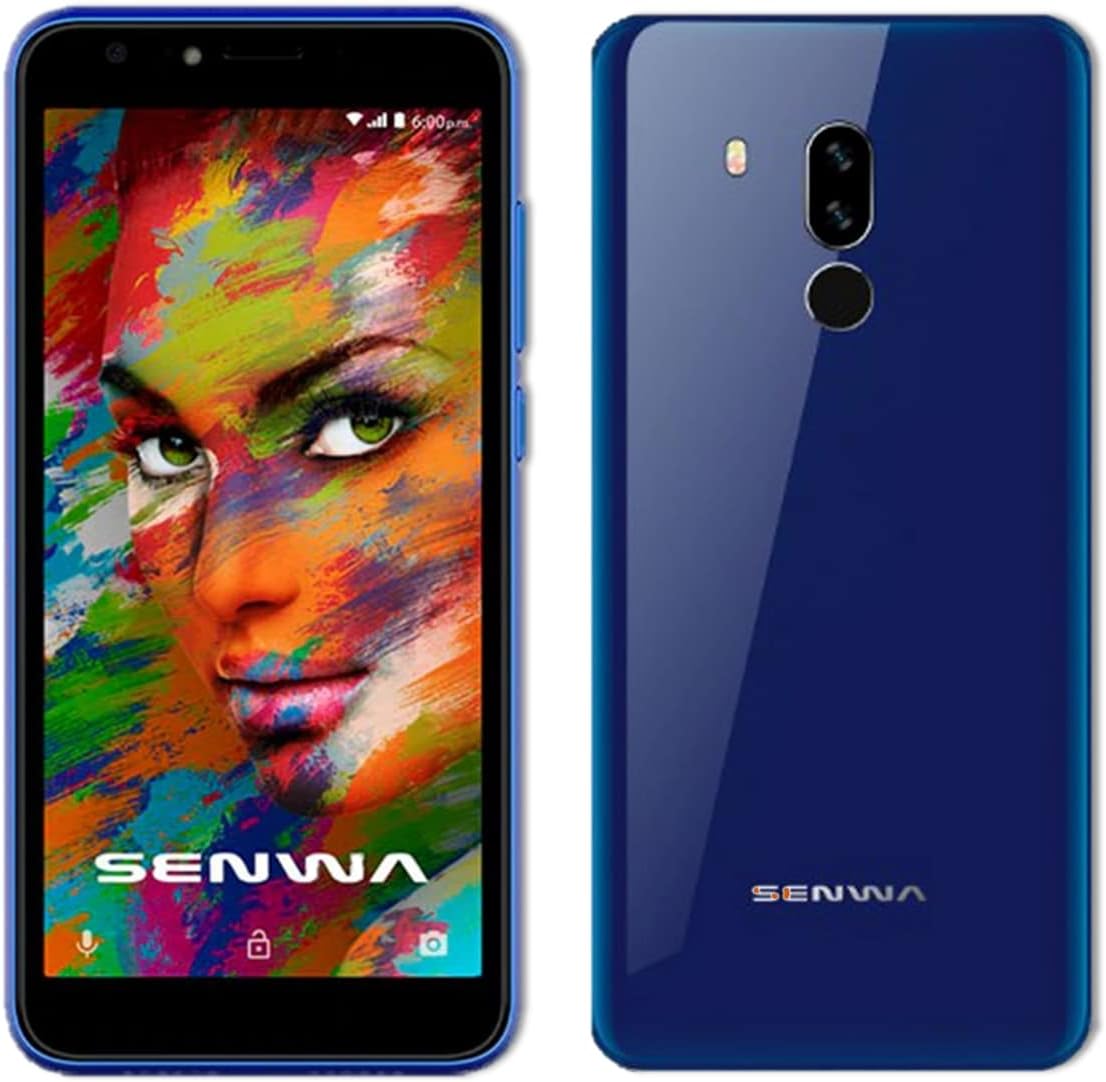
Зураг: Урд ба хойд views of the Azumi Senwa LS5018FP smartphone. The front shows the display, earpiece, and front camera. The back highlights the dual rear cameras, LED flash, and fingerprint sensor.
Гол бүрэлдэхүүн хэсгүүд:
- Урд камер: For selfies and video calls, equipped with a flash.
- Дэлгэц: 5-inch HD screen with an 18:9 aspect ratio.
- Дууны товчлуурууд: Аудио түвшинг тохируулах.
- Цахилгаан товч: Turn the device on/off, lock/unlock screen.
- Арын камерууд: Main camera with flash for capturing photos and videos.
- Хурууны хээ мэдрэгч: Аюулгүй түгжээг тайлахын тулд ар талд нь байрлуулсан.
- Илтгэгч: Аудио гаралтын хувьд.
- USB порт: Цэнэглэх, өгөгдөл дамжуулах зориулалттай.
- 3.5 мм аудио залгуур: Чихэвчний хувьд.
Тохиргоо
1. SIM карт болон SD картыг оруулж байна
Your phone uses a standard SIM card. An additional 16GB SD card is included for expanded storage.
- Утасны хажуу талд SIM/SD картын тавиурыг олоорой.
- Тавиурыг нээхийн тулд өгөгдсөн SIM карт гаргах хэрэгсэл (хамааралтай бол) эсвэл жижиг цаасан хавчаарыг ашиглана уу.
- Carefully place your activated SIM card into the designated slot. Ensure the gold contacts face down.
- Insert the included 16GB SD card into its slot. The phone supports up to 64GB SD cards.
- Тавиурыг хажуу талтайгаа тэгш болтол нь утсандаа зөөлөн түлхэнэ.
2. Батерейг цэнэглэж байна
Эхний удаа ашиглахын өмнө утасны батарейг бүрэн цэнэглэ.
- USB кабелийг цэнэглэгч рүү холбоно уу.
- Цэнэглэгчийг цахилгаан залгуурт холбоно уу.
- Connect the other end of the USB cable to the phone's USB port.
- Цэнэглэх үзүүлэлт дэлгэц дээр гарч ирнэ.
3. Асаалт ба анхны тохиргоо
- Press and hold the Power button until the Azumi logo appears.
- Follow the on-screen prompts to complete the initial setup. This includes selecting your language, connecting to Wi-Fi, setting up your Google account, and configuring security options like the fingerprint sensor.
Operating Your Smartphone
Үндсэн навигаци
- Мэдрэгчтэй дэлгэцийн дохио зангаа: Товш, шудар, чимхэж томруулна гэдэг нь Android үйлдлийн системийн стандарт дохио юм.
- Үндсэн дэлгэц: Өөрийн апп, виджет болон мэдэгдлүүдэд хандах.
- Navigation Bar: Дэлгэцийн доод хэсэгт байрлах Буцах, Нүүр хуудас болон Сүүлийн үеийн аппликейшн товчлууруудыг ашиглана уу.
Дуудлага ба мессеж
- Дуудлага хийх: Утасны програмыг нээж, дугаар руу залгаад дуудлагын дүрс дээр товшино уу.
- Мессеж илгээх: Open the Messages app, tap "Start chat," enter recipient and message.
Холболт
- Wi-Fi: Боломжтой сүлжээнд холбогдохын тулд Тохиргоо > Сүлжээ ба интернет > Wi-Fi руу очно уу.
- Bluetooth: Go to Settings > Connected devices > Bluetooth to pair with other devices.
- Мобайл өгөгдөл: Ensure mobile data is enabled in Settings > Network & internet > Mobile network for internet access via your carrier.
Камерын хэрэглээ
The Senwa LS5018FP features both front and rear cameras, each with a flash.
- Камер програмыг нээнэ үү.
- Зураг авахын тулд Хөшигний товчийг товшино уу.
- Tap the video icon to record a video.
- Use the flash icon to toggle the flash on/off/auto.
- Камерын шилжүүлэгчийн дүрсийг ашиглан урд болон хойд камеруудын хооронд шилжинэ үү.
Хурууны хээний аюулгүй байдал
Set up your fingerprint for quick and secure unlocking.
- Тохиргоо > Аюулгүй байдал > Хурууны хээ рүү очно уу.
- Follow the on-screen instructions to register your fingerprint. You will need to set up a backup screen lock method (PIN, pattern, or password) first.
- Once registered, simply place your finger on the rear fingerprint sensor to unlock your phone.
Хадгалалтын менежмент
Your phone comes with 8GB of internal storage and an included 16GB SD card. You can expand storage up to 64GB with a compatible SD card.
- To check storage usage, go to Settings > Storage.
- Кэшийг тогтмол цэвэрлэж, шаардлагагүй files зай гаргах.
- Move photos and videos to the SD card to optimize internal storage.
Засвар үйлчилгээ
Төхөөрөмжөө цэвэрлэж байна
- Утасны дэлгэц болон их биеийг цэвэрлэхийн тулд зөөлөн, хөвөнгүй даавуугаар цэвэрлээрэй.
- Химийн хатуу бодис, зүлгүүрийн материал ашиглахаас зайлсхий.
Батерейны арчилгаа
- Батерейны ашиглалтын хугацаанд нөлөөлж болзошгүй тул хэт өндөр температураас зайлсхий.
- Бүрэн цэнэглэгдсэний дараа утсаа удаан хугацаагаар цэнэглэж болохгүй.
- For optimal battery longevity, try to keep the charge between 20% and 80%.
Програм хангамжийн шинэчлэлтүүд
Periodically check for software updates to ensure your phone has the latest features and security patches.
- Тохиргоо > Систем > Системийн шинэчлэлт рүү очно уу.
- Connect to Wi-Fi before downloading updates to avoid mobile data charges.
Алдааг олж засварлах
| Асуудал | Боломжит шийдэл |
|---|---|
| Утас асахгүй байна. | Батерейг цэнэглэсэн эсэхийг шалгаарай. Цэнэглэгчээ холбож, асаахаасаа өмнө хэдэн минут хүлээнэ үү. |
| Дуудлага хийх эсвэл хүлээн авах боломжгүй. | Check if the SIM card is properly inserted. Verify that your mobile network signal is strong. Ensure your account is active with your carrier. |
| Wi-Fi холболтын асуудал. | Restart your phone and Wi-Fi router. Forget the network in Wi-Fi settings and reconnect. |
| Аппликейшнүүд гацаж эсвэл хөлддөг. | Clear the app's cache (Settings > Apps & notifications > [App Name] > Storage & cache > Clear cache). Restart the phone. |
| Low storage space. | Шаардлагагүй устга files, photos, and videos. Move media to the SD card. Uninstall unused apps. |
| Хурууны хээ мэдрэгч ажиллахгүй байна. | Ensure your finger and the sensor are clean and dry. Re-register your fingerprint in Settings > Security. |
Үзүүлэлтүүд
| Онцлог | Дэлгэрэнгүй |
|---|---|
| Загварын нэр | SENWA (LS5018FP) |
| Үйлдлийн систем | Android 11 (Go хувилбар) |
| Дэлгэц | 5 Inches, 1280 x 720 Resolution (HD) |
| Процессор | Quad-core, 1.84 GHz CPU Speed |
| RAM | 1 ГБ |
| Дотоод санах ой | 8 ГБ |
| Өргөтгөх боломжтой хадгалах сан | Up to 64 GB via SD Card (16GB included) |
| Арын камер | Тиймээ, флэштэй |
| Урд камер | Тиймээ, флэштэй |
| Зайны багтаамж | 2000 мАч лити ион |
| Холболт | 4G LTE, Wi-Fi, Bluetooth |
| Аудио залгуур | 3.5 мм |
| Онцлог шинж чанарууд | Finger Print Security |
| Хэмжээ | 5 x 4 x 4 инч |
| Зүйлийн жин | 1 фунт |
| Өнгө | Цэнхэр |
Баталгаат болон дэмжлэг
For warranty information and technical support, please refer to the documentation provided with your purchase or contact Azumi customer service through their official webсайт. Баталгаат нэхэмжлэл гаргахын тулд худалдан авалтаа нотлох баримтаа хадгалаарай.
Онлайн нөөцүүд:
- For general information and support, visit the Azumi Mobile official webсайт.
- For software updates and FAQs, check the support section of the manufacturer's webсайт.
Ask a question about this manual
Ask about setup, troubleshooting, compatibility, parts, safety, or missing instructions. Manuals+ will review the question and use this page’s manual context to help answer it.