
1. Танилцуулга
The HanRongDa HRD-308S is a portable stereo FM radio headset designed for personal listening. It integrates a digital FM radio tuner into comfortable over-ear headphones, making it ideal for activities such as walking, jogging, or traveling. Featuring DSP (Digital Signal Processing) technology, it aims to provide clear reception and sound quality across its FM frequency range of 50-108MHz. This manual provides detailed instructions for the proper setup, operation, and maintenance of your HRD-308S headphones.

Figure 1.1: HanRongDa HRD-308S Portable FM Radio Headphones. This image shows the overall design of the black over-ear headphones with an integrated radio control panel on the right earcup and an extendable antenna.
2. Багцын агуулга
Бүх зүйл байгаа эсэхийг шалгахын тулд багцыг сайтар шалгана уу:
- 1 x HRD-308 Radio Headphones
- 1 x Audio Cable (3.5mm)
- 1 х Англи хэлний хэрэглэгчийн гарын авлага

Figure 2.1: Package Contents. This image displays the HRD-308S headphones alongside the included 3.5mm audio cable and the user manual.
3. Бүтээгдэхүүний онцлог
- FM радио хүлээн авах: Wide FM frequency range of 50-108MHz.
- DSP Digital Tuning: Advanced digital signal processing for enhanced reception and reduced interference.
- Зөөврийн болон эвхэгддэг загвар: Easy to store and carry, suitable for various outdoor activities.
- Батерейгаар ажилладаг: Requires 2 AA batteries (not included), providing up to 30 hours of listening time. Saved stations are retained even after battery replacement.
- Wired Headset Functionality: Connects to external audio devices (smartphones, PCs, tablets) via a 3.5mm audio cable (included).
- Урьдчилан тохируулсан станцууд: Supports automatic search and memory for up to 10 stations, plus one favorite station accessible via a dedicated button.
- Тав тухтай дизайн: Features soft over-ear earmuffs and a telescopic headband for an adjustable and comfortable fit.
- Аудио чанар: Equipped with 40mm speakers for clear sound.
- Идэвхгүй дуу чимээг арилгах: Helps reduce ambient noise for a better listening experience.

Figure 3.1: Key Features. This image highlights the soft earmuffs for comfort, the DSP chip for improved signal processing, and the 40mm speaker for audio output.
4. Удирдлага ба дэлгэц
The control panel is located on the right earcup of the headphones. Familiarize yourself with the buttons and the LCD display:
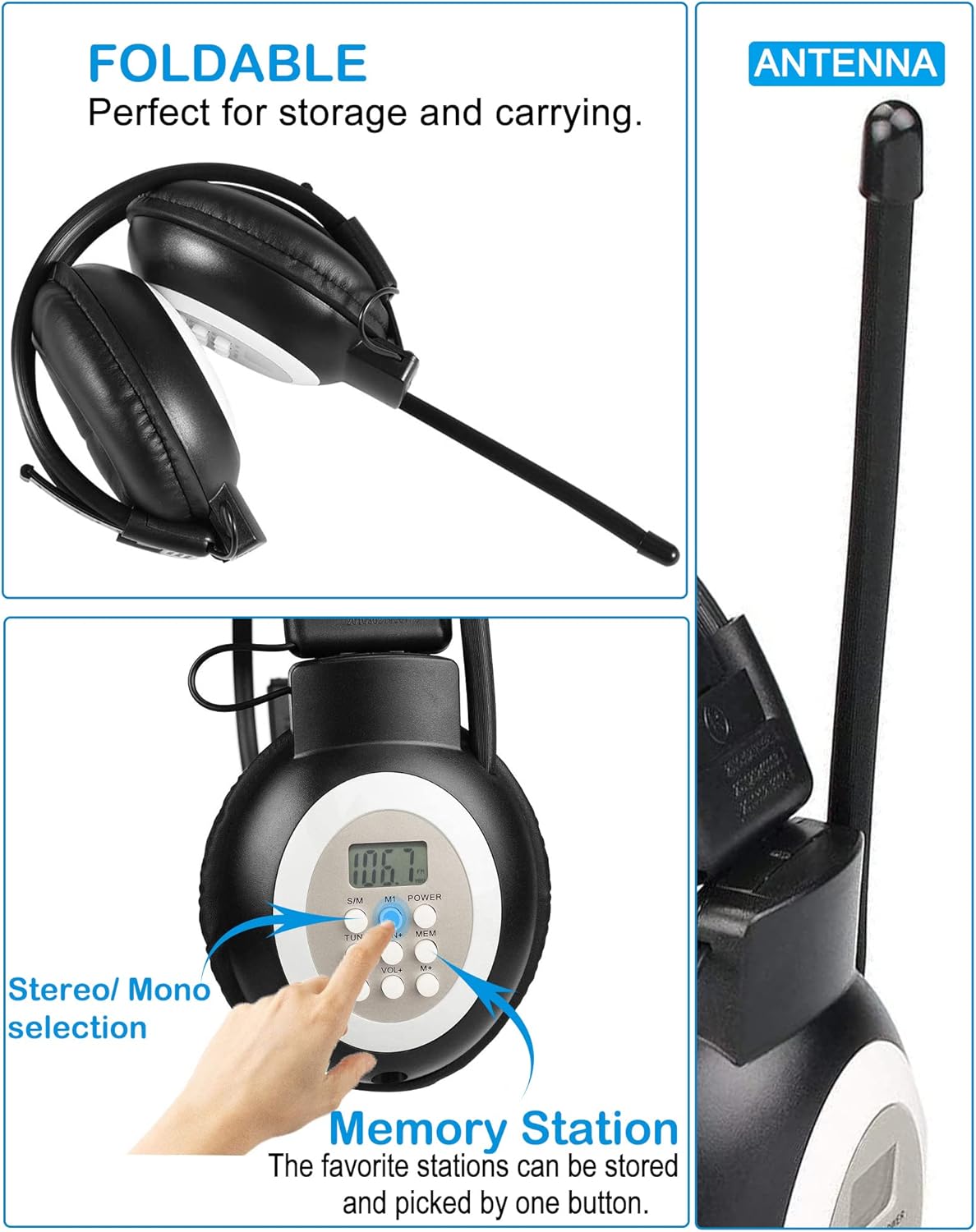
Figure 4.1: Controls and Design Elements. This image shows the control buttons on the earcup, the foldable design of the headphones, and the extendable antenna.
| Товч / Онцлог | Чиг үүрэг |
|---|---|
| LCD дэлгэц | Shows current FM frequency, battery status, and other indicators. |
| ХҮЧ | Чихэвчийг асаах, унтраахын тулд удаан дарна уу. |
| TUN+ / TUN- | Press briefly to fine-tune the frequency up/down. Press and hold to auto-scan for the next available station. |
| VOL + / VOL- | Adjusts the listening volume up or down. |
| MEM (санах ой) | Used to save and recall preset radio stations. |
| M1 (Memory 1) | Dedicated button to quickly access your first saved favorite station. |
| S/M (Stereo/Mono) | Switches between stereo and mono audio modes. |
| Антен | Extendable antenna for improved FM signal reception. |
| 3.5mm аудио порт | Input for connecting external audio sources via the included audio cable. |
5. Тохиргоо
5.1 Батерей суурилуулах
The HRD-308S headphones require two (2) AA batteries for operation. Batteries are not included.
- Locate the battery compartment on the left earcup.
- Батерейны тасалгааны тагийг зөөлөн нээнэ үү.
- Тасалгааны дотор талд заасанчлан зөв туйлшралыг (+ ба -) хангаж, хоёр АА батерейг оруулна уу.
- Зайны тасалгааны тагийг сайтар хаа.

Figure 5.1: Battery Installation. This image shows the open battery compartment on the left earcup, ready for two AA batteries.
5.2 Wired Headset Connection
To use the HRD-308S as a wired headset with an external audio device:
- Locate the 3.5mm audio port on the right earcup.
- Connect one end of the included 3.5mm audio cable to this port.
- Connect the other end of the audio cable to the headphone jack of your smartphone, PC, tablet, or other audio device.
- The headphones will now function as a wired audio output device. The radio function will be disabled when the audio cable is connected.

Figure 5.2: Wired Connection. This image shows the 3.5mm audio port on the right earcup and an audio jack, illustrating how to connect the headphones as a wired headset.
6. Ашиглалтын заавар
6.1 Асаах/унтраах
- Асаахын тулд: товчийг дараад барина уу ХҮЧ button until the LCD display illuminates.
- Унтраахын тулд: товчийг дараад барина уу ХҮЧ дэлгэц унтрах хүртэл дахин дарна уу.
6.2 Дууны хэмжээг тохируулах
- дээр дарна уу VOL+ дууны хэмжээг нэмэгдүүлэхийн тулд товчлуур.
- дээр дарна уу VOL- дууны хэмжээг багасгах товчлуур.
6.3 FM станцуудыг тааруулах
Автомат хайлт:
- -г удаан дар TUN+ or ТУН- button. The radio will automatically scan for the next available strong station and stop.
Гараар тааруулах:
- дээр дарна уу TUN+ or ТУН- button briefly to adjust the frequency step by step.
6.4 Saving and Recalling Preset Stations
The HRD-308S can store up to 10 FM stations in memory, plus one favorite station (M1).
Станцыг хадгалахын тулд:
- Tune to the desired FM station using the TUN+ or TUN- buttons.
- дээр дарна уу MEM button. The preset number on the LCD will flash.
- -г ашиглана уу TUN+ or ТУН- buttons to select the desired memory slot (P0-P9).
- дээр дарна уу MEM Станцыг баталгаажуулж хадгалахын тулд товчийг дахин дарна уу.
To Save a Favorite Station (M1):
- Tune to your most frequently listened-to station.
- -г удаан дар M1 button until the display confirms it's saved.
Станцыг эргэн санахын тулд:
- дээр дарна уу MEM button repeatedly to cycle through the saved preset stations (P0-P9).
- дээр дарна уу M1 button to instantly recall your favorite station.
6.5 Switching Stereo/Mono Mode
- дээр дарна уу S/M button to toggle between stereo and mono reception. Mono mode can improve reception clarity in areas with weak signals.
7. Засвар үйлчилгээ
- Цэвэрлэгээ: Чихэвчийг цэвэрлэхийн тулд зөөлөн, хуурай даавуу ашиглана уу. Шингэн цэвэрлэгч болон зүлгүүрийн материалыг бүү ашигла.
- Батерейны арчилгаа: Remove batteries if the headphones will not be used for an extended period to prevent leakage.
- Хадгалах: Store the headphones in a cool, dry place away from direct sunlight and extreme temperatures. The foldable design allows for compact storage.
- Усны эсэргүүцэл: These headphones are not water-resistant. Avoid exposure to water or high humidity.
8. Алдаа засах
| Асуудал | Боломжит шалтгаан | Шийдэл |
|---|---|---|
| No power/Headphones do not turn on. | Батерей дууссан эсвэл буруу оруулсан байна. | Зөв туйлшралыг хангасан шинэхэн АА батерейгаар солино уу. |
| Poor FM reception/Static. | Сул дохио, антенн сунгаагүй, эсвэл хөндлөнгийн оролцоотой байна. | Extend the antenna fully. Try moving to a different location. Switch to mono mode (S/M button). |
| Чихэвчнээс дуу гарахгүй. | Volume too low, headphones in wired mode, or faulty connection. | Increase volume using VOL+ button. Ensure 3.5mm audio cable is disconnected if using radio. Check if batteries are low. |
| Cannot save preset stations. | Incorrect procedure. | Follow the 'Saving a Station' instructions in Section 6.4 carefully. |
| Headphones uncomfortable or fall off. | Буруу тохируулга. | Adjust the telescopic headband for a secure and comfortable fit. |
9. Техникийн үзүүлэлтүүд
| Онцлог | Дэлгэрэнгүй |
|---|---|
| Загварын нэр | HRD-308S |
| Брэнд | ХанРонДа |
| FM давтамжийн хүрээ | 50-108 МГц |
| Холболтын технологи | AUX (3.5mm Audio Jack) |
| Утасгүй холбоо | FM |
| Эрчим хүчний эх үүсвэр | 2 х АА батерей (оруулаагүй) |
| Зайны ашиглалт | 30 цаг хүртэл |
| Хяналтын арга | Товчлуур |
| Чихэвчний хэлбэр | Чихний дээгүүр |
| Дуу чимээний хяналт | Идэвхгүй дуу чимээг арилгах |
| Бүтээгдэхүүний хэмжээс | 4.72 x 4.72 x 3.54 инч |
| Зүйлийн жин | 7 унц |
| Материал | Хуванцар |
| UPC | 724991586434 |
10. Баталгаат хугацаа ба дэмжлэг
For any product-related issues, questions, or support needs, please contact HanRongDa customer service. Refer to the contact information provided with your purchase or on the official HanRongDa webсайт. Баталгаат заргад зориулж худалдан авалтаа нотлох баримтаа үлдээнэ үү.