
Танилцуулга
This manual provides essential instructions for the safe operation, setup, and maintenance of your Protocol Director HD Foldable Drone. Please read this manual thoroughly before operating the drone to ensure proper function and to prevent damage or injury.
The Protocol Director HD is a foldable drone equipped with a live streaming HD camera, designed for capturing aerial video and photos. It features an intuitive 2.4 GHz remote control, an altitude sensor for stable flight, and a free downloadable app for enhanced camera control and flight path drawing.
Аюулгүй байдлын урьдчилан сэргийлэх арга хэмжээ
- Дроныг үргэлж нээлттэй, саадгүй газар, хүн, амьтан, саад бэрхшээлээс хол байлга.
- Do not operate near airports, restricted airspace, or sensitive facilities.
- Цахилгаан шугам, мод, усны байгууламжаас аюулгүй зайг барина.
- Ensure all propellers are securely attached and undamaged before each flight.
- Хүчтэй салхи, цаг агаарын тааламжгүй нөхцөлд нисч болохгүй.
- Эргэлддэг сэнснээс хуруу болон үсийг хол байлга.
- Adult supervision is recommended for users under 18 years of age. Recommended age for operation is 14 years and up.
- Only use original Protocol replacement parts and accessories.
- Do not attempt to modify the drone or its components.
- Turn off the drone and remote control when not in use.
Багцын агуулга
Бүх зүйл багцад байгаа эсэхийг шалгана уу:
- Protocol Director HD Foldable Drone with Camera
- Remote Control with Phone Mount
- USB цэнэглэгч кабель
- 2 x Drone Batteries
- Аялалын цүнх
- Хэрэглэх заавар (энэ баримт бичиг)
- Spare Parts: Blades, Screwdriver

Image: The Protocol Director HD Foldable Drone, showcasing its compact design with propellers extended and camera visible at the front.
Тохиргоо
1. Дрон батерейг цэнэглэж байна
- Insert one of the drone batteries into the USB charging cable.
- Connect the USB charging cable to a USB power source (e.g., computer USB port, USB wall adapter).
- The charging indicator light on the USB cable will illuminate during charging and turn off when fully charged.
- Цэнэглэхэд ойролцоогоор 60-90 минут шаардагдана. Хэт цэнэглэж болохгүй.
2. Алсын удирдлагатай батерейг суурилуулах
- Алсын удирдлагын ар талд байрлах зайны тасалгааг нээнэ үү.
- Insert 4 AA batteries (not included), ensuring correct polarity (+/-).
- Зайны тасалгааг найдвартай хаа.

Image: The drone's remote control with a smartphone securely mounted, displaying a live feed from the drone's camera.
3. Дроныг дэлгэх
- Gently unfold each of the four rotor arms until they click into place.
- Нисэхийн өмнө бүх гараа бүрэн сунгаж, түгжсэн эсэхийг шалгаарай.
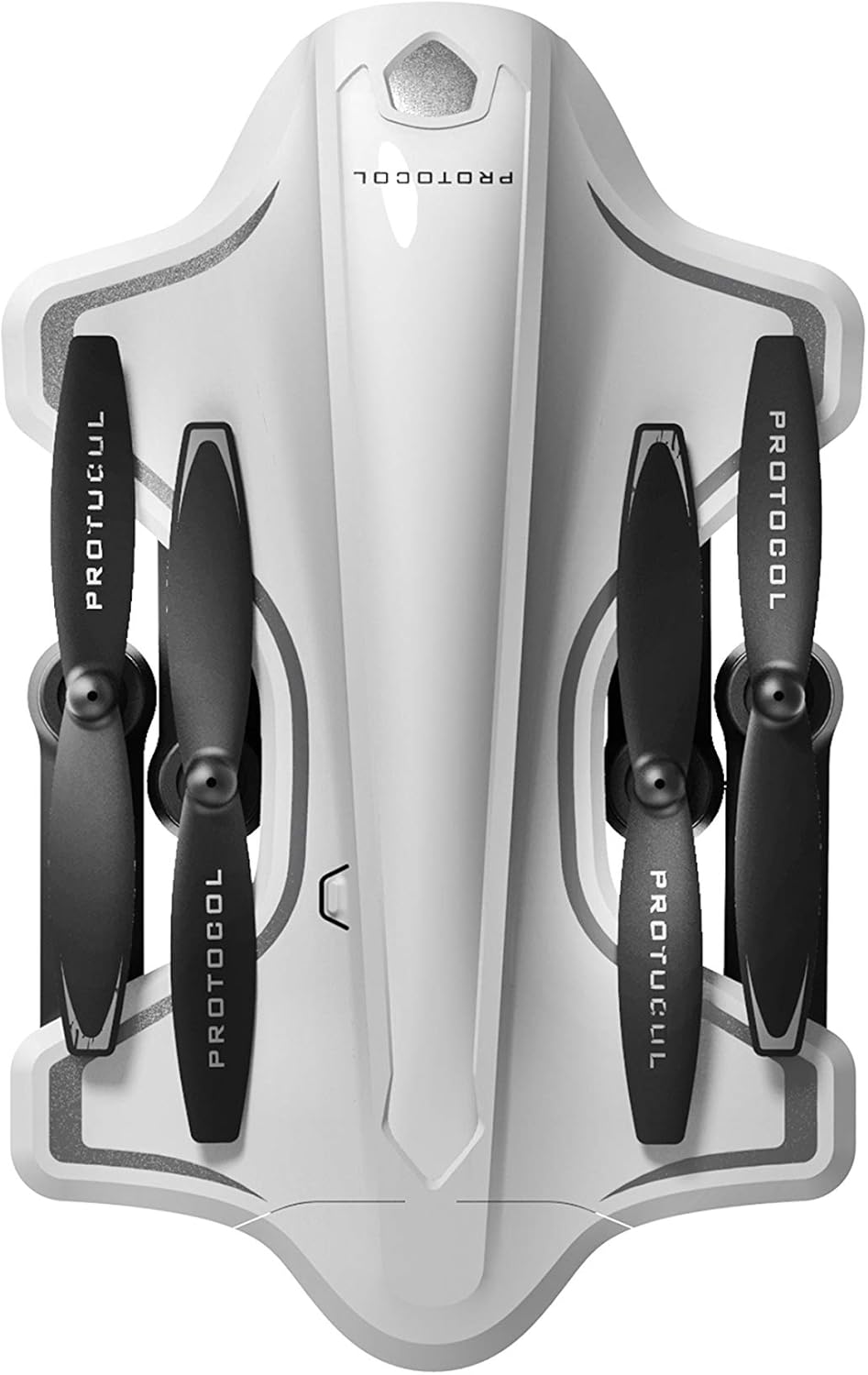
Image: The Protocol Director HD Foldable Drone in its compact, folded configuration, ready for transport.
4. Дрон батерейг суурилуулах
- Дрон дээрх зайны тасалгааг олоорой.
- Insert the fully charged drone battery, ensuring it is securely seated.
- Зайны тасалгааны тагийг хаа.
5. Downloading the App (Optional for Camera Features)
- хайх the "Protocol Director HD" app in your smartphone's app store (iOS or Android).
- Download and install the free application.
- Mount your smartphone onto the remote control's phone mount.
Ашиглалтын заавар
1. Асаах болон Хослуулах
- Дроныг тэгш, тэгш гадаргуу дээр байрлуул.
- Turn on the drone by pressing the power button. The drone's lights will flash.
- Алсын удирдлагыг асаана уу.
- Зүүн жолооны бариул (дроссель)-ийг бүхэлд нь дээш, дараа нь доош нь дарна уу. Дронгийн гэрэл тогтвортой асч, амжилттай хослуулсныг илтгэнэ.
2. Calibrating the Gyroscope
Хослосны дараа тогтвортой нислэгийн хувьд гироскопыг тохируулахыг зөвлөж байна:
- With the drone on a flat surface, push both joysticks down and to the right simultaneously for a few seconds.
- The drone's lights will flash rapidly and then become solid, indicating calibration is complete.
3. Нислэгийн үндсэн удирдлага
The Protocol Director HD features auto launch, hover, and land functions due to its altitude sensor.
- Auto Launch: Press the dedicated auto launch button on the remote. The drone will ascend to a stable hovering altitude.
- Тохируулагч (Зүүн тийш жолоодох товчлуур):
- Push up: Increase altitude
- Push down: Decrease altitude
- Push left/right: Rotate drone left/right (yaw)
- Чиглэлийн удирдлага (Баруун тийш чиглүүлэгч):
- Push up: Fly forward
- Push down: Fly backward
- Push left: Fly left (strafe)
- Push right: Fly right (strafe)
- Auto Land: Press the dedicated auto land button. The drone will slowly descend and land.
- Хурдны сонголт: Use the speed button on the remote to cycle through three selectable speeds (low, medium, high).
4. Camera and App Features
Connect your smartphone to the drone's Wi-Fi network (usually named "Protocol_Drone_XXXXXX") to access live streaming and advanced camera functions via the app.
- Шууд дамжуулалт: View the drone's camera feed in real-time on your smartphone.
- Видео бичлэг: Initiate and stop video recording (480p resolution) through the app.
- Зураг авах: Take still images through the app.
- Камерын олон өнцөг: The app supports three different camera angles (Aerial, POV, Selfie) for varied content creation.
- Аудио бичлэг: The app allows for audio recording alongside video.
- Draw Your Own Flight Path: Utilize the app's feature to draw a flight path on your screen, and the drone will follow it.
- VR Capability: The app is VR capable; VR goggles are sold separately.
Засвар үйлчилгээ
- Сэнсний үзлэг: Regularly check propellers for cracks, bends, or damage. Replace any damaged propellers using the provided spare parts and screwdriver.
- Цэвэрлэгээ: Use a soft, dry cloth to clean the drone and remote control. Avoid using liquids or harsh chemicals.
- Батерейны арчилгаа:
- Батерейг хэт их цэнэглэж болохгүй.
- Батерейг сэрүүн, хуурай газар хадгална.
- Remove batteries from the drone and remote control during long periods of non-use.
- Хадгалах: Fold the drone arms for compact storage in the provided travel bag when not in use. Store in a cool, dry environment.
Алдааг олж засварлах
| Асуудал | Боломжит шалтгаан | Шийдэл |
|---|---|---|
| Дрон асахгүй байна. | Батерейг цэнэглээгүй эсвэл буруу суурилуулсан. | Батерейг бүрэн цэнэглэж, зөв оруулсан эсэхийг шалгаарай. |
| Алсын удирдлага асахгүй байна. | AA batteries are dead or incorrectly installed. | Replace AA batteries, checking polarity. |
| Drone and remote do not pair. | Хослуулах дарааллыг зөв дагаж мөрдөөгүй байна. | Ensure drone is on, then remote. Push left joystick up then down completely. |
| Нислэгийн үеэр дрон нисдэг. | Gyroscope needs calibration; uneven surface at launch. | Land the drone, place on a flat surface, and recalibrate the gyroscope (both joysticks down and right). |
| One propeller does not spin. | Propeller damaged or motor issue. | Check for obstructions. Replace damaged propeller. If issue persists, contact support. |
| Ухаалаг утас дээр шууд видео бичлэг байхгүй. | Дроны Wi-Fi-д холбогдоогүй байна; аппликейшн нээгдээгүй байна. | Ensure smartphone is connected to the drone's Wi-Fi network and the app is running. |
Үзүүлэлтүүд
| Брэнд | Протокол |
| Загварын нэр | Director HD |
| Загварын дугаар | 6182-7RCHA |
| Хэмжээ (Эвхэгдсэн) | Ойролцоогоор 4.75 инч (урт) |
| Хэмжээ (өргөтгөсөн) | Approximately 9 inches (length, including blades) |
| Жин | 0.94 килограмм (940 гр) |
| Камерын нягтрал | 480p (Video Capture) |
| Холболт | Wi-Fi (for app control and live streaming), 2.4 GHz (for remote control) |
| Тогтворжуулах | 6-axis motion-sensitive auto stabilizers, Altitude sensor |
| Хурдны горимууд | Three selectable speeds |
| Дронны зай | Rechargeable (2 included) |
| Алсын удирдлагатай батерей | 4 х АА батерей (оруулаагүй) |
| Материал | Plastic (Crash-resistant) |
| Санал болгож буй нас | 14 жил ба түүнээс дээш |
Баталгаат болон дэмжлэг
For warranty information, technical support, or to purchase replacement parts, please visit the official Protocol webсайт эсвэл харилцагчийн үйлчилгээний хэлтэстэй холбогдоно уу. Худалдан авалтын баримтаа худалдан авалтын баталгаа болгон хадгалаарай.
Webсайт: www.protocolny.com (Жишээ ньample холбоос, бодит холбоос өөр байж болно)
Холбоо барих: Refer to the Protocol website for contact details, including phone numbers or email support.