
Verkstar B07FYZ31DF
Verkstar Bluetooth Wireless Karaoke Microphone Instruction Manual
Model: B07FYZ31DF
1. Танилцуулга
Худалдан авалт хийсэнд баярлалааasing the Verkstar Bluetooth Wireless Karaoke Microphone. This device combines a karaoke microphone, a high-quality Bluetooth speaker, and a recording microphone into one portable unit. It features colorful LED lights that synchronize with music, supports multiple connection methods, and offers a long battery life for extended use. This manual provides detailed instructions to help you get the most out of your new microphone.

Image 1.1: Verkstar Bluetooth Wireless Karaoke Microphone (Black)
2. Багцын агуулга
Доор жагсаасан бүх зүйл таны багцад байгаа эсэхийг шалгана уу.
- Verkstar Karaoke Microphone x 1
- Instruction Manual (Japanese) x 1
- USB цэнэглэгч кабель x 1
- AUX кабель x 1
3. Бүтээгдэхүүн дууссанview болон Хяналтууд
Familiarize yourself with the various parts and controls of your microphone:
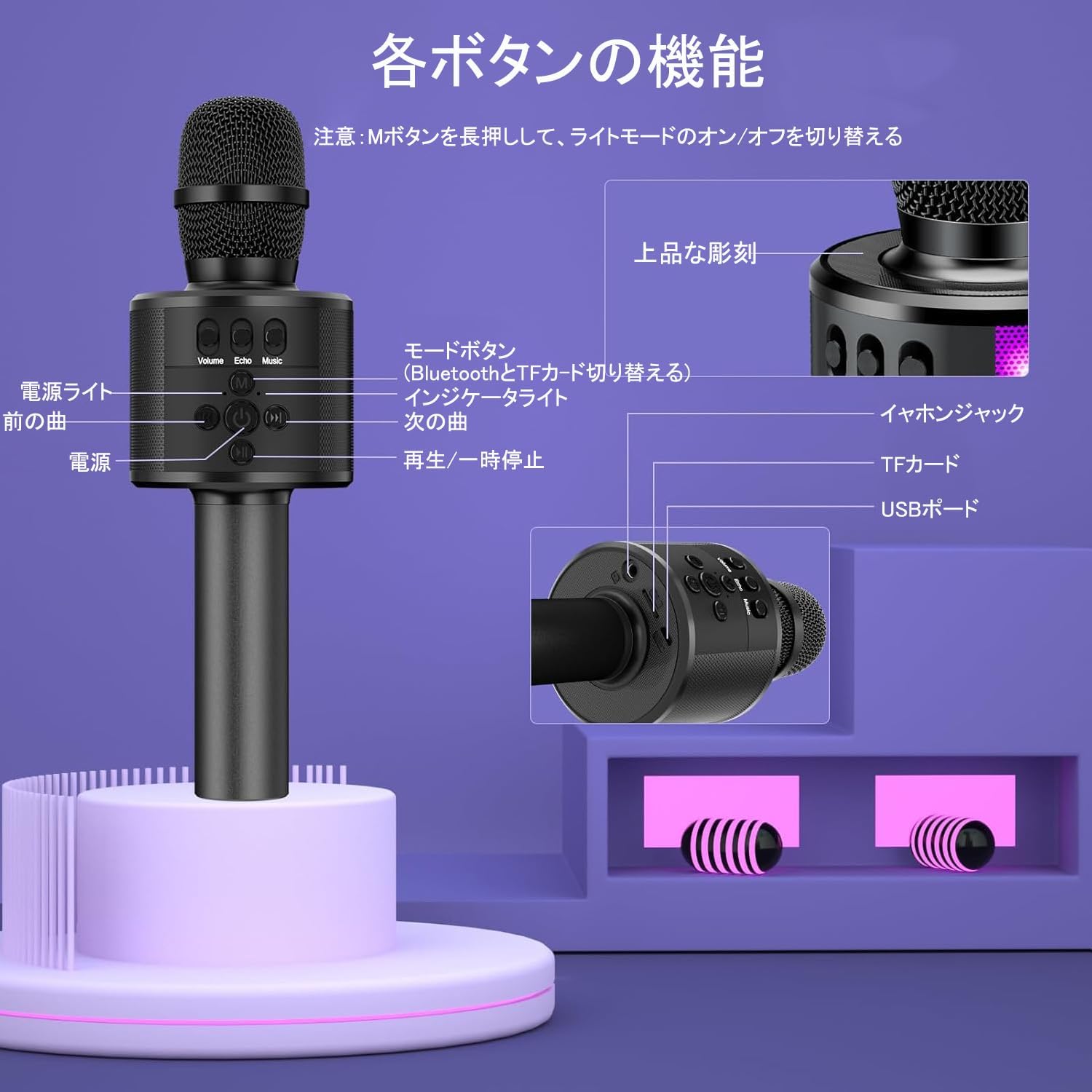
Image 3.1: Microphone Controls and Ports
Хяналтын функцууд:
- Цахилгаан товч: Long press to power on/off. Short press for mode switching.
- Цахилгаан гэрэл: Эрчим хүчний төлөвийг заана.
- Өмнөх дууны товчлуур: Өмнөх дуу руу алгасах.
- Дараагийн дууны товчлуур: Дараагийн дуу руу шилжих.
- Тоглуулах/түр зогсоох товчлуур: Аудио тоглуулах эсвэл түр зогсооно.
- Горимын товчлуур (M): Long press to switch between Bluetooth and TF card modes. Long press to turn LED lights on/off.
- Заагч гэрэл: Хослуулах үед анивчих, холбогдсон үед тогтвортой.
- Дууны хяналт: Микрофоны дууг тохируулна.
- Цуурай хяналт: Adjusts echo effect level.
- Music Volume Control: Adjusts background music volume.
- Чихэвчний залгуур: Чихэвчээр хувийн сонсох зориулалттай.
- TF картын оролт: Insert a TF card for music playback.
- USB порт: Микрофоныг цэнэглэх зориулалттай.
4. Тохиргоо
4.1 Микрофоныг цэнэглэх
Before first use, fully charge the microphone. Connect the included USB charging cable to the microphone's USB port and to a compatible USB power source (e.g., computer, USB wall adapter). The indicator light will show charging status and turn off when fully charged. A full charge takes approximately 2 hours.
4.2 Асаах/унтраах
To power on the microphone, long press the Цахилгаан товч for approximately 2 seconds. The indicator light will illuminate. To power off, long press the Цахилгаан товч дахин.
4.3 Bluetooth холболт
The microphone features an auto-connect function. After initial pairing, it will automatically connect to the last paired device.
- On your smartphone or tablet, open the Тохиргоо menu and turn on Bluetooth.
- Long press the microphone's Цахилгаан товч for about 2 seconds to turn it on. The indicator light will flash, indicating it is in pairing mode.
- On your device's Bluetooth list, select "Q78".
- Once "Connected" is displayed on your device, the Bluetooth connection is complete.

Image 4.1: Bluetooth Connection Guide
5. Үйлдлийн горимууд
The microphone supports various music playback and connection modes:
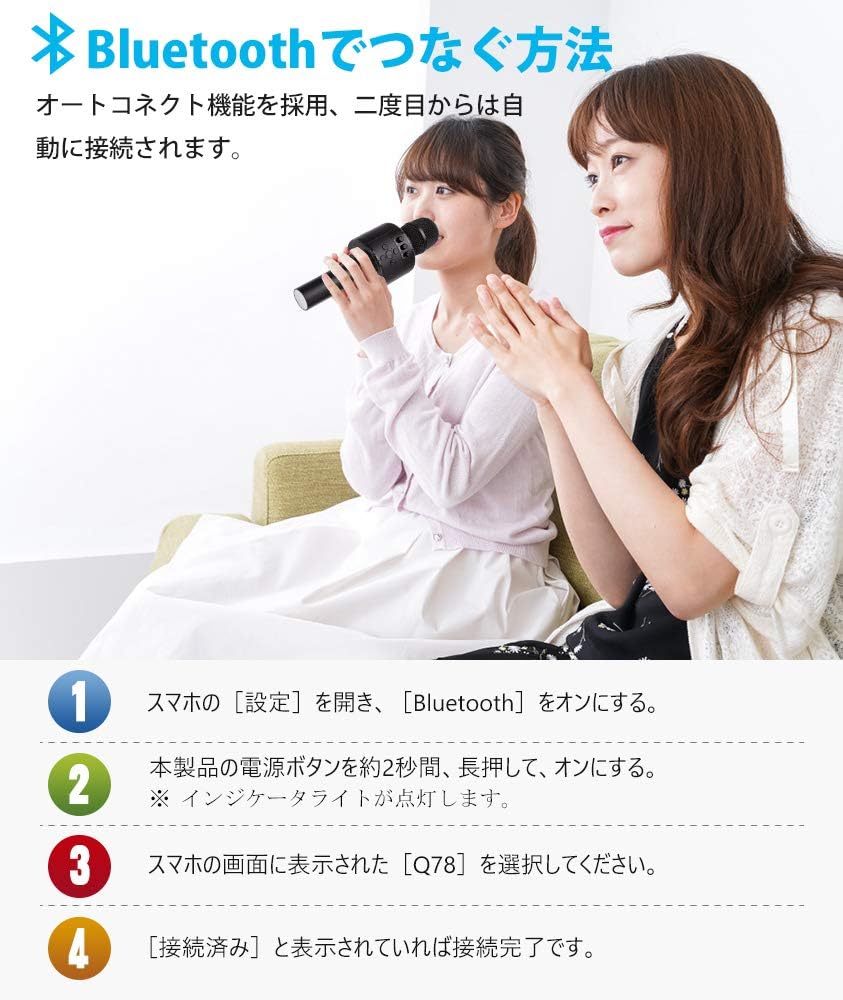
Image 5.1: Multiple Music Playback Modes
5.1 Bluetooth горим
After successful Bluetooth pairing (refer to Section 4.3), you can play music from your smartphone, tablet, or PC wirelessly through the microphone's speaker. Use the microphone's controls (Previous/Next Song, Play/Pause) or your connected device to manage playback.
5.2 Wired Connection (AUX Cable)
Connect the included AUX cable from your device's audio output to the microphone's earphone jack. This allows for a stable wired connection for audio playback and karaoke.
5.3 TF карт тоглуулах
Insert a TF (MicroSD) card (not included) into the TF card slot. The microphone supports TF cards up to 32GB and plays MP3 audio files. The microphone will automatically switch to TF card mode. Use the Previous/Next Song and Play/Pause buttons to control playback.
5.4 AUX Mode (External Audio Input)
If you wish to use the microphone as a speaker for an external audio source that does not support Bluetooth, connect an AUX audio cable (sold separately) from the external device's audio output to the microphone's earphone jack.
6. Бичлэг хийх функц
The microphone supports recording your singing through a connected smartphone application.
- Connect the microphone to your smartphone using the included AUX audio cable.
- Download and open a karaoke application on your smartphone.
- Follow the instructions within the karaoke app to begin recording your performance.
- After recording, you can play back your recorded track through the app.
Жич: The microphone itself does not have internal recording storage. Recording is performed and saved on your connected smartphone or device.

Image 6.1: Recording with a Smartphone App
7. LED Light Features
The microphone is equipped with a music sensor that makes the colorful LED lights flash in sync with the rhythm of the music. The lights will flash faster as the volume increases, creating a dynamic visual experience.
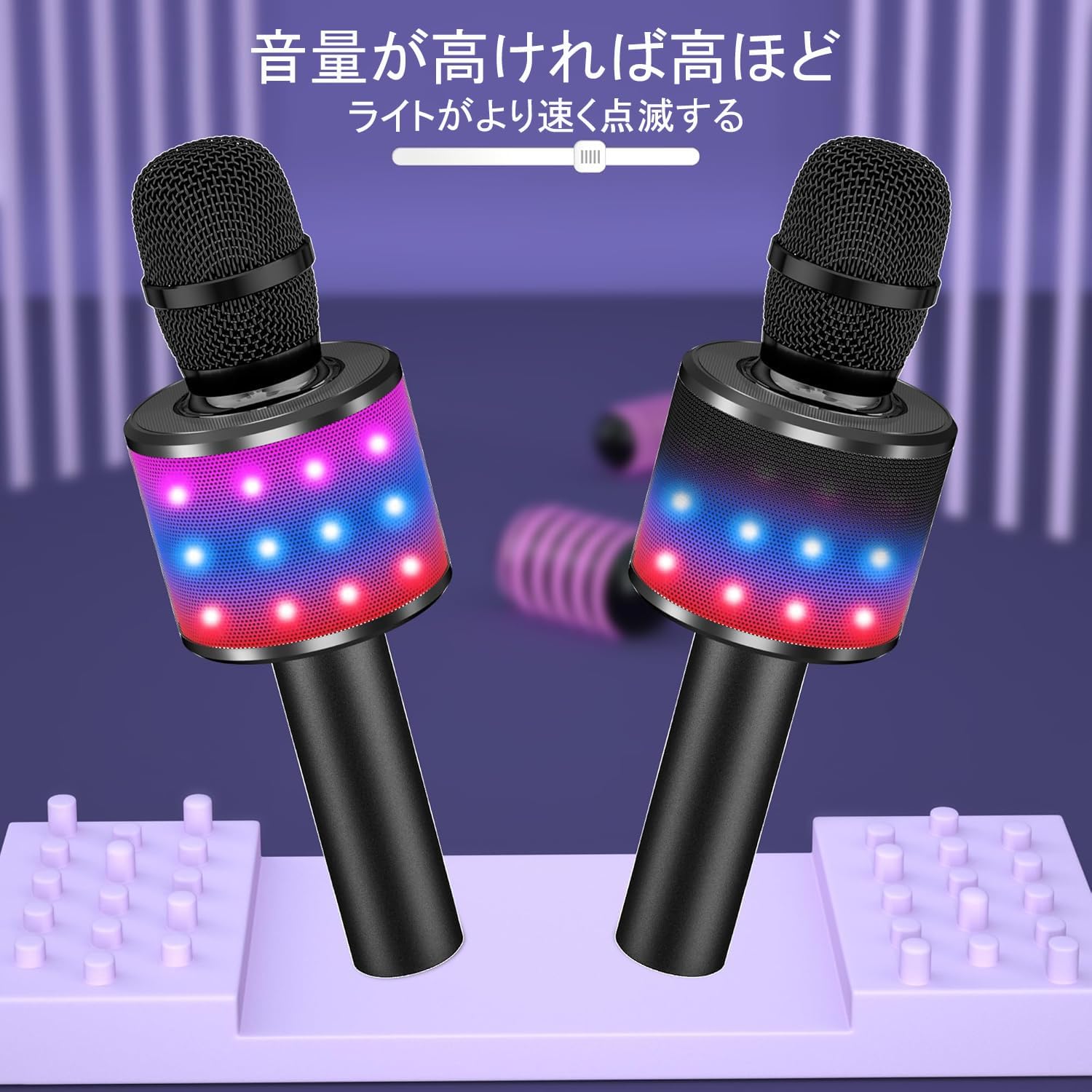
Image 7.1: LED Lights Reacting to Music
To turn the LED lights on or off, long press the Горимын товчлуур (M).
8. Засвар үйлчилгээ
To ensure the longevity and optimal performance of your microphone, please follow these maintenance guidelines:
- Цэвэрлэгээ: Микрофоныг зөөлөн, хуурай даавуугаар арчина. Зүлгүүрийн цэвэрлэгч эсвэл уусгагч хэрэглэж болохгүй.
- Хадгалах: Микрофоныг сэрүүн, хуурай газар, нарны шууд тусгал болон хэт өндөр температураас хол хадгална уу.
- Усанд өртөх: Avoid exposing the microphone to water or excessive moisture. This device is not waterproof.
- Харьцуулах: Микрофоныг унах эсвэл дотоод эд ангиудыг гэмтээж болзошгүй цохилтоос сэргийлж болгоомжтой барь.
9. Алдаа засах
If you encounter issues with your microphone, please refer to the following common problems and solutions:
| Асуудал | Боломжит шалтгаан | Шийдэл |
|---|---|---|
| Микрофон асахгүй байна. | Батерей бага. | Charge the microphone for at least 2 hours. |
| Bluetooth-ээр холбогдож чадахгүй байна. | Bluetooth is off on device; microphone not in pairing mode; incorrect device selected. | Ensure Bluetooth is enabled on your device. Long press the microphone's power button to enter pairing mode (flashing indicator light). Select "Q78" from your device's Bluetooth list. |
| Микрофоноос дуу гарахгүй. | Microphone volume too low; echo/music volume too low; incorrect mode. | Adjust the microphone, echo, and music volume controls. Ensure the correct operating mode (Bluetooth, TF card, or wired) is selected. |
| LED гэрэл ажиллахгүй байна. | Гэрэл унтарсан. | Long press the 'M' button to toggle the LED lights on. |
| TF карт тоглогдохгүй байна. | Дэмжигдээгүй file format; TF card not inserted correctly; TF card capacity too large. | Баталгаажуулах files are in MP3 format. Reinsert the TF card. Use a TF card with a maximum capacity of 32GB. |
10. Техникийн үзүүлэлтүүд
| Онцлог | Дэлгэрэнгүй |
|---|---|
| Брэнд | Verkstar |
| Загварын дугаар | B07FYZ31DF |
| Микрофоны төрөл | Гарын төхөөрөмж |
| Эрчим хүчний эх үүсвэр | Батерейгаар ажилладаг |
| Зайны төрөл | 2 Lithium Polymer Batteries (included) |
| Зайны багтаамж | 2600 мАч |
| Цэнэглэх хугацаа | Ойролцоогоор 2 цаг |
| Ашиглалтын хугацаа | 8 цаг хүртэл |
| Холболтын технологи | Bluetooth, 3.5 мм залгуур |
| Давтамжийн хариу үйлдэл | 100Гц-10КГц |
| Онцлог шинж чанарууд | Recording Function, LED Lights |
| Тохиромжтой төхөөрөмжүүд | Ухаалаг утас, таблет, компьютер |
| Туйлын загвар | Бүх чиглэлтэй |
| Өнгө | Хар |
| Бүтээгдэхүүний жин | 425 грамм |
| Бүтээгдэхүүний хэмжээс | 25.4 x 8.7 x 8.3 см |
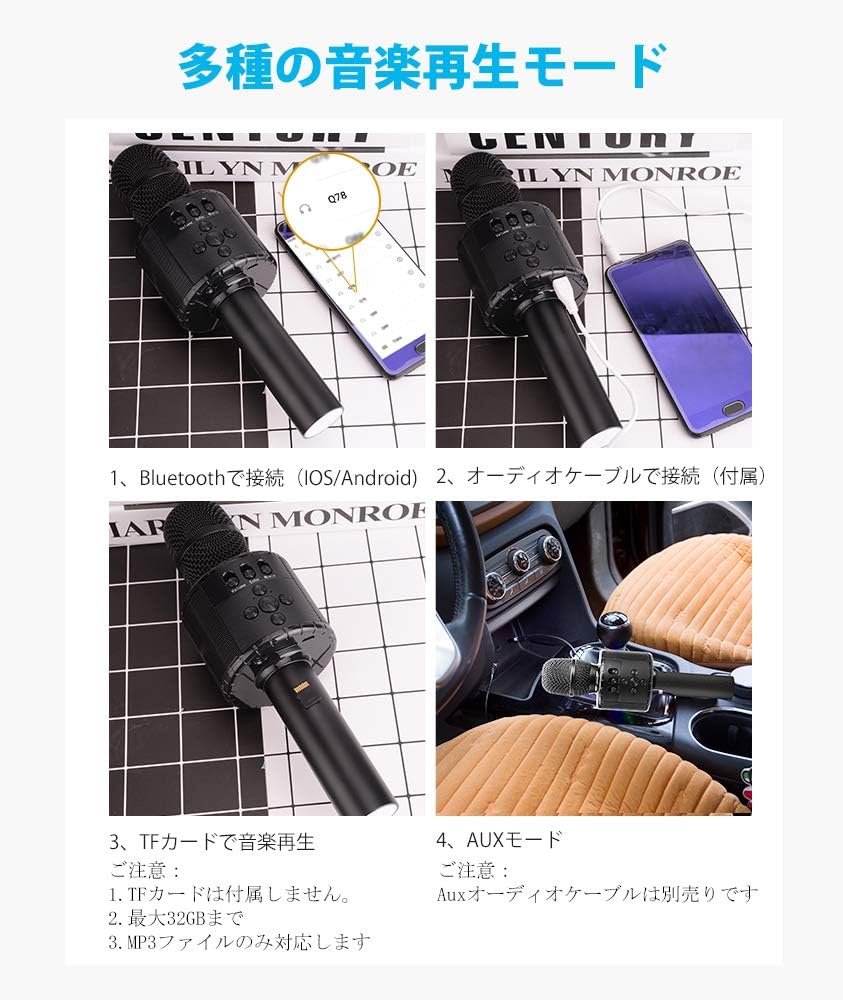
Image 10.1: Battery Life and Capacity
11. Баталгаат хугацаа ба дэмжлэг
11.1 Баталгаат хугацааны мэдээлэл
Энэ бүтээгдэхүүн нь хамт ирдэг 12 сарын баталгаат хугацаа Худалдан авсан өдрөөс эхлэн. Баталгаат хугацааны нэхэмжлэл гаргахын тулд худалдан авалтын баримтаа хадгална уу. Баталгаа нь хэвийн ашиглалтын үед гарсан үйлдвэрлэлийн согог болон эвдрэлийг хамарна.
11.2 Хэрэглэгчийн дэмжлэг
For any questions, concerns, or technical assistance, please contact our customer support team. We offer 24 цагийн хэрэглэгчийн дэмжлэг to assist you. Refer to the contact information provided with your purchase or on the official Verkstar webсайт.
Ask a question about this manual
Ask about setup, troubleshooting, compatibility, parts, safety, or missing instructions. Manuals+ will review the question and use this page’s manual context to help answer it.