
Танилцуулга
This manual provides detailed instructions for the setup, operation, and maintenance of your Panasonic KX-DT543x Executive Digital Proprietary Telephone. The KX-DT543x is designed for business environments, offering advanced communication features and a user-friendly interface.
Key features include a 3-line backlit display, 24 programmable keys, and a full-duplex speakerphone, enhancing communication efficiency. This telephone is part of the KX-DT500 Series, known for its clear voice quality and robust functionality.
Бүтээгдэхүүн дууссанview
Гол онцлогууд
- 3-line Graphical LCD with backlighting for clear information display.
- Full-duplex speakerphone, handset, and headset support for flexible communication.
- 24 freely programmable function keys for quick access to frequently used features.
- Built-in Electric Hook Switch (EHS) port for Plantronics-compatible wireless headsets.
- Intuitive user interface with easy navigation keys.
Telephone Components
Refer to the diagram below for an identification of the main components of your KX-DT543x telephone.

Зургийн тайлбар: A detailed diagram of the Panasonic KX-DT543x telephone, showing various parts labeled with numbers for identification. Key components include the handset, LCD display, programmable keys, navigation keys, dial pad, and speakerphone.
Нэмэлт views of the telephone are provided below:

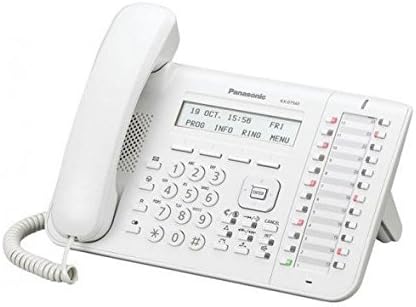
Зургийн тайлбар: Two images of the Panasonic KX-DT543x telephone. The first shows a direct front view, highlighting the display, keypad, and programmable buttons. The second image provides an angled perspective, showcasing the ergonomic design and the stand.
Тохиргоо
Багцын агуулга
Before proceeding with the setup, ensure all items are present:
- Panasonic KX-DT543x Telephone Unit
- Гар утас
- Гар утас
- Шугамын утас
- AC Adapter (Power Supply)
Утас холбох
- Гар утсыг холбоно уу: Plug one end of the coiled handset cord into the handset and the other end into the handset jack on the telephone unit.
- Утасны утсыг холбоно уу: Plug one end of the line cord into the digital extension port on the telephone unit (typically labeled "LINE" or "EXT") and the other end into the corresponding digital extension port on your PBX system or wall jack.
- АС адаптерийг холбоно уу: Plug the AC adapter into the power jack on the telephone unit (typically labeled "DC IN" or "POWER"). Then, plug the other end of the AC adapter into a standard electrical outlet.
- Анхны асаалт: Once connected, the telephone will power on automatically. The LCD display will illuminate, and the phone will begin its initialization sequence. Follow any on-screen prompts for initial setup if they appear.
Ашиглалтын заавар
Дуудлага хийх, хүлээн авах
- Дуудлага хийхийн тулд: Lift the handset, press the Speaker button, or press an available line button. Dial the desired number.
- Дуудлага хүлээн авахын тулд: Lift the handset, press the Speaker button, or press the flashing line button.
- Дуудлага дуусгахын тулд: Replace the handset, or press the Speaker button again if using speakerphone.
Using Programmable Keys
The 24 programmable keys can be customized for various functions such as speed dial, line access, or feature activation. Consult your system administrator for specific programming details for your office environment.
Чанга яригч функц
To use the speakerphone, press the Илтгэгч button. You can then speak and listen without lifting the handset. Press the Илтгэгч button again to end the call or switch to the handset.
Чихэвчний ажиллагаа
The KX-DT543x features an Electric Hook Switch (EHS) port, compatible with Plantronics wireless headsets. Connect your compatible headset to the EHS port. Refer to your headset's manual for specific pairing and usage instructions. This allows for hands-free communication and mobility.
LCD Display and Navigation
The 3-line graphical LCD displays call information, menu options, and system status. Use the navigation keys (up, down, left, right, and enter) located below the display to scroll through menus and select options. Soft keys directly below the display provide context-sensitive functions.
Олон шугамын ажиллагаа
This telephone supports multi-line operation, allowing you to manage multiple calls simultaneously. Use the dedicated line buttons to switch between active calls or place a call on hold.
Засвар үйлчилгээ
Утас цэвэрлэх
- Wipe the telephone unit and handset with a soft, dry cloth.
- Зөрүүд шороонд бага зэрэг dampдаавууг усаар эсвэл зөөлөн, зүлгүүргүй цэвэрлэгчээр угаана.
- Do not use strong cleaning agents, abrasive pads, or solvents, as these can damage the surface.
- Утасны нүхэнд шингэн орохгүй байхыг анхаарна уу.
Ерөнхий арчилгаа
- Keep the telephone away from direct sunlight, heat sources, and excessive moisture.
- Утсаа унагаах эсвэл хүчтэй цохилтод өртөхөөс зайлсхий.
- Do not attempt to disassemble the telephone; refer servicing to qualified personnel.
Алдааг олж засварлах
This section addresses common issues you might encounter with your Panasonic KX-DT543x telephone.
Залгах ая байхгүй
- Холболтуудыг шалгах: Ensure the line cord is securely plugged into both the telephone unit and the wall jack/PBX port.
- Эрчим хүчний хангамж: Verify that the AC adapter is properly connected and the power outlet is functional.
- Системийн байдал: Confirm with your system administrator that the digital extension line is active and operational.
Display is Blank or Unresponsive
- Эрчим хүчний мөчлөг: Disconnect the AC adapter from the telephone, wait 10 seconds, then reconnect it.
- Эрчим хүчний эх үүсвэр: Check the power outlet and AC adapter for any damage or malfunction.
Cannot Hear or Be Heard
- Дууны тохируулга: Adjust the handset, speaker, or headset volume using the dedicated volume buttons.
- Гар утас/Чихэвчний холболт: Ensure the handset cord or headset is securely plugged in.
- Дууг хаах функц: Check if the mute function is accidentally activated.
Programmable Keys Not Working
- Системийн тохиргоо: Programmable keys are typically configured by your system administrator. Contact them to verify the key assignments and system settings.
Үзүүлэлтүүд
The following are the technical specifications for the Panasonic KX-DT543x Executive Digital Proprietary Telephone:
| Онцлог | Тодорхойлолт |
|---|---|
| Загварын дугаар | KX-DT543x |
| Брэнд | Panasonic |
| Дэлгэц | 3-line Graphical LCD with backlighting |
| Програмчлагдах түлхүүрүүд | 24 |
| Чанга яригч | Бүрэн дуплекс |
| Чихэвчний порт | Electric Hook Switch (EHS) - Plantronics compatible |
| Эрчим хүчний эх үүсвэр | Утастай цахилгаан |
| Хэмжээ (L x W x H) | 20 x 9 x 15 см |
| Жин | 0.9 кг |
| Олон шугамын ажиллагаа | Дэмжигдсэн |
| Хариулах системийн төрөл | Дижитал |
Note: The specification for "Telephone type" as "Cordless" in some listings appears to be an error, as this model is a Digital Proprietary Telephone designed for corded connection to a PBX system.
Баталгаат болон дэмжлэг
For information regarding the warranty period and terms for your Panasonic KX-DT543x telephone, please refer to the warranty card included with your purchase or visit the official Panasonic webтанай бүс нутагт зориулсан сайт.
For technical support, service, or further inquiries, please contact your Panasonic dealer or the Panasonic customer support center. Contact details can typically be found on the Panasonic official webсайт эсвэл таны бүтээгдэхүүний баримт бичигт.
Та мөн зочилж болно Амазон дээрх Panasonic дэлгүүр бүтээгдэхүүний нэмэлт мэдээлэл авах.