
MikroTik CRS326-24G-2S+RM
MikroTik CRS326-24G-2S+RM User Manual
24 Port Gigabit Ethernet Switch with 2 SFP+ Ports
Танилцуулга
This manual provides comprehensive instructions for the MikroTik CRS326-24G-2S+RM, a high-performance 24-port Gigabit Ethernet switch with two SFP+ ports. Designed for robust networking environments, this device offers wire-speed connectivity and advanced switching features. It supports a unique "Dual boot" feature, allowing users to select between RouterOS and SwOS operating systems based on their specific needs.
The CRS326-24G-2S+RM is a managed switch capable of various network configurations, including port-to-port forwarding, MAC filtering, VLAN configuration, traffic mirroring, bandwidth limitation, and adjustment of MAC and IP header fields. Its SFP+ cages are compatible with both 1.25 Gb SFP and 10 Gb SFP+ modules, providing flexible uplink options.
Тохиргоо ба суурилуулалт
1. Багцын агуулга
- MikroTik CRS326-24G-2S+RM Switch Unit
- Эрчим хүчний адаптер
- Rackmount Ears (for rack installation)
- SFP+ cables
2. Физик суурилуулалт
The CRS326-24G-2S+RM is designed for rackmount installation but can also be used as a desktop unit. Ensure adequate ventilation around the device.

Зураг 1: Урд view of the MikroTik CRS326-24G-2S+RM switch, showing 24 RJ45 Gigabit Ethernet ports, 2 SFP+ ports, and a console port.
3. Эрчим хүчний холболт
Connect the provided power adapter to the DC input jack on the rear of the switch and then to a suitable power outlet. The power LED on the front panel should illuminate.
4. Сүлжээний холболтууд
- Ethernet портууд: Connect your network devices (computers, servers, other switches) to the 24 Gigabit Ethernet (RJ45) ports.
- SFP+ портууд: For high-speed uplinks or connections to fiber optic networks, insert compatible 1.25 Gb SFP or 10 Gb SFP+ modules into the two SFP+ cages and connect appropriate fiber optic cables.
5. Initial Access and Dual Boot
The CRS326-24G-2S+RM supports a "Dual boot" feature, allowing you to choose between MikroTik's RouterOS and SwOS operating systems. By default, the device may boot into one of these. You can switch between them during the boot process or via the operating system's interface.
For initial configuration, you can typically access the device via its default IP address (e.g., 192.168.88.1) using a web browser or through the console port using a serial cable and terminal software.
Шилжүүлэгчийг ажиллуулах
The CRS326-24G-2S+RM can operate with either RouterOS or SwOS, each offering distinct functionalities:
- SwOS (Switch Operating System): Optimized for Layer 2 switching, providing a simplified interface for managing switch-specific features.
- RouterOS (Router Operating System): A full-featured operating system offering advanced routing, firewall, VPN, and other Layer 3 capabilities in addition to Layer 2 switching.
Key Features and Configuration
Regardless of the chosen OS, the switch supports a wide range of features:
- Боомтын менежмент: Configure individual port settings, including speed, duplex, and flow control.
- VLAN: Create and manage Virtual Local Area Networks (VLANs) for network segmentation and traffic isolation.
- MAC шүүлтүүр: Implement MAC address filtering for enhanced security.
- Traffic Mirroring: Mirror traffic from one port to another for monitoring and analysis.
- Bandwidth Limitation: Apply rate limits to control bandwidth usage on specific ports.
- Port-to-Port Forwarding: Configure direct forwarding paths between specific ports.
- SFP/SFP+ Module Support: The SFP+ cages are versatile, supporting both 1.25 Gb SFP and 10 Gb SFP+ modules, allowing for flexible fiber optic connectivity options.
Refer to the official MikroTik documentation for detailed configuration guides specific to RouterOS and SwOS.
Засвар үйлчилгээ
1. Цэвэрлэгээ
Regularly clean the exterior of the switch with a soft, dry cloth. Ensure ventilation openings are free from dust and obstructions to prevent overheating. Do not use liquid cleaners or aerosols.
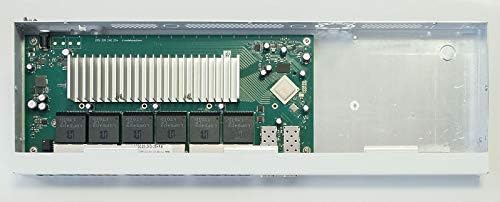
Зураг 2: Дотоод view of the MikroTik CRS326-24G-2S+RM switch, revealing the circuit board, heatsink, and SFP+ module slots. This view is for informational purposes and the device should not be opened by unauthorized personnel.
2. Програм хангамжийн шинэчлэлтүүд
It is recommended to periodically check for and install the latest firmware updates for your chosen operating system (RouterOS or SwOS). Firmware updates often include bug fixes, security enhancements, and new features. Refer to the MikroTik webшинэчлэлтийн журмын сайт.
3. Байгаль орчны асуудал
Operate the switch within its specified environmental limits (temperature, humidity) to ensure optimal performance and longevity. Avoid exposing the device to direct sunlight, excessive heat, or moisture.
Алдааг олж засварлах
Хүч чадалгүй
- Цахилгаан адаптер нь унтраалга болон ажиллаж байгаа цахилгааны залгуурт найдвартай холбогдсон эсэхийг шалгаарай.
- Verify the power outlet is active by testing with another device.
- Цахилгаан адаптерт харагдахуйц гэмтэл байгаа эсэхийг шалгана уу.
No Link on Ethernet Port
- Verify the Ethernet cable is properly connected at both ends.
- Өөр Ethernet кабель ашиглаж үзнэ үү.
- Холбогдсон төхөөрөмж асаалттай, зөв ажиллаж байгаа эсэхийг шалгаарай.
- Check the port status in the switch's management interface (SwOS/RouterOS).
SFP+ Port Issues
- Ensure the SFP/SFP+ module is fully inserted and compatible with the switch.
- Verify the fiber optic cable is correctly connected and not damaged.
- Check the link status LEDs on the SFP+ port.
- Confirm the module and cable are compatible with the device on the other end of the connection.
Удирдлагын интерфэйсэд хандах боломжгүй байна
- Ensure your computer's IP address is in the same subnet as the switch's default IP (e.g., 192.168.88.x).
- Try accessing via the console port.
- Reset the device to factory defaults (refer to MikroTik documentation for the specific procedure, usually involving a reset button). Жич: This will erase all configurations.
Бүтээгдэхүүний техникийн үзүүлэлтүүд
| Онцлог | Дэлгэрэнгүй |
|---|---|
| Загварын дугаар | CRS326-24G-2S+RM |
| Шилжүүлэгчийн төрөл | Сүлжээ солих |
| Портууд | 24 x Gigabit Ethernet (RJ45), 2 x SFP+ cages |
| Өгөгдөл дамжуулах хурд | 10 Gigabits Per Second (SFP+), 1 Gigabit Per Second (Ethernet) |
| Үйлдлийн систем | Dual Boot (RouterOS / SwOS) |
| CPU | 800 МГц |
| RAM | 512 МБ |
| Бүтээгдэхүүний хэмжээс | 17.44"L x 5.67"W x 1.73"H |
| Зүйлийн жин | 2 фунт |
| Кейсийн материал | Металл |
| Ботьtage | 24 вольт |
| Тохиромжтой төхөөрөмжүүд | Ширээний компьютер, зөөврийн компьютер, хэвлэгч |
| UPC | 696613438196, 708747434323, 680665926800 |
Баталгаат хугацааны мэдээлэл
The MikroTik CRS326-24G-2S+RM typically comes with a Үйлдвэрлэгчийн 1 жилийн баталгаат хугацаа. This warranty covers defects in materials and workmanship under normal use. For specific terms and conditions, including warranty claims and service, please refer to the official MikroTik warranty policy available on their webсайт руу орж үзэх эсвэл худалдан авалтын цэгтэйгээ холбогдоно уу.
Please note that international products may have separate terms and conditions regarding warranty coverage.
Техникийн дэмжлэг
For technical assistance, advanced configuration guides, or troubleshooting beyond the scope of this manual, please visit the official MikroTik webсайт. Тэдний website provides extensive documentation, forums, and support resources for RouterOS and SwOS products.
You can typically find:
- Detailed product documentation and wikis.
- Software downloads and firmware updates.
- Community forums for peer-to-peer support.
- Contact information for direct technical support.
Always ensure you are referring to the latest documentation for your specific device model and software version.
Ask a question about this manual
Ask about setup, troubleshooting, compatibility, parts, safety, or missing instructions. Manuals+ will review the question and use this page’s manual context to help answer it.