
Танилцуулга
This manual provides detailed instructions for the safe and effective use of your Sony Cyber-shot DSC-HX5V digital camera. Please read this manual thoroughly before operating the camera and retain it for future reference. The DSC-HX5V is a 10.2 MP CMOS digital camera featuring a 10x wide-angle zoom lens, Optical SteadyShot image stabilization, and a 3.0-inch LCD.
1. Тохиргоо
1.1 Сав баглаа боодол, анхны үзлэг
Carefully unpack all items and ensure the following accessories are present:
- Battery charger (BC-CSGD/BC-CSGE)
- Power cord (mains lead) (may not be supplied in USA and Canada)
- Rechargeable battery pack (NP-BG1) / Battery case
- USB, A/V cable for multi-use terminal
- HDMI adaptor
- Бугуйн оосор
- CD-ROM (Cyber-shot application software, Cyber-shot Handbook)
- Хэрэглэх заавар (энэ баримт бичиг)
1.2 Зайг суурилуулах, цэнэглэх
Insert the NP-BG1 rechargeable battery pack into the camera with the correct orientation. To charge the battery, connect the battery charger (BC-CSGD/BC-CSGE) to a power outlet and insert the battery. The charging indicator will illuminate during charging and turn off when complete. A full charge typically takes approximately 2-3 hours.
1.3 Санах ойн карт оруулах
The camera supports Memory Stick Duo/Memory Stick PRO Duo/Memory Stick PRO-HG Duo media and SD/SDHC media. Open the memory card slot cover, insert the memory card firmly until it clicks into place, ensuring the correct orientation. Close the cover securely.
1.4 Анхдагч асаалт ба үндсэн тохиргоо
Press the ON/OFF button to power on the camera. Upon first use, you may be prompted to set the date, time, and language. Follow the on-screen instructions to configure these basic settings.
2. Камерыг ажиллуулах
2.1 Камерын удирдлага дууссанview
Familiarize yourself with the camera's buttons and dials for efficient operation.

Зураг 1: Ар талд view of the DSC-HX5V, highlighting the LCD screen and control buttons.
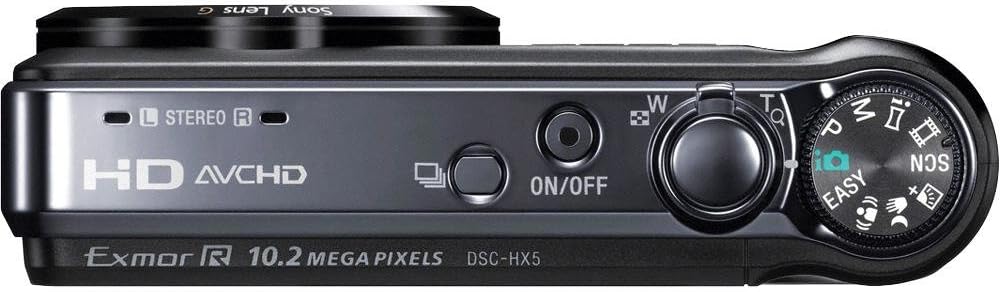
Зураг 2: Дээд тал view of the DSC-HX5V, illustrating the mode dial, power button, and shutter/zoom controls.

Figure 3: Ergonomic grip of the DSC-HX5V, showing how the camera fits in hand.
2.2 Гэрэл зургийн үндсэн горимууд
Turn the mode dial to select your desired shooting mode.
- Ухаалаг автомат (iAuto) горим: The camera automatically detects the scene and adjusts settings for optimal results. This mode is recommended for beginners.
- Хөтөлбөрийн автомат горим: Allows for more control over settings like ISO sensitivity while the camera sets exposure.
- Үзэсгэлэнгийн горимууд: Select from various scene-specific presets such as High Sensitivity, Twilight, Portrait, Landscape, Beach, Snow, Fireworks, Advanced Sports Shooting, Gourmet, and Pet to optimize settings for specific conditions.
2.3 Гэрэл зургийн дэвшилтэт онцлогууд
- "Exmor R" CMOS Sensor: Enhances low-light performance, reducing noise and improving image clarity.
- 10x Optical Zoom G-Lens: Provides a versatile 25mm wide-angle to 250mm telephoto focal range for capturing various subjects from landscapes to distant objects.
- Optical SteadyShot дүрс тогтворжуулах: Minimizes blur caused by camera shake, especially useful at longer zoom settings or in low light.
- Intelligent Sweep Panorama Mode: Capture wide panoramic images by sweeping the camera horizontally or vertically. The camera stitches multiple images automatically.
- Handheld Twilight: Captures multiple images and combines them to create a single, clear, low-noise image in low-light conditions without a tripod.
- Хөдөлгөөнийг бүдгэрүүлэхийн эсрэг горим: Reduces blur in low-light shots by combining multiple images taken at high shutter speeds.
- High Speed Shooting (10fps): Capture fast-moving subjects with up to 10 frames per second at full 10.2-megapixel resolution.
- Арын гэрэлтүүлэг засах HDR: Takes two exposures and combines them to preserve detail in both bright highlights and dark shadows in high-contrast scenes.
- Нүүр таних технологи: Automatically detects and optimizes focus, exposure, and white balance for up to eight faces.
- Инээмсэглэх хаалт технологи: Инээмсэглэл илэрсэн үед автоматаар зураг авдаг.
- Анивчихаас хамгаалах функц: Captures two images and saves the one with less blinking.
- Өөрийгөө хөрөг цаг хэмжигч: Таны царай кадрт ороход 2 секундын таймерыг идэвхжүүлэхийн тулд царай таних функцийг ашигладаг.
- GPS and Compass: Records location and direction data for your photos, allowing you to view them on a map with compatible software.
2.4 Видео бичлэг хийх
The DSC-HX5V offers high-definition video recording capabilities.
- 1080i AVCHD Movie Mode: Records high-quality Full HD video at 60i, suitable for playback on Blu-ray Disc players and compatible HDTVs.
- HD MP4 Movie Mode: Records video in a web-friendly MP4 format, ideal for easy transfer to PCs and sharing on social media platforms.
- Идэвхтэй горимтой оптик тогтвортой зураг авалт: Provides enhanced image stabilization during video recording, ensuring smoother footage even while moving.
2.5 Тоглуулах болон Viewing
- 3.0-inch Clear Photo LCD: View your photos and videos on the bright, anti-reflective LCD screen.
- Viewгоримууд: Organize and find your photos using folder or calendar viewгоримууд.
- Камер доторх засварлах хэрэгслүүд: Perform basic edits like trimming, red-eye correction, and unsharp masking directly on the camera.
- ФОТОМУГЖИЛТ: Create slideshows with music and visual effects using pre-loaded tracks or your own.
- Фото ТВ HD: Connect to compatible Sony BRAVIA HDTVs for optimized high-definition photo viewing.
2.6 Connecting to Other Devices
- HDMI гаралт: Connect the camera to an HDTV using the HDMI adaptor and cable (supplied) for high-definition playback.
- USB холболт: Use the supplied USB cable to connect the camera to a computer for transferring photos and videos.
- TransferJet технологи: Allows for wireless transfer of files between two TransferJet enabled devices by touching them together (requires compatible devices).
- DVDirect DVD Recorder Compatibility: For easy burning of AVCHD footage to DVD (recorder and media sold separately).
- Зураг Хөдөлгөөнт Хөтчийн (PMB) Програм хангамж: Use the included software for managing, editing, and sharing your media on a compatible PC.
3. Засвар үйлчилгээ
3.1 Камерыг цэвэрлэх
- Линз: Зөөлөн, хуурай даавуу эсвэл линзний сойз ашиглан тоосыг зөөлөн арилгана. Зовлонтой толбыг камерын линзэнд тусгайлан зориулсан линз цэвэрлэгч уусмал ашиглана уу.
- Их бие: Камерын их биеийг зөөлөн, хуурай даавуугаар арчина. Спирт эсвэл шингэлэгч зэрэг органик уусгагч хэрэглэж болохгүй.
- LCD дэлгэц: Gently wipe with a soft, lint-free cloth. Avoid pressing hard on the screen.
3.2 Батерейны арчилгаа
- Always use the genuine Sony NP-BG1 battery pack.
- Батерейг анх хэрэглэхийн өмнө болон удаан хугацаагаар ашиглаагүйн дараа бүрэн цэнэглэ.
- Батерейг ашиглаагүй үед сэрүүн, хуурай газар хадгална.
- Батерейг хэт өндөр температурт байлгахаас зайлсхий.
3.3 Хадгалалт
Камерыг удаан хугацаагаар хадгалахдаа зай болон санах ойн картыг салга. Камерыг хуурай, агааржуулалт сайтай газар, нарны шууд тусгал болон хэт өндөр температураас хол хадгална уу.
4. Алдаа засах
Хэрэв та камертайгаа холбоотой асуудалтай тулгарвал дараах нийтлэг асуудал болон шийдлүүдийг үзнэ үү.
| Асуудал | Боломжит шалтгаан / шийдэл |
|---|---|
| Камер асахгүй байна. | Батерей дуусч байна. Зайг цэнэглэ. Батерейг буруу оруулсан байна. Батерейг зөв чиглүүлж дахин оруулна уу. |
| Зургууд бүдэг байна. | Camera shake. Use Optical SteadyShot or a tripod. Subject is moving. Use a faster shutter speed or Advanced Sports Shooting mode. Линз бохир байна. Линзийг цэвэрлэ. |
| Санах ойн картын алдаа. | Санах ойн карт дүүрсэн байна. Шаардлагагүй устга fileэсвэл шинэ карт ашиглана уу. Санах ойн карт эвдэрсэн байна. Картыг форматлана уу (ингэснээр бүх өгөгдөл устах болно). Memory card is incompatible. Use a supported Memory Stick or SD card. |
| GPS signal acquisition is slow. | Camera is indoors or in an area with poor satellite reception. Move to an open outdoor area. GPS Assist Data is outdated. Update GPS Assist Data using the Picture Motion Browser software. |
| Флэш асахгүй. | Flash mode is set to 'Flash Off'. Change the flash mode. Flash is covered. Ensure nothing is obstructing the flash unit. |
5. Техникийн үзүүлэлтүүд
| Онцлог | Тодорхойлолт |
|---|---|
| Загварын нэр | DSC-HX5V |
| Зургийн мэдрэгч | 10.2 MP "Exmor R" CMOS Sensor |
| Линз | Sony G-Lens, 10x Optical Zoom (25mm-250mm equivalent) |
| Зураг тогтворжуулах | Optical SteadyShot (with Active Mode for video) |
| LCD дэлгэц | 3.0 инчийн Clear Photo LCD (230k пиксел) |
| Видео бичлэг | 1080i AVCHD (60i), HD MP4 |
| ISO мэдрэмж | Автомат, 100, 200, 400, 800, 1600, 3200 |
| High Speed Shooting | Up to 10 fps at full resolution |
| Онцлог шинж чанарууд | Intelligent Sweep Panorama, Handheld Twilight, Anti-Motion Blur, Backlight Correction HDR, GPS, Compass, Face Detection, Smile Shutter, TransferJet |
| Хадгалах хэрэгсэл | Memory Stick Duo/PRO Duo/PRO-HG Duo, SD/SDHC |
| Зайны төрөл | NP-BG1 Lithium-ion |
| Хэмжээ (Ө x Ө x D) | 4.13 x 2.38 x 1.2 инч (ойролцоогоор) |
| Жин | 7.1 унц (ойролцоогоор) |
6. Баталгаат хугацаа ба дэмжлэг
6.1 Баталгаат хугацааны мэдээлэл
Your Sony Cyber-shot DSC-HX5V camera is covered by a limited warranty. Please refer to the warranty card included in your product packaging for specific terms and conditions, including warranty period and coverage details. Keep your proof of purchase for warranty claims.
6.2 Хэрэглэгчийн дэмжлэг
For technical assistance, troubleshooting not covered in this manual, or service inquiries, please contact Sony customer support. Visit the official Sony webхолбоо барих мэдээлэл, түгээмэл асуултууд болон нэмэлт эх сурвалжийн сайт.
Онлайн нөөцөд дараахь зүйлс багтаж болно.