
Танилцуулга
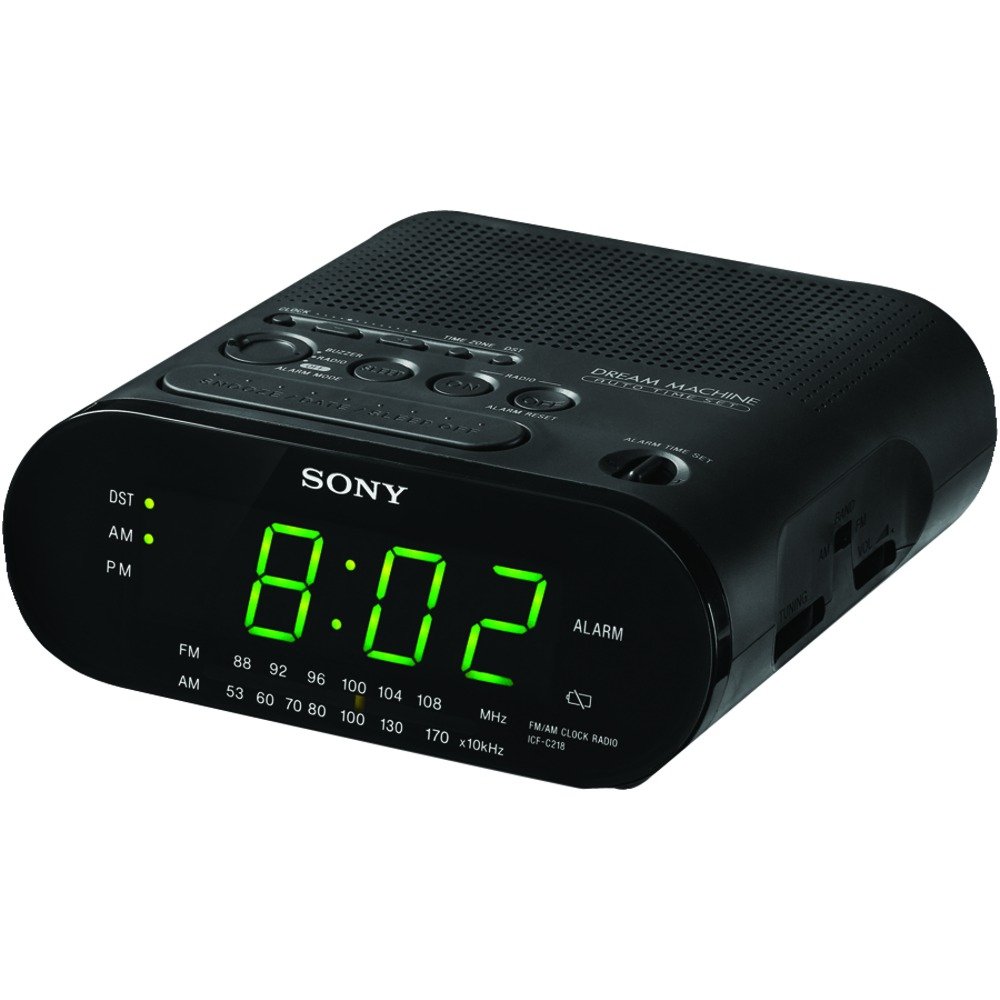
This manual provides detailed instructions for the setup, operation, maintenance, and troubleshooting of your Sony Dream Machine Clock Radio Model ICF-C218. Please read this manual thoroughly before using the product to ensure proper function and longevity.
Бүтээгдэхүүний онцлог
- Automatic time setting and calendar adjustment.
- Automatic Daylight Saving Time / Summer Time adjustment.
- Battery backup system to maintain correct time during power outages.
- Clear 0.9-inch green LED display for easy readability.
- Easy-to-use alarm setting with an extendable snooze function.
- Integrated AM/FM radio.
Тохиргоо
Савлах, анхны үзлэг
Carefully remove the clock radio from its packaging. Inspect the unit for any signs of damage. If any damage is found, do not use the product and contact your retailer.
Эрчим хүчний холболт
Connect the AC power cord to a standard wall outlet. The unit is designed to operate on AC power. For backup during power interruptions, install one CR2 battery (not included) in the battery compartment located on the bottom of the unit. This battery preserves the time and alarm settings.
Автомат цагийн тохиргоо
Upon initial connection to AC power, the clock radio will attempt to set the time automatically. Ensure the unit is placed in an area with good reception for this feature to function correctly. You may need to manually adjust the time zone.
Daylight Saving Time (DST) Adjustment
The unit is equipped with an automatic Daylight Saving Time adjustment feature. This will automatically adjust the time forward or backward by one hour as required by your region's DST schedule. If your region does not observe DST, you may need to disable this feature or manually adjust the time twice a year.
Ашиглалтын заавар
Одоогийн цагийг тохируулах
- -г удаан дар ЦАГ ТОНОГЛОХ button. The time display will begin to flash.
- Барьж байхдаа ЦАГ ТОНОГЛОХ, товчийг дарна уу ЦАГ button to adjust the hour. Observe the AM/PM indicator.
- Барьж байхдаа ЦАГ ТОНОГЛОХ, товчийг дарна уу МИНУТ минутыг тохируулах товч.
- -г суллана ЦАГ ТОНОГЛОХ товчийг дарж тохиргоог баталгаажуулна уу.
Сэрүүлэг тохируулах
- -г удаан дар Сэрүүлэг тохируулах button. The alarm time display will begin to flash.
- Барьж байхдаа Сэрүүлэг тохируулах, товчийг дарна уу ЦАГ сэрүүлгийн цагийг тохируулах товч.
- Барьж байхдаа Сэрүүлэг тохируулах, товчийг дарна уу МИНУТ сэрүүлгийн минутыг тохируулах товчийг дарна уу.
- -г суллана Сэрүүлэг тохируулах Сэрүүлгийн тохиргоог баталгаажуулахын тулд товчийг дарна уу.
- Select your desired alarm mode (Buzzer or Radio) using the Сэрүүлэг горим солих.
Түр хойшлуулах функц
Сэрүүлэг дуугарах үед том товчлуурыг дар SNOOZE / DATE / SLEEP OFF button to temporarily silence the alarm for approximately 10 minutes. The alarm will sound again after the snooze period. To cancel the snooze and turn off the alarm for the day, press the Сэрүүлэг дахин тохируулах товч.
Радио үйл ажиллагаа
- Радиог асаахын тулд товчийг дарна уу РАДИО АСААЛТ товч.
- Select the desired band (AM or FM) using the БАНД солих.
- Tune to your desired station using the ТААРУУЛАХ dial located on the side of the unit.
- Ашиглан дууны хэмжээг тохируулна уу ЭЗЭМШИГ залгах.
- Радиог унтраахын тулд товчийг дарна уу РАДИО унтарсан товч.
Засвар үйлчилгээ
Нэгжийг цэвэрлэх
Wipe the exterior of the clock radio with a soft, dry cloth. Do not use abrasive cleaners or solvents, as they may damage the finish. Avoid spraying liquids directly onto the unit.
Зай солих
The battery backup requires one CR2 battery. If the time display flashes or the time is incorrect after a power outage, the battery may need to be replaced. To replace the battery, open the battery compartment cover on the bottom of the unit, remove the old battery, and insert a new CR2 battery, observing the correct polarity. Close the compartment cover securely.
Алдааг олж засварлах
| Асуудал | Шийдэл |
|---|---|
| Clock display is blank or incorrect. | Ensure the AC power cord is securely plugged into a working outlet. Check the battery backup; replace the CR2 battery if it is old or depleted. |
| Сэрүүлэг дуугарахгүй байна. | Verify that the alarm time is set correctly and the ALARM MODE switch is set to either BUZZER or RADIO. Ensure the radio volume is not set to minimum if using the radio alarm. |
| Радио хүлээн авалт муу. | Adjust the position of the unit to improve reception. For FM, extend the wire antenna fully. For AM, rotate the unit for best reception. Avoid placing near electronic devices that may cause interference. |
| Time is incorrect after Daylight Saving Time. | The unit has an automatic DST adjustment. If your region does not observe DST, you may need to manually adjust the time or check the DST setting if available. |
Үзүүлэлтүүд
| Онцлог | Дэлгэрэнгүй |
|---|---|
| Брэнд | Sony |
| Загварын дугаар | ICF-C218 |
| Дэлгэцийн төрөл | Digital LED (Green, 0.9-inch) |
| Эрчим хүчний эх үүсвэр | Хувьсах гүйдлийн хүч |
| Зайны нөөцлөлт | 1 CR2 батерей (дагалдахгүй) |
| Бүтээгдэхүүний хэмжээс | Approx. 6.1"W x 6"D x 2.54"H |
| Зүйлийн жин | 1.09 фунт |
| Онцлог шинж чанарууд | Alarm, Built-in Clock, Automatic DST |
Баталгаат болон дэмжлэг
Warranty information for the Sony Dream Machine Clock Radio Model ICF-C218 is not provided within this manual. For details regarding warranty coverage, technical support, or service, please refer to the documentation included with your purchase or visit the official Sony support webсайт.
Please note the legal disclaimer from the product information: All sales are final, no returns.