
1 പ്രധാനപ്പെട്ട സുരക്ഷാ വിവരങ്ങൾ
Please read all safety instructions carefully before using the ZYHKON SU9 Sleep Earbuds. Keep this manual for future reference.
- വോളിയം ലെവലുകൾ: കേൾവിക്ക് കേടുപാടുകൾ സംഭവിക്കുന്നത് തടയാൻ ദീർഘനേരം ഉയർന്ന ശബ്ദത്തിൽ കേൾക്കുന്നത് ഒഴിവാക്കുക.
- വൃത്തിയാക്കൽ: ഇയർബഡുകളും ചാർജിംഗ് കെയ്സും വൃത്തിയാക്കാൻ മൃദുവായതും ഉണങ്ങിയതുമായ തുണി ഉപയോഗിക്കുക. കഠിനമായ രാസവസ്തുക്കളോ ഉരച്ചിലുകളുള്ള വസ്തുക്കളോ ഉപയോഗിക്കരുത്.
- വാട്ടർ എക്സ്പോഷർ: The earbuds are IPX7 waterproof, meaning they can withstand immersion in water up to 1 meter for 30 minutes. The charging case is not waterproof.
- വേർപെടുത്തുക: ഉൽപ്പന്നം ഡിസ്അസംബ്ലിംഗ് ചെയ്യാനോ പരിഷ്ക്കരിക്കാനോ ശ്രമിക്കരുത്, കാരണം ഇത് വാറന്റി അസാധുവാക്കുകയും കേടുപാടുകൾ വരുത്തുകയും ചെയ്തേക്കാം.
- ബാറ്ററി: The product contains a built-in rechargeable battery. Do not expose to excessive heat or direct sunlight.
2. പാക്കേജ് ഉള്ളടക്കം
പാക്കേജിൽ എല്ലാ ഇനങ്ങളും ഉണ്ടെന്ന് ഉറപ്പാക്കുക:
- Sleep Headphones (Left/Right) x 2
- USB-C ചാർജിംഗ് കേബിൾ x 1
- Portable charging box x 1
- ഉപയോക്തൃ മാനുവൽ x 1
3. ഉൽപ്പന്നം കഴിഞ്ഞുview
The ZYHKON SU9 Sleep Earbuds are designed for comfort and high-quality audio, especially for use during sleep. They feature an ultra-lightweight, ergonomic design and come with a smart touchscreen charging case.

4. സജ്ജീകരണം
4.1 ഇയർബഡുകളും കേസും ചാർജ് ചെയ്യുന്നു
Before first use, fully charge the earbuds and charging case. Connect the provided USB-C cable to the charging port on the case and a power source. A full charge takes approximately 1.5 hours.

4.2 ഒരു ഉപകരണവുമായി ജോടിയാക്കൽ
- നിങ്ങളുടെ ഉപകരണത്തിന്റെ ബ്ലൂടൂത്ത് ഓണാക്കിയിട്ടുണ്ടെന്ന് ഉറപ്പാക്കുക.
- Open the lid of the ZYHKON SU9 charging case. The earbuds will automatically enter pairing mode.
- On your device, search for "SU9" in the Bluetooth settings and select it to connect.
- The earbuds will connect instantly once paired.
5. പ്രവർത്തന നിർദ്ദേശങ്ങൾ
5.1 ഇയർബഡുകൾ ധരിക്കൽ
The SU9 earbuds are designed to be ultra-light (3.0 grams per ear) and fit comfortably, even for side sleepers. Insert the earbuds gently into your ears until they feel secure and comfortable.

5.2 Touchscreen Controls (Charging Case)
The smart full-color LED touchscreen on the charging case provides intuitive control over various functions:
- സംഗീത പ്ലേബാക്ക്: Play/pause music, skip tracks.
- വോളിയം നിയന്ത്രണം: ഓഡിയോ വോളിയം ക്രമീകരിക്കുക.
- കോൾ മാനേജ്മെൻ്റ്: കോളുകൾക്ക് മറുപടി നൽകുക അല്ലെങ്കിൽ അവസാനിപ്പിക്കുക.
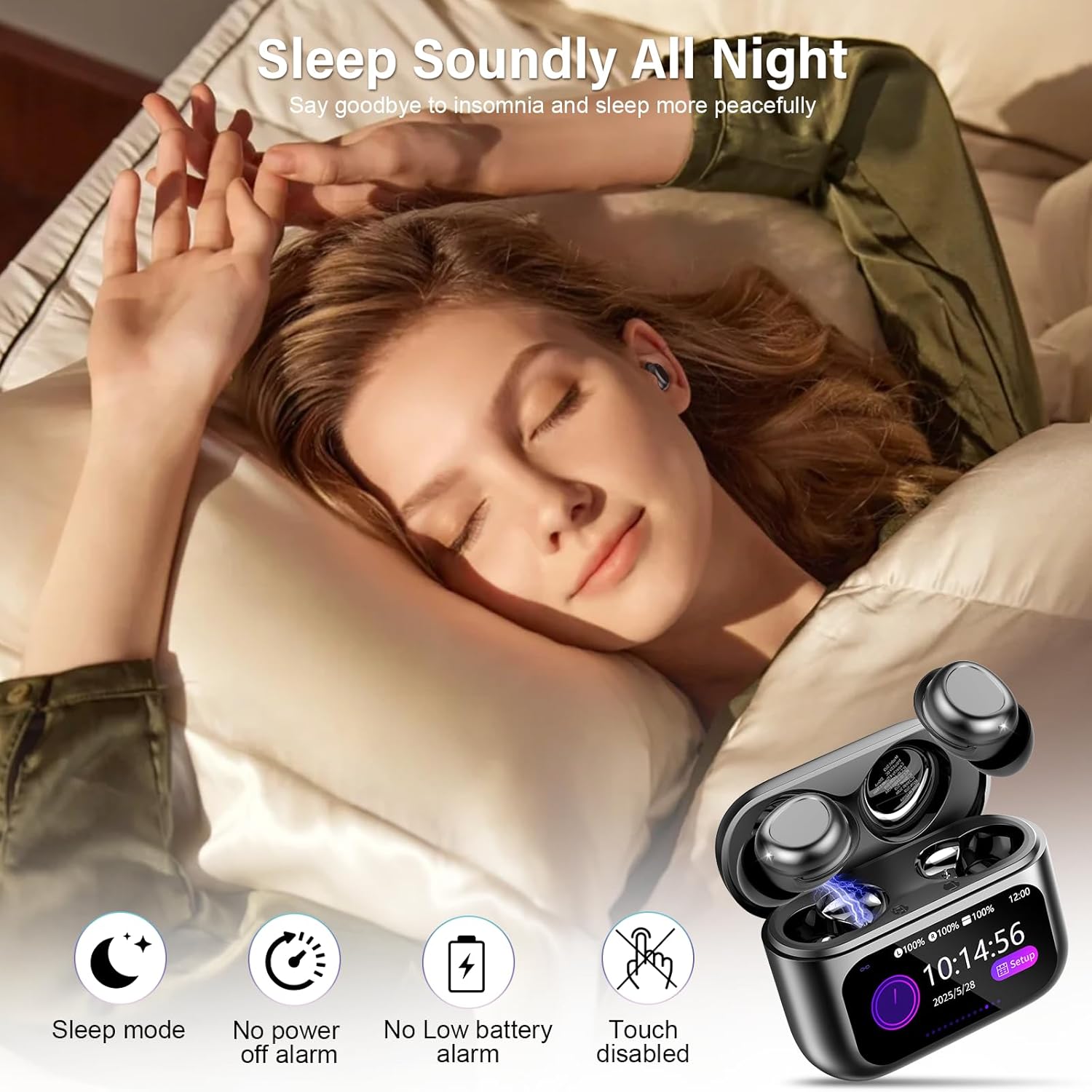
- സ്ലീപ്പ് മോഡ് സജീവമാക്കൽ: Enable sleep mode to mute low-battery and shutdown alarms.
- ഭാഷാ ഓപ്ഷനുകൾ: ലഭ്യമായ 7 ഭാഷകളിൽ നിന്ന് തിരഞ്ഞെടുക്കുക.
- Wallpaper & Brightness: Customize the screen's appearance.
- EQ മോഡുകൾ: Switch between 5 custom equalizer modes.

5.3 Immersive Stereo Sound and EQ Modes
Equipped with 13mm dynamic drivers, the earbuds deliver rich bass, crisp mids, and clear highs. You can tailor your audio experience with five expertly tuned EQ modes:
- സ്റ്റാൻഡേർഡ്
- ക്ലാസിക്
- ജാസ്
- പാറ
- പോപ്പ്


5.4 Find My Earphone Feature
If you misplace an earbud, use the 'Find My Earphone' function on the charging case touchscreen. Select the left or right earbud, and it will emit a high-frequency sound to help you locate it.
5.5 സ്ലീപ്പ് മോഡ്
Activate Sleep Mode via the touchscreen to ensure an undisturbed night. In this mode, low-battery and shutdown alarms are muted, and the earbuds remain silent, preventing any interruptions to your sleep.
6. പരിപാലനം
6.1 വൃത്തിയാക്കൽ
- Regularly clean the ear tips and charging contacts with a soft, dry, lint-free cloth.
- Remove any earwax buildup from the ear tips to maintain sound quality.
- Do not use liquids or sprays directly on the earbuds or charging case.
6.2 സംഭരണം
ഇയർബഡുകൾ ഉപയോഗിക്കാത്തപ്പോൾ ചാർജിംഗ് കേസിൽ സൂക്ഷിക്കുക, അങ്ങനെ അവ സംരക്ഷിക്കപ്പെടുകയും ചാർജ് ചെയ്തിട്ടുണ്ടെന്ന് ഉറപ്പാക്കുകയും ചെയ്യുക.
7. പ്രശ്നപരിഹാരം
| പ്രശ്നം | പരിഹാരം |
|---|---|
| ഇയർബഡുകൾ ജോടിയാക്കുന്നില്ല | Ensure Bluetooth is enabled on your device. Place earbuds back in the case, close, then reopen. If issues persist, try resetting the earbuds using the reset button on the case. |
| ശബ്ദമോ കുറഞ്ഞ വോളിയമോ ഇല്ല | Check device volume and earbud volume via the touchscreen. Ensure earbuds are properly seated in your ears. Clean ear tips if necessary. |
| ചാർജിംഗ് കേസ് ചാർജുചെയ്യുന്നില്ല | Verify the USB-C cable is securely connected to both the case and the power source. Try a different charging cable or power adapter. |
| Earbuds fall out during sleep | Ensure earbuds are correctly inserted and fit snugly. The ergonomic design is intended for secure fit. |
8 സ്പെസിഫിക്കേഷനുകൾ
| ഫീച്ചർ | വിശദാംശങ്ങൾ |
|---|---|
| മോഡലിൻ്റെ പേര് | SU9 |
| കണക്റ്റിവിറ്റി ടെക്നോളജി | വയർലെസ്സ് (ബ്ലൂടൂത്ത് 5.4) |
| ബാറ്ററി ലൈഫ് | 48 മണിക്കൂർ വരെ (ചാർജിംഗ് കേസിനൊപ്പം) |
| ചാർജിംഗ് സമയം | 1.5 മണിക്കൂർ (പൂർണ്ണ ചാർജിന്) |
| ഓഡിയോ ഡ്രൈവർ തരം | 13 എംഎം ഡൈനാമിക് ഡ്രൈവർ |
| ജല പ്രതിരോധ നില | IPX7 വാട്ടർപ്രൂഫ് |
| പ്രത്യേക സവിശേഷതകൾ | Sleep Mode, Ergonomic Design, Smart Touchscreen Control, Extended Playtime |
| ഇനത്തിൻ്റെ ഭാരം | 3.2 ഔൺസ് |
9. ഔദ്യോഗിക ഉൽപ്പന്ന വീഡിയോ
10. വാറൻ്റിയും പിന്തുണയും
For warranty information and customer support, please refer to the contact details provided on the product packaging or the official ZYHKON webസൈറ്റ്. ഏതെങ്കിലും വാറന്റി ക്ലെയിമുകൾക്ക് വാങ്ങിയതിന്റെ തെളിവായി നിങ്ങളുടെ വാങ്ങൽ രസീത് സൂക്ഷിക്കുക.